Dzięki. Tak odbiegając od tematu znasz jakąś alternatywę dla routera kablowego(TV/DS Lite) z openwrt. Posiadam Fritzbox 6690. Jest w ogóle coś czy nie ma nic na rynku?
Nie jesteś zalogowany. Proszę się zalogować lub zarejestrować.
Opcje wyszukiwania (Strona 1 z 9)
eko.one.pl → Posty przez solargrim
Znalezione posty: 1 do 25 z 217
2 2024-12-02 21:25:40
Temat: Pierwszy model OpenWrt wchodzi na rynek (10 odpowiedzi, napisanych Inne)
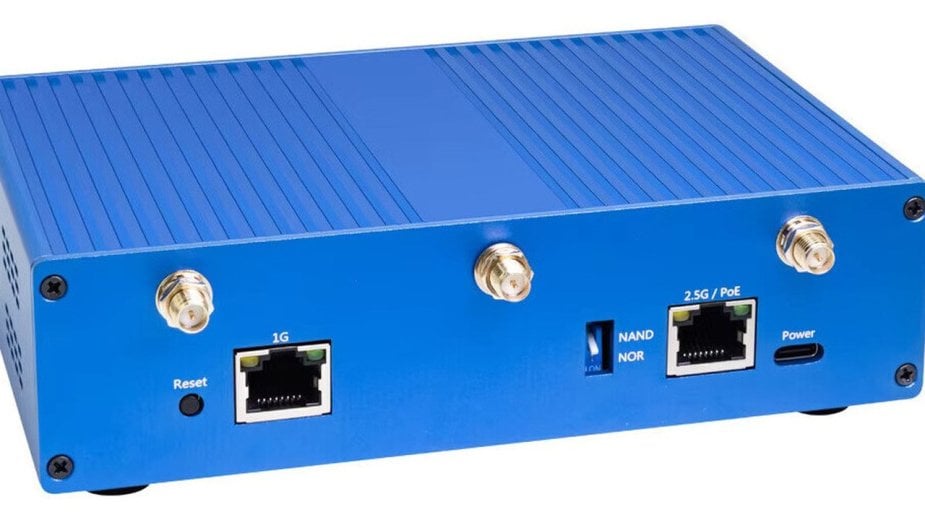
Specyfikacje i możliwości techniczne OpenWrt One
Router został wyposażony w układ MediaTek MT7981B, który obsługuje dwuzakresowy Wi-Fi 6 dzięki technologii MediaTek MT7976C. Umożliwia to szybkie i stabilne połączenie w paśmie 2,4 GHz (2x2) oraz 5 GHz (3x3). Urządzenie oferuje również rozbudowane opcje połączeń sieciowych, w tym port WAN o przepustowości 2,5 Gbit/s oraz port LAN o przepustowości 1 Gbit/s. Dodatkowo router został wyposażony w gniazda USB typu C, port USB 2.0 oraz możliwość rozbudowy pamięci dzięki złączom NVMe PCIe 2.0 i mikroBUS. Dla użytkowników ceniących pełną kontrolę nad urządzeniem dostępny jest przełącznik mechaniczny pozwalający na wybór między rozruchem z pamięci NAND a NOR.
Więcej na https://ithardware.pl/aktualnosci/route … 36984.html
Aliexpress: https://de.aliexpress.com/item/1005007795779282.html
3 2020-03-02 21:43:24
Odp: TDW8970 Timeouty po WiFi (18 odpowiedzi, napisanych Oprogramowanie / Software)
UWAGA! Dziś włączyłem jeden i drugi router. I co? Działają na 2.4 bez problemu nic nie rozłącza, nie ma timeoutów. Nic nie zmieniałem w ustawieniach. Jednak ktoś tutaj zagłuszał jak Cezary wspomniał. Tej sieci NSA Surveillance Van już nie ma.
A już miał iść router do śmietnika... :>
4 2020-03-01 19:42:30
Odp: TDW8970 Timeouty po WiFi (18 odpowiedzi, napisanych Oprogramowanie / Software)
Już widzę jak odpowiednie służby miałyby widoczny SSID jeszcze pod taką nazwą ;-) Komuś się nudzi. Pomieszam jeszcze kanałami ale wątpie, że coś da.
5 2020-03-01 19:35:27
Odp: TDW8970 Timeouty po WiFi (18 odpowiedzi, napisanych Oprogramowanie / Software)
Wklejam ->
2,4 GHz: 32 sieci
5 GHz: 8 sieci
WLAN-823330 2,4 GHz 6 5C:DC:96:D5:73:35
Telekom_FON 2,4 GHz 6 5C:DC:96:D5:73:36
WLAN-823330 5 GHz 52 5C:DC:96:D5:73:37
Telekom_FON 5 GHz 52 5C:DC:96:D5:73:38
Telekom_FON 2,4 GHz 6 94:6A:B0:AD:7B:35
Unitymedia WifiSpot 2,4 GHz 6 3A:43:1D:BE:2B:D2
UPC4936012 2,4 GHz 1 38:43:7D:64:67:37
Unitymedia WifiSpot 2,4 GHz 1 3A:43:1D:64:67:37
Panther 2,4 GHz 1 44:4E:6D:37:74:FB
UPC476DDC2 2,4 GHz 1 90:5C:44:4C:31:9E
UPC9100107 2,4 GHz 6 34:2C:C4:2E:AE:CF
Unitymedia WifiSpot 2,4 GHz 6 36:2C:94:2E:AE:CF
WLAN-244101 2,4 GHz 6 94:6A:B0:AD:7B:33
WLAN-KoBRA 2,4 GHz 11 58:D7:59:09:29:42
FRITZ!Box 6490 Cable 2,4 GHz 11 98:9B:CB:65:DE:AF
NSASurveillanceVan42 2,4 GHz 11 44:4E:6D:2D:93:2A
WLANMV 2,4 GHz 13 E8:DF:70:33:67:2A
Big Doener 2,4 GHz 1 02:26:4D:1E:1B:92
UPC2408464 2,4 GHz 6 38:43:7D:BE:2B:D2
Wu-Tang LAN 2,4 GHz 1 94:8F:CF:94:4A:DC
UPC476DDC2 5 GHz 64 90:5C:44:4C:31:57
NSA Surveillance Van 45 5 GHz 36 44:4E:6D:2D:93:2B
UPC9100107 5 GHz 36 34:2C:C4:2E:AE:C3
UPC4936012 5 GHz 36 38:43:7D:64:67:07
FRITZ!Box 6490 Cable 5 GHz 44 98:9B:CB:65:DE:B0
Wu-Tang LAN 5 GHz 112 94:8F:CF:94:4A:DD
DIRECT-275594EA 2,4 GHz 1 FA:D0:27:55:14:EA
Telekom_FON 2,4 GHz 11 58:D7:59:09:29:43
WLAN-WGL2G7 2,4 GHz 11 BC:75:74:86:BD:0D
Telekom_FON 2,4 GHz 11 BC:75:74:86:BD:0E
Unitymedia WifiSpot 2,4 GHz 11 3A:43:1D:8F:60:BF
o2-WLAN19 2,4 GHz 6 18:83:BF:2C:00:DB
WLAN-FA3906 2,4 GHz 1 B0:48:7A:B3:AD:68
WLAN-E2GW8M 2,4 GHz 6 58:D7:59:40:69:38
Telekom_FON 2,4 GHz 6 58:D7:59:40:69:39
WLAN-Q7ER4M 2,4 GHz 6 58:D7:59:67:4A:B4
sNobat-wlan 2,4 GHz 6 18:83:BF:AF:84:93
Telekom_FON 2,4 GHz 6 58:D7:59:67:4A:B5
Fellmann 2,4 GHz 6 02:23:08:DC:B7:55
Telekom_FON 2,4 GHz 6 18:83:BF:AF:84:94
6 2020-03-01 19:25:41
Odp: TDW8970 Timeouty po WiFi (18 odpowiedzi, napisanych Oprogramowanie / Software)
Żeby nie było wrzuciłem na tego TD9870 oryginalny soft TPLINKA i także to samo. Czy to możliwe, że dwa routery poszły się jeb*c za przeproszeniem? Działały normalnie zrobiłem przeprowadzkę i poszły w odstawkę. Problem leży tylko w 2.4Ghz i to w obydwu co jest dla mnie dziwnie.
7 2020-03-01 19:21:14
Odp: TDW8970 Timeouty po WiFi (18 odpowiedzi, napisanych Oprogramowanie / Software)
Tu jest jakiś inny problem i to DHCP to było tylko zbiegiem okoliczności, że podziałało chwilę. Bo na sztywnym IP albo sie nie laczy albo sie polaczy i zerwie. Takze loteria.
Wyciągnąłem z szafy sprawnego AC1750 który zawsze dział. I teraz tak. Jak zwykle po kablu działa dobrze.
Zrobiłem dwie sieci 5GHz i 2.4GHz ta pierwsza działa doskonale. Niestety pod 2.4 znowu są cyrki. I teraz nie wiem gdzie leży problem - czyżby zawalona sieć 2.4GHz była problemem? 
8 2020-03-01 15:55:26
Odp: TDW8970 Timeouty po WiFi (18 odpowiedzi, napisanych Oprogramowanie / Software)
Na najnowszym sofcie jest dokladnie to samo.
Ok nie ma tematu. Teraz juz w ogole nie moge sie po WiFi polaczyc chociaż przed chwilą działo poprawnie. Chyba problem z modułem. Ląduje do śmieci. Szkoda czasu na tego śmiecia.
9 2020-03-01 15:38:49
Odp: TDW8970 Timeouty po WiFi (18 odpowiedzi, napisanych Oprogramowanie / Software)
Nie. Jest podłączony jako osobny router i nie ma nic wspólnego z innym routerem który jest aktualnie wyłączony.
Przecież przydzielał poprawnie adresy DHCP ale rzucał timeoutami wkleiłem log wyżej. Bez DHCP działa.
Drugi router ma inna pule adresowa tak btw.
(ten ma pracować jako zapasowy jak pierwszy ulegnie uszkodzeniu)
10 2020-03-01 15:29:49
Odp: TDW8970 Timeouty po WiFi (18 odpowiedzi, napisanych Oprogramowanie / Software)
znalazłem przyczynę - serwer DHCP. Wyłączyłem go i teraz jak ustawię na sztywno adres IP to działa poprawnie.
Jeśli włączę DHCP dalej to samo. Przy włączonym DHCP ustawienie adresu IP na sztywno powoduje to, że także nie chce się w ogóle połączyć z siecią.
- ale to nie zmienia faktu, że potrzebuję DHCP.
Pinging 192.168.1.1 with 32 bytes of data:
Reply from 192.168.1.1: bytes=32 time=3ms TTL=64
Reply from 192.168.1.1: bytes=32 time=1ms TTL=64
Reply from 192.168.1.1: bytes=32 time=1ms TTL=64
Reply from 192.168.1.1: bytes=32 time=1ms TTL=64
config dnsmasq
option domainneeded '1'
option boguspriv '1'
option filterwin2k '0'
option localise_queries '1'
option rebind_protection '1'
option rebind_localhost '1'
option local '/lan/'
option domain 'lan'
option expandhosts '1'
option nonegcache '0'
option authoritative '1'
option readethers '1'
option leasefile '/tmp/dhcp.leases'
option resolvfile '/tmp/resolv.conf.auto'
option nonwildcard '1'
option localservice '1'
config dhcp 'lan'
option interface 'lan'
option dhcpv6 'server'
option ra 'server'
option ignore '1'
option ra_management '1'
config dhcp 'wan'
option interface 'wan'
option ignore '1'
config odhcpd 'odhcpd'
option maindhcp '0'
option leasefile '/tmp/hosts/odhcpd'
option leasetrigger '/usr/sbin/odhcpd-update'
option loglevel '4'
11 2020-03-01 14:46:35
Odp: TDW8970 Timeouty po WiFi (18 odpowiedzi, napisanych Oprogramowanie / Software)
Dalej bez zmian. Po WiFi nic nie działa mimo połaczenia które co jakiś czas jest zrywane (chociaz nie zawsze). Nie wiem czy ten router to nie jest śmietnik już. dmesg nie wywala żadnych komunikatów odnośnie wifi
Wireless LAN adapter Lenovo:
Connection-specific DNS Suffix . : lan
IPv6 Address. . . . . . . . . . . : fda2:3722:a116::d3d
IPv6 Address. . . . . . . . . . . : fda2:3722:a116:0:a07b:4956:d78f:f82d
IPv6 Address. . . . . . . . . . . : fdc8:528d:db21::d3d
Temporary IPv6 Address. . . . . . : fda2:3722:a116:0:403:76bc:6c51:3382
Link-local IPv6 Address . . . . . : fe80::a07b:4956:d78f:f82d%25
IPv4 Address. . . . . . . . . . . : 192.168.1.189
Subnet Mask . . . . . . . . . . . : 255.255.255.0
Default Gateway . . . . . . . . . : 192.168.1.1
C:\Users\terror>ping 192.168.1.1
Pinging 192.168.1.1 with 32 bytes of data:
Request timed out.
Request timed out.
Control-C
ping stoi w miejscu
Z routera w drugą stronę to samo ->
root@OpenWrt:~# ping 192.168.1.189
PING 192.168.1.189 (192.168.1.189): 56 data bytes
--- 192.168.1.189 ping statistics ---
30 packets transmitted, 0 packets received, 100% packet loss
tj pisalem po kablu dziala
root@OpenWrt:~# ping 192.168.1.5
PING 192.168.1.5 (192.168.1.5): 56 data bytes
64 bytes from 192.168.1.5: seq=0 ttl=128 time=0.936 ms
- sprawdzam to na kilku urządzeniach nie tylko na jednym
Spróbuje jeszcze http://downloads.openwrt.org/releases/1 … pgrade.bin jeśli nie pójdzie no to do śmietnika idzie.
12 2020-03-01 14:40:09
Odp: TDW8970 Timeouty po WiFi (18 odpowiedzi, napisanych Oprogramowanie / Software)
Nie no masakra jakaś. Zrobiłem kolejnego firstboota i teraz podziała przez 5sekund WiFi w sensie polaczy i zaraz rozłącza.. ale udaje mi się na chwilę połączyć poprzez SSH czy też stronę konfiguracyjną
13 2020-03-01 14:17:42
Temat: TDW8970 Timeouty po WiFi (18 odpowiedzi, napisanych Oprogramowanie / Software)
OpenWrt 18.06.1, r7258-5eb055306f
Zrobiłem factory reset na moim starym TDW8970 chce go zostawic jako awaryjny router do DSL.
Jaki jest problem? Cos nie tak z WiFi - timeouty. Normalnie sie lacze z siecia dostaje adres lecz niestety nie moge z sieci dostac sie np do routera. Domyslna konfiguracja - nic nie ruszalem tylko ustawilem WiFi.
* Przed factory reset działo wifi ;-)
root@OpenWrt:/etc/config# cat network
config interface 'loopback'
option ifname 'lo'
option proto 'static'
option ipaddr '127.0.0.1'
option netmask '255.0.0.0'
config globals 'globals'
option ula_prefix 'fdc8:528d:db21::/48'
#config atm-bridge 'atm'
# option vpi '1'
# option vci '32'
# option encaps 'llc'
# option payload 'bridged'
# option nameprefix 'dsl'
config dsl 'dsl'
option xfer_mode 'ptm'
option line_mode 'vdsl'
option annex 'a'
option tone 'av'
config interface 'lan'
option type 'bridge'
option ifname 'eth0.1'
option proto 'static'
option ipaddr '192.168.1.1'
option netmask '255.255.255.0'
option ip6assign '60'
config interface 'wan'
option ifname 'dsl0'
option proto 'pppoe'
option username 'xxxxxxx
option password 'xxxxxxxxxxxxxx'
option ipv6 '0'
option delegate '0'
config device 'wan_dev'
option name 'dsl0'
option macaddr '30:xx:c2:d8:xx:f9'
config interface 'wan6'
option ifname '@wan'
option proto 'dhcpv6'
config switch
option name 'switch0'
option reset '1'
option enable_vlan '1'
config switch_vlan
option device 'switch0'
option vlan '1'
option ports '0 2 4 5 6t'
root@OpenWrt:/etc/config# cat wireless
config wifi-device 'radio0'
option type 'mac80211'
option hwmode '11g'
option path 'pci0000:00/0000:00:00.0/0000:01:00.0'
option htmode 'HT20'
option country 'DE'
option legacy_rates '1'
option channel '6'
config wifi-iface 'default_radio0'
option device 'radio0'
option network 'lan'
option mode 'ap'
option ssid 'XXXXXXX'
option key 'xxxxxxxxxxxxxxxxxx'
option encryption 'psk2'
Ognimurka nie dotykałem. Jest domyślny.
root@OpenWrt:/etc/config# cat firewall
config defaults
option syn_flood 1
option input ACCEPT
option output ACCEPT
option forward REJECT
# Uncomment this line to disable ipv6 rules
# option disable_ipv6 1
config zone
option name lan
list network 'lan'
option input ACCEPT
option output ACCEPT
option forward ACCEPT
config zone
option name wan
list network 'wan'
list network 'wan6'
option input REJECT
option output ACCEPT
option forward REJECT
option masq 1
option mtu_fix 1
config forwarding
option src lan
option dest wan
# We need to accept udp packets on port 68,
# see https://dev.openwrt.org/ticket/4108
config rule
option name Allow-DHCP-Renew
option src wan
option proto udp
option dest_port 68
option target ACCEPT
option family ipv4
# Allow IPv4 ping
config rule
option name Allow-Ping
option src wan
option proto icmp
option icmp_type echo-request
option family ipv4
option target ACCEPT
config rule
option name Allow-IGMP
option src wan
option proto igmp
option family ipv4
option target ACCEPT
# Allow DHCPv6 replies
# see https://dev.openwrt.org/ticket/10381
config rule
option name Allow-DHCPv6
option src wan
option proto udp
option src_ip fc00::/6
option dest_ip fc00::/6
option dest_port 546
option family ipv6
option target ACCEPT
config rule
option name Allow-MLD
option src wan
option proto icmp
option src_ip fe80::/10
list icmp_type '130/0'
list icmp_type '131/0'
list icmp_type '132/0'
list icmp_type '143/0'
option family ipv6
option target ACCEPT
# Allow essential incoming IPv6 ICMP traffic
config rule
option name Allow-ICMPv6-Input
option src wan
option proto icmp
list icmp_type echo-request
list icmp_type echo-reply
list icmp_type destination-unreachable
list icmp_type packet-too-big
list icmp_type time-exceeded
list icmp_type bad-header
list icmp_type unknown-header-type
list icmp_type router-solicitation
list icmp_type neighbour-solicitation
list icmp_type router-advertisement
list icmp_type neighbour-advertisement
option limit 1000/sec
option family ipv6
option target ACCEPT
# Allow essential forwarded IPv6 ICMP traffic
config rule
option name Allow-ICMPv6-Forward
option src wan
option dest *
option proto icmp
list icmp_type echo-request
list icmp_type echo-reply
list icmp_type destination-unreachable
list icmp_type packet-too-big
list icmp_type time-exceeded
list icmp_type bad-header
list icmp_type unknown-header-type
option limit 1000/sec
option family ipv6
option target ACCEPT
config rule
option name Allow-IPSec-ESP
option src wan
option dest lan
option proto esp
option target ACCEPT
config rule
option name Allow-ISAKMP
option src wan
option dest lan
option dest_port 500
option proto udp
option target ACCEPT
# include a file with users custom iptables rules
config include
option path /etc/firewall.user
Laczac sie np. przez ssh po WiFi dostaje timeout. Po kablu działa doskonale.
root@OpenWrt:/etc/config# arp
IP address HW type Flags HW address Mask Device
192.168.1.5 0x1 0x2 00:xx:24:5b:xx:14 * br-lan <--- Kabel
192.168.1.189 0x1 0x2 68:17:xx:ee:f0:xx* br-lan <--- wifi
192.168.1.121 0x1 0x2 xx:4e:36:xx:xx:27 * br-lan <--- wifi
14 2019-12-14 14:39:13
Odp: modem Aero2 (3 odpowiedzi, napisanych Inne)
Albo się wstrzymam. Wrzucę te kartę sim do starego telefonu i udostępnię neta i tyle. Wiem, że to wolne i rozłącza. Ale to nie dla mnie generalnie.
15 2019-12-14 14:13:59
Temat: modem Aero2 (3 odpowiedzi, napisanych Inne)
Co aktualnie się opłaca kupić? Zależy mi na jak najmiejszym usb sticku z mozliwoscia podlaczenia zewnetrznej anteny.
Chyba, ze ma ktos na sprzdaz to chetnie odkupię. Akurat 20 bede w PL i chcialbym potestowac sobie te usluge.
Na razie mysle o Huawei E3272 ale niestety nie ma zewnetrznego wyjscia na antenę.
16 2019-10-02 22:13:41
Odp: device wlan1 left promiscuous mode (3 odpowiedzi, napisanych Oprogramowanie / Software)
Doszedł kolejny komunikat ->
[247858.407889] ath: phy1: Unable to reset channel, reset status -5
[247858.529594] ath: phy1: Unable to reset channel, reset status -5
oraz ponownie
[261164.507893] br-lan: port 2(wlan1) entered disabled state
[261164.513510] br-lan: port 3(wlan0) entered disabled state
[261164.519056] br-lan: port 1(eth1.1) entered disabled state
[261164.614342] device eth1.1 left promiscuous mode
[261164.619065] device eth1 left promiscuous mode
[261164.623866] br-lan: port 1(eth1.1) entered disabled state
[261164.687500] IPv6: ADDRCONF(NETDEV_UP): eth1.1: link is not ready
[261164.707922] eth1: link down
[261164.742970] device wlan0 left promiscuous mode
[261164.747722] br-lan: port 3(wlan0) entered disabled state
[261164.782792] device wlan1 left promiscuous mode
[261164.787641] br-lan: port 2(wlan1) entered disabled state
[261165.251007] eth0: link down
[261169.033758] IPv6: ADDRCONF(NETDEV_UP): eth1: link is not ready
[261169.040959] eth1: link up (1000Mbps/Full duplex)
[261169.045739] IPv6: ADDRCONF(NETDEV_CHANGE): eth1: link becomes ready
[261169.069528] br-lan: port 1(eth1.1) entered blocking state
[261169.075096] br-lan: port 1(eth1.1) entered disabled state
[261169.081049] device eth1.1 entered promiscuous mode
[261169.086004] device eth1 entered promiscuous mode
[261169.112178] br-lan: port 1(eth1.1) entered blocking state
[261169.117787] br-lan: port 1(eth1.1) entered forwarding state
[261169.123769] IPv6: ADDRCONF(NETDEV_UP): br-lan: link is not ready
[261169.200301] IPv6: ADDRCONF(NETDEV_UP): eth0: link is not ready
[261169.213262] IPv6: ADDRCONF(NETDEV_UP): eth0.2: link is not ready
[261170.076708] IPv6: ADDRCONF(NETDEV_CHANGE): br-lan: link becomes ready
[261170.237616] eth0: link up (1000Mbps/Full duplex)
[261170.242461] IPv6: ADDRCONF(NETDEV_CHANGE): eth0: link becomes ready
[261170.288082] IPv6: ADDRCONF(NETDEV_CHANGE): eth0.2: link becomes ready
[261171.250462] IPv6: ADDRCONF(NETDEV_UP): wlan1: link is not ready
[261172.908527] ath10k_pci 0000:00:00.0: 10.1 wmi init: vdevs: 16  peers: 127  tid: 256
[261172.925394] ath10k_pci 0000:00:00.0: wmi print 'P 128 V 8 T 410'
[261172.932026] ath10k_pci 0000:00:00.0: wmi print 'msdu-desc: 1424  sw-crypt: 0 ct-sta: 0'
[261172.940280] ath10k_pci 0000:00:00.0: wmi print 'alloc rem: 20904 iram: 25992'
[261173.003347] ath10k_pci 0000:00:00.0: pdev param 0 not supported by firmware
[261173.018277] IPv6: ADDRCONF(NETDEV_UP): wlan0: link is not ready
[261173.024607] br-lan: port 2(wlan1) entered blocking state
[261173.030133] br-lan: port 2(wlan1) entered disabled state
[261173.035855] device wlan1 entered promiscuous mode
[261173.071251] br-lan: port 3(wlan0) entered blocking state
[261173.076915] br-lan: port 3(wlan0) entered disabled state
[261173.082640] device wlan0 entered promiscuous mode
[261173.705158] IPv6: ADDRCONF(NETDEV_CHANGE): wlan1: link becomes ready
[261173.711883] br-lan: port 2(wlan1) entered blocking state
[261173.717394] br-lan: port 2(wlan1) entered forwarding state
[261173.810184] IPv6: ADDRCONF(NETDEV_CHANGE): wlan0: link becomes ready
[261173.816924] br-lan: port 3(wlan0) entered blocking state
[261173.822405] br-lan: port 3(wlan0) entered forwarding state17 2019-09-30 18:58:41
Odp: device wlan1 left promiscuous mode (3 odpowiedzi, napisanych Oprogramowanie / Software)
Wlasnie nic nie instalowalem oprócz dodatków do ipv6. Mam Twój ostatni obraz.
Wyłączyłem na próbe wan6 (tu mam henet skonfigurowany) ale wątpie, że to tu leży problem.
19:57:59 [root@OpenWrt] ~$ ps
  PID USER       VSZ STAT COMMAND
    1 root      1560 S    /sbin/procd
    2 root         0 SW   [kthreadd]
    4 root         0 IW<  [kworker/0:0H]
    5 root         0 IW   [kworker/u2:0]
    6 root         0 IW<  [mm_percpu_wq]
    7 root         0 SW   [ksoftirqd/0]
    8 root         0 IW   [kworker/u2:1]
   98 root         0 SW   [oom_reaper]
   99 root         0 IW<  [writeback]
  101 root         0 SW   [kcompactd0]
  102 root         0 IW<  [crypto]
  104 root         0 IW<  [kblockd]
  119 root         0 IW<  [watchdogd]
  140 root         0 SW   [kswapd0]
  198 root         0 SW   [spi0]
  341 root         0 IW<  [ipv6_addrconf]
  378 root         0 IW<  [kworker/0:1H]
  403 root         0 SW   [irq/16-keys]
  404 root         0 SW   [irq/23-keys]
  463 root         0 SW   [scsi_eh_0]
  465 root         0 IW<  [scsi_tmf_0]
  466 root         0 SW   [usb-storage]
  535 root         0 SWN  [jffs2_gcd_mtd4]
  616 root      1208 S    /sbin/ubusd
  617 root       916 S    /sbin/askfirst /usr/libexec/login.sh
  644 root      1020 S    /sbin/urngd
  743 root         0 IW<  [cfg80211]
  760 root         0 IW<  [ath10k_wq]
  761 root         0 IW<  [ath10k_aux_wq]
  763 root         0 SW   [f2fs_flush-8:1]
  764 root         0 SW   [f2fs_discard-8:]
  765 root         0 SW   [f2fs_gc-8:1]
 1125 root      1240 S    /sbin/logd -S 64
 1150 root      1612 S    /sbin/rpcd -s /var/run/ubus.sock -t 30
 1212 dnsmasq   1344 S    /usr/sbin/dnsmasq -C /var/etc/dnsmasq.conf.cfg01411c -k -x /var/run/dnsmasq/dnsmasq.cfg01411c.pid
 1245 root      1072 S    /usr/sbin/dropbear -F -P /var/run/dropbear.1.pid -p 22 -K 300 -T 3
 1302 root      1740 S    /sbin/netifd
 1337 root      1440 S    /usr/sbin/odhcpd
 1402 root      4308 S    /usr/sbin/uhttpd -f -h /www -r OpenWrt -x /cgi-bin -t 60 -T 30 -k 20 -A 1 -n 3 -N 100 -R -p 0.0.0.0:80 -p [::]:80 -C /etc/uhttpd.crt -K /etc/
 1619 root      2392 S    /usr/sbin/smbd -F
 1620 root      2480 S    /usr/sbin/nmbd -F
 1698 root      1208 S    udhcpc -p /var/run/udhcpc-eth0.2.pid -s /lib/netifd/dhcp.script -f -t 0 -i eth0.2 -x hostname:OpenWrt -C -O 121
 1955 root      1212 S<   /usr/sbin/ntpd -n -N -S /usr/sbin/ntpd-hotplug -p 0.openwrt.pool.ntp.org -p 1.openwrt.pool.ntp.org -p 2.openwrt.pool.ntp.org -p 3.openwrt.poo
 1984 root      1760 S    /usr/sbin/hostapd -s -P /var/run/wifi-phy0.pid -B /var/run/hostapd-phy0.conf
 3101 root      1760 S    /usr/sbin/hostapd -s -P /var/run/wifi-phy1.pid -B /var/run/hostapd-phy1.conf
 4979 root         0 IW   [kworker/0:2]
 4999 root      2864 S    /usr/sbin/smbd -F
 5000 root      1140 S    /usr/sbin/dropbear -F -P /var/run/dropbear.1.pid -p 22 -K 300 -T 3
 5001 root      2200 S    -bash
 5112 root         0 IW   [kworker/0:0]
 5293 root         0 IW   [kworker/0:1]
5300 root 1208 R ps18 2019-09-30 18:50:41
Temat: device wlan1 left promiscuous mode (3 odpowiedzi, napisanych Oprogramowanie / Software)
Powtarza sie komunikat -> device wlan1 left promiscuous mode
Googlałem ale nic ciekawego nie znalazłem na ten temat oprócz kilku tematów w którym nie było rozwiązania.
archer c7 v2
19:47:31 [root@OpenWrt] ~$ dmesg
[    0.000000] Linux version 4.14.143 (cezary@eko.one.pl) (gcc version 7.4.0 (OpenWrt GCC 7.4.0 r10532-cf3b50377e)) #0 Sat Sep 14 15:10:41 2019
[    0.000000] bootconsole [early0] enabled
[    0.000000] CPU0 revision is: 00019750 (MIPS 74Kc)
[    0.000000] MIPS: machine is TP-Link Archer C7 v2
[    0.000000] SoC: Qualcomm Atheros QCA9558 ver 1 rev 0
[    0.000000] Determined physical RAM map:
[    0.000000]  memory: 08000000 @ 00000000 (usable)
[    0.000000] Initrd not found or empty - disabling initrd
[    0.000000] Primary instruction cache 64kB, VIPT, 4-way, linesize 32 bytes.
[    0.000000] Primary data cache 32kB, 4-way, VIPT, cache aliases, linesize 32 bytes
[    0.000000] Zone ranges:
[    0.000000]   Normal   [mem 0x0000000000000000-0x0000000007ffffff]
[    0.000000] Movable zone start for each node
[    0.000000] Early memory node ranges
[    0.000000]   node   0: [mem 0x0000000000000000-0x0000000007ffffff]
[    0.000000] Initmem setup node 0 [mem 0x0000000000000000-0x0000000007ffffff]
[    0.000000] On node 0 totalpages: 32768
[    0.000000] free_area_init_node: node 0, pgdat 804f9f30, node_mem_map 81008c20
[    0.000000]   Normal zone: 256 pages used for memmap
[    0.000000]   Normal zone: 0 pages reserved
[    0.000000]   Normal zone: 32768 pages, LIFO batch:7
[    0.000000] random: get_random_bytes called from 0x804fd740 with crng_init=0
[    0.000000] pcpu-alloc: s0 r0 d32768 u32768 alloc=1*32768
[    0.000000] pcpu-alloc: [0] 0
[    0.000000] Built 1 zonelists, mobility grouping on.  Total pages: 32512
[    0.000000] Kernel command line: console=ttyS0,115200n8 rootfstype=squashfs,jffs2
[    0.000000] PID hash table entries: 512 (order: -1, 2048 bytes)
[    0.000000] Dentry cache hash table entries: 16384 (order: 4, 65536 bytes)
[    0.000000] Inode-cache hash table entries: 8192 (order: 3, 32768 bytes)
[    0.000000] Writing ErrCtl register=00000000
[    0.000000] Readback ErrCtl register=00000000
[    0.000000] Memory: 123304K/131072K available (4023K kernel code, 160K rwdata, 532K rodata, 1228K init, 211K bss, 7768K reserved, 0K cma-reserved)
[    0.000000] SLUB: HWalign=32, Order=0-3, MinObjects=0, CPUs=1, Nodes=1
[    0.000000] NR_IRQS: 51
[    0.000000] CPU clock: 720.000 MHz
[    0.000000] clocksource: MIPS: mask: 0xffffffff max_cycles: 0xffffffff, max_idle_ns: 5309056796 ns
[    0.000007] sched_clock: 32 bits at 360MHz, resolution 2ns, wraps every 5965232126ns
[    0.008295] Calibrating delay loop... 358.80 BogoMIPS (lpj=1794048)
[    0.074984] pid_max: default: 32768 minimum: 301
[    0.080063] Mount-cache hash table entries: 1024 (order: 0, 4096 bytes)
[    0.087103] Mountpoint-cache hash table entries: 1024 (order: 0, 4096 bytes)
[    0.098247] clocksource: jiffies: mask: 0xffffffff max_cycles: 0xffffffff, max_idle_ns: 19112604462750000 ns
[    0.108741] futex hash table entries: 256 (order: -1, 3072 bytes)
[    0.115286] pinctrl core: initialized pinctrl subsystem
[    0.122707] NET: Registered protocol family 16
[    0.130045] PCI host bridge /ahb/apb/pcie-controller@18250000 ranges:
[    0.136944]  MEM 0x0000000012000000..0x0000000013ffffff
[    0.142499]   IO 0x0000000000000001..0x0000000000000001
[    0.162688] PCI host bridge to bus 0000:00
[    0.167050] pci_bus 0000:00: root bus resource [mem 0x12000000-0x13ffffff]
[    0.174395] pci_bus 0000:00: root bus resource [io  0x0001]
[    0.180316] pci_bus 0000:00: root bus resource [??? 0x00000000 flags 0x0]
[    0.187542] pci_bus 0000:00: No busn resource found for root bus, will use [bus 00-ff]
[    0.195998] pci 0000:00:00.0: [168c:003c] type 00 class 0x028000
[    0.196051] pci 0000:00:00.0: reg 0x10: [mem 0x00000000-0x001fffff 64bit]
[    0.196106] pci 0000:00:00.0: reg 0x30: [mem 0x00000000-0x0000ffff pref]
[    0.196177] pci 0000:00:00.0: supports D1 D2
[    0.196353] pci_bus 0000:00: busn_res: [bus 00-ff] end is updated to 00
[    0.196376] pci 0000:00:00.0: BAR 0: assigned [mem 0x12000000-0x121fffff 64bit]
[    0.204191] pci 0000:00:00.0: BAR 6: assigned [mem 0x12200000-0x1220ffff pref]
[    0.214265] clocksource: Switched to clocksource MIPS
[    0.220477] NET: Registered protocol family 2
[    0.225862] TCP established hash table entries: 1024 (order: 0, 4096 bytes)
[    0.233284] TCP bind hash table entries: 1024 (order: 0, 4096 bytes)
[    0.240090] TCP: Hash tables configured (established 1024 bind 1024)
[    0.246964] UDP hash table entries: 256 (order: 0, 4096 bytes)
[    0.253187] UDP-Lite hash table entries: 256 (order: 0, 4096 bytes)
[    0.260083] NET: Registered protocol family 1
[    0.264783] PCI: CLS 0 bytes, default 32
[    0.267156] Crashlog allocated RAM at address 0x3f00000
[    0.273738] workingset: timestamp_bits=30 max_order=15 bucket_order=0
[    0.284751] squashfs: version 4.0 (2009/01/31) Phillip Lougher
[    0.290956] jffs2: version 2.2 (NAND) (SUMMARY) (LZMA) (RTIME) (CMODE_PRIORITY) (c) 2001-2006 Red Hat, Inc.
[    0.308877] io scheduler noop registered
[    0.313049] io scheduler deadline registered (default)
[    0.318833] ar7200-usb-phy 18030000.usb-phy0: phy reset is missing
[    0.325490] ar7200-usb-phy 18030010.usb-phy1: phy reset is missing
[    0.333642] pinctrl-single 1804002c.pinmux: 544 pins at pa b804002c size 68
[    0.341580] gpio-export gpio-export: 2 gpio(s) exported
[    0.347915] Serial: 8250/16550 driver, 16 ports, IRQ sharing enabled
[    0.356690] console [ttyS0] disabled
[    0.360523] 18020000.uart: ttyS0 at MMIO 0x18020000 (irq = 9, base_baud = 2500000) is a 16550A
[    0.369736] console [ttyS0] enabled
[    0.377156] bootconsole [early0] disabled
[    0.403633] m25p80 spi0.0: w25q128 (16384 Kbytes)
[    0.408476] 3 fixed-partitions partitions found on MTD device spi0.0
[    0.414937] Creating 3 MTD partitions on "spi0.0":
[    0.419804] 0x000000000000-0x000000020000 : "u-boot"
[    0.425509] 0x000000020000-0x000000ff0000 : "firmware"
[    0.431690] 2 tplink-fw partitions found on MTD device firmware
[    0.437734] Creating 2 MTD partitions on "firmware":
[    0.442773] 0x000000000000-0x0000001854ed : "kernel"
[    0.448434] 0x0000001854f0-0x000000fd0000 : "rootfs"
[    0.454050] mtd: device 3 (rootfs) set to be root filesystem
[    0.459867] 1 squashfs-split partitions found on MTD device rootfs
[    0.466167] 0x000000490000-0x000000fd0000 : "rootfs_data"
[    0.472251] 0x000000ff0000-0x000001000000 : "art"
[    0.478638] libphy: Fixed MDIO Bus: probed
[    0.825981] libphy: ag71xx_mdio: probed
[    0.832498] switch0: Atheros AR8327 rev. 4 switch registered on mdio-bus.0
[    1.483574] ag71xx 19000000.eth: connected to PHY at mdio-bus.0:00 [uid=004dd034, driver=Atheros AR8216/AR8236/AR8316]
[    1.494955] eth0: Atheros AG71xx at 0xb9000000, irq 4, mode: rgmii
[    1.835850] ag71xx 1a000000.eth: connected to PHY at fixed-0:00 [uid=00000000, driver=Generic PHY]
[    1.845475] eth1: Atheros AG71xx at 0xba000000, irq 5, mode: sgmii
[    1.853959] NET: Registered protocol family 10
[    1.862946] Segment Routing with IPv6
[    1.866795] NET: Registered protocol family 17
[    1.871346] bridge: filtering via arp/ip/ip6tables is no longer available by default. Update your scripts to load br_netfilter if you need this.
[    1.884504] 8021q: 802.1Q VLAN Support v1.8
[    1.890983] hctosys: unable to open rtc device (rtc0)
[    1.900721] VFS: Mounted root (squashfs filesystem) readonly on device 31:3.
[    1.912319] Freeing unused kernel memory: 1228K
[    1.916944] This architecture does not have kernel memory protection.
[    2.584279] random: fast init done
[    2.608941] init: Console is alive
[    2.612563] init: - watchdog -
[    4.334828] kmodloader: loading kernel modules from /etc/modules-boot.d/*
[    4.493406] usbcore: registered new interface driver usbfs
[    4.499081] usbcore: registered new interface driver hub
[    4.504573] usbcore: registered new device driver usb
[    4.535589] ehci_hcd: USB 2.0 'Enhanced' Host Controller (EHCI) Driver
[    4.548999] SCSI subsystem initialized
[    4.556654] ehci-platform: EHCI generic platform driver
[    4.562166] ehci-platform 1b000000.usb: EHCI Host Controller
[    4.567978] ehci-platform 1b000000.usb: new USB bus registered, assigned bus number 1
[    4.576004] ehci-platform 1b000000.usb: irq 14, io mem 0x1b000000
[    4.604294] ehci-platform 1b000000.usb: USB 2.0 started, EHCI 1.00
[    4.611224] hub 1-0:1.0: USB hub found
[    4.615378] hub 1-0:1.0: 1 port detected
[    4.619883] ehci-platform 1b400000.usb: EHCI Host Controller
[    4.625697] ehci-platform 1b400000.usb: new USB bus registered, assigned bus number 2
[    4.633720] ehci-platform 1b400000.usb: irq 15, io mem 0x1b400000
[    4.664291] ehci-platform 1b400000.usb: USB 2.0 started, EHCI 1.00
[    4.671238] hub 2-0:1.0: USB hub found
[    4.675364] hub 2-0:1.0: 1 port detected
[    4.683073] usbcore: registered new interface driver usb-storage
[    4.690915] usbcore: registered new interface driver uas
[    4.696856] kmodloader: done loading kernel modules from /etc/modules-boot.d/*
[    4.706830] init: - preinit -
[    5.604333] usb 1-1: new high-speed USB device number 2 using ehci-platform
[    5.918416] random: jshn: uninitialized urandom read (4 bytes read)
[    6.000933] random: procd: uninitialized urandom read (4 bytes read)
[    6.007840] usb-storage 1-1:1.0: USB Mass Storage device detected
[    6.025084] scsi host0: usb-storage 1-1:1.0
[    6.184769] random: jshn: uninitialized urandom read (4 bytes read)
[    7.096496] scsi 0:0:0:0: Direct-Access              USB DISK 2.0     PMAP PQ: 0 ANSI: 4
[    7.470560] IPv6: ADDRCONF(NETDEV_UP): eth1: link is not ready
[    7.476589] IPv6: ADDRCONF(NETDEV_UP): eth1.1: link is not ready
[    8.515404] eth1: link up (1000Mbps/Full duplex)
[    8.520109] IPv6: ADDRCONF(NETDEV_CHANGE): eth1: link becomes ready
[    8.526788] IPv6: ADDRCONF(NETDEV_CHANGE): eth1.1: link becomes ready
[    9.728434] sd 0:0:0:0: [sda] 15133248 512-byte logical blocks: (7.75 GB/7.22 GiB)
[    9.736544] sd 0:0:0:0: [sda] Write Protect is off
[    9.741415] sd 0:0:0:0: [sda] Mode Sense: 23 00 00 00
[    9.741918] sd 0:0:0:0: [sda] No Caching mode page found
[    9.747343] sd 0:0:0:0: [sda] Assuming drive cache: write through
[    9.779419]  sda: sda1
[    9.784802] sd 0:0:0:0: [sda] Attached SCSI removable disk
[   10.645653] mount_root: loading kmods from internal overlay
[   10.677027] kmodloader: loading kernel modules from //etc/modules-boot.d/*
[   10.684943] kmodloader: done loading kernel modules from //etc/modules-boot.d/*
[   12.041516] jffs2: notice: (533) jffs2_build_xattr_subsystem: complete building xattr subsystem, 7 of xdatum (3 unchecked, 4 orphan) and 74 of xref (8 dead, 0 orphan) found.
[   12.057733] block: attempting to load /tmp/jffs_cfg/upper/etc/config/fstab
[   12.077027] block: extroot: not configured
[   12.292024] jffs2: notice: (531) jffs2_build_xattr_subsystem: complete building xattr subsystem, 7 of xdatum (3 unchecked, 4 orphan) and 74 of xref (8 dead, 0 orphan) found.
[   12.312981] mount_root: loading kmods from internal overlay
[   12.500665] kmodloader: loading kernel modules from /tmp/overlay/upper/etc/modules-boot.d/*
[   12.745894] kmodloader: done loading kernel modules from /tmp/overlay/upper/etc/modules-boot.d/*
[   16.355705] block: attempting to load /tmp/jffs_cfg/upper/etc/config/fstab
[   16.368490] block: extroot: not configured
[   16.373621] mount_root: switching to jffs2 overlay
[   16.402181] overlayfs: upper fs does not support tmpfile.
[   16.412765] urandom-seed: Seeding with /etc/urandom.seed
[   16.523530] eth1: link down
[   16.553010] procd: - early -
[   16.556076] procd: - watchdog -
[   17.200931] procd: - watchdog -
[   17.204421] procd: - ubus -
[   17.352768] urandom_read: 5 callbacks suppressed
[   17.352775] random: ubusd: uninitialized urandom read (4 bytes read)
[   17.379184] random: ubusd: uninitialized urandom read (4 bytes read)
[   17.386912] procd: - init -
[   18.699144] kmodloader: loading kernel modules from /etc/modules.d/*
[   18.737731] urngd: v1.0.0 started.
[   18.776955] sit: IPv6, IPv4 and MPLS over IPv4 tunneling driver
[   18.797536] ip6_tables: (C) 2000-2006 Netfilter Core Team
[   18.830140] Loading modules backported from Linux version v4.19.66-0-g893af1c79e42
[   18.837865] Backport generated by backports.git v4.19.66-1-0-g354501da
[   18.886082] ip_tables: (C) 2000-2006 Netfilter Core Team
[   18.921552] nf_conntrack version 0.5.0 (2048 buckets, 8192 max)
[   19.096021] xt_time: kernel timezone is -0000
[   19.108478] random: crng init done
[   19.294556] PPP generic driver version 2.4.2
[   19.301105] NET: Registered protocol family 24
[   19.330539] ath10k 4.19 driver, optimized for CT firmware, probing pci device: 0x3c.
[   19.339873] PCI: Enabling device 0000:00:00.0 (0000 -> 0002)
[   19.345820] ath10k_pci 0000:00:00.0: pci irq legacy oper_irq_mode 1 irq_mode 0 reset_mode 0
[   19.627949] ath10k_pci 0000:00:00.0: Direct firmware load for ath10k/fwcfg-pci-0000:00:00.0.txt failed with error -2
[   19.638658] ath10k_pci 0000:00:00.0: Falling back to user helper
[   19.931689] F2FS-fs (sda1): Mounted with checkpoint version = 3dea1c4d
[   20.313488] firmware ath10k!fwcfg-pci-0000:00:00.0.txt: firmware_loading_store: map pages failed
[   20.322679] ath10k_pci 0000:00:00.0: Direct firmware load for ath10k/pre-cal-pci-0000:00:00.0.bin failed with error -2
[   20.333562] ath10k_pci 0000:00:00.0: Falling back to user helper
[   20.512902] firmware ath10k!pre-cal-pci-0000:00:00.0.bin: firmware_loading_store: map pages failed
[   20.523357] ath10k_pci 0000:00:00.0: Direct firmware load for ath10k/QCA988X/hw2.0/ct-firmware-5.bin failed with error -2
[   20.534507] ath10k_pci 0000:00:00.0: Falling back to user helper
[   20.716257] firmware ath10k!QCA988X!hw2.0!ct-firmware-5.bin: firmware_loading_store: map pages failed
[   20.725894] ath10k_pci 0000:00:00.0: Direct firmware load for ath10k/QCA988X/hw2.0/ct-firmware-2.bin failed with error -2
[   20.737042] ath10k_pci 0000:00:00.0: Falling back to user helper
[   20.916073] firmware ath10k!QCA988X!hw2.0!ct-firmware-2.bin: firmware_loading_store: map pages failed
[   20.925693] ath10k_pci 0000:00:00.0: Direct firmware load for ath10k/QCA988X/hw2.0/firmware-6.bin failed with error -2
[   20.936572] ath10k_pci 0000:00:00.0: Falling back to user helper
[   21.117505] firmware ath10k!QCA988X!hw2.0!firmware-6.bin: firmware_loading_store: map pages failed
[   21.126868] ath10k_pci 0000:00:00.0: Direct firmware load for ath10k/QCA988X/hw2.0/firmware-5.bin failed with error -2
[   21.137749] ath10k_pci 0000:00:00.0: Falling back to user helper
[   21.318875] firmware ath10k!QCA988X!hw2.0!firmware-5.bin: firmware_loading_store: map pages failed
[   21.328227] ath10k_pci 0000:00:00.0: Direct firmware load for ath10k/QCA988X/hw2.0/firmware-4.bin failed with error -2
[   21.339112] ath10k_pci 0000:00:00.0: Falling back to user helper
[   21.529419] firmware ath10k!QCA988X!hw2.0!firmware-4.bin: firmware_loading_store: map pages failed
[   21.538801] ath10k_pci 0000:00:00.0: Direct firmware load for ath10k/QCA988X/hw2.0/firmware-3.bin failed with error -2
[   21.549679] ath10k_pci 0000:00:00.0: Falling back to user helper
[   21.729278] firmware ath10k!QCA988X!hw2.0!firmware-3.bin: firmware_loading_store: map pages failed
[   21.741623] ath10k_pci 0000:00:00.0: qca988x hw2.0 target 0x4100016c chip_id 0x043202ff sub 0000:0000
[   21.751023] ath10k_pci 0000:00:00.0: kconfig debug 0 debugfs 1 tracing 0 dfs 1 testmode 0
[   21.763437] ath10k_pci 0000:00:00.0: firmware ver 10.1-ct-8x-__fW-022-fa250764 api 2 features wmi-10.x,has-wmi-mgmt-tx,mfp,txstatus-noack,wmi-10.x-CT,ratemask-CT,txrate-CT,get-temp-CT,tx-rc-CT,cust-stats-CT,retry-gt2-CT,txrate2-CT,beacon-cb-CT,wmi-block-ack-CT crc32 26a1777b
[   21.888295] ath10k_pci 0000:00:00.0: Direct firmware load for ath10k/QCA988X/hw2.0/board-2.bin failed with error -2
[   21.898908] ath10k_pci 0000:00:00.0: Falling back to user helper
[   22.004039] firmware ath10k!QCA988X!hw2.0!board-2.bin: firmware_loading_store: map pages failed
[   22.013289] ath10k_pci 0000:00:00.0: board_file api 1 bmi_id N/A crc32 bebc7c08
[   22.962189] ath10k_pci 0000:00:00.0: 10.1 wmi init: vdevs: 16  peers: 127  tid: 256
[   22.978952] ath10k_pci 0000:00:00.0: wmi print 'P 128 V 8 T 410'
[   22.985280] ath10k_pci 0000:00:00.0: wmi print 'msdu-desc: 1424  sw-crypt: 0 ct-sta: 0'
[   22.993403] ath10k_pci 0000:00:00.0: wmi print 'alloc rem: 20904 iram: 25992'
[   23.044500] ath10k_pci 0000:00:00.0: htt-ver 2.1 wmi-op 2 htt-op 2 cal file max-sta 128 raw 0 hwcrypto 1
[   23.058398] ath10k_pci 0000:00:00.0: NOTE:  Firmware DBGLOG output disabled in debug_mask: 0x10000000
[   23.197621] ath: EEPROM regdomain: 0x0
[   23.197628] ath: EEPROM indicates default country code should be used
[   23.197631] ath: doing EEPROM country->regdmn map search
[   23.197644] ath: country maps to regdmn code: 0x3a
[   23.197649] ath: Country alpha2 being used: US
[   23.197652] ath: Regpair used: 0x3a
[   23.263020] ath: EEPROM regdomain: 0x0
[   23.263026] ath: EEPROM indicates default country code should be used
[   23.263030] ath: doing EEPROM country->regdmn map search
[   23.263042] ath: country maps to regdmn code: 0x3a
[   23.263047] ath: Country alpha2 being used: US
[   23.263050] ath: Regpair used: 0x3a
[   23.280587] ieee80211 phy1: Selected rate control algorithm 'minstrel_ht'
[   23.282057] ieee80211 phy1: Atheros AR9550 Rev:0 mem=0xb8100000, irq=13
[   23.344640] kmodloader: done loading kernel modules from /etc/modules.d/*
[   33.685915] IPv6: ADDRCONF(NETDEV_UP): eth1: link is not ready
[   33.692987] eth1: link up (1000Mbps/Full duplex)
[   33.704437] IPv6: ADDRCONF(NETDEV_CHANGE): eth1: link becomes ready
[   33.723232] br-lan: port 1(eth1.1) entered blocking state
[   33.728753] br-lan: port 1(eth1.1) entered disabled state
[   33.734610] device eth1.1 entered promiscuous mode
[   33.739473] device eth1 entered promiscuous mode
[   33.771918] br-lan: port 1(eth1.1) entered blocking state
[   33.777441] br-lan: port 1(eth1.1) entered forwarding state
[   33.783337] IPv6: ADDRCONF(NETDEV_UP): br-lan: link is not ready
[   33.848925] IPv6: ADDRCONF(NETDEV_UP): eth0: link is not ready
[   33.866582] IPv6: ADDRCONF(NETDEV_UP): eth0.2: link is not ready
[   34.754655] IPv6: ADDRCONF(NETDEV_CHANGE): br-lan: link becomes ready
[   34.915597] eth0: link up (1000Mbps/Full duplex)
[   34.920348] IPv6: ADDRCONF(NETDEV_CHANGE): eth0: link becomes ready
[   34.994460] IPv6: ADDRCONF(NETDEV_CHANGE): eth0.2: link becomes ready
[   36.221142] ath: EEPROM regdomain: 0x8114
[   36.221149] ath: EEPROM indicates we should expect a country code
[   36.221153] ath: doing EEPROM country->regdmn map search
[   36.221157] ath: country maps to regdmn code: 0x37
[   36.221162] ath: Country alpha2 being used: DE
[   36.221166] ath: Regpair used: 0x37
[   36.221171] ath: regdomain 0x8114 dynamically updated by user
[   36.221246] ath: EEPROM regdomain: 0x8114
[   36.221249] ath: EEPROM indicates we should expect a country code
[   36.221253] ath: doing EEPROM country->regdmn map search
[   36.221257] ath: country maps to regdmn code: 0x37
[   36.221260] ath: Country alpha2 being used: DE
[   36.221263] ath: Regpair used: 0x37
[   36.221267] ath: regdomain 0x8114 dynamically updated by user
[   38.871299] IPv6: ADDRCONF(NETDEV_UP): wlan1: link is not ready
[   38.922704] br-lan: port 2(wlan1) entered blocking state
[   38.928209] br-lan: port 2(wlan1) entered disabled state
[   38.933853] device wlan1 entered promiscuous mode
[   38.938747] br-lan: port 2(wlan1) entered blocking state
[   38.944138] br-lan: port 2(wlan1) entered forwarding state
[   38.974391] br-lan: port 2(wlan1) entered disabled state
[   40.784327] ath10k_pci 0000:00:00.0: 10.1 wmi init: vdevs: 16  peers: 127  tid: 256
[   40.802690] ath10k_pci 0000:00:00.0: wmi print 'P 128 V 8 T 410'
[   40.808829] ath10k_pci 0000:00:00.0: wmi print 'msdu-desc: 1424  sw-crypt: 0 ct-sta: 0'
[   40.816971] ath10k_pci 0000:00:00.0: wmi print 'alloc rem: 20904 iram: 25992'
[   40.887274] ath10k_pci 0000:00:00.0: pdev param 0 not supported by firmware
[   40.909003] IPv6: ADDRCONF(NETDEV_UP): wlan0: link is not ready
[   40.938002] br-lan: port 3(wlan0) entered blocking state
[   40.943393] br-lan: port 3(wlan0) entered disabled state
[   40.949092] device wlan0 entered promiscuous mode
[   41.988095] IPv6: ADDRCONF(NETDEV_CHANGE): wlan1: link becomes ready
[   41.994733] br-lan: port 2(wlan1) entered blocking state
[   42.000123] br-lan: port 2(wlan1) entered forwarding state
[   42.064439] IPv6: ADDRCONF(NETDEV_CHANGE): wlan0: link becomes ready
[   42.071065] br-lan: port 3(wlan0) entered blocking state
[   42.076494] br-lan: port 3(wlan0) entered forwarding state
[ 2367.256363] device wlan1 left promiscuous mode
[ 2367.260959] br-lan: port 2(wlan1) entered disabled state
[ 2367.918529] IPv6: ADDRCONF(NETDEV_UP): wlan1: link is not ready
[ 2367.979324] br-lan: port 2(wlan1) entered blocking state
[ 2367.984923] br-lan: port 2(wlan1) entered disabled state
[ 2367.990628] device wlan1 entered promiscuous mode
[ 2367.995479] br-lan: port 2(wlan1) entered blocking state
[ 2368.000901] br-lan: port 2(wlan1) entered forwarding state
[ 2368.286069] br-lan: port 2(wlan1) entered disabled state
[ 2368.338491] IPv6: ADDRCONF(NETDEV_CHANGE): wlan1: link becomes ready
[ 2368.345140] br-lan: port 2(wlan1) entered blocking state
[ 2368.350575] br-lan: port 2(wlan1) entered forwarding state
[ 2397.271255] device wlan1 left promiscuous mode
[ 2397.275908] br-lan: port 2(wlan1) entered disabled state
[ 2397.930059] IPv6: ADDRCONF(NETDEV_UP): wlan1: link is not ready
[ 2397.990035] br-lan: port 2(wlan1) entered blocking state
[ 2397.995681] br-lan: port 2(wlan1) entered disabled state
[ 2398.001418] device wlan1 entered promiscuous mode
[ 2398.006318] br-lan: port 2(wlan1) entered blocking state
[ 2398.011720] br-lan: port 2(wlan1) entered forwarding state
[ 2398.302902] br-lan: port 2(wlan1) entered disabled state
[ 2398.345401] IPv6: ADDRCONF(NETDEV_CHANGE): wlan1: link becomes ready
[ 2398.351996] br-lan: port 2(wlan1) entered blocking state
[ 2398.357442] br-lan: port 2(wlan1) entered forwarding state
[ 2543.080801] device wlan1 left promiscuous mode
[ 2543.085392] br-lan: port 2(wlan1) entered disabled state
[ 2543.736905] IPv6: ADDRCONF(NETDEV_UP): wlan1: link is not ready
[ 2543.795224] br-lan: port 2(wlan1) entered blocking state
[ 2543.800664] br-lan: port 2(wlan1) entered disabled state
[ 2543.806385] device wlan1 entered promiscuous mode
[ 2543.811242] br-lan: port 2(wlan1) entered blocking state
[ 2543.816658] br-lan: port 2(wlan1) entered forwarding state
[ 2544.116354] br-lan: port 2(wlan1) entered disabled state
[ 2544.150298] IPv6: ADDRCONF(NETDEV_CHANGE): wlan1: link becomes ready
[ 2544.156939] br-lan: port 2(wlan1) entered blocking state
[ 2544.162327] br-lan: port 2(wlan1) entered forwarding state19 2019-09-29 09:07:44
Odp: 19.07 błędy bootowanie: ath10k_pci Falling back to user helper (3 odpowiedzi, napisanych Oprogramowanie / Software)
Myślałem, żeby nakierować go na poprawny driver co by nie pluł błedami i szybciej się bootował.
20 2019-09-28 21:58:11
Temat: 19.07 błędy bootowanie: ath10k_pci Falling back to user helper (3 odpowiedzi, napisanych Oprogramowanie / Software)
To wypluwa przy botowaniu C7 V2 dla Twojego obrazu openwrt-19.07-snapshot-r10532-cf3b50377e-ath79-generic-tplink_archer-c7-v2-squashfs-sysupgrade.bin w 18.06 nic takiego nie miało miejsca.
[   16.603839] ath10k_pci 0000:00:00.0: pci irq legacy oper_irq_mode 1 irq_mode 0 reset_mode 0
[   17.027989] ath10k_pci 0000:00:00.0: Direct firmware load for ath10k/fwcfg-pci-0000:00:00.0.txt failed with error -2
[   17.038700] ath10k_pci 0000:00:00.0: Falling back to user helper
[   18.666744] firmware ath10k!fwcfg-pci-0000:00:00.0.txt: firmware_loading_store: map pages failed
[   18.675954] ath10k_pci 0000:00:00.0: Direct firmware load for ath10k/pre-cal-pci-0000:00:00.0.bin failed with error -2
[   18.686835] ath10k_pci 0000:00:00.0: Falling back to user helper
[   18.864247] firmware ath10k!pre-cal-pci-0000:00:00.0.bin: firmware_loading_store: map pages failed
[   18.875579] ath10k_pci 0000:00:00.0: Direct firmware load for ath10k/QCA988X/hw2.0/ct-firmware-5.bin failed with error -2
[   18.886730] ath10k_pci 0000:00:00.0: Falling back to user helper
[   19.062875] firmware ath10k!QCA988X!hw2.0!ct-firmware-5.bin: firmware_loading_store: map pages failed
[   19.072497] ath10k_pci 0000:00:00.0: Direct firmware load for ath10k/QCA988X/hw2.0/ct-firmware-2.bin failed with error -2
[   19.083644] ath10k_pci 0000:00:00.0: Falling back to user helper
[   19.261306] firmware ath10k!QCA988X!hw2.0!ct-firmware-2.bin: firmware_loading_store: map pages failed
[   19.270929] ath10k_pci 0000:00:00.0: Direct firmware load for ath10k/QCA988X/hw2.0/firmware-6.bin failed with error -2
[   19.281811] ath10k_pci 0000:00:00.0: Falling back to user helper
[   19.459103] firmware ath10k!QCA988X!hw2.0!firmware-6.bin: firmware_loading_store: map pages failed
[   19.468472] ath10k_pci 0000:00:00.0: Direct firmware load for ath10k/QCA988X/hw2.0/firmware-5.bin failed with error -2
[   19.479354] ath10k_pci 0000:00:00.0: Falling back to user helper
[   19.657756] firmware ath10k!QCA988X!hw2.0!firmware-5.bin: firmware_loading_store: map pages failed
[   19.667125] ath10k_pci 0000:00:00.0: Direct firmware load for ath10k/QCA988X/hw2.0/firmware-4.bin failed with error -2
[   19.678005] ath10k_pci 0000:00:00.0: Falling back to user helper
[   19.855612] firmware ath10k!QCA988X!hw2.0!firmware-4.bin: firmware_loading_store: map pages failed
[   19.864969] ath10k_pci 0000:00:00.0: Direct firmware load for ath10k/QCA988X/hw2.0/firmware-3.bin failed with error -2
[   19.875846] ath10k_pci 0000:00:00.0: Falling back to user helper
[   20.052628] firmware ath10k!QCA988X!hw2.0!firmware-3.bin: firmware_loading_store: map pages failed
[   20.065470] ath10k_pci 0000:00:00.0: qca988x hw2.0 target 0x4100016c chip_id 0x043202ff sub 0000:0000
[   20.074869] ath10k_pci 0000:00:00.0: kconfig debug 0 debugfs 1 tracing 0 dfs 1 testmode 0
[   20.087302] ath10k_pci 0000:00:00.0: firmware ver 10.1-ct-8x-__fW-022-fa250764 api 2 features wmi-10.x,has-wmi-mgmt-tx,mfp,txstatus-noack,wmi-10.x-CT,ratemask-CT,txrate-CT,get-temp-CT,tx-rc-CT,cust-stats-CT,retry-gt2-CT,txrate2-CT,beacon-cb-CT,wmi-block-ack-CT crc32 26a1777b
[   20.197244] ath10k_pci 0000:00:00.0: Direct firmware load for ath10k/QCA988X/hw2.0/board-2.bin failed with error -2
[   20.207856] ath10k_pci 0000:00:00.0: Falling back to user helper
[   20.321830] firmware ath10k!QCA988X!hw2.0!board-2.bin: firmware_loading_store: map pages failed
Sam router działa poprawnie tj radio itp.
Tutaj jest cały log -> https://pastebin.com/ybgzgRjW - bardzo dlugo trwa bootowanie
config wifi-device 'radio0'
option type 'mac80211'
option channel '36'
option hwmode '11a'
option path 'pci0000:00/0000:00:00.0'
option htmode 'VHT80'
option txpower '20'
option legacy_rates '1'
option noscan '1'
option country 'DE'
Przy okazji znalazłem identyczny temat -> https://eko.one.pl/forum/viewtopic.php?id=17960
Napisales, zeby zainstalowac firmware ale ktore? QCA9880-BR4A
To mam zainstalowane -> Package ath10k-firmware-qca988x-ct (2019-06-28-7651f5bb-1) installed in root is up to date.
root@OpenWrt:/etc/config# opkg list|grep ath10k-firmware
ath10k-firmware-qca4019 - 20190416-1 - ath10k qca4019 firmware
ath10k-firmware-qca4019-ct - 2019-06-28-7651f5bb-1 - Alternative ath10k firmware for IPQ4019 radio from Candela Technologies. Enables IBSS and other features.  Works with standard or ath10k-ct driver. See:  http://www.candelatech.com/ath10k-10.4.php
ath10k-firmware-qca4019-ct-htt - 2019-06-28-7651f5bb-1 - Alternative ath10k firmware for IPQ4019 radio from Candela Technologies. Uses normal HTT TX data path for management frames, which improves stability in busy networks and may be required for .11r authentication. Enables IBSS and other features. See:  http://www.candelatech.com/ath10k-10.4.php This firmware selects and requires the ath10k-ct driver.
ath10k-firmware-qca6174 - 20190416-1 - ath10k qca6174 firmware
ath10k-firmware-qca9887 - 20190416-1 - ath10k qca9887 firmware
ath10k-firmware-qca9887-ct - 2019-06-28-7651f5bb-1 - Alternative ath10k firmware for QCA9887 from Candela Technologies. Enables IBSS and other features.  See: http://www.candelatech.com/ath10k-10.1.php This firmware conflicts with the standard 9887 firmware, so select only one.
ath10k-firmware-qca9887-ct-htt - 2019-06-28-7651f5bb-1 - Alternative ath10k firmware for QCA9887 from Candela Technologies. Uses normal HTT TX data path for management frames, which improves stability in busy networks and fixes .11r authentication. Enables IBSS and other features.  See: http://www.candelatech.com/ath10k-10.1.php This firmware selects and requires the ath10k-ct driver.
ath10k-firmware-qca9888 - 20190416-1 - ath10k qca9888 firmware
ath10k-firmware-qca9888-ct - 2019-06-28-7651f5bb-1 - Alternative ath10k firmware for QCA9886 and QCA9888 from Candela Technologies. Enables IBSS and other features.  See: http://www.candelatech.com/ath10k-10.4.php This firmware conflicts with the standard 9886 and 9888 firmware, so select only one.
ath10k-firmware-qca9888-ct-htt - 2019-06-28-7651f5bb-1 - Alternative ath10k firmware for QCA9886 and QCA9888 from Candela Technologies. Uses normal HTT TX data path for management frames, which improves stability in busy networks and may be required for .11r authentication. Enables IBSS and other features.  See: http://www.candelatech.com/ath10k-10.4.php This firmware selects and requires the ath10k-ct driver.
ath10k-firmware-qca988x - 20190416-1 - ath10k qca988x firmware
ath10k-firmware-qca988x-ct - 2019-06-28-7651f5bb-1 - Alternative ath10k firmware for QCA988X from Candela Technologies. Enables IBSS and other features.  See: http://www.candelatech.com/ath10k-10.1.php This firmware will NOT be used unless the standard ath10k-firmware-qca988x is un-selected since the driver will try to load firmware-5.bin before firmware-2.bin
ath10k-firmware-qca988x-ct-htt - 2019-06-28-7651f5bb-1 - Alternative ath10k firmware for QCA988X from Candela Technologies. Uses normal HTT TX data path for management frames, which improves stability in busy networks and fixes .11r authentication. Enables IBSS and other features.  See: http://www.candelatech.com/ath10k-10.1.php This firmware selects and requires the ath10k-ct driver.
ath10k-firmware-qca9984 - 20190416-1 - ath10k qca9984 firmware
ath10k-firmware-qca9984-ct - 2019-06-28-7651f5bb-1 - Alternative ath10k firmware for QCA9984 from Candela Technologies. Enables IBSS and other features.  See: http://www.candelatech.com/ath10k-10.4.php This firmware conflicts with the standard 9984 firmware, so select only one.
ath10k-firmware-qca9984-ct-htt - 2019-06-28-7651f5bb-1 - Alternative ath10k firmware for QCA9984 from Candela Technologies. Uses normal HTT TX data path for management frames, which improves stability in busy networks and may be required for .11r authentication. Enables IBSS and other features.  See: http://www.candelatech.com/ath10k-10.4.php This firmware selects and requires the ath10k-ct driver.
ath10k-firmware-qca99x0 - 20190416-1 - ath10k qca99x0 firmware
ath10k-firmware-qca99x0-ct - 2019-06-28-7651f5bb-1 - Alternative ath10k firmware for QCA99x0 from Candela Technologies. Enables IBSS and other features.  See: http://www.candelatech.com/ath10k-10.4.php This firmware conflicts with the standard 99x0 firmware, so select only one.
ath10k-firmware-qca99x0-ct-htt - 2019-06-28-7651f5bb-1 - Alternative ath10k firmware for QCA99x0 from Candela Technologies. Uses normal HTT TX data path for management frames, which improves stability in busy networks and may be required for .11r authentication. Enables IBSS and other features. See: http://www.candelatech.com/ath10k-10.4.php This firmware selects and requires the ath10k-ct driver.21 2019-09-28 20:51:15
Odp: Zmiany w wydaniu OpenWrt 19.07 (1,299 odpowiedzi, napisanych Oprogramowanie / Software)
W sensie Twoje wydanie 19.07 na Archer C7 v2. Nie znalazłem u Ciebie w repo https://dl.eko.one.pl/openwrt-19.07/tar … x/generic/
22 2019-09-28 20:47:24
Odp: Zmiany w wydaniu OpenWrt 19.07 (1,299 odpowiedzi, napisanych Oprogramowanie / Software)
Cezary, czy bedzie Twoja paczka z 19.* na C7V2?
23 2019-09-28 18:41:58
Odp: TP-LINK Archer C7 v5 i działanie Gargoyle (12 odpowiedzi, napisanych Oprogramowanie / Software)
odde napisał/a:
solargrim napisał/a:Posiadam C7 V2 z LEDE i działa doskonale.
Jak wygląda u ciebie zasięg 5 GHz? Z jednym stropem regipsowym i odległością circa 6 metrów odczuję różnicę względem starszej technologii?
Ścianę dalej w 'kiblu' mam już gorszy zasięg ale dalej jeszcze ciut jest. Bardziej zastanawia mnie o co chodzi z transferem.
Na 2.4GHz mam większy transfer niż po 5GHz. Np. kopiowanie pliku z sieci 2.4GHz powiedzmy srednio 10M/s, na 5GHz tylko ok 9M/s
bitrate dla 5GHz - 866Mbps zaś dla 2.4 300mbps
24 2019-09-28 13:49:26
Odp: TP-LINK Archer C7 v5 i działanie Gargoyle (12 odpowiedzi, napisanych Oprogramowanie / Software)
Posiadam C7 V2 z LEDE i działa doskonale.
25 2019-09-21 14:19:11
Odp: Zaklocenia od zasilacza labolatoryjnego (12 odpowiedzi, napisanych Inne)
To nie jest na pewno Power Line. To zwykly AP ktory laczy sie z glownym routerem po WiFi. Wystarczy, ze zmienie jego polozenie i juz sie zmienia sygnal. Mam wskaznik ledowy.
Znalezione posty: 1 do 25 z 217
eko.one.pl → Posty przez solargrim
Forum oparte o PunBB, wspierane przez Informer Technologies, Inc