1 (edytowany przez byku 2025-06-14 12:41:53)

Temat: Wifi extender przez kabel jak ustawić WAN na LAN w routerze 2 portowym

Witam, próbuję połączyć dwa routery główny z podrzędnym (Cudy TR1200) który ma tylko 2 porty rj-45.
Całość musi być w jednej sieci i port WAN chcę, żeby był wykorzystywany do sieci LAN
Schemat:

Główny (Asus AX53U --- > Cudy TR1200 --- > Wifi do telefonu / lub po skrętce (1 została wolna)  do TV/laptopa itd.
DHCP ma rozsyłać główny router.

Robiłem prawie to samo co na tej stronie: --- > https://openwrt.org/docs/guide-user/net … /bridgedap
z tym, że nie zajmowałem się tagowaniem VLANów bo nie lubię i nie umię, ustawiałem z GUI i powodowało spamowaniem DHCPOFFER na głównym routerze
Na chwilę obecną configi wyglądają tak:

root@OpenWrt:~# cat /etc/config/network

config interface 'loopback'
        option device 'lo'
        option proto 'static'
        option ipaddr '127.0.0.1'
        option netmask '255.0.0.0'

config globals 'globals'
        option ula_prefix 'fde2:1be8:8d58::/48'
        option packet_steering '1'

config device
        option name 'br-lan'
        option type 'bridge'
        list ports 'eth0.1'
        list ports 'wan'
        option ipv6 '0'

config interface 'lan'
        option device 'br-lan'
        option proto 'static'
        option ipaddr '192.168.1.2'
        option netmask '255.255.255.0'
        option ip6assign '60'
        option gateway '192.168.1.1'
        option dns '192.168.1.1'
        option ipv6 'off'

#config interface 'wan'
#       option device 'eth0.2'
#       option proto 'dhcp'
#       option ipv6 'off'

#config interface 'wan6'
#       option device 'eth0.2'
#       option proto 'dhcpv6'
#       option disabled '1'
#       option auto '0'
#       option reqaddress 'try'
#       option reqprefix 'auto'
#       option norelease '1'

config switch
        option name 'switch0'
        option reset '1'
        option enable_vlan '1'

config switch_vlan
        option device 'switch0'
        option vlan '1'
        option ports '0 1 6t'

#config switch_vlan
#       option device 'switch0'
#       option vlan '2'
#       option ports '1 6t'

config device
        option name 'eth0'
        option ipv6 '0'

config device
        option name 'eth0.1'
        option type '8021q'
        option ifname 'eth0'
        option vid '1'

config device
        option name 'eth0.2'
        option type '8021q'
        option ifname 'eth0'
        option vid '2'

config device
        option name 'phy1-ap0'

root@OpenWrt:~#
root@OpenWrt:~# cat /etc/config/dhcp

config dnsmasq
        option domainneeded '1'
        option boguspriv '1'
        option filterwin2k '0'
        option localise_queries '1'
        option rebind_protection '1'
        option rebind_localhost '1'
        option local '/lan/'
        option domain 'lan'
        option expandhosts '1'
        option nonegcache '0'
        option cachesize '1000'
        option authoritative '1'
        option readethers '1'
        option leasefile '/tmp/dhcp.leases'
        option resolvfile '/tmp/resolv.conf.d/resolv.conf.auto'
        option nonwildcard '1'
        option localservice '1'
        option ednspacket_max '1232'
        option filter_aaaa '0'
        option filter_a '0'

config dhcp 'lan'
        option interface 'lan'
        option start '100'
        option limit '150'
        option leasetime '12h'
        option dhcpv4 'server'
        option ignore '1'
        option dhcpv6 'disabled'

config dhcp 'wan'
        option interface 'wan'
        option ignore '1'

config odhcpd 'odhcpd'
        option maindhcp '0'
        option leasefile '/tmp/hosts/odhcpd'
        option leasetrigger '/usr/sbin/odhcpd-update'
        option loglevel '4'

root@OpenWrt:~#
root@OpenWrt:~# cat /etc/config/wireless

config wifi-device 'radio0'
        option type 'mac80211'
        option path 'platform/10300000.wmac'
        option band '2g'
        option channel '1'
        option htmode 'HT20'
        option disabled '1'

config wifi-iface 'default_radio0'
        option device 'radio0'
        option network 'lan'
        option mode 'ap'
        option ssid 'OpenWrt'
        option encryption 'none'

config wifi-device 'radio1'
        option type 'mac80211'
        option path 'pci0000:00/0000:00:00.0/0000:01:00.0'
        option band '5g'
        option channel '36'
        option htmode 'VHT80'
        option cell_density '0'
        option country 'PL'
        option txpower '7'

config wifi-iface 'default_radio1'
        option device 'radio1'
        option network 'lan'
        option mode 'ap'
        option ssid 'chwilowy'
        option encryption 'psk2'
        option key 'HASŁO'

root@OpenWrt:~#
root@OpenWrt:~# swconfig dev rt305x show
Global attributes:
        enable_vlan: 1
        alternate_vlan_disable: 0
        bc_storm_protect: 0
        led_frequency: 0
Port 0:
        disable: 0
        doubletag: 0
        untag: 1
        led: 5
        lan: 1
        recv_bad: 0
        recv_good: 0
        tr_bad: 0
        tr_good: 0
        pvid: 1
        link: port:0 link:down
Port 1:
        disable: 0
        doubletag: 0
        untag: 1
        led: 5
        lan: 0
        recv_bad: 0
        recv_good: 980
        tr_bad: 0
        tr_good: 563
        pvid: 1
        link: port:1 link:up speed:100baseT full-duplex
Port 2:
        disable: 1
        doubletag: 0
        untag: 0
        led: 5
        lan: 1
        recv_bad: 0
        recv_good: 0
        tr_bad: 0
        tr_good: 0
        pvid: 0
        link: port:2 link:down
Port 3:
        disable: 1
        doubletag: 0
        untag: 0
        led: 5
        lan: 1
        recv_bad: 0
        recv_good: 0
        tr_bad: 0
        tr_good: 0
        pvid: 0
        link: port:3 link:down
Port 4:
        disable: 1
        doubletag: 0
        untag: 0
        led: 5
        lan: 1
        recv_bad: 0
        recv_good: 0
        tr_bad: 0
        tr_good: 0
        pvid: 0
        link: port:4 link:down
Port 5:
        disable: 1
        doubletag: 0
        untag: 0
        led: ???
        lan: 1
        recv_bad: 0
        recv_good: 0
        tr_bad: 0
        tr_good: 0
        pvid: 0
        link: port:5 link:down
Port 6:
        disable: 0
        doubletag: 0
        untag: 0
        led: ???
        lan: ???
        recv_bad: ???
        recv_good: ???
        tr_bad: ???
        tr_good: ???
        pvid: 0
        link: port:6 link:up speed:1000baseT full-duplex
VLAN 1:
        ports: 0 1 6t
root@OpenWrt:~#
2 (edytowany przez byku 2025-06-14 14:56:05)

Odp: Wifi extender przez kabel jak ustawić WAN na LAN w routerze 2 portowym

usunąłem 0 (zero) z tego fragmentu i wygląda na to, że działa.

config switch_vlan
        option device 'switch0'
        option vlan '1'
        option ports '1 6t'

Teraz mam inny problem, ustawiłem oba SSID na to samo, ten sam kanał a nadal łączy się z tym routerem dalej ze słabą siłą sygnału, tego ze 100 procentową siłą w ogóle nie widzi


Log z tego "podrzędnego" (Cudy TR1200)

at Jun 14 13:32:48 2025 daemon.notice netifd: Wireless device 'radio1' is now up
Sat Jun 14 13:32:48 2025 daemon.notice hostapd: phy1-ap0: interface state HT_SCAN->DFS
Sat Jun 14 13:32:48 2025 daemon.notice hostapd: phy1-ap0: DFS-CAC-START freq=5280 chan=56 sec_chan=-1, width=1, seg0=58, seg1=0, cac_time=60s
Sat Jun 14 13:32:48 2025 daemon.err hostapd: DFS start_dfs_cac() failed, -1
Sat Jun 14 13:32:48 2025 daemon.err hostapd: Interface initialization failed
Sat Jun 14 13:32:48 2025 daemon.notice hostapd: phy1-ap0: interface state DFS->DISABLED
Sat Jun 14 13:32:48 2025 daemon.notice hostapd: phy1-ap0: AP-DISABLED
Sat Jun 14 13:40:20 2025 daemon.err uhttpd[1531]: [info] luci: accepted login on / for root from 192.168.1.146

3

Odp: Wifi extender przez kabel jak ustawić WAN na LAN w routerze 2 portowym

Zmień na cudy kanał z 56 na 36 bo chce skanować i na dfs trafia.

Nie wiem po co w ogóle jakiś vlany robiłeś. Trzeba było zostawić tak jak jest domyślnie tylko wan dołączyć do bridge lanowego i to wszystko, kabel do portu i już. Zwykły głupi ap chciałeś zrobić po prostu, tu nie ma żadnej wyższej ideologii.

Masz niepotrzebny router, uszkodzony czy nie - chętnie przygarnę go.

4 (edytowany przez byku 2025-06-14 20:05:30)

Odp: Wifi extender przez kabel jak ustawić WAN na LAN w routerze 2 portowym

root@OpenWrt:~# cat /etc/config/network

config interface 'loopback'
        option device 'lo'
        option proto 'static'
        option ipaddr '127.0.0.1'
        option netmask '255.0.0.0'

config globals 'globals'
        option ula_prefix 'fde2:1be8:8d58::/48'
        option packet_steering '1'

config device
        option name 'br-lan'
        option type 'bridge'
        option ipv6 '0'
        list ports 'eth0.1'
        list ports 'eth0.2'

config interface 'lan'
        option device 'br-lan'
        option proto 'static'
        option ipaddr '192.168.1.2'
        option netmask '255.255.255.0'
        option ip6assign '60'
        option gateway '192.168.1.1'
        option dns '192.168.1.1'
        option ipv6 'off'

config interface 'wan'
        option device 'eth0.2'
        option proto 'dhcp'
        option ipv6 'off'

config interface 'wan6'
        option device 'eth0.2'
        option proto 'dhcpv6'
        option disabled '1'
        option auto '0'
        option reqaddress 'try'
        option reqprefix 'auto'
        option norelease '1'

config switch
        option name 'switch0'
        option reset '1'
        option enable_vlan '1'

config switch_vlan
        option device 'switch0'
        option vlan '1'
        option ports '1 6t'

config switch_vlan
        option device 'switch0'
        option vlan '2'
        option ports '1 6t'

config device
        option name 'eth0'
        option ipv6 '0'

config device
        option name 'eth0.1'
        option type '8021q'
        option ifname 'eth0'
        option vid '1'

config device
        option name 'eth0.2'
        option type '8021q'
        option ifname 'eth0'
        option vid '2'

config device
        option name 'phy1-ap0'

root@OpenWrt:~#

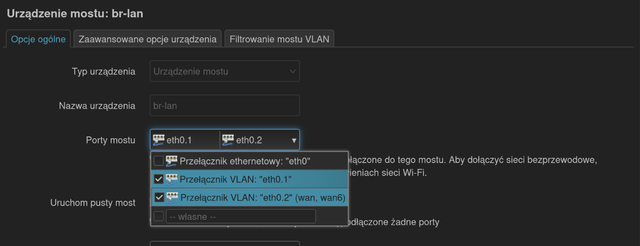
https://i.ibb.co/SDBpSD2w/cezary.png

Tak jest dobrze? Robiłem przez Luci, żeby było łatwiej. Samo dodaje jakieś VLANy.
Dwa nie wiem czemu Cudy na kanale 56 ma jakieś problemy, może za wcześnie i nie poczekałem? tamten jest 8 metrów dalej i nie ma problemu z DFS'em, wiem, że trzeba czekać ileśtam minut.

5

Odp: Wifi extender przez kabel jak ustawić WAN na LAN w routerze 2 portowym

Nie rób przez luci in nie rób tych vlanów. Zostawłeś wan na tym interfejsie i jednocześnie przypiąłeś go do lanu. Tak nie może być.

Przywróć ustawienia domyślne. Zrób

uci set network.lan.ipaddr=192.168.1.2
uci set network.lan.gateway=192.168.1.1
uci set network.lan.dns=192.168.1.1
uci set dhcp.lan.ignore='1'
uci del network.wan
uci del network.wan6
uci add_list network.@device[0].ports=eth0.2
uci commit
reboot

Podłącz kabel do dowolnego portu, włącz wifi i masz głupiego AP.

Masz niepotrzebny router, uszkodzony czy nie - chętnie przygarnę go.

6

Odp: Wifi extender przez kabel jak ustawić WAN na LAN w routerze 2 portowym

Tak to teraz wygląda, jest coś do usunięcia ręcznie tutaj?

root@OpenWrt:~# cat /etc/config/network

config interface 'loopback'
        option device 'lo'
        option proto 'static'
        option ipaddr '127.0.0.1'
        option netmask '255.0.0.0'

config globals 'globals'
        option ula_prefix 'fde2:1be8:8d58::/48'
        option packet_steering '1'

config device
        option name 'br-lan'
        option type 'bridge'
        option ipv6 '0'
        list ports 'eth0.1'
        list ports 'eth0.2'
        list ports 'eth0.2'

config interface 'lan'
        option device 'br-lan'
        option proto 'static'
        option ipaddr '192.168.1.2'
        option netmask '255.255.255.0'
        option ip6assign '60'
        option gateway '192.168.1.1'
        option dns '192.168.1.1'
        option ipv6 'off'

config switch
        option name 'switch0'
        option reset '1'
        option enable_vlan '1'

config switch_vlan
        option device 'switch0'
        option vlan '1'
        option ports '1 6t'

config switch_vlan
        option device 'switch0'
        option vlan '2'
        option ports '1 6t'

config device
        option name 'eth0'
        option ipv6 '0'

config device
        option name 'eth0.1'
        option type '8021q'
        option ifname 'eth0'
        option vid '1'

config device
        option name 'eth0.2'
        option type '8021q'
        option ifname 'eth0'
        option vid '2'

config device
        option name 'phy1-ap0'

root@OpenWrt:~#

7

Odp: Wifi extender przez kabel jak ustawić WAN na LAN w routerze 2 portowym

- masz dwa razy  list ports 'eth0.2', jedną linią możesz usunać.
- config switch_vlan
        option device 'switch0'
        option vlan '1'
        option ports '1 6t'

config switch_vlan
        option device 'switch0'
        option vlan '2'
        option ports '1 6t'

To na pewno nie jest tak domyślnie.

-

to jest zbędne

config device
        option name 'eth0.1'
        option type '8021q'
        option ifname 'eth0'
        option vid '1'

config device
        option name 'eth0.2'
        option type '8021q'
        option ifname 'eth0'
        option vid '2'

config device
        option name 'phy1-ap0'


Nie przywróciłeś ustawień domyślnych...

Masz niepotrzebny router, uszkodzony czy nie - chętnie przygarnę go.

8 (edytowany przez byku 2025-06-15 01:34:37)

Odp: Wifi extender przez kabel jak ustawić WAN na LAN w routerze 2 portowym

po resecie do factory defaults.

root@OpenWrt:~# cat /etc/config/network

config interface 'loopback'
        option device 'lo'
        option proto 'static'
        option ipaddr '127.0.0.1'
        option netmask '255.0.0.0'

config globals 'globals'
        option ula_prefix 'fd48:e3c2:e705::/48'

config device
        option name 'br-lan'
        option type 'bridge'
        list ports 'eth0.1'

config interface 'lan'
        option device 'br-lan'
        option proto 'static'
        option ipaddr '192.168.1.1'
        option netmask '255.255.255.0'
        option ip6assign '60'

config interface 'wan'
        option device 'eth0.2'
        option proto 'dhcp'

config interface 'wan6'
        option device 'eth0.2'
        option proto 'dhcpv6'

config switch
        option name 'switch0'
        option reset '1'
        option enable_vlan '1'

config switch_vlan
        option device 'switch0'
        option vlan '1'
        option ports '0 6t'

config switch_vlan
        option device 'switch0'
        option vlan '2'
        option ports '1 6t'

root@OpenWrt:~#

ładuję Twoje polecenia i kasować te vlany czy zostawić?

root@OpenWrt:~# cat /etc/config/network

config interface 'loopback'
        option device 'lo'
        option proto 'static'
        option ipaddr '127.0.0.1'
        option netmask '255.0.0.0'

config globals 'globals'
        option ula_prefix 'fd48:e3c2:e705::/48'

config device
        option name 'br-lan'
        option type 'bridge'
        list ports 'eth0.1'
        list ports 'eth0.2'

config interface 'lan'
        option device 'br-lan'
        option proto 'static'
        option ipaddr '192.168.1.2'
        option netmask '255.255.255.0'
        option ip6assign '60'
        option gateway '192.168.1.1'
        option dns '192.168.1.1'

config switch
        option name 'switch0'
        option reset '1'
        option enable_vlan '1'

config switch_vlan
        option device 'switch0'
        option vlan '1'
        option ports '0 6t'

config switch_vlan
        option device 'switch0'
        option vlan '2'
        option ports '1 6t'

root@OpenWrt:~# nano /etc/config/network
  GNU nano 8.4                                         /etc/config/network
        option device 'br-lan'
        option proto 'static'
        option ipaddr '192.168.1.2'
        option netmask '255.255.255.0'
        option ip6assign '60'
        option gateway '192.168.1.1'
        option dns '192.168.1.1'

config switch
        option name 'switch0'
        option reset '1'
        option enable_vlan '1'

config switch_vlan
        option device 'switch0'
        option vlan '1'
        option ports '0 6t'

config switch_vlan
        option device 'switch0'
        option vlan '2'
        option ports '1 6t'

============


EDIT2:


============
Dobra mam, dzięki Cezary, dosyć tego cyrku z interfaces, devices, vlan i portsami teraz jest dobrze.

root@OpenWrt:~# cat /etc/config/network

config interface 'loopback'
        option device 'lo'
        option proto 'static'
        option ipaddr '127.0.0.1'
        option netmask '255.0.0.0'

config globals 'globals'
        option ula_prefix 'fd48:e3c2:e705::/48'

config device
        option name 'br-lan'
        option type 'bridge'
        list ports 'eth0'

config interface 'lan'
        option device 'br-lan'
        option proto 'static'
        option ipaddr '192.168.1.2'
        option netmask '255.255.255.0'
        option ip6assign '60'
        option gateway '192.168.1.1'
        list dns '192.168.1.1'

config switch
        option name 'switch0'
        option reset '1'
        option enable_vlan '0'