401

Odp: Modem od routera MF286D

Leo-PL napisał/a:

I think I can ask a friend to extract one from his working unit, which I have dump of partitions as well, which came from the same network.

That should fine, all other stuff can be extracted from ZTE framework. You have just to modify partition_nand.xml and contents.xml smile

402

Odp: Modem od routera MF286D

smereka napisał/a:

Panowie i Panie działa. Podłączyłem go królikowego pacjenta dwr961 nawet na jego sofcie nic nie zmieniane dodałem co Cezary napisał i działa mi net ale frajda. Trochę męczyłem te 2 konektory antenowe bo nie wiem który gdzie a modem ma 5 a ja mam tylko 2 i na chybił trafił w końcu się za zarejestrował.  Duża zasługa sticha86 wink


good job sitch86 smile))


Na tych dwóch lichych antenach podpięty do oznaczeń  na zte 3 i 4 mam na orange 55/11 więc jest extra

Lepiej go nie męcz bez anten ,bo jeszze się fizycznie spali....

Czyli rozumiem ,że ten plik qcn potrzebny jest z działającego modemu , i nie będzie (narazie) do udostępnienia , bo w nim jest IMEI ?

403

Odp: Modem od routera MF286D

MiG25 napisał/a:
smereka napisał/a:

Panowie i Panie działa. Podłączyłem go królikowego pacjenta dwr961 nawet na jego sofcie nic nie zmieniane dodałem co Cezary napisał i działa mi net ale frajda. Trochę męczyłem te 2 konektory antenowe bo nie wiem który gdzie a modem ma 5 a ja mam tylko 2 i na chybił trafił w końcu się za zarejestrował.  Duża zasługa sticha86 wink


good job sitch86 smile))


Na tych dwóch lichych antenach podpięty do oznaczeń  na zte 3 i 4 mam na orange 55/11 więc jest extra

Lepiej go nie męcz bez anten ,bo jeszze się fizycznie spali....

Czyli rozumiem ,że ten plik qcn potrzebny jest z działającego modemu , i nie będzie (narazie) do udostępnienia , bo w nim jest IMEI ?

It can be shared, but just put a dummy IMEI on it (like the one shared by me)

404 (edytowany przez smereka 2022-06-21 13:49:58)

Odp: Modem od routera MF286D

MiG25 a niech się pali. Płyta główna i tak ma zastosowanie i taniej wyszła niż takie ubiquiti o podobnych parametrach. Bedę w Białymstoku to może ją zabiorę i zobaczymy co po przywróceniu oryginału będzie się działo. Zabieram się za klecenie instrukcji o ile wszystko pamiętam co stich86 robił no ale to na bieżąco w razie czego będziemy edytować a potem Wy forumowicze przetestujcie i jak gdzieś będzie zbyt duży skrót myślowy dawajcie znać

405

Odp: Modem od routera MF286D

Stich if I now connect to pc and open qpst and tab Backup I don't see modem. After running the correct IMEI, does qpst not recognize the modem and must it be broken to detect it?

406 (edytowany przez stich86 2022-06-21 14:36:28)

Odp: Modem od routera MF286D

smereka napisał/a:

Stich if I now connect to pc and open qpst and tab Backup I don't see modem. After running the correct IMEI, does qpst not recognize the modem and must it be broken to detect it?

no, you have to force installation of driver using SDI application
Because in this mode PID and VID are different, it will not found the ZTE diagnostic port using older driver

If you still have Teamviewer we can do it together. Let me know

407

Odp: Modem od routera MF286D

wait because I'm going with the procedure from the beginning and now, as I passed the modem with files from sb 3.0, it is visible in qpst backupo, i.e. it must be damaged to be detected there

408 (edytowany przez stich86 2022-06-21 14:48:17)

Odp: Modem od routera MF286D

smereka napisał/a:

wait because I'm going with the procedure from the beginning and now, as I passed the modem with files from sb 3.0, it is visible in qpst backupo, i.e. it must be damaged to be detected there

let me explain:

the first installation of driver using SDI (the little program inside Win Drivers folder on my MEGA share) is recognized because modem in broken state (or with autorun\download mode at 0) are presented to the system with VID\PID 19d2:0016. These IDs are the standard one into normal ZTE packages. At this point without force installation, QPST will find the modem.

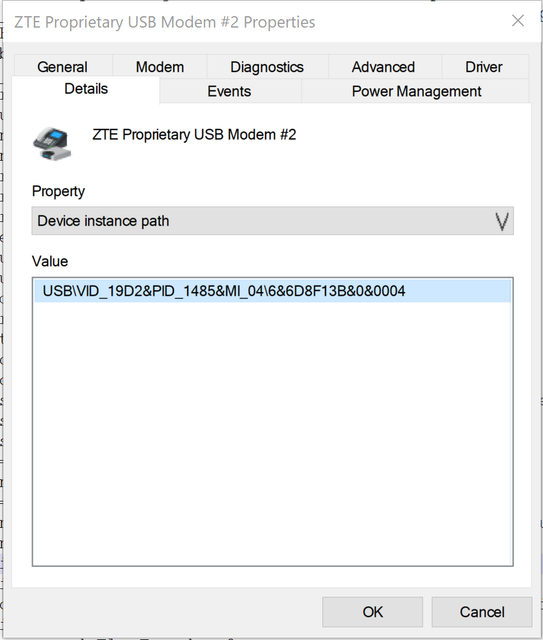
When you restore everthing, the VID\PID become 19d2:1485, these IDs are not part of the INF file, so you have to manually force installation of driver. You have just one driver to install in this way for the DIAG port that's the one used by QPST

409

Odp: Modem od routera MF286D

Ok I start team viver show one more time

410

Odp: Modem od routera MF286D

teamviver in online you can connect

411

Odp: Modem od routera MF286D

smereka napisał/a:

Ok I start team viver show one more time

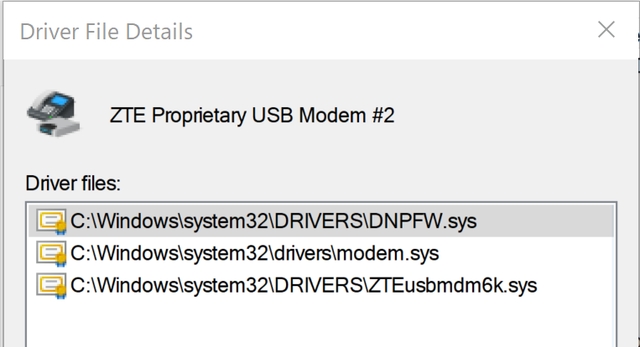
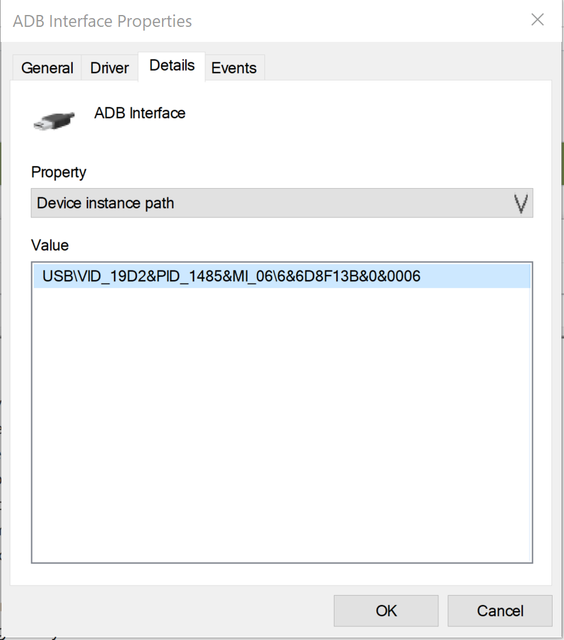
here is the list of driver used (with relative HW path) that should be forced:

ADB (using Google Android Drivers):

https://i.ibb.co/BLwdDHt/image.png
https://i.ibb.co/jywzPXm/image.png

ZTE Proprietary Modem (used for AT commands):

https://i.ibb.co/R2JyFmC/image.png
https://i.ibb.co/dDTT27C/image.png

ZTE Diagnostic Ports (for QPST/qtools stuff):


https://i.ibb.co/Qn12FS5/diagnostic-port-instance-path.png
https://i.ibb.co/YT2ywvk/diagnostic-port-used-driver.png

412 (edytowany przez stich86 2022-06-21 20:45:25)

Odp: Modem od routera MF286D

oh nice.. with changed IMEI, our MF286D finally can connect to TIM network smile

https://www.speedtest.net/result/13310349163.png

413 (edytowany przez Leo-PL 2022-06-21 23:51:40)

Odp: Modem od routera MF286D

Ok, took the plunge and attempted to flash once again. Reinstalled QPST and drivers, and whenever the device identifies as 19d2:0076 (QUSB__BULK), something interacts with it and causes a reboot into normal sequence. I had a Sierra modem installed in the laptop I'm using, so I removed its drivers just to be safe. The question is - which drivers are correct for this ID? Previously I found "ZTE Diagnostic drivers" package, but it's from pretty random source on the Internet, and I wonder if it doesn't conflict with drivers bundled with QPST.

Also, after entering 9008 QDL mode, and starting SB3.0 download, the modem just reboots after executing the loader.

I had pretty much the same behaviour, when trying to dump the flash contents using 'edl', device reboots just after uploading (E)NPRG9x55p.bin - so I wonder if my modem's RAM isn't actually toast :-(

Also, a request to @smereka or @stich86 - what happens if you try to dump the NAND contents from the modem using EDL tool, if you force it to 9008 mode and use ENPRG9x55p loader?

Edit: currently the most I can get out of it is that:

Qualcomm Sahara / Firehose Client V3.60 (c) B.Kerler 2018-2022.
main - Using loader zte mf286d Nordic to Nordic_B11 192.168.32.1 pw admin/UPDATE/NPRG9x55.mbn ...
main - Waiting for the device
main - Device detected :)
sahara - Protocol version: 2.1
main - Mode detected: sahara
Device is in streaming mode, uploading loader
sahara - Device serial : 0xc1203dba
sahara - Protocol version: 2.1

414 (edytowany przez stich86 2022-06-22 09:12:19)

Odp: Modem od routera MF286D

Leo-PL napisał/a:

Ok, took the plunge and attempted to flash once again. Reinstalled QPST and drivers, and whenever the device identifies as 19d2:0076 (QUSB__BULK), something interacts with it and causes a reboot into normal sequence. I had a Sierra modem installed in the laptop I'm using, so I removed its drivers just to be safe. The question is - which drivers are correct for this ID? Previously I found "ZTE Diagnostic drivers" package, but it's from pretty random source on the Internet, and I wonder if it doesn't conflict with drivers bundled with QPST.

Also, after entering 9008 QDL mode, and starting SB3.0 download, the modem just reboots after executing the loader.

I had pretty much the same behaviour, when trying to dump the flash contents using 'edl', device reboots just after uploading (E)NPRG9x55p.bin - so I wonder if my modem's RAM isn't actually toast :-(

Also, a request to @smereka or @stich86 - what happens if you try to dump the NAND contents from the modem using EDL tool, if you force it to 9008 mode and use ENPRG9x55p loader?

Edit: currently the most I can get out of it is that:

Qualcomm Sahara / Firehose Client V3.60 (c) B.Kerler 2018-2022.
main - Using loader zte mf286d Nordic to Nordic_B11 192.168.32.1 pw admin/UPDATE/NPRG9x55.mbn ...
main - Waiting for the device
main - Device detected :)
sahara - Protocol version: 2.1
main - Mode detected: sahara
Device is in streaming mode, uploading loader
sahara - Device serial : 0xc1203dba
sahara - Protocol version: 2.1
You have to use loader into qtools folder, not the one into ZTE framework (that I think are not patched)

Use the qtools found on my MEGA folder, when you are in that mode 19d2:0076, use SDI programm on driver folder to install driver called "ZTE Diagnostic Port", the use these command to put it on 9008 HS Loader mode:

X = your port COM number

qdload.exe -k12 -q  -pX
qcommand.exe -pX -c "m 193d100 1"
qcommand.exe -pX -c "d 7980000 4" <-- stop this one when the modem switch to 9008 device, usally just two printed outputs

After last command, modem should boot in 9008 mode, please be sure to install 9008 Qualcomm drivers, otherwise you will have Uknown device. When you are on this mode, you can load firmware with SB3.0

If you want we can do a TeamViewer session smile

415

Odp: Modem od routera MF286D

Listen stich86 I trying to put together this instruction and go through all the steps from the beginning. Unfortunately, now always after using sb3.0 it happens very quickly, not as it was damaged and after resetting it starts not as nmea, propiaty only as adb and all devices when it is operational. How to make sb3.0 run as nmea, pripiaty, etc.

416

Odp: Modem od routera MF286D

Something has changed recently since I tried EDL under Linux last time - which is my main OS - probably when I pulled last EDL updates. Now it seems to stick on the Sahara hello packet for some reason. I'll revert it and see what happens - I was using the patched loader with that previously, and behaviour was quite similar in both modes.

Regarding SB 3.0, I was able to enter 9008 mode without qtools, having feedback on the modem's console, and this one was recognized properly. However, just after starting the process, the modem rebooted to show 19d2:0076 ID, was detected by QPST in Sahara Memory Dump mode, and then promplty rebooted back into OS - and this is the puzzling part.

417 (edytowany przez stich86 2022-06-22 11:01:56)

Odp: Modem od routera MF286D

Leo-PL napisał/a:

Something has changed recently since I tried EDL under Linux last time - which is my main OS - probably when I pulled last EDL updates. Now it seems to stick on the Sahara hello packet for some reason. I'll revert it and see what happens - I was using the patched loader with that previously, and behaviour was quite similar in both modes.

Regarding SB 3.0, I was able to enter 9008 mode without qtools, having feedback on the modem's console, and this one was recognized properly. However, just after starting the process, the modem rebooted to show 19d2:0076 ID, was detected by QPST in Sahara Memory Dump mode, and then promplty rebooted back into OS - and this is the puzzling part.

Because SB3.0 send a wrong loader and you will get this bootloop
use my qtools and commands to put it on 9008 wink

418

Odp: Modem od routera MF286D

smereka napisał/a:

Listen stich86 I trying to put together this instruction and go through all the steps from the beginning. Unfortunately, now always after using sb3.0 it happens very quickly, not as it was damaged and after resetting it starts not as nmea, propiaty only as adb and all devices when it is operational. How to make sb3.0 run as nmea, pripiaty, etc.

I don't understand... what are you trying to do?

419 (edytowany przez smereka 2022-06-22 11:32:45)

Odp: Modem od routera MF286D

I turn on sb 3. And I give him the files from your sb3.0 directory. I press start and they had everything 10 seconds and restarts the modem. Earlier, when he was dead, he had 3 minutes to grind it. Earlier, when he grinded it, it was 3 minutes, then it was fired as nmea, pripriaty. And now, after grinding, it gets up right away.


Edit: Ok working never mind

420

Odp: Modem od routera MF286D

wait a second guys..

SB3.0 (usally Software Download app), can put the modem in 9008. The problem is that our modem doesn't accept the loaded bootloader and reboot itself.

So only way is to put on 9008 using patched bootloader and qcommands provided

421

Odp: Modem od routera MF286D

Ok then, that explains a lot.
I need to make myself some kind of USB adapter board to connect between the laptop and the modem breakout board, allowing for external backup power and for grounding the D+ line to enter EDL mode. I guess I know what I'll do tonight at hackerspace ;-]

422

Odp: Modem od routera MF286D

Leo-PL napisał/a:

Ok then, that explains a lot.
I need to make myself some kind of USB adapter board to connect between the laptop and the modem breakout board, allowing for external backup power and for grounding the D+ line to enter EDL mode. I guess I know what I'll do tonight at hackerspace ;-]

but what's the current status of your modem?

423

Odp: Modem od routera MF286D

I can force it into 9008 mode. But then it either reboots (if running SB3.0) or just stays there if trying to use 'edl' on it, regardless of selected lodaer - as I mentioned, probably an edl bug. Haven't really tried qtools to force the modem into 9008 EDL, because I could do that with the wire.  qtools would spew out something in russian, which came out garbled due to lacking cyrylic font in console - and fail. Maybe I can cross-compile the latest version on Windows.

424

Odp: Modem od routera MF286D

Leo-PL napisał/a:

I can force it into 9008 mode. But then it either reboots (if running SB3.0) or just stays there if trying to use 'edl' on it, regardless of selected lodaer - as I mentioned, probably an edl bug. Haven't really tried qtools to force the modem into 9008 EDL, because I could do that with the wire.  qtools would spew out something in russian, which came out garbled due to lacking cyrylic font in console - and fail. Maybe I can cross-compile the latest version on Windows.

I think you have to force in 9008 like I did using qtools

425 (edytowany przez smereka 2022-06-22 13:54:33)

Odp: Modem od routera MF286D

Jest jakiś darmowy portal na zdjęcia. Używałem imgbb.Teraz próbuję to instrukcję wstawić i cyrki odwalają się. Jedno zdjęcie poszło a drugie wskakuje w jakiś dziwny link i forum Cezarego mi błąd wywala nawet nie mogę dać porównania bo nawet tu jako komentarz wywala błąd.... Oba pliki z rozszerzeniem png


Jaka jest prawidłowa składnia?