Sprawa z eSIM.
Modem ma wbudowany chip eSIM. Testowałem kartę eSIM od T-Mobile Polska i działa.
Instrukcja https://github.com/prusa-dev/lpac-fibocom-wrapper
Modem trzeba podłączyć na chwilę bezpośrednio do kompa i wgrać profil karty eSIM. Gotowy programik do tego: EasyLPAC pod Windowsa https://github.com/prusa-dev/lpac-fiboc … ibocom.zip
Może ktoś potrafi dopisać kod, żeby działał env dla OpenWrt Rest API albo najlepiej wrapper Lpac do uruchomienia bezpośrednio na OpenWrt/Luci?
Nie jesteś zalogowany. Proszę się zalogować lub zarejestrować.
Opcje wyszukiwania (Strona 1 z 2)
eko.one.pl → Posty przez JanMaz
Znalezione posty: 1 do 25 z 41
1 2024-12-23 17:46:09
Odp: Fibocom FM350-GL modem 5G/LTE/WCDMA pod OpenWrt (375 odpowiedzi, napisanych Sprzęt / Hardware)
2 2024-12-23 17:29:18
Odp: Fibocom FM350-GL modem 5G/LTE/WCDMA pod OpenWrt (375 odpowiedzi, napisanych Sprzęt / Hardware)
Sprawa z firmwarem.
Na pierwszy rzut oka, moja uwaga do instrukcji https://github.com/mrhaav/openwrt/blob/ … upgrade.md z 28 października. Brakuje info na czerwono ze źródła:
Uwaga! Tylko dla zaawansowanych użytkowników i eksperymentatorów.
Wszystko, co robisz z modemem, robisz na własne ryzyko.
Jeśli sformatujesz modem, wszystkie partycje i wszystkie dane modemu zostaną usunięte, w tym IMEI itp.
Pamiętaj o utworzeniu kopii zapasowej działającego modemu.
(przetłumaczone przez Google Translator https://4pda.to/forum/index.php?showtop … y128299931)
Odzyskiwanie Preloadera https://4pda.to/forum/index.php?showtop … y132990598
3 2024-11-25 01:06:00
Odp: Fibocom FM350-GL modem 5G/LTE/WCDMA pod OpenWrt (375 odpowiedzi, napisanych Sprzęt / Hardware)
mvincm napisał/a:
Jakieś pomysły? Jak nie ma połączenia to sobie stabilnie USB działa. Można wysłać i odbierać komendy AT. Wywołujemy połączenie i różnie się rozłącza (a to szybko a to dam radę testy jakieś zrobić). Powtarzalność mała. Temperatura to też nie ten magiczny czynnik bo nie zdąży się nagrzać jak to USB3 się rozłączy. No pojęcia nie mam ... Any ideas?
Na Windowsie nie rozłącza przy obciążeniu, tak?
Na tym samym kompie z OpenWrt x86 przy obciążeniu rozłącza się?
Jaki masz adapter?
Czy możesz spróbować na innym adapterze? (najlepszy taki https://www.amazon.pl/Waveshare-5G-M-2- … B0CNCS4YMR szybki test w ramach prawa konsumenckiego)?
4 2024-11-25 00:27:02
Odp: Fibocom FM350-GL modem 5G/LTE/WCDMA pod OpenWrt (375 odpowiedzi, napisanych Sprzęt / Hardware)
Kerio napisał/a:
Thu Nov 21 03:05:25 2024 : Get Profile 1 SIM IMEI Profile -
Chyba próbowałeś ustawić "Custom Profiles"?
Przywróciłeś oryginalny skrypt simlock.sh?
Mniejsza o to co zmieniałeś. Szkoda czasu.
Moja propozycja na najszybsze rozwiązanie tego problemu.
Zrób reset do ustawień domyślnych routera. W przeglądarce logujesz się do routera, zakładka System -> Backup / Flash Firmware i klikasz Perform reset.
Po resecie, nic nie zmieniaj w zakładce "Connection Profile". Jeżeli masz kartę sim z pinem to wpisz tylko ten pin. APN niech na razie zostanie internet (później spróbujesz data).
Modem ma już poprawnie ustawiony fizyczny slot SIM i powinno działać. Jak nie będzie działać, to pokaż logi.
5 2024-11-17 20:52:59
Odp: Fibocom FM350-GL modem 5G/LTE/WCDMA pod OpenWrt (375 odpowiedzi, napisanych Sprzęt / Hardware)
Adapter bez możliwość podłączenia zasilacza?
Takie rozłączanie po chwili, to brzmi jakby port USB nie dawał rady prądowo. Czy możesz sprawdzić na innym kompie?
Jak używasz Banana Pi do czegoś innego, to może spróbuj na innym routerze z USB z wgranym nowym firmwarem ROOter?
Na ROOter powinno działać. Jak nie będzie działać, to pokaż logi z logread
6 2024-11-12 22:04:31
Odp: Fibocom FM350-GL modem 5G/LTE/WCDMA pod OpenWrt (375 odpowiedzi, napisanych Sprzęt / Hardware)
tomasi napisał/a:
Dochodzę do wniosku, że mój modem jest po prostu jakiś zrypany. Zakupiłem jakąś przejściówkę usb- niestety nie mam żadnego pc ze złączem m2 key b (poza głupim lenovo, który ma whitelist i nic nowego nie działa tam).
Nigdzie nie spotkałem się z objawem, że po załadowaniu kmod t7xx wywala system i uruchamia się recovery. W każdym bądź razie na pc też brak sukcesu- sterowniki zainstalowane- pojawia się lista nowych urządzeń, w tym szeregowe AT, ale niestety po kilku sekundach wszystko znika. I tak non stop.
Jaki adapter USB kupiłeś?
Nie działa na Windowsie?
Testowałeś firmware ROOter na Banana Pi?
7 2024-11-12 21:42:56
Odp: Fibocom FM350-GL modem 5G/LTE/WCDMA pod OpenWrt (375 odpowiedzi, napisanych Sprzęt / Hardware)
stachurp napisał/a:
mam dokładnie ten modem FM350-GL-16 , również przejściówkę 5G M.2 to Gigabit Ethernet Converter i mi zadziałało, tylko podłączone do terminala x86.
instalowałem pakiety wg instrukcji :
https://4pda.to/forum/index.php?showtop … y128818100nie pamiętam czy do
# /etc/rc.local
dodałem
echo "0e8d 7127 ff" > /sys/bus/usb-serial/drivers/option1/new_id
ale raczej tak.nie mam również pewności czy modemu nie trzeba było przestawić w jakiś inny tryb żeby zaczęła działać. próbowałem różnych opcji, uruchamiania pod windows :
https://4pda.to/forum/index.php?showtop … y128527008
kiedy ruszyła pod windows, finalnie ruszyła i pod openwrt. Kupiłem drugi modem już bez dopisku -16, również nie wystartował po włożeniu do adaptera, niestety nie wiem która operacja zmusiła go do działania.co do ROOter openwrt - tutaj ta sama konfiguracja nie chce mi działać - tzn, od strzała modem jest wykrywany, łączy się z siecią komórkową, ale Internetu nie ma. nie wiem dlaczego modem jest wykrywany na ttyUsb3 a nie na ttyUsb4 jak w działającym przypadku, ale skoro odczytuje parametry sieci komórkowej to chyba jest prawidłowo. Być może problemem są jakieś ustawienia zapory, czy inna konfiguracja której nie znam.
Modem Fibocom FM350-GL-16 to wersja bez modułu radiowego 5G więc szkoda czasu...
Zrób fotkę tego drugiego modemu.
Czy dobrze zrozumiałem, że ten drugi modem działa prawidłowo na Windowsie?
Podaj nazwę pliku z obrazem ROOter, którego użyłeś.
Napisałeś, że na ROOter wykrył ten drugi modem, ale nie ma internetu. Sprawdzałeś podstawową komendę, czyli np: ping 8.8.8.8, tak? Jeżeli tak, to na ROOter miałem podobny problem. Na szybko, spróbuj odinstalować mwan3 i zrób reboot, czyli komendy:
opkg remove mwan3
reboot
8 2024-11-04 21:38:55
Odp: eSIM w modemie (49 odpowiedzi, napisanych Sprzęt / Hardware)
Cezary napisał/a:
Lekki OT: teltonika zrobiła router z esimem: https://teltonika-networks.com/newsroom … sim-router
Jak wiadomo ich soft bazuje na OpenWrt, ciekawe jak to sobie wymyślili.
Teltonika w kilku modelach routerów montuje modemy, które posiadają chipy eSIM. Jako manager profili eSIM korzysta z lpac https://github.com/estkme-group/lpac
Na githubie widziałem kilka projektów do uruchomienia eSIM na modemach Quectel i Fibocom. Korzystają z lpac + skrypty:
modemy MBIM https://github.com/stich86/lpac-libmbim-wrapper
QMI https://github.com/z3ntu/lpac-libqmi-wrapper
Fibocom FM350 https://github.com/prusa-dev/lpac-fibocom-wrapper
info o innych projektach https://euicc-manual.osmocom.org/docs/l … -solution/
9 2024-11-04 20:56:03
Odp: Fibocom FM350-GL modem 5G/LTE/WCDMA pod OpenWrt (375 odpowiedzi, napisanych Sprzęt / Hardware)
Marolo napisał/a:
Witam,
Kupiłem:
Modem FM350-GL-16 https://allegro.pl/oferta/karta-sieciow … 6080463272
Konwerter 5G M.2 to Gigabit Ethernet Converter https://www.waveshare.com/5g-m.2-to-gigabit-eth.htmPodłączam do D-Team Newifi D2 na
OpenWrt 23.05-SNAPSHOT r24111-5332351821i dostaję coś takiego w dzienniku systemowym (modem włożony do konwertera):
Sun Nov 3 12:19:00 2024 kern.info kernel: [ 2664.484964] usb 1-1: new high-speed USB device number 4 using xhci-mtk
Sun Nov 3 12:19:00 2024 kern.info kernel: [ 2664.768992] cdc_acm 1-1:1.0: ttyACM0: USB ACM device
Sun Nov 3 12:19:01 2024 kern.info kernel: [ 2665.712415] usb 1-1: USB disconnect, device number 4
Sun Nov 3 12:19:01 2024 kern.err kernel: [ 2665.722588] xhci-mtk 1e1c0000.xhci: drop_ep_quirk high-speed ep3in intr, mpkt:64, interval:16/4096mslsusb zwraca:
Bus 002 Device 001: ID 1d6b:0003 Linux 5.15.167 xhci-hcd xHCI Host Controller
Bus 001 Device 001: ID 1d6b:0002 Linux 5.15.167 xhci-hcd xHCI Host ControllerJak wyciągnę modem z konwertera nic nie dostaje w dzienniku.
Karta różni się trochę od tej na zdjęciu z aukcji bo ma możliwość podłączenia tylko dwóch anten.Jak podłączam pod lapka z Windows 8.1 niby coś znajduje , ale żaden port COM się nie pokazuje.
Podłączam też pod Unraid na komputerku z i też dostaje:
Nov 3 12:37:42 Tower usb_manager: Info: rc.usb_manager usb_add MediaTek_MT65xx_Preloader /dev/bus/usb/003/023 003 023
Nov 3 12:37:42 Tower usb_manager: Info: rc.usb_manager Add device with more than one interface & connect serial .
Nov 3 12:37:42 Tower usb_manager: Info: rc.usb_manager Autoconnect No Mapping found MediaTek_MT65xx_Preloader /dev/bus/usb/003/023 003 023 port 3-5.1.1
Nov 3 12:37:42 Tower usb_manager: Info: rc.usb_manager tty_add MediaTek_MT65xx_Preloader /dev/ttyACM0
Nov 3 12:37:42 Tower usb_manager: Info: rc.usb_manager Processing tty attach MediaTek_MT65xx_Preloader /dev/ttyACM0 003 023
Nov 3 12:37:42 Tower usb_manager: Info: rc.usb_manager Add device with more than one interface & connect serial 1 1.
Nov 3 12:37:42 Tower usb_manager: Info: rc.usb_manager Autoconnect No Mapping found MediaTek_MT65xx_Preloader /dev/ttyACM0 003 023 port 3-5.1.1
Nov 3 12:37:43 Tower kernel: usb 3-5.1.1: USB disconnect, device number 23
Nov 3 12:37:43 Tower usb_manager: Info: rc.usb_manager usb_remove MediaTek_MT65xx_Preloader /dev/bus/usb/003/023 003 023
Nov 3 12:37:43 Tower usb_manager: Info: rc.usb_manager Device Match 003/023 vm: 003 023
Nov 3 12:37:43 Tower usb_manager: Info: rc.usb_manager Removed 003/023 vm: nostate 003 023Próbowałem 3 różnych kabli - jeden z zestawu od konwertera, 2 od telefonów.
I teraz nie wiem co jest zwalone modem czy konwerter.
Modem Fibocom FM350-GL-16 to wersja bez modułu radiowego 5G. W środku jest chip MT6880. https://www.ntt.com/business/iot/product/m244.html
To wyjątkowo słaba wersja tego modemu. Chyba tylko ta wersja nie ma 5G.
Moim zdaniem, nie warto tracić czasu na próbach uruchomienia tej wersji modemu (będą potrzebne inne drivery).
Towar niezgodny z opisem oferty. Może sprzedawca wymieni na wersję z 5G (z chipem MediaTek T700).
Info o wersjach modemu Fibocom FM 350 https://4pda.to/forum/index.php?showtop … y130198542
tomasi napisał/a:
Jako że zepsułem swój T99W175, więc do momentu kiedy go nie naprawię albo wyrzucę, pora zepsuć kolejny sprzęt. Kiedy chcę zainstalować kmod-mtk-7xx, od razu wywala mi do trybu recovery. BananaPI oraz goły openwrt.
Próbowałem zrobić opkg z -V oraz wyświetlić cat /proc/kmsg ale za wiele info tam nie ma.7>[ 558.864750] mtk_t7xx 0003:01:00.0: assign IRQ: got 112 <6>[ 558.869903] mtk_t7xx 0003:01:00.0: enabling device (0000 -> 0002) <7>[ 558.876004] mtk_t7xx 0003:01:00.0: enabling bus masteringNo i potem znowu recovery.
FM350 może działać w trybie USB albo PCIe.
Z tego co widziałem na forum openwrt to modem w trybie PCIe z driverem mtk_t7xx via MBIM i Modem Manager, aktualnie działa bardzo niestabilnie. Może nowszy kernel 6.11 poprawi stabilność drivera. Ktoś pisał, że działa stabilnie na architekturze x86. https://forum.openwrt.org/t/fibocom-fm3 … ort/142682
Możesz zróbić krótki test modemu z obciążeniem na Windowsie. Jak będzie ok, to spróbuj na BananaPi z firmwarem ROOter (automatycznie zainicjuje modem stabilny tryb USB i stworzy połączanie z internetem).
10 2024-08-27 23:48:23
Odp: Fibocom FM350-GL modem 5G/LTE/WCDMA pod OpenWrt (375 odpowiedzi, napisanych Sprzęt / Hardware)
flash608 napisał/a:
@JanMaz
Nie, nie do końca. Na OpenWRT dużo więcej działam/kombinuję z racji, że takie jest docelowe wykorzystanie.
Do laptopa podpinałem głównie po to by sprawdzić działanie, nie męczyłem jednak takiej konfiguracji przez dłuższy czas, więc czy jest bardziej stabilne, nie wiem. Dwa, że z laptopem nie uwzględniam/łem przemieszczania się, co jak widzę jest czasami tym problematycznym punktem, który powoduje utratę internetu na routerze.
Chodziło mi o to, żeby zrobić krótki test porównawczy OpenWRT vs Windows. Test po 10 minut z obciążeniem i poruszaniem.
flash608 napisał/a:
W przypadku routera na OpenWRT i tego mojego adaptera, połączenie potrafi być jak najbardziej stabilne, przy ciągłym pobieraniu rzędu 200Mbps, natomiast czasami wystarczy, że poruszę router, albo ten adapter i nagle internet się traci. Wygląda to tak jakby coś się faktycznie rozłączało, jednakże na tą chwilę nie udało mi się ustalić co bezpośrednio to powoduje. Próbowałem na różnych kablach USB między adapterem, a routerem, różne kable zasilające tak adapter jak i router oraz różne źródła zasilania. Jednakże co ciekawe "fizycznie" nic nie wskazuje problemu utraty połączenia, router dalej ma dostępny modem na ttyUSB1 (mogę dalej wysyłać komendy AT), zasilanie też wszędzie jest.
pokaż dmesg i logread
flash608 napisał/a:
Wybrałem ten konkretny adapter USB z racji na wyjścia 5V na wentylator. Ten, o którym piszesz niestety jest zamkniętą puszką i trudno będzie ją schłodzić, o czym z resztą jest sporo komentarzy np. na Amazonie.
Adapter Waveshark 5G M.2 to Gigabit Ethernet Converter, 5G M.2 to USB3.1, Aluminum Alloy Case, ... jest bardzo mały, mało miejsca na chłodzenie modemu. Można zrobić "kanapkę" na modemie. Termopad, na to gładki kawałem aluminium, termopad, żeby odprowadzał ciepło na obudowę adaptera. Dodatkowo, do zewnętrznej powierzchni ścianki adaptera można przykleić radiator.
flash608 napisał/a:
Zamówiłem więc z Amazona ten adapter, o którym wspomniałeś. Port Ethernet na tą chwilę wydaje mi się pewniejszym stabilniejszym rozwiązaniem wersus USB, a po USB też można go spiąć. Potestuje, zobaczę jak to się sprawdzi, najwyżej zrobię zwrot. Martwi mnie jedynie kwestia chłodzenia.
Na routerze GL-MT3000, może zadziała na jednym dobrym kablu USB "Y" z dodatkowym zasilaniem przez zasilacz USB lub powerbank.
W adapterach modem Fibocom FM350 działa tylko po USB.
Inne wybrane modemy mogą działać przez port Ethernet.
instrukcja https://www.waveshare.com/wiki/5G_M.2_T … nstruction
11 2024-08-26 23:05:30
Odp: Fibocom FM350-GL modem 5G/LTE/WCDMA pod OpenWrt (375 odpowiedzi, napisanych Sprzęt / Hardware)
flash608 napisał/a:
Z laptopem łączyłem go na początku ze wskazanym przez Ciebie skryptem/sterownikami, bo to było najłatwiejsze do sprawdzenia i mogę potwierdzić, że działa.
czyli na OpenWRT modem się zawiesza/resetuje, a na Windowsie działa stabilnie pod max obciążeniem?
flash608 napisał/a:
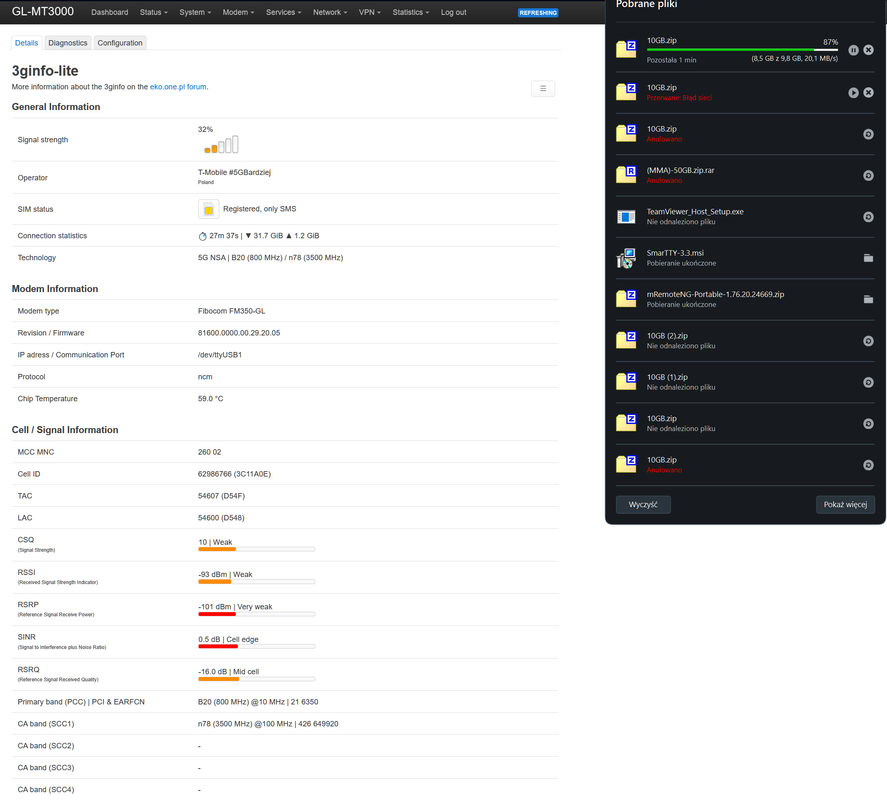
Masz słabe parametry sygnału 5G. To też, może być problem dla tego modemu.
Czy modem nie przełącza się co chwilę na LTE?
W innej lokalizacji, czy modem nie próbuje zrobić agregacji pięciu pasm dla połączenia 5G?
Na forum 4pda są opinie, że nowszy firmware obniża temp. na modemie. Z tego co spojrzałem, to DeepL Pro lepiej tłumaczy ruski niż Google Translator.
flash608 napisał/a:
Plan zakładał wykorzystanie tego adaptera/modemu 5G + router mobilny (Wireguard), zasilane z 230V albo z powerbanku poza domem, gdzie np. WiFi jest bardzo słabe (niejeden hotel), albo w miejscach, gdzie telefon ma za słaby zasięg. Umiejscowienie gdzieś bliżej okna/w najwyższym możliwym punkcie.
Adapter Waveshark 5G M.2 to Gigabit Ethernet Converter, 5G M.2 to USB3.1, Aluminum Alloy Case, ... jest dwa razy mniejszy. W zestawie jest dobry zasilacz sieciowy 12V. Jest możliwość podłączenia jednym dobrym kablem USB 3.1.
Testowałem ten adapter.
Jak podłączyłem do peceta po USB 3.1, to wszystko było OK pod max obciążeniem (peak 600 Mb/s).
Jak podłączyłem do starego serwera po USB 3.0, to po kilku minutach obciążenia modem się resetował. Nie miałem dobrego kabla USB "Y" (może to by pomogło).
Ciekawe jaki będzie speed połączenia Wireguard na GL-MT3000 + ten modem Fibocom FM350 po USB.
12 2024-08-22 22:49:57
Odp: Fibocom FM350-GL modem 5G/LTE/WCDMA pod OpenWrt (375 odpowiedzi, napisanych Sprzęt / Hardware)
flash608 napisał/a:
To jest modem Foxconn T99W175 (znany także jako Dell DW5930 / Lenovo SDX55) więc sprawa na inny wątek.
eh.. tak, zgadza się. Wrzuciłem nie to zdjęcie. Dw5930 też miałem, zwróciłem bo w tym moim adapterze go w ogóle nie wykrywał na USB czy to podpięty do routera czy laptopa. Natomiast wpięty w gniazdo m.2 w laptopie działał OK.
[EDIT] wrzuciłem prawidłowe zdjęcie w poprzednim poście.
Z tego co pamiętam, w modemach Foxconn T99W175 / Dell DW5930 / Lenovo SDX55, żeby działał interface USB trzeba zrobić modyfikację. Chyba trzeba zakleić odpowiedni pin w złączu M.2 i połączyć 2 styki na modemie. Modem bez modyfikacji, działa w laptopie na interface PCI-E. Na forum 4pda jest dokładny opis.
Wracając do tematu modemu Fibocom FM350 i adaptera.
flash608 napisał/a:
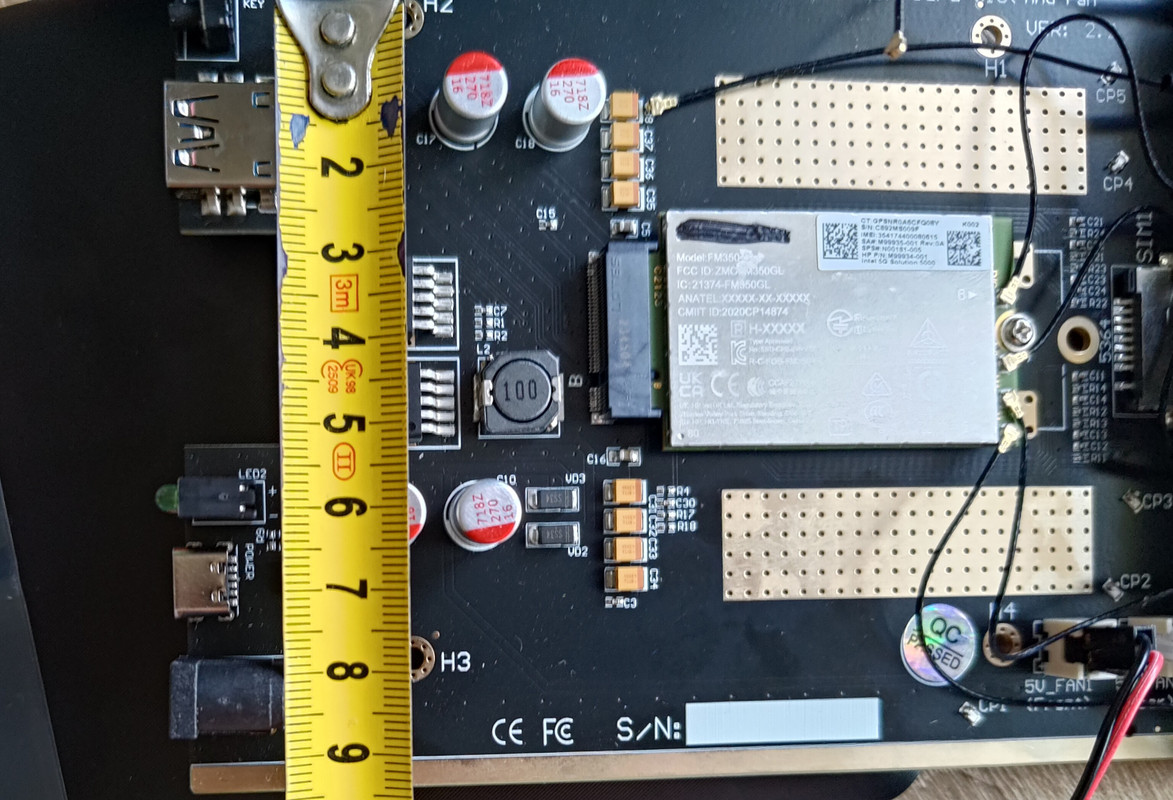
flash608 napisał/a:
A kiedy się traci internet? Jak np. ruszę jedną z anten, albo jak puszczę Speedtest czyli przy większym obciążeniu, albo coś nie styka? Sprawdzałem już na różnych kablach USB-A/USB-C, przekręcałem anteny miejscami między sobą, zasilałem z różnych zasilaczy.
Wcześniej internet tracił się tylko w trakcie przemieszczania się po mieście natomiast teraz przy większym obciążeniu, albo jak go ruszę.
Masz adapter z 6 antenami i 2 wentylatorki.
Z tego co widzę, nieużywane pigtaile leża luźno przy kondensorach na płycie. Jest szansa na małe zwarcie. Na twoim miejscu, zakleiłbym taśmą nieużywane pigtaile albo całkowicie odmontować z adaptera.
Zamontowałbym radiator na modem i odłączył oba prądożerne wentylatorki (test na otwartej obudowie adaptera).
Spróbuj na innym routerze z USB z wgranym firmwarem ROOter (żeby nie stracić tego co skonfigurowałeś na MT-3000).
Wcześniej wspominałem plan B. Test na max obciążenie modemu na Windowsie. https://github.com/prusa-dev/fibocom-connect-fm350 są drivery i gotowe skrypty.
Jeżeli nadal będzie problem z rozłączaniem przy obciążeniu:
próba na zasilaczu 12V z pasującym wtykiem beczka,
wymiana kabla USB i zasilacza USB 5V/2A na dobre markowe,
próba na innym adapterze lub na innym modemie.
Na forum 4pda jest ruska instrukcja, jak zrobić update firmware. Dla mnie ta instrukcja jest skomplikowana i niezrozumiała. Jest ryzyko uceglenia modemu.
13 2024-08-20 23:40:42
Odp: Fibocom FM350-GL modem 5G/LTE/WCDMA pod OpenWrt (375 odpowiedzi, napisanych Sprzęt / Hardware)
flash608 napisał/a:
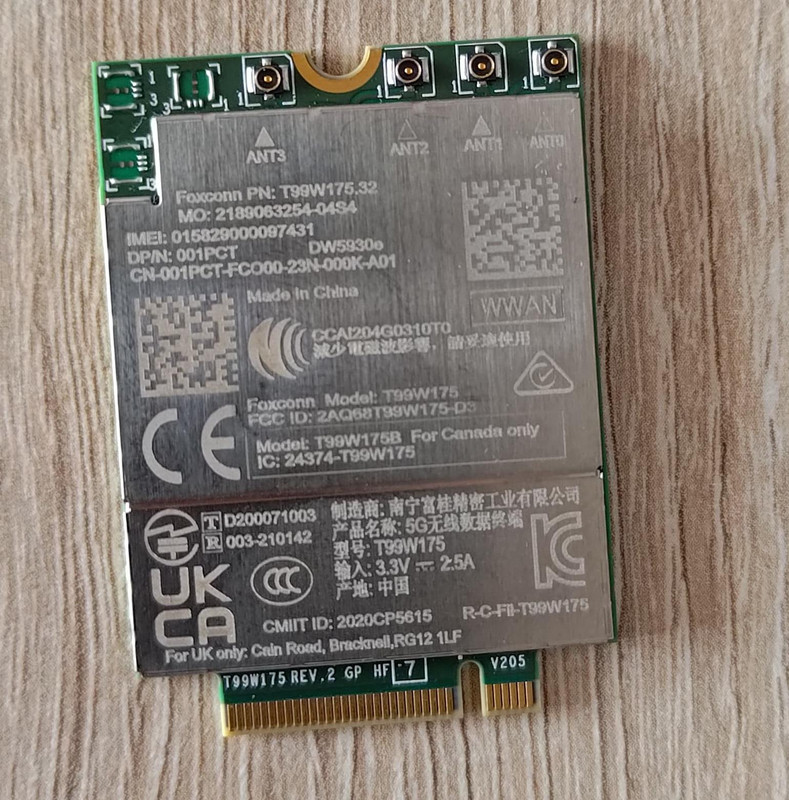
To jest modem Foxconn T99W175 (znany także jako Dell DW5930 / Lenovo SDX55) więc sprawa na inny wątek.
14 2024-08-20 13:55:31
Odp: Fibocom FM350-GL modem 5G/LTE/WCDMA pod OpenWrt (375 odpowiedzi, napisanych Sprzęt / Hardware)
flash608 napisał/a:
Cześć Wam.
Rooter jak czytałem niby obsługuje 5G, ale akurat do MT-3000 widzę, że nie jest dostępny.
Są wersje ROOter PreRelease http://aturnofthenut.com/autobuilds/
widzę GliNet_MT3000-GO2024-08-14-ABSM.zip link http://aturnofthenut.com/autobuilds/Gli … 4-ABSM.zip
Plan B.
Jeżeli nie masz problemu z FCC lock i wykrywaniem kart SIM, ja bym sprawdził modem na Windowsie.
https://github.com/prusa-dev/fibocom-connect-fm350 są drivery i gotowe skrypty
15 2024-08-13 18:05:45
Odp: ZBT Z8102AX-M2-S (Z8102AX V01) - wsparcie OpenWrt (117 odpowiedzi, napisanych Sprzęt / Hardware)
Cezary napisał/a:
Skoro masz urządzenie to może czujesz się na tyle na siłach żeby wydobyć to ze źródeł, przyklepać to jak jak powinno być i wysłać do openwrt?
Nie umiem i nie czuję się na siłach.
Czy źródła Rootera na github, nie nadają się?
Jeszcze widziałem, że OpenMPTCProuter https://www.openmptcprouter.com/ udostępnia:
ZBT z8102ax 128Mo (64-bits)
squashfs image: openmptcprouter-v0.60-6.1-r0+24843-acf40c022e-mediatek-filogic-z8102ax-128m-squashfs-sysupgrade.bin (2024/04/09 - 46.93Mo
16 2024-08-13 14:46:41
Odp: Fibocom FM350-GL modem 5G/LTE/WCDMA pod OpenWrt (375 odpowiedzi, napisanych Sprzęt / Hardware)
Cezary napisał/a:
Na dobrą sprawę to nikt nie wie skąd one są. Niektóre sztuki mają zamazany napis "fibocom" i sprzedawane są jako fm350-gl, co by mogło sugerować że albo to cudownie znikło z fabryki albo to jakiś sztuki które np. nie przeszły testów i miały na złom trafić. A niektórzy nie bawią się w to i jawnie jest to sprzedawane jako fibocom. Ostatecznie nie wiadomo skąd taka cena i dlaczego tyko taka. Ale fakt że są super tanie jak na modem 5G.
Ja mam dwie sztuki z zamazanymi napisami fibocom i bardzo starym firmwarem. Brak zabezpieczenia przed przegrzaniem to znaczący problem, który uniemożliwia sprzedaż jako pełnowartościowy modem.
17 2024-08-13 14:35:46
Odp: ZBT Z8102AX-M2-S (Z8102AX V01) - wsparcie OpenWrt (117 odpowiedzi, napisanych Sprzęt / Hardware)
Cezary napisał/a:
ile masz tam pamięci nand?
128 MB
dmesg
[ 0.468059] spi-nand spi0.0: Winbond SPI NAND was found.
[ 0.473414] spi-nand spi0.0: 128 MiB, block size: 128 KiB, page size: 2048, OOB size: 64
[ 0.509479] Signature found at block 1022 [0x07fc0000]
[ 0.514618] NMBM management region starts at block 960 [0x07800000]
[ 0.522594] First info table with writecount 0 found in block 960
[ 0.533844] Second info table with writecount 0 found in block 963
[ 0.540028] NMBM has been successfully attached
[ 0.544870] 5 fixed-partitions partitions found on MTD device spi0.0
[ 0.551240] Creating 5 MTD partitions on "spi0.0":
[ 0.556020] 0x000000000000-0x000000100000 : "bl2"
[ 0.561816] 0x000000100000-0x000000180000 : "u-boot-env"
[ 0.567877] 0x000000180000-0x000000380000 : "Factory"
[ 0.574611] 0x000000380000-0x000000580000 : "FIP"
[ 0.581051] 0x000000580000-0x0000077a0000 : "ubi"
18 2024-08-10 12:02:41
Odp: ZBT Z8102AX-M2-S (Z8102AX V01) - wsparcie OpenWrt (117 odpowiedzi, napisanych Sprzęt / Hardware)
Cześć,
ROOter do modelu ZBT Z8102AX udostępnia dwie wersje obrazu, dla V1 i V2.
Instrukcja:
Flashing the ZBT Z8102AX
========================
There are two different versions of the Z8102AX that require different firmware.
You can not tell which version you have by looking at the case or the
board inside.
The only way to tell is to check for a bootloader Recovery GUI. To do this :
1. Power down the router and hold in the Reset button.
2. While holding in the button power up the router again.
3. Hold the button in for 10 seconds and then release.
4. Use your browser to go to 192.168.1.1
5. If you see a GUI that is for flashing firmware then you have the V2 model.
If there is no GUI and the router continues to boot up normally
you have the V1 model.
Choose the correct firmware from the ZBT-Z8102AX-V1 folder for the V1 model
and from the ZBT-Z8102AX-V2 folder for the V2 model.
Be sure to only use the correct firmware as flashing the V2 firmware on
the V1 router will brick it and require a Serial cable to recover it.
Because the V2 router has a Recovery GUI it can be used to recover from
an incorrect firmware.
To flash from factory to ROOter go to the System->Backup/Flash
menu and flash from there.
If your router has the Intelligent Router factory firmware then you
have to use the Recovery GUI from above to flash it.
Be sure to deselect Keep Settings and select Force Flash.
========================
Ja mam model Z8012AX wersja -M2-S (info z pudełka).
Na PCB oznaczenie ZBT-Z801AX V01 2023.04.18
Firmware: Intelligent Router.
Zgodnie z powyższą instrukcją, w moim egzemplarzu pojawiło się GUI ZBT U-BOOT V2. Od razu wgrałem obraz -upgrade dla V2 i działa.
ROOter nie udostępnia obrazów squashfs-factory dla tego modelu.
Pytanie do IceG. Czy obrazy z
IceG napisał/a:
są tylko i wyłącznie do V1?
Ciekawostka, zasilacz 12V 2,5A, który waży może ze 100 g.
19 2024-08-10 11:17:18
Odp: Fibocom FM350-GL modem 5G/LTE/WCDMA pod OpenWrt (375 odpowiedzi, napisanych Sprzęt / Hardware)
Na allegro widzę wysyp ofert od chińskich sprzedawców. Nie jestem specjalistą w handlu, ale oferty typu modem 45 zł i koszt dostawy 69 zł to chyba jakiś szwindelek?
20 2024-08-09 17:36:39
Odp: Fibocom FM350-GL modem 5G/LTE/WCDMA pod OpenWrt (375 odpowiedzi, napisanych Sprzęt / Hardware)
Wracając do początku tematu o modemie Fibocom FM350.
Sprawdziłem kilka odmian OpenWrt.
Dla leniwych jest gotowiec, ROOter Project https://www.ofmodemsandmen.com. Są gotowe obrazy, które mają "wszystko". Automatycznie inicjuje modem i pomyślnie łączy się z 5G NSA (testowałem w Polsce w Play i Orange) . Aktualnie mam wersje GoldenOrb_2024-07-31 5.15.139 i zauważyłem, że opcja ręcznego wyboru pasm, wymaga poprawki.
Podłączając modem do PC na Windowsie, można skorzystać z gotowych skryptów: Fibocom FM350 Connect for Windows https://github.com/prusa-dev/fibocom-connect-fm350
Do modemu warto zamontować radiator. Przy testowym pobieraniu pliku 20 GB, po kilku minutach, modem bez radiatora osiągnął 88°C, nie zwalniał i przerwałem test. Z małych pasywnym radiatorem jest OK, max 65°C.
Zainteresowała mnie możliwość update firmware. Jest instrukcja po rosyjsku. Ma dużo specjalistycznych wyrazów i tłumaczenie (Google Translate) z ruskiego jest niezrozumiałe.
Dodatkowo, modem ma w sobie chip eSIM (jeżeli dobrze zrozumiałem tłumaczenie z ruskiego). Widzę początki eSIM w tym modemie https://github.com/prusa-dev/lpac-fibocom-wrapper
21 2024-07-18 21:31:01
Odp: Fibocom FM350-GL modem 5G/LTE/WCDMA pod OpenWrt (375 odpowiedzi, napisanych Sprzęt / Hardware)
bardzo dużo informacji o modemie Fibocom FM350-GL https://4pda.to/forum/index.php?showtopic=1057776
informacje o adapterach do modemów https://4pda.to/forum/index.php?showtopic=994474
Kupiłem modem i adapter na usb https://allegro.pl/oferta/modul-ngff-m- … 3826466270
Chciałbym wykorzystać stary komputer z serwerowym procesorem Intela.
Od czego mam zacząć? Co radzicie zainstalować?
22 2024-07-13 15:20:32
Odp: ZTE MF286D - Openwrt (3,876 odpowiedzi, napisanych Sprzęt / Hardware)
Czy do routera ZTE MF286D można zamontować modem Fibocom FM350-GL i połączyć się z 5G od Play/Orange?
23 2024-07-05 14:54:24
Odp: Fibocom FM350-GL modem 5G/LTE/WCDMA pod OpenWrt (375 odpowiedzi, napisanych Sprzęt / Hardware)
RPi4 ma USB 3.0, dlaczego tylko 480 Mb? CPU nie daje rady więcej?
nie działa przez Ethernet?
s0pio napisał/a:
Posiadam "WAVESHARE, 5G M.2 to Gigabit Ethernet Converter, USB"
połączenie USB do Raspberry Pi4 to tylko 480Mbps
24 2024-07-04 16:53:33
Odp: Fibocom FM350-GL modem 5G/LTE/WCDMA pod OpenWrt (375 odpowiedzi, napisanych Sprzęt / Hardware)
Czy działa to stabilnie na 5G?
Zależy mi, żeby to działało na co dzień (5G od Play). Czy do tego modemu, warto kupić Waweshark 5G M.2 to Gigabit Ethernet Converter, 5G M.2 to USB3.1 200 zł?
25 2023-03-28 16:30:13
Odp: DVB-T RTL2832U na MT7621 (28 odpowiedzi, napisanych Oprogramowanie / Software)
@kmaras77
czy możesz udostępnić plik .config z Twojej kompilacji openwrt i działającym tunerem xbox?
Znalezione posty: 1 do 25 z 41
eko.one.pl → Posty przez JanMaz
Forum oparte o PunBB, wspierane przez Informer Technologies, Inc