Przejdź do treści forum
eko.one.pl
OpenWrt, Linux, USB, notebooki i inne ciekawe rzeczy
Nie jesteś zalogowany. Proszę się zalogować lub zarejestrować.
Aktywne tematy Tematy bez odpowiedzi
Opcje wyszukiwania (Strona 2 z 3)
Przebrnąłem przez konfigurację ale transfery są podobne(przy wyłączonej sambie). Czy przyczyną tego stanu rzeczy może być hub usb podłączony po drodze?(hub do routera a do huba drukarka,czytnik kart i dysk w kieszeni z własnym zasilaniem).Hub na bank jest w std usb 2.0 ale może w linuxie trzeba to jakoś włączyć?
Zrobiłem firstboota i nfs się zapamiętuję- coś miałem pokopane w konfiguracji.
Sęk w tym,że jak dam z poziomu gui zapamiętuje mi tylko ustawienie cifs. nfs niby zapamiętuje(ale tuner nie widzi tego udziału więc coś nie działa) do momentu rebootu.Po rebocie w zakładce nośniki usb znów jest pusto.
nfsd chyba jest włączone: /etc/init.d/nfsd enable
Jak możesz raz jeszcze zerknąc zdalnie byłbym wdzięczny.
Nie do końca-raczej mam kłopot z instalacją. Szczerze mówiąc, jeśli ruszyłby ten nfs to samba do szczęścia mi wcale nie będzie potrzebna(o ile spowoduje to wzrost wydajności).Usiłuję zainstalować nfs wg opisu
http://eko.one.pl/?p=openwrt-nfs
Pojawia mi się błąd:
/$ opkg update
Downloading http://ecco.selfip.net/gargoyle-pl/ar71xx/packages/Packages.gz.
Inflating http://ecco.selfip.net/gargoyle-pl/ar71xx/packages/Packages.gz.
Updated list of available packages in /var/opkg-lists/gargoylepl.
Downloading http://downloads.openwrt.org/backfire/10.03.1-rc4/ar71xx/packages/Packages.gz.
Inflating http://downloads.openwrt.org/backfire/10.03.1-rc4/ar71xx/packages/Packages.gz.
Updated list of available packages in /var/opkg-lists/packages.
/$ opkg install nfs-kernel-server
Package nfs-kernel-server (1.1.6-1) installed in root is up to date.
/$ /etc/init.d/portmap enable
/$ /etc/init.d/portmap start
/$ /etc/init.d/nfsd enable
/$ /etc/init.d/nfsd start
exportfs: could not open /var/lib/nfs/.etab.lock for locking: errno 2 (No such file or directory)
exportfs: can't lock /var/lib/nfs/etab for writing
Niestety odczyt mam na poziomie 4MB/s a zapis 2,5MB/s.Czy powodem tak wolnego działania jest włączona samba na routerze? Tuner ma możliwość nagrywania na udział NFS- ale jak z GUi wybiorę NFS to znów ustawienie jest niezapamiętywane(trzeba coś pod nfs doinstalować?) a tuner nie widzi takiego udziału.
@Cezary
A może Masz wiedzę na temat Enigmy2? W jednym image(niestety nie pod mój router) jest dodany hddidle
################################################## ##
Newnigma2 team proudly presents:
Newnigma2 v2.8.3 beta
################################################## ##
** uses same info as dm600 for some reason :-)

Basics:
•Enigma2 2.6: 10.01.2010
•Enigma2 Plugins 2.6: 10.01.2010
•Newnigma2 Plugins: 10.01.2010

•add hdd-idle: USB Harddisk Spindown example >hd-idle -a sda -i 600< spindown
Dzięki ,wszystko działa jak należy...no prawie. Teraz pojawił się kolejny problem tj. prawdopodobnie zbyt wolna prędkość zapisu. Kiedy dysk miałem podłączony bezpośrednio do tunera, nie pojawiał się problem pikselozy ale za to w żaden sposób nie przechodził w stan uśpienia co mi po prostu przeszkadzało wieczorową porą. W tym momencie (podłaczony do routera)dysk ładnie się usypia i wybudza ale przy nagrywaniu kanałów hd pojawia się co kilka minut lub sekund pikseloza.
Pytanie- czy jest szansa na poprawienie wydajności? Sytuację może poprawić skrętka gigabit?
Niestety na tunerze nie ma możliwości instalacji hddidle,sdparm-jest hdparm ale on nie działa z dyskami usb
Nie pomogło.Za każdym razem muszę w gui zmieniać.
/root$ /etc/init.d/samba
Syntax: /etc/init.d/samba [command]

Available commands:
    start    Start the service
    stop    Stop the service
    restart    Restart the service
    reload    Reload configuration files (or restart if that fails)
    enable    Enable service autostart
    disable    Disable service autostart
samba.@samba[0].name=openwrt
samba.@samba[0].description=openwrt
samba.@samba[0].homes=0
samba.@samba[0].workgroup=SIEC
samba.0_sda1=sambashare
samba.0_sda1.name=sda1
samba.0_sda1.path=/tmp/usb_mount/98d307ef-3047-4205-ac57-f46963da810c
samba.0_sda1.read_only=no
samba.0_sda1.create_mask=0777
samba.0_sda1.dir_mask=0777
samba.0_sda1.browseable=yes
samba.0_sda1.guest_ok=yes
/root$ uci show nfsd
uci: Entry not found
/root$ ps
  PID USER       VSZ STAT COMMAND
    1 root      1364 S    init
    2 root         0 SW   [kthreadd]
    3 root         0 SW   [ksoftirqd/0]
    4 root         0 SW   [events/0]
    5 root         0 SW   [khelper]
    8 root         0 SW   [async/mgr]
   41 root         0 SW   [sync_supers]
   43 root         0 SW   [bdi-default]
   45 root         0 SW   [kblockd/0]
   70 root         0 SW   [kswapd0]
   71 root         0 SW   [aio/0]
   72 root         0 SW   [crypto/0]
   84 root         0 SW   [mtdblockd]
   90 root         0 SW   [ar71xx-spi]
  223 root         0 SW   [ipolldevd]
  276 root         0 SWN  [jffs2_gcd_mtd3]
  292 root      1364 S    init
  306 root      1368 S    syslogd -C16
  308 root      1352 S    klogd
  322 root       796 S    /sbin/hotplug2 --override --persistent --set-worker /
  492 root         0 SW   [cfg80211]
  509 root      1620 S    /usr/sbin/pppd plugin rp-pppoe.so mtu 1492 mru 1492 n
  539 root         0 SW   [khubd]
  647 root         0 SW   [phy0]
  667 root         0 SW   [rpciod/0]
  690 root         0 SW   [nfsiod]
  990 root         0 SW   [scsi_eh_0]
  991 root         0 SW   [usb-storage]
  993 root         0 SW   [scsi_eh_1]
  994 root         0 SW   [usb-storage]
 1015 nobody     924 S    /usr/sbin/portmap
 1193 root      1428 S    hostapd -P /var/run/wifi-phy0.pid -B /var/run/hostapd
 1546 root      1140 S    /usr/sbin/dropbear -p 22 -P /var/run/dropbear.1.pid
 1566 root       744 S    /usr/bin/hd-idle -i 300 -t sda
 1569 root       748 S    /usr/sbin/p9100d -f /dev/lp0 0
 1612 root      1336 S    httpd_gargoyle -c cgi-bin/**|**.sh|**.cgi|**.csv -d /
 1645 root         0 SW   [jbd2/sda1-8]
 1646 root         0 SW   [ext4-dio-unwrit]
 1675 nobody     908 S    /usr/sbin/dnsmasq -K -D -y -Z -b -E -s lan -S /lan/ -
 1698 root      2248 S N  oscam -b
 1699 root      2248 S N  oscam -b
 1700 root      2248 S N  oscam -b
 1701 root      2248 S N  oscam -b
 1710 root      1368 S    /usr/bin/ddns_gargoyle -P /etc/ddns_providers.conf -C
 1726 root      1360 S    watchdog -t 5 /dev/watchdog
 1877 root      2248 S N  oscam -b
 1880 root       760 S    /usr/sbin/ntpclient -i 43200 -s -l -D -p 123 -h 0.pl.
 2549 root      1372 S    crond -c /etc/crontabs -l 5
 2590 root      1196 S    /usr/sbin/dropbear -p 22 -P /var/run/dropbear.1.pid
 2591 root      1360 S    -ash
 2600 root      1356 R    ps
/root$ logread
Jan  1 01:00:20 Gargoyle user.info kernel: ip_tables: (C) 2000-2006 Netfilter Core Team
Jan  1 01:00:20 Gargoyle user.info kernel: ehci_hcd: USB 2.0 'Enhanced' Host Controller (EHCI) Driver
Jan  1 01:00:20 Gargoyle user.info kernel: ar71xx-ehci ar71xx-ehci: Atheros AR91xx built-in EHCI controller
Jan  1 01:00:20 Gargoyle user.info kernel: ar71xx-ehci ar71xx-ehci: new USB bus registered, assigned bus number 1
Jan  1 01:00:20 Gargoyle user.info kernel: ar71xx-ehci ar71xx-ehci: irq 3, io mem 0x1b000000
Jan  1 01:00:20 Gargoyle user.info kernel: ar71xx-ehci ar71xx-ehci: USB 2.0 started, EHCI 1.00
Jan  1 01:00:20 Gargoyle user.info kernel: usb usb1: configuration #1 chosen from 1 choice
Jan  1 01:00:20 Gargoyle user.info kernel: hub 1-0:1.0: USB hub found
Jan  1 01:00:20 Gargoyle user.info kernel: hub 1-0:1.0: 1 port detected
Jan  1 01:00:20 Gargoyle user.warn kernel: nf_conntrack version 0.5.0 (460 buckets, 1840 max)
Jan  1 01:00:20 Gargoyle user.warn kernel: CONFIG_NF_CT_ACCT is deprecated and will be removed soon. Please use
Jan  1 01:00:20 Gargoyle user.warn kernel: nf_conntrack.acct=1 kernel parameter, acct=1 nf_conntrack module option or
Jan  1 01:00:20 Gargoyle user.warn kernel: sysctl net.netfilter.nf_conntrack_acct=1 to enable it.
Jan  1 01:00:21 Gargoyle user.info kernel: usb 1-1: new high speed USB device using ar71xx-ehci and address 2
Jan  1 01:00:21 Gargoyle user.info kernel: usb 1-1: configuration #1 chosen from 1 choice
Jan  1 01:00:21 Gargoyle user.info kernel: hub 1-1:1.0: USB hub found
Jan  1 01:00:21 Gargoyle user.info kernel: hub 1-1:1.0: 4 ports detected
Jan  1 01:00:21 Gargoyle user.notice usb-modeswitch: 1-0:1.0: Manufacturer=Linux_2.6.32.27_ehci_hcd Product=Atheros_AR91xx_built-in_EHCI_controller Serial=ar71xx-ehci
Jan  1 01:00:21 Gargoyle user.info kernel: usb 1-1.1: new full speed USB device using ar71xx-ehci and address 3
Jan  1 01:00:21 Gargoyle user.info kernel: usb 1-1.1: configuration #1 chosen from 1 choice
Jan  1 01:00:21 Gargoyle user.info kernel: usb 1-1.2: new high speed USB device using ar71xx-ehci and address 4
Jan  1 01:00:21 Gargoyle user.info kernel: usb 1-1.2: configuration #1 chosen from 1 choice
Jan  1 01:00:22 Gargoyle user.info kernel: usb 1-1.3: new full speed USB device using ar71xx-ehci and address 5
Jan  1 01:00:22 Gargoyle user.info kernel: usb 1-1.3: configuration #1 chosen from 1 choice
Jan  1 01:00:22 Gargoyle user.notice usb-modeswitch: 1-1:1.0: Manufacturer=? Product=USB2.0_Hub Serial=?
Jan  1 01:00:22 Gargoyle user.info kernel: xt_time: kernel timezone is -0000
Jan  1 01:00:22 Gargoyle user.notice usb-modeswitch: 1-1.1:1.0: Manufacturer=? Product=? Serial=BROF8F967789
Jan  1 01:00:22 Gargoyle user.notice usb-modeswitch: 1-1.1:1.1: Manufacturer=? Product=? Serial=BROF8F967789
Jan  1 01:00:23 Gargoyle user.info kernel:     Hooked IMQ after mangle on PREROUTING
Jan  1 01:00:23 Gargoyle user.info kernel:     Hooked IMQ after nat on POSTROUTING
Jan  1 01:00:23 Gargoyle user.info kernel: IMQ driver loaded successfully.
Jan  1 01:00:23 Gargoyle user.notice usb-modeswitch: 1-1.1:1.2: Manufacturer=? Product=? Serial=BROF8F967789
Jan  1 01:00:23 Gargoyle user.info kernel: Ebtables v2.0 registered
Jan  1 01:00:23 Gargoyle user.notice usb-modeswitch: 1-1.2:1.0: Manufacturer=JMicron Product=USB_to_ATA/ATAPI_bridge Serial=000000000000
Jan  1 01:00:23 Gargoyle user.notice usb-modeswitch: 1-1.3:1.0: Manufacturer=FTDI Product=FT232R_USB_UART Serial=A800bYN5
Jan  1 01:00:24 Gargoyle user.info kernel: usblp0: USB Bidirectional printer dev 3 if 0 alt 0 proto 2 vid 0x04F9 pid 0x01CE
Jan  1 01:00:24 Gargoyle user.info kernel: usbcore: registered new interface driver usblp
Jan  1 01:00:24 Gargoyle user.info kernel: usbcore: registered new interface driver usbserial
Jan  1 01:00:24 Gargoyle user.info kernel: USB Serial support registered for generic
Jan  1 01:00:24 Gargoyle user.info kernel: usbcore: registered new interface driver usbserial_generic
Jan  1 01:00:24 Gargoyle user.info kernel: usbserial: USB Serial Driver core
Jan  1 01:00:24 Gargoyle user.info kernel: Initializing USB Mass Storage driver...
Jan  1 01:00:24 Gargoyle user.info kernel: scsi0 : SCSI emulation for USB Mass Storage devices
Jan  1 01:00:24 Gargoyle user.debug kernel: usb-storage: device found at 3
Jan  1 01:00:24 Gargoyle user.debug kernel: usb-storage: waiting for device to settle before scanning
Jan  1 01:00:24 Gargoyle user.info kernel: scsi1 : SCSI emulation for USB Mass Storage devices
Jan  1 01:00:24 Gargoyle user.info kernel: usbcore: registered new interface driver usb-storage
Jan  1 01:00:24 Gargoyle user.info kernel: USB Mass Storage support registered.
Jan  1 01:00:24 Gargoyle user.debug kernel: usb-storage: device found at 4
Jan  1 01:00:24 Gargoyle user.debug kernel: usb-storage: waiting for device to settle before scanning
Jan  1 01:00:24 Gargoyle user.info kernel: usbcore: registered new interface driver ums-alauda
Jan  1 01:00:24 Gargoyle user.info kernel: usbcore: registered new interface driver ums-cypress
Jan  1 01:00:24 Gargoyle user.info kernel: usbcore: registered new interface driver ums-datafab
Jan  1 01:00:24 Gargoyle user.info kernel: usbcore: registered new interface driver ums-freecom
Jan  1 01:00:25 Gargoyle user.info kernel: usbcore: registered new interface driver ums-isd200
Jan  1 01:00:25 Gargoyle user.info kernel: usbcore: registered new interface driver ums-jumpshot
Jan  1 01:00:25 Gargoyle user.info kernel: usbcore: registered new interface driver ums-karma
Jan  1 01:00:25 Gargoyle user.info kernel: usbcore: registered new interface driver ums-sddr09
Jan  1 01:00:25 Gargoyle user.info kernel: usbcore: registered new interface driver ums-sddr55
Jan  1 01:00:25 Gargoyle user.info kernel: usbcore: registered new interface driver ums-usbat
Jan  1 01:00:25 Gargoyle user.info kernel: USB Serial support registered for FTDI USB Serial Device
Jan  1 01:00:25 Gargoyle user.info kernel: ftdi_sio 1-1.3:1.0: FTDI USB Serial Device converter detected
Jan  1 01:00:25 Gargoyle user.info kernel: usb 1-1.3: Detected FT232RL
Jan  1 01:00:25 Gargoyle user.info kernel: usb 1-1.3: Number of endpoints 2
Jan  1 01:00:25 Gargoyle user.info kernel: usb 1-1.3: Endpoint 1 MaxPacketSize 16384
Jan  1 01:00:25 Gargoyle user.info kernel: usb 1-1.3: Endpoint 2 MaxPacketSize 16384
Jan  1 01:00:25 Gargoyle user.info kernel: usb 1-1.3: Setting MaxPacketSize 64
Jan  1 01:00:25 Gargoyle user.info kernel: usb 1-1.3: FTDI USB Serial Device converter now attached to ttyUSB0
Jan  1 01:00:25 Gargoyle user.info kernel: usbcore: registered new interface driver ftdi_sio
Jan  1 01:00:25 Gargoyle user.info kernel: ftdi_sio: v1.5.0:USB FTDI Serial Converters Driver
Jan  1 01:00:25 Gargoyle user.info kernel: USB Serial support registered for GSM modem (1-port)
Jan  1 01:00:25 Gargoyle user.info kernel: usbcore: registered new interface driver option
Jan  1 01:00:25 Gargoyle user.info kernel: option: v0.7.2:USB Driver for GSM modems
Jan  1 01:00:25 Gargoyle user.info kernel: USB Serial support registered for Sierra USB modem
Jan  1 01:00:25 Gargoyle user.info kernel: usbcore: registered new interface driver sierra
Jan  1 01:00:25 Gargoyle user.info kernel: sierra: v.1.3.8:USB Driver for Sierra Wireless USB modems
Jan  1 01:00:25 Gargoyle user.info kernel: fuse init (API version 7.13)
Jan  1 01:00:28 Gargoyle daemon.warn pppd[509]: Timeout waiting for PADO packets
Jan  1 01:00:28 Gargoyle daemon.err pppd[509]: Unable to complete PPPoE Discovery
Jan  1 01:00:28 Gargoyle user.info kernel: device wlan0 entered promiscuous mode
Jan  1 01:00:28 Gargoyle user.info kernel: br-lan: port 2(wlan0) entering forwarding state
Jan  1 01:00:29 Gargoyle user.notice kernel: scsi 1:0:0:0: Direct-Access     ST316081 5AS                   PQ: 0 ANSI: 2 CCS
Jan  1 01:00:29 Gargoyle user.debug kernel: usb-storage: device scan complete
Jan  1 01:00:29 Gargoyle user.notice kernel: scsi 0:0:0:0: Direct-Access     Brother  DCP-135C         1.00 PQ: 0 ANSI: 2
Jan  1 01:00:29 Gargoyle user.notice kernel: sd 1:0:0:0: [sda] 312579695 512-byte logical blocks: (160 GB/149 GiB)
Jan  1 01:00:29 Gargoyle user.notice kernel: sd 1:0:0:0: [sda] Write Protect is off
Jan  1 01:00:29 Gargoyle user.debug kernel: sd 1:0:0:0: [sda] Mode Sense: 28 00 00 00
Jan  1 01:00:29 Gargoyle user.err kernel: sd 1:0:0:0: [sda] Assuming drive cache: write through
Jan  1 01:00:29 Gargoyle user.err kernel: sd 1:0:0:0: [sda] Assuming drive cache: write through
Jan  1 01:00:29 Gargoyle user.info kernel:  sda: sda1
Jan  1 01:00:29 Gargoyle user.err kernel: sd 1:0:0:0: [sda] Assuming drive cache: write through
Jan  1 01:00:29 Gargoyle user.notice kernel: sd 1:0:0:0: [sda] Attached SCSI disk
Jan  1 01:00:29 Gargoyle user.notice kernel: sd 0:0:0:0: [sdb] Attached SCSI removable disk
Jan  1 01:00:29 Gargoyle user.debug kernel: usb-storage: device scan complete
Jan  1 01:00:30 Gargoyle user.info kernel: device wlan0 left promiscuous mode
Jan  1 01:00:30 Gargoyle user.info kernel: br-lan: port 2(wlan0) entering disabled state
Jan  1 01:00:30 Gargoyle user.info kernel: device wlan0 entered promiscuous mode
Jan  1 01:00:30 Gargoyle user.info kernel: br-lan: port 2(wlan0) entering forwarding state
Dec 29 14:55:36 Gargoyle user.info sysinit: Error 1 looking up hostname 0.pl.pool.ntp.org
Dec 29 14:55:36 Gargoyle user.info sysinit: Error 1 looking up hostname 1.pl.pool.ntp.org
Dec 29 14:55:36 Gargoyle user.info sysinit: Error 1 looking up hostname 2.pl.pool.ntp.org
Dec 29 14:55:36 Gargoyle user.info sysinit: Loading defaults
Dec 29 14:55:37 Gargoyle user.info sysinit: Loading synflood protection
Dec 29 14:55:37 Gargoyle user.info sysinit: Adding custom chains
Dec 29 14:55:38 Gargoyle user.info sysinit: Loading zones
Dec 29 14:55:38 Gargoyle user.info sysinit: Loading forwarding
Dec 29 14:55:38 Gargoyle user.info sysinit: Loading redirects
Dec 29 14:55:39 Gargoyle user.info sysinit: Loading rules
Dec 29 14:55:39 Gargoyle user.info sysinit: Loading includes
Dec 29 14:55:40 Gargoyle user.info sysinit: iptables -t filter -A input_wan -p tcp --dport 443 -m connmark --mark 0x0080/0x0080 -j ACCEPT
Dec 29 14:55:40 Gargoyle user.info sysinit: iptables -t filter -A input_wan -p tcp --dport 80 -m connmark --mark 0x0080/0x0080 -j ACCEPT
Dec 29 14:55:40 Gargoyle user.info sysinit: l7 used = ""
Dec 29 14:55:41 Gargoyle user.info sysinit: udhcpc (v1.15.3) started
Dec 29 14:55:41 Gargoyle user.info sysinit: Sending discover...
Dec 29 14:55:41 Gargoyle user.info sysinit: Sending select for 192.168.2.64...
Dec 29 14:55:41 Gargoyle user.info sysinit: Lease of 192.168.2.64 obtained, lease time 86400
Dec 29 14:55:41 Gargoyle user.info sysinit: Loading zone defaults
Dec 29 14:55:42 Gargoyle user.notice root: adding lan (br-lan) to firewall zone lan
Dec 29 14:55:42 Gargoyle cron.err crond[1537]: crond (busybox 1.15.3) started, log level 5
Dec 29 14:55:44 Gargoyle authpriv.info dropbear[1546]: Running in background
Dec 29 14:55:44 Gargoyle lpr.err p9100d[1569]: socket: Address family not supported by protocol
Dec 29 14:55:44 Gargoyle user.warn kernel: EXT4-fs (sda1): warning: maximal mount count reached, running e2fsck is recommended
Dec 29 14:55:44 Gargoyle user.info kernel: EXT4-fs (sda1): mounted filesystem with ordered data mode
Dec 29 14:55:45 Gargoyle daemon.crit httpd_gargoyle[1608]: socket :: - Address family not supported by protocol
Dec 29 14:55:45 Gargoyle daemon.err httpd_gargoyle[1608]: unknown sockaddr family on listen socket - 0
Dec 29 14:55:45 Gargoyle daemon.warn httpd_gargoyle[1612]: started as root without requesting chroot(), warning only
Dec 29 14:55:45 Gargoyle daemon.notice httpd_gargoyle[1612]: httpd_gargoyle/1.0 14mar2008 starting on Gargoyle, port 80
Dec 29 14:55:46 Gargoyle user.warn kernel: EXT4-fs (sda1): warning: maximal mount count reached, running e2fsck is recommended
Dec 29 14:55:46 Gargoyle user.info kernel: EXT4-fs (sda1): mounted filesystem with ordered data mode
Dec 29 14:55:47 Gargoyle user.notice dnsmasq: DNS rebinding protection is active, will discard upstream RFC1918 responses!
Dec 29 14:55:47 Gargoyle user.notice dnsmasq: Allowing 127.0.0.0/8 responses
Dec 29 14:55:50 Gargoyle daemon.info dnsmasq[1675]: started, version 2.55 cachesize 150
Dec 29 14:55:50 Gargoyle daemon.info dnsmasq[1675]: compile time options: IPv6 GNU-getopt no-DBus no-I18N DHCP TFTP
Dec 29 14:55:50 Gargoyle daemon.info dnsmasq-dhcp[1675]: DHCP, IP range 192.168.1.100 -- 192.168.1.250, lease time 12h
Dec 29 14:55:50 Gargoyle daemon.info dnsmasq[1675]: using local addresses only for domain lan
Dec 29 14:55:50 Gargoyle daemon.info dnsmasq[1675]: reading /tmp/resolv.conf.auto
Dec 29 14:55:50 Gargoyle daemon.warn dnsmasq[1675]: ignoring nameserver 192.168.1.1 - local interface
Dec 29 14:55:50 Gargoyle daemon.info dnsmasq[1675]: using local addresses only for domain lan
Dec 29 14:55:50 Gargoyle daemon.info dnsmasq[1675]: read /etc/hosts - 2 addresses
Dec 29 14:55:50 Gargoyle daemon.info dnsmasq-dhcp[1675]: read /etc/ethers - 0 addresses
Dec 29 14:55:51 Gargoyle daemon.warn exportfs[1691]: could not open /var/lib/nfs/.etab.lock for locking: errno 2 (No such file or directory)
Dec 29 14:55:51 Gargoyle user.info sysinit: exportfs: could not open /var/lib/nfs/.etab.lock for locking: errno 2 (No such file or directory)
Dec 29 14:55:51 Gargoyle daemon.err exportfs[1691]: can't lock /var/lib/nfs/etab for writing
Dec 29 14:55:51 Gargoyle user.info sysinit: exportfs: can't lock /var/lib/nfs/etab for writing
Dec 29 14:55:52 Gargoyle user.info sysinit: setting up led WLAN
Dec 29 14:55:52 Gargoyle user.debug kernel: ar71xx-wdt: enabling watchdog timer
Dec 29 14:56:03 Gargoyle daemon.info pppd[509]: PPP session is 1565
Dec 29 14:56:03 Gargoyle daemon.info pppd[509]: Using interface pppoe-wan
Dec 29 14:56:03 Gargoyle daemon.notice pppd[509]: Connect: pppoe-wan <--> eth0.2
Dec 29 14:56:03 Gargoyle daemon.info pppd[509]: CHAP authentication succeeded
Dec 29 14:56:03 Gargoyle daemon.notice pppd[509]: CHAP authentication succeeded
Dec 29 14:56:03 Gargoyle daemon.notice pppd[509]: peer from calling number 00:90:1A:A0:AA:3E authorized
Dec 29 14:56:03 Gargoyle daemon.notice pppd[509]: local  IP address 79.185.17.128
Dec 29 14:56:03 Gargoyle daemon.notice pppd[509]: remote IP address 213.25.2.173
Dec 29 14:56:03 Gargoyle daemon.notice pppd[509]: primary   DNS address 194.204.152.34
Dec 29 14:56:03 Gargoyle daemon.notice pppd[509]: secondary DNS address 194.204.159.1
Dec 29 14:56:04 Gargoyle user.notice root: adding wan (pppoe-wan) to firewall zone wan
Dec 29 14:56:05 Gargoyle daemon.info dnsmasq[1675]: reading /tmp/resolv.conf.auto
Dec 29 14:56:05 Gargoyle daemon.info dnsmasq[1675]: using nameserver 194.204.159.1#53
Dec 29 14:56:05 Gargoyle daemon.info dnsmasq[1675]: using nameserver 194.204.152.34#53
Dec 29 14:56:05 Gargoyle daemon.warn dnsmasq[1675]: ignoring nameserver 192.168.1.1 - local interface
Dec 29 14:56:05 Gargoyle daemon.info dnsmasq[1675]: using local addresses only for domain lan
Dec 29 14:56:15 Gargoyle user.notice root: starting ntpclient
Dec 29 14:57:01 Gargoyle daemon.info hostapd: wlan0: STA 00:25:d3:9e:68:ca IEEE 802.11: authenticated
Dec 29 14:57:01 Gargoyle daemon.info hostapd: wlan0: STA 00:25:d3:9e:68:ca IEEE 802.11: associated (aid 1)
Dec 29 14:57:01 Gargoyle daemon.info hostapd: wlan0: STA 00:25:d3:9e:68:ca WPA: pairwise key handshake completed (RSN)
Dec 29 14:57:03 Gargoyle cron.err crond[1999]: crond (busybox 1.15.3) started, log level 5
Dec 29 14:57:06 Gargoyle cron.err crond[2549]: crond (busybox 1.15.3) started, log level 5
Dec 29 14:57:19 Gargoyle user.notice rdate: Failed to sync with vega.cbk.poznan.pl
Dec 29 14:57:20 Gargoyle user.notice rdate: Synced with ntp.itl.waw.pl
Dec 29 15:00:01 Gargoyle cron.err crond[2549]: USER root pid 2584 cmd /usr/bin/set_kernel_timezone >/dev/null 2>&1
Dec 29 15:01:01 Gargoyle cron.err crond[2549]: USER root pid 2586 cmd /usr/bin/set_kernel_timezone >/dev/null 2>&1
Dec 29 15:02:13 Gargoyle authpriv.info dropbear[2590]: Child connection from 192.168.1.163:51380
Dec 29 15:02:16 Gargoyle authpriv.notice dropbear[2590]: password auth succeeded for 'root' from 192.168.1.163:51380
/root$ uci show nfsd
uci: Entry not found
a przecież instalowałem...
Tak, niestety nie zapamiętuje...Dałem też polecenie i to samo.Jak daję w gui zapisz zmiany to automatycznie windows i tuner widzi mój udział w otoczeniu sieciowym- w innym razie nie.
No dobra, zaktualizowałem, pojawiła się opcja z udziałami usb. Jest jeden problem- za każdym razem muszę w gui dawać zapisz zmiany(w zakładce usb),żeby po rebocie udział był dostępny w sieci. Napisz proszę ,który plik konfiguracyjny odpowiada za to ustawienie(nfsd nie mam w konfigach).
Dziękuję za odpowiedź. Czyli sysupgrade wykonuję poleceniem sysupgrade -n /tmp/code.bin ale pytanie jest czy też mogę to załadować z gui gargoyle..bo nie do końca zrozumiałem.
Ale ja w ogóle nie mam wpisu USB Storage w gui - obrazek dałem poglądowo,że tego nie mam:) Muszę zaktualizować fw do wersji 1.3.8? Nic się nie stanie jak wrzucę openwrt-ar71xx-tl-wr1043nd-v1-squashfs-factory.bin przez gui gargoyle? Czy jestem skazany na sys upgrade? Wiem,że są opisy ale nie sztuka zepsuć...
pzdr
Z tego też opisu staram się korzystać. Przyznaję się bez bicia ,że nie widzę w gui gargoyle(Wersja Gargoyle:1.3.7 (by obsy) ) nic dotyczącego nfs. Natomiast w /etc/config/ nie mam pliku nfsd stąd moje pytanie.
Po instalacji nfsd pojawił się plik konfiguracyjne exports - nic innego nie mam- gdzie leży błąd?
Dzięki i pozdrawiam.
=====
edit:
U mnie nie ma takowej opcji w gui:
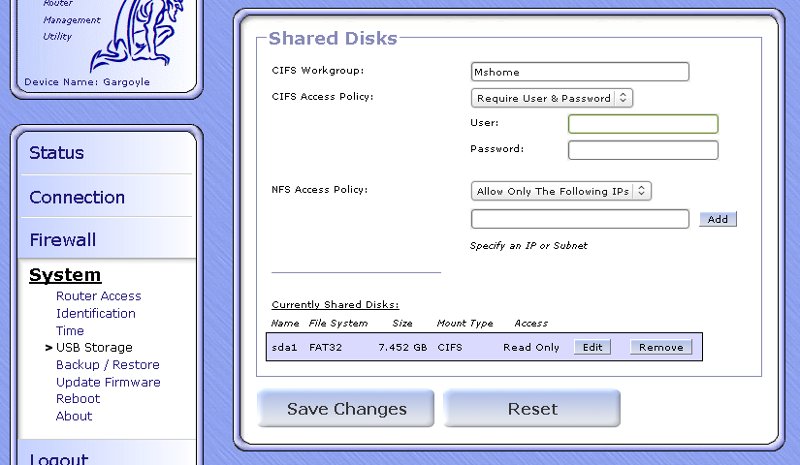
Podbijam temat bo problem nie do końca został rozwiązany- tzn udostępnienie przez sambę działa ale po kilku godzinach pracy oscam postawiony na routerze zalicza błędy. Pomyślałem,że nie potrzebna mi samba w tplinku bo vu podmontowany udział i tak udostępni w sambie. Zainstalowałem nfs-kernel-server, poczytałem pokrewny topik:
http://eko.one.pl/forum/viewtopic.php?id=1143
Ale nie widzę nic odpowiedzialnego w gui za nfs a pliku /etc/config/nfsd nie mam wcale. Mój dysk jest widziany jako:
/dev/sdb1 149.0G 17.8G 131.2G 12% /mnt/sdb1
Plik konfiguracyjny exports:
/mnt/sdb1 (rw,sync,no_subtree_check)
Teraz chodzi o to,żeby vu(pochodna dreamboxa) był w stanie podmontować taki udział bez włączonej samby na routerze.
Proszę o podpowiedzi.
Super- o to mi chodziło,mam jeszcze pytanie dodatkowe- jak sobie poradzić z przypadłością tego typu,że po reboocie routera raz jest podmontowany dysk jako sda1 a innym razem sdb1?
Dzięki ale chciałbym zapytać w jaki sposób? mam nfs-kernel-server i pomimo wpisów w pliku konfiguracyjnym widzi mi tylko udział CIFS- dyski(w menedżerze sieci tunera)-po drodze miałem tryb failsafe... Jak najprościej udostępnić /mnt/sda1?(teraz tak jest widziany dysk) -za pomocą samby? http://eko.one.pl/?p=openwrt-samba
pzdr.
Witam. Posiadam tuner na linuksie vu+solo, jako,że linuks,który tam siedzi za pierona nie chce uśpić mi dysku w kieszeni usb, postanowiłem podłączyć pod tplinka. Dysk już wcześniej był sformatowany pod tunerem w systemie plików ext3. Podłączyłem dysk pod router, automatycznie mi go wykrył jako sdb1, potem doczytałem jak go uśpić(hdidle)-wszystko działa jak należy. Pojawił się tylko jeden problem: w momencie montowania udziału(opcja hdd replacement) vu+solo tworzy folder "movie" w głównym katalogu z udziałami tplinka a powinien zapisywać w sdb1/movie:

co za tym idzie nagrywanie odbywa się do flasha routera[sic!].Za pierona nie mogę sobie z tym poradzić. Oczywiście podogrywałem odpowiednie pakiety do obsługi nfs dla routera-widać z poziomu tunka zasób sdb1. Istnieje możliwość,żebym odmontował udział dyski a podmontowany zostawił tylko sdb1?Może wtedy tuner będzie "zmuszony"utworzyć katalog movie w udziale sdb1. Nie bardzo mam koncepcję...
Proszę o pomoc
pzdr
@tomi513:
W zasadzie kol. pepino napisał wszystko, choć akurat sam mam opticum 9500hd z dualbootem a a nim uruchamiana z pena enigma i zaręczam,że nie ma problemu z szarikiem ale wiadomo nie jest to dreambox-nie działają czytniki,nagrywanie kuleje,kanały stosunkowo wolno się przełączają. Co do czytnika na usb to mogę poradzić sprawdzony na ftdi:
http://allegro.pl/show_item.php?item=1289579326 Co do softu to SifTeam też sobie chwalę.
Dziękuję - śmiga wszystko. Na marginesie aż dziw bierze,że tu tak przyjaźni ludzie urzędują 
Dziękuję za szybką jak zwykle odpowiedź. Czyli mam wpisać:
uci add firewall rule
uci set firewall.@rule[-1]._name=ssh
uci set firewall.@rule[-1].src=wan
uci set firewall.@rule[-1].target=ACCEPT
uci set firewall.@rule[-1].proto=tcp
uci set firewall.@rule[-1].dest_port=10101
uci commit firewall
Rozumiem,że zmiany zostaną zachowane i nie będę musiał po rebocie klepać? Druga sprawa- przekierowanie z gui mam usunąć?
@tomi513:
Mam dwa tunery- relook 200s z softem SifTeam i opticum 9500hd z enigmą2. Wczoraj uruchomiłem oscam na tplinku i działa to nadspodziewanie stabilnie.
Witam ponownie. Udało mi się uruchomić serwer kart oscam-działa zarówna z kartą c+ jak i tnk. Wszystko byłoby pięknie ale niestety całość działa tylko w lanie:/ Oscam działa na porcie 8989, porty nasłuchu kart to odpowiednio 10100 i 10101- przekierowałem je tak:
osctnk Both 10101 192.168.1.1 10101
oscamcp Both 10100 192.168.1.1 10100
Korzystam z dyndns i no.ip(dopisane w sekcji dynds routera,aktualizują się)- w sekcji konfiguracji globalnej oscama zaznaczyłem dyndns klient.
Proszę o pomoc. Nie mam pojęcia gdzie leży problem.
Dzięki-już drukuje. Trzeba było użyć polecenia
uci set p910nd.@p910nd[0].device=/dev/lp0 a dodatkowo dla pewności przeinstalowałem drukarkę pod win7.
Możesz jeszcze napisać czy istnieje możliwość,żeby serwer wydruku startował mi automatycznie bez klepania poleceń po rebocie routera? Proszę o wyrozumiałość:)
Mam problem z uruchomieniem printserwera - zastosowałem się do opisu http://eko.one.pl/?p=openwrt-printserwer
Drukarkę miałem wcześniej podłączoną do asusa wl-600g, działała przez printserver. Jeśli chodzi o parametry od strony klienta to są identyczne jak w opisie, rozumiem,że nie muszę raz jeszcze instalować? Wpisałem polecenie dmesg i otrzymałem min:
usb-storage: device found at 4
usb-storage: waiting for device to settle before scanning
scsi 1:0:0:0: Direct-Access Brother DCP-135C 1.00 PQ: 0 ANSI: 2
usb-storage: device scan complete
Czyli drukarka jest widziana przez router? Wracając do opisu:
# uci set p910nd.@p910nd[0].device=/dev/usb/lp0
# uci set p910nd.@p910nd[0].port=0
# uci set p910nd.@p910nd[0].enabled=1
# uci commit p910nd
# /etc/init.d/p910nd restart
w miejscu port=0 nie powinno być 9100? Druga sprawa Dla kernela 2.6 trzeba zmienić device na inny...Jak sprawdzić wersję kernela? Wiem,że printserwer nie zadziała z każdą drukarką ale podejrzewam,że błąd leży po mojej stronie:) Proszę o podpowiedzi.
Z góry dziękuję
Znalezione posty: 26 do 50 z 61
