Przejdź do treści forum
eko.one.pl
OpenWrt, Linux, USB, notebooki i inne ciekawe rzeczy
Nie jesteś zalogowany. Proszę się zalogować lub zarejestrować.
Aktywne tematy Tematy bez odpowiedzi
Opcje wyszukiwania (Strona 11 z 20)
wo!:D
[root@OpenWrt /root]# gnokii --identify
GNOKII Version 0.6.21
IMEI         : ****
Manufacturer : huawei
Model        : E169
Product name : E169
Revision     : 11.314.13.01.00
Cezary możesz się podzielić, gdzie to dokładnie napisane że port USB0 ? zmienie przypadkiem gniazdo usb czy coś i nie będe wiedział oco chodzi 
Z zapytania cat /proc/bus/usb/devices to wiem, ale gdzie to ?
[root@OpenWrt /root]# cat /proc/bus/usb/devices

T:  Bus=02 Lev=00 Prnt=00 Port=00 Cnt=00 Dev#=  1 Spd=12   MxCh= 2
B:  Alloc=  0/900 us ( 0%), #Int=  0, #Iso=  0
D:  Ver= 1.10 Cls=09(hub  ) Sub=00 Prot=00 MxPS=64 #Cfgs=  1
P:  Vendor=1d6b ProdID=0001 Rev= 3.03
S:  Manufacturer=Linux 3.3.8 uhci_hcd
S:  Product=UHCI Host Controller
S:  SerialNumber=0000:00:10.0
C:* #Ifs= 1 Cfg#= 1 Atr=e0 MxPwr=  0mA
I:* If#= 0 Alt= 0 #EPs= 1 Cls=09(hub  ) Sub=00 Prot=00 Driver=hub
E:  Ad=81(I) Atr=03(Int.) MxPS=   2 Ivl=255ms

T:  Bus=01 Lev=00 Prnt=00 Port=00 Cnt=00 Dev#=  1 Spd=480  MxCh= 2
B:  Alloc=  0/800 us ( 0%), #Int=  2, #Iso=  0
D:  Ver= 2.00 Cls=09(hub  ) Sub=00 Prot=00 MxPS=64 #Cfgs=  1
P:  Vendor=1d6b ProdID=0002 Rev= 3.03
S:  Manufacturer=Linux 3.3.8 ehci_hcd
S:  Product=EHCI Host Controller
S:  SerialNumber=0000:00:10.3
C:* #Ifs= 1 Cfg#= 1 Atr=e0 MxPwr=  0mA
I:* If#= 0 Alt= 0 #EPs= 1 Cls=09(hub  ) Sub=00 Prot=00 Driver=hub
E:  Ad=81(I) Atr=03(Int.) MxPS=   4 Ivl=256ms

T:  Bus=01 Lev=01 Prnt=01 Port=00 Cnt=01 Dev#=  2 Spd=480  MxCh= 0
D:  Ver= 2.00 Cls=00(>ifc ) Sub=00 Prot=00 MxPS=64 #Cfgs=  1
P:  Vendor=152d ProdID=2338 Rev= 1.00
S:  Manufacturer=JMicron
S:  Product=USB to ATA/ATAPI bridge
S:  SerialNumber=107181801033
C:* #Ifs= 1 Cfg#= 1 Atr=c0 MxPwr=  2mA
I:* If#= 0 Alt= 0 #EPs= 2 Cls=08(stor.) Sub=06 Prot=50 Driver=usb-storage
E:  Ad=81(I) Atr=02(Bulk) MxPS= 512 Ivl=0ms
E:  Ad=02(O) Atr=02(Bulk) MxPS= 512 Ivl=0ms

T:  Bus=01 Lev=01 Prnt=01 Port=01 Cnt=02 Dev#=  9 Spd=480  MxCh= 4
D:  Ver= 2.00 Cls=09(hub  ) Sub=00 Prot=01 MxPS=64 #Cfgs=  1
P:  Vendor=05e3 ProdID=0608 Rev=77.64
S:  Product=USB2.0 Hub
C:* #Ifs= 1 Cfg#= 1 Atr=e0 MxPwr=100mA
I:* If#= 0 Alt= 0 #EPs= 1 Cls=09(hub  ) Sub=00 Prot=00 Driver=hub
E:  Ad=81(I) Atr=03(Int.) MxPS=   1 Ivl=256ms

T:  Bus=01 Lev=02 Prnt=09 Port=01 Cnt=01 Dev#= 11 Spd=12   MxCh= 0
D:  Ver= 1.10 Cls=00(>ifc ) Sub=00 Prot=00 MxPS=64 #Cfgs=  1
P:  Vendor=12d1 ProdID=1001 Rev= 0.00
S:  Manufacturer=ÿÿÿÿÿÿÿÿÿÿÿÿÿÿÿÿÿÿÿ
S:  Product=HUAWEI Mobile
S:  SerialNumber=ÿÿÿÿÿÿÿÿÿÿÿÿÿÿÿÿÿÿÿ
C:* #Ifs= 4 Cfg#= 1 Atr=a0 MxPwr=500mA
I:* If#= 0 Alt= 0 #EPs= 3 Cls=ff(vend.) Sub=ff Prot=ff Driver=option
E:  Ad=81(I) Atr=03(Int.) MxPS=  16 Ivl=128ms
E:  Ad=82(I) Atr=02(Bulk) MxPS=  64 Ivl=0ms
E:  Ad=02(O) Atr=02(Bulk) MxPS=  64 Ivl=0ms
I:* If#= 1 Alt= 0 #EPs= 2 Cls=ff(vend.) Sub=ff Prot=ff Driver=option
E:  Ad=84(I) Atr=02(Bulk) MxPS=  64 Ivl=0ms
E:  Ad=03(O) Atr=02(Bulk) MxPS=  64 Ivl=0ms
I:* If#= 2 Alt= 0 #EPs= 2 Cls=ff(vend.) Sub=ff Prot=ff Driver=option
E:  Ad=85(I) Atr=02(Bulk) MxPS=  64 Ivl=0ms
E:  Ad=05(O) Atr=02(Bulk) MxPS=  64 Ivl=0ms
I:* If#= 3 Alt= 0 #EPs= 2 Cls=08(stor.) Sub=06 Prot=50 Driver=usb-storage
E:  Ad=83(I) Atr=02(Bulk) MxPS=  64 Ivl=0ms
E:  Ad=04(O) Atr=02(Bulk) MxPS=  64 Ivl=0ms
Sprawdzałem na karcie od plusa i od heyah'a - to samo
Obie karty nie posiadają blokady sim
mam już skompilowane openwrt , wgrane
kmod-usb-serial-option
usb-modeswitch
usb-modeswitch-data
podłaczam modem, w logach mam to samo
Jun 18 21:26:15 OpenWrt user.notice usb-modeswitch: 1-2.1:1.0: Switching seemingly failed
Jun 18 21:26:16 OpenWrt kern.notice kernel: [  809.832634] scsi 7:0:0:0: CD-ROM            HUAWEI   Mass Storage     2.31 PQ: 0 ANSI: 2
Jun 18 21:26:16 OpenWrt user.notice usb-modeswitch: 1-2.1:1.0: Switching seemingly failed
Jun 18 21:26:17 OpenWrt user.notice usb-modeswitch: 1-2.1:1.0: Switching seemingly failed
Jun 18 21:26:18 OpenWrt user.notice usb-modeswitch: 1-2.1:1.0: Switching seemingly failed
Jun 18 21:26:19 OpenWrt user.notice usb-modeswitch: 1-2.1:1.0: Switching seemingly failed
Jun 18 21:26:20 OpenWrt user.notice usb-modeswitch: 1-2.1:1.0: Switching seemingly failed
Jun 18 21:26:21 OpenWrt user.notice usb-modeswitch: 1-2.1:1.0: Switching seemingly failed
Jun 18 21:26:22 OpenWrt user.notice usb-modeswitch: 1-2.1:1.0: Manufacturer=ÿÿÿÿÿÿÿÿÿÿÿÿÿÿÿÿÿÿÿ Product=HUAWEI_Mobile Serial=ÿÿÿÿÿÿÿÿÿÿÿÿÿÿÿÿÿÿÿ
Jun 18 21:26:22 OpenWrt user.notice usb-modeswitch: 1-2.1:1.0: Selecting /etc/usb_modeswitch.d/12d1:1001 for mode switching
Jun 18 21:26:22 OpenWrt user.notice usb-modeswitch: 1-2.1:1.0: Switching seemingly failed
Jun 18 21:26:23 OpenWrt user.notice usb-modeswitch: 1-2.1:1.0: Switching seemingly failed
Jun 18 21:26:24 OpenWrt user.notice usb-modeswitch: 1-2.1:1.0: Switching seemingly failed
Jun 18 21:26:25 OpenWrt user.notice usb-modeswitch: 1-2.1:1.0: Switching seemingly failed
Jun 18 21:26:26 OpenWrt user.notice usb-modeswitch: 1-2.1:1.0: Switching seemingly failed
Jun 18 21:26:27 OpenWrt user.notice usb-modeswitch: 1-2.1:1.0: Switching seemingly failed
Jun 18 21:26:28 OpenWrt user.notice usb-modeswitch: 1-2.1:1.0: Switching seemingly failed
przez ssh mam takie coś :
[root@OpenWrt /root]# gnokii --identify
GNOKII Version 0.6.21

Telephone interface init failed: Command timed out.
Quitting.
Cannot unlock device.
Command timed out.
Czyżby modem coś nie halo ?
napisałem jaki to modem
Wczoraj 18:56:46

mam teraz jakiś Huawei Mobile connect model : E169
Sprawdzam tego : kmod-usb-serial-option
[root@OpenWrt /root]# opkg install kmod-usb-serial-option
Installing kmod-usb-serial-option (3.3.8-1) to root...
Downloading http://downloads.openwrt.org/attitude_adjustment/12.09/x86/generic/packages/kmod-usb-serial-option_3.3.8-1_x86.ipk.
Collected errors:
 * satisfy_dependencies_for: Cannot satisfy the following dependencies for kmod-usb-serial-option:
 *      kernel (= 3.3.8-1-fa7af62e0ef1d529ecb7f7efccc706c3) *   kernel (= 3.3.8-1-fa7af62e0ef1d529ecb7f7efccc706c3) *   kernel (= 3.3.8-1-fa7af62e0ef1d529ecb7f7efccc706c3) *
 * opkg_install_cmd: Cannot install package kmod-usb-serial-option.
** Aha.. muszę skompilować pakiet : kmod-usb-serial-option w moim openwrt bo mam 12.09.01 x86
po wgraniu
usb-modeswitch
usb-modeswitch-data
podłaczam ponownie modem i mam takie coś w logach :
Jun 18 14:12:41 OpenWrt user.notice usb-modeswitch: 1-2.1:1.0: Manufacturer=ÿÿÿÿÿÿÿÿÿÿÿÿÿÿÿÿÿÿÿ Product=HUAWEI_Mobile Serial=?
Jun 18 14:12:41 OpenWrt user.notice usb-modeswitch: 1-2.1:1.0: Selecting /etc/usb_modeswitch.d/12d1:1001 for mode switching
Jun 18 14:12:42 OpenWrt kern.info kernel: [86954.770480] usb 1-2.1: new full-speed USB device number 9 using ehci_hcd
Jun 18 14:12:42 OpenWrt kern.info kernel: [86954.906117] scsi16 : usb-storage 1-2.1:1.3
Jun 18 14:12:42 OpenWrt user.notice usb-modeswitch: 1-2.1:1.0: Switching seemingly failed
Jun 18 14:12:43 OpenWrt kern.notice kernel: [86955.912971] scsi 16:0:0:0: CD-ROM            HUAWEI   Mass Storage     2.31 PQ: 0 ANSI: 2
Jun 18 14:12:43 OpenWrt user.notice usb-modeswitch: 1-2.1:1.0: Switching seemingly failed
Jun 18 14:12:44 OpenWrt user.notice usb-modeswitch: 1-2.1:1.0: Switching seemingly failed
Jun 18 14:12:45 OpenWrt user.notice usb-modeswitch: 1-2.1:1.0: Switching seemingly failed
Jun 18 14:12:46 OpenWrt user.notice usb-modeswitch: 1-2.1:1.0: Switching seemingly failed
Jun 18 14:12:47 OpenWrt user.notice usb-modeswitch: 1-2.1:1.0: Switching seemingly failed
Jun 18 14:12:48 OpenWrt user.notice usb-modeswitch: 1-2.1:1.0: Switching seemingly failed
Jun 18 14:12:49 OpenWrt user.notice usb-modeswitch: 1-2.1:1.0: Manufacturer=ÿÿÿÿÿÿÿÿÿÿÿÿÿÿÿÿÿÿÿ Product=HUAWEI_Mobile Serial=ÿÿÿÿÿÿÿÿÿÿÿÿÿÿÿÿÿÿÿ
Jun 18 14:12:49 OpenWrt user.notice usb-modeswitch: 1-2.1:1.0: Selecting /etc/usb_modeswitch.d/12d1:1001 for mode switching
Jun 18 14:12:49 OpenWrt user.notice usb-modeswitch: 1-2.1:1.0: Switching seemingly failed
Jun 18 14:12:50 OpenWrt user.notice usb-modeswitch: 1-2.1:1.0: Switching seemingly failed
Jun 18 14:12:51 OpenWrt user.notice usb-modeswitch: 1-2.1:1.0: Switching seemingly failed
Jun 18 14:12:52 OpenWrt user.notice usb-modeswitch: 1-2.1:1.0: Switching seemingly failed
Jun 18 14:12:53 OpenWrt user.notice usb-modeswitch: 1-2.1:1.0: Switching seemingly failed
Jun 18 14:12:54 OpenWrt user.notice usb-modeswitch: 1-2.1:1.0: Switching seemingly failed
Jun 18 14:12:55 OpenWrt user.notice usb-modeswitch: 1-2.1:1.0: Switching seemingly failed
Jun 18 14:12:56 OpenWrt user.notice usb-modeswitch: 1-2.1:1.1: Manufacturer=ÿÿÿÿÿÿÿÿÿÿÿÿÿÿÿÿÿÿÿ Product=HUAWEI_Mobile Serial=ÿÿÿÿÿÿÿÿÿÿÿÿÿÿÿÿÿÿÿ
Jun 18 14:12:56 OpenWrt user.notice usb-modeswitch: 1-2.1:1.1: Selecting /etc/usb_modeswitch.d/12d1:1001 for mode switching
Jun 18 14:12:56 OpenWrt user.notice usb-modeswitch: 1-2.1:1.1: Switching seemingly failed
Jun 18 14:12:57 OpenWrt user.notice usb-modeswitch: 1-2.1:1.1: Switching seemingly failed
Jun 18 14:12:59 OpenWrt user.notice usb-modeswitch: 1-2.1:1.1: Switching seemingly failed
Jun 18 14:13:00 OpenWrt user.notice usb-modeswitch: 1-2.1:1.1: Switching seemingly failed
Jun 18 14:13:01 OpenWrt user.notice usb-modeswitch: 1-2.1:1.1: Switching seemingly failed
Jun 18 14:13:02 OpenWrt user.notice usb-modeswitch: 1-2.1:1.1: Switching seemingly failed
Jun 18 14:13:03 OpenWrt user.notice usb-modeswitch: 1-2.1:1.1: Switching seemingly failed
Jun 18 14:13:04 OpenWrt user.notice usb-modeswitch: 1-2.1:1.2: Manufacturer=ÿÿÿÿÿÿÿÿÿÿÿÿÿÿÿÿÿÿÿ Product=HUAWEI_Mobile Serial=ÿÿÿÿÿÿÿÿÿÿÿÿÿÿÿÿÿÿÿ
Jun 18 14:13:04 OpenWrt user.notice usb-modeswitch: 1-2.1:1.2: Selecting /etc/usb_modeswitch.d/12d1:1001 for mode switching
Jun 18 14:13:04 OpenWrt user.notice usb-modeswitch: 1-2.1:1.2: Switching seemingly failed
Jun 18 14:13:05 OpenWrt user.notice usb-modeswitch: 1-2.1:1.2: Switching seemingly failed
Jun 18 14:13:06 OpenWrt user.notice usb-modeswitch: 1-2.1:1.2: Switching seemingly failed
Jun 18 14:13:07 OpenWrt user.notice usb-modeswitch: 1-2.1:1.2: Switching seemingly failed
Jun 18 14:13:08 OpenWrt user.notice usb-modeswitch: 1-2.1:1.2: Switching seemingly failed
Jun 18 14:13:09 OpenWrt user.notice usb-modeswitch: 1-2.1:1.2: Switching seemingly failed
Jun 18 14:13:10 OpenWrt user.notice usb-modeswitch: 1-2.1:1.2: Switching seemingly failed
Jun 18 14:13:10 OpenWrt daemon.notice netifd: lan (1046): Sending renew...
Jun 18 14:13:10 OpenWrt daemon.notice netifd: lan (1046): Lease of 192.168.1.22 obtained, lease time 600
Jun 18 14:13:11 OpenWrt user.notice usb-modeswitch: 1-2.1:1.3: Manufacturer=ÿÿÿÿÿÿÿÿÿÿÿÿÿÿÿÿÿÿÿ Product=HUAWEI_Mobile Serial=ÿÿÿÿÿÿÿÿÿÿÿÿÿÿÿÿÿÿÿ
Jun 18 14:13:11 OpenWrt user.notice usb-modeswitch: 1-2.1:1.3: Selecting /etc/usb_modeswitch.d/12d1:1001 for mode switching
Jun 18 14:13:11 OpenWrt user.notice usb-modeswitch: 1-2.1:1.3: Switching seemingly failed
Jun 18 14:13:12 OpenWrt user.notice usb-modeswitch: 1-2.1:1.3: Switching seemingly failed
Jun 18 14:13:13 OpenWrt user.notice usb-modeswitch: 1-2.1:1.3: Switching seemingly failed
Jun 18 14:13:14 OpenWrt user.notice usb-modeswitch: 1-2.1:1.3: Switching seemingly failed
Jun 18 14:13:14 OpenWrt kern.info kernel: [86987.715583] usb 1-2.1: USB disconnect, device number 9
Jun 18 14:13:16 OpenWrt kern.info kernel: [86989.211907] usb 1-2: USB disconnect, device number 7
Jun 18 14:13:26 OpenWrt kern.info kernel: [86998.810131] usb 2-2: new full-speed USB device number 3 using uhci_hcd
Jun 18 14:13:26 OpenWrt kern.info kernel: [86999.043132] scsi20 : usb-storage 2-2:1.3
Jun 18 14:13:26 OpenWrt user.notice usb-modeswitch: 2-2:1.0: Manufacturer=ÿÿÿÿÿÿÿÿÿÿÿÿÿÿÿÿÿÿÿ Product=HUAWEI_Mobile Serial=ÿÿÿÿÿÿÿÿÿÿÿÿÿÿÿÿÿÿÿ
Jun 18 14:13:26 OpenWrt user.notice usb-modeswitch: 2-2:1.0: Selecting /etc/usb_modeswitch.d/12d1:1001 for mode switching
Jun 18 14:13:26 OpenWrt user.notice usb-modeswitch: 2-2:1.0: Switching seemingly failed
Jun 18 14:13:27 OpenWrt kern.notice kernel: [87000.055140] scsi 20:0:0:0: CD-ROM            HUAWEI   Mass Storage     2.31 PQ: 0 ANSI: 2
Jun 18 14:13:27 OpenWrt user.notice usb-modeswitch: 2-2:1.0: Switching seemingly failed
Jun 18 14:13:28 OpenWrt user.notice usb-modeswitch: 2-2:1.0: Switching seemingly failed
Jun 18 14:13:29 OpenWrt user.notice usb-modeswitch: 2-2:1.0: Switching seemingly failed
Jun 18 14:13:30 OpenWrt user.notice usb-modeswitch: 2-2:1.0: Switching seemingly failed
Jun 18 14:13:31 OpenWrt user.notice usb-modeswitch: 2-2:1.0: Switching seemingly failed
Jun 18 14:13:32 OpenWrt user.notice usb-modeswitch: 2-2:1.0: Switching seemingly failed
to jak przełączyć modem ? podłączyć do pc i jakiś program ?
dobra mam kartę sim, podłaczony modem.
wgrałem :
opkg install gnokii
nano /root/.gnokiirc
Zapisałem :
    [global]
    model = AT
    port = /dev/ttyUSB1
    connection = serial
Nie jestem pewny który port usb - jak to sprawdzić ?
daje :
 gnokii --identify
GNOKII Version 0.6.21
Gnokii serial_open: open: No such file or directory
Couldn't open ATBUS device: No such file or directory
Telephone interface init failed: Command failed.
Quitting.
Cannot unlock device.
Command failed.
z logów w openwrt mam takie coś :
Jun 18 13:40:50 OpenWrt kern.info kernel: [85042.790140] usb 1-2: new high-speed USB device number 3 using ehci_hcd
Jun 18 13:40:50 OpenWrt kern.info kernel: [85042.963925] hub 1-2:1.0: USB hub found
Jun 18 13:40:50 OpenWrt kern.info kernel: [85042.976222] hub 1-2:1.0: 4 ports detected
Jun 18 13:41:42 OpenWrt kern.info kernel: [85095.500354] usb 1-2.1: new full-speed USB device number 4 using ehci_hcd
Jun 18 13:41:42 OpenWrt kern.info kernel: [85095.636942] scsi3 : usb-storage 1-2.1:1.0
Jun 18 13:41:43 OpenWrt kern.info kernel: [85095.774629] usb 1-2.1: USB disconnect, device number 4
Jun 18 13:41:43 OpenWrt kern.info kernel: [85096.111250] usb 1-2.1: new full-speed USB device number 5 using ehci_hcd
Jun 18 13:41:43 OpenWrt kern.info kernel: [85096.274598] scsi7 : usb-storage 1-2.1:1.3
Jun 18 13:41:44 OpenWrt kern.notice kernel: [85097.282593] scsi 7:0:0:0: CD-ROM            HUAWEI   Mass Storage     2.31 PQ: 0 ANSI: 2
Najpierw podłaczyłem rozdzielacz usb a do niego modem co jest w logach, ale nie widze które usb ?
Sprawdziłem już
/dev/ttyUSB1,2,3,4,5 bez zmian
bez głośny, brak wiatraków
mam teraz jakiś Huawei Mobile connect model : E169
** Modem nie potrafi dzwonić ?
Ajj.. czyli nikt na ten pomysł jeszcze nie wpadł 
z wielkością bym polenizował  Masz tutaj porównanie u mnie, mój terminal po prawej (ten srebrny) po lewej główne urządzenie asus n10u i biały router jako switch - bo mam coś jeszcze do podłaczenia - a brak gniazd lan
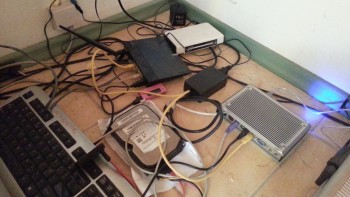
* z prądem no to już spory problem ..
Ale jakie możliwości jakiś czas temu wrzuciłem na hdd do kolejki chyba 5 czy 6 torrentów jednocześnie (razem prawie 200 GB) spokojnie to pobrało bez żadnej zwiechy czy coś
Co na asusie z tomato, jeden torrent większy i już jest problem -a cenowo asus koło 100 zł był warty
** ale to tylko od taka ciekawostka
nie rozważasz może kupna terminalu ? czyli mi pc na którym spokojnie wgrasz sobie openwrt, możliwości i cena takiego terminalu przebija routerki  - Tylko jedynie pobór prądu jest większy na terminalu (są takie co biorą po 10 W, ale cenowo ... ) ja swój na zasilaczu jest max 20 W, dałem 50 zł (800 mhz,256 ram , 128 mb flash) wgrane openwrt x86
Zaopatrzę się w kartę sim jakąś do testów i na pewno w wolnej chwili sprawdzę
A pójdźmy krok dalej , możliwość np. dzwonienia ? np. przez skype bym się łaczył z openwrt i z tamtej karty sim już dzwonił ?
Wybieram numer ze skype , przekierowuje mi i dzwoni z karty sim która jest w modemie w domu ?
interesujący temat : http://eko.one.pl/?p=openwrt-gnokii
Czy dobrze zrozumiałem, że np. podłączając modem z kartą z dowolnej sieci , np. plusik czy heayahh mogę tak wysyłać sms'y z numeru który mam w modemie ?
Jest może jakaś bramka typu mam w swoim telefonie kartę z plusa, ale np. znajomi mają z hey , w modemie mam kartę z heyah'a , właczam jakis programik na telefonie (na którym mam połączenie z internetem) i prosto wysyłam / odbieram smsy z karty którą mam w modemie ? coś w stylu graficznym jak np. gg ? lista kontaktów > wybieram osobę i piszę ?
zobacz temat : https://openlinksys.info/forum/viewthre … d_id=17720
przejrzyj szybko posty, są tam na 2 stronie chyba metody wrzucenia tego na hdd. Najszybciej by było zbotowanie czego kolwiek (ubuntu / debiana czy coś odpalenia go z usb)
korzystałem z tego filmiku > https://www.youtube.com/watch?v=cL81DQk4WL8
A nawet powiem że jestem całkowitym laikiem a udało mi się skompilować openwrt od podstaw pod moje potrzeby
Wiec nie jest to aż tak straszne
czy rozumiem że do tego jeszcze potrzebuje skompilowanego i działające sterownika do dzwięku itp ? tak samo nie widzę wyrażnego tematu z streamripper openwrt w google, jedynie tematy kompilacja itp
jak w temacie, jest coś do nagrywania strumienia, lub nawet strumieni i nagrywanie tego(najlepiej w formacie mp3 . np 128 czy 192 kb/s ? )
są świetne programy na pc pod M$ jest coś takiego pod openwrt? wpisuje adres do strumienia , nagrywa i dzieli odrazu ?
również to samo
chce zostawić w tle kopiowanie między ftp, jak włacze samo mc ustawiam do kopiowania i wyłaczam "x" putty to przestaje kopiować.
Chce zostawić to w tle wiec daje screen mc i mam całego rozjechanego mc + nie działa klikanie myszką coś trzeba dograć ? czy to się inaczej włacza
tak sprawdzałem, na utf8:

na wind1250:

ps. na wind1250 - nawet w putty nie mam pl znaków, na iso(europe)
ps2. ktoś pisał że trzeba ustawić poprawny w putty + w konfigu irssi,
ps3. ha już wiem co może być tego przyczyną : w help na stronie irssi jest takie coś :
...
 Następnie upewnij się, że twój terminal wspiera UTF-8 (np. xterm -u8). Jeśli używasz programu screen, musisz uruchomić go z opcją uruchamiającą wsparcie dla UTF-8:

screen -U irssi
wiec daje :
SCREEN -U irssi (nazwa kanału) i dostaje :

wiec żeby wejść na irc muszę : screen irssi -c (nazwa kanału) wtedy czat się ładuje
na kanale jest utf8 , taki niby mam ustawiony  jakieś pomysły ?
a dało by radę zrobić identyczny lub jeszcze lepszy webui jak ma np. utorrent  ?
?
to jak to ustawić? sprawdzić?
przez putty się łacze i tam mam wszystkie polskie znaki . jak wpisze cat i nazwa pliku txt z polskimi znakami mam niby wszystkie prócz ą, gdzie wyświetla niby ś z 2 kreseczkami
gdy pisze przez irssi , ja widzę swoje polskie znaki. Na kanale wyświetlają się krzaczki w miejscu pl znaków, tak samo nie widzę pl znaków innych userów
do transmission , jeśli chcesz troszkę bardziej rozbudowany i przystępny wygląd webui polecam >
"Istnieje także pakiet transmission-control zawierający bardziej rozbudowany interfejs www."
świetnie się sprawuje u mnie - polecam podmienić pliczki i testować
wgrane irssi
A co do tego jak szukałem, to wpisywałem Irc openewrt
Ha no to pytanie za 100 pkt, jak zrobić pl ?
z > http://faq.irssi.org.pl/#top
3.14 Jak zmusić Irssi do korzystania z kodowania UTF-8?

 Najpierw upewnij się, że twój LC_CTYPE wskazuje na pl_PL.UTF-8. Jeśli nie to wydaj polecenie:

export LC_CTYPE=pl_PL.UTF-8

 Następnie upewnij się, że twój terminal wspiera UTF-8 (np. xterm -u8). Jeśli używasz programu screen, musisz uruchomić go z opcją uruchamiającą wsparcie dla UTF-8:

screen -U irssi

 Następnie w Irssi ustaw:

/set term_charset UTF-8

 Dla wersji 0.8.9 i starszych:

/set term_type utf-8
niby wchodzi, ale dla wersji :
Dla wersji 0.8.9 i starszych:
/set term_type utf-8
jest brak takiej komendy, a dla nowszej - niby idzie , ale są same krzaczki zamiast ó,ą,ę itp
Znalezione posty: 251 do 275 z 484