Odp: Check Point L-50, Gargoyle błędne naliczanie transferu
Przekroczenie limitu było widoczne w gui jak to robiłem. Zrobie ponowmie od zera ale dopiero po południu.
Nie jesteś zalogowany. Proszę się zalogować lub zarejestrować.
eko.one.pl → Oprogramowanie / Software → Check Point L-50, Gargoyle błędne naliczanie transferu
Strony Poprzednia 1 2
Zaloguj się lub zarejestruj by napisać odpowiedź
Przekroczenie limitu było widoczne w gui jak to robiłem. Zrobie ponowmie od zera ale dopiero po południu.
Ciekawe co się właściwie przekręca.
It looks like the quota is not there at all actually. It is not in the iptables output (and therefore not in print_quotas)
Also apologies for English. I can provide a polish translation if it is preferred.
English is not a problem. On a clean system, with limit 1 GB and after opening one www site.
root@Gargoyle:~# iptables -t mangle -nvL | grep bandwidth
0 0 all -- * * 0.0.0.0/0 0.0.0.0/0 bandwidth --id total1-upload-2-449 --type combined --current_bandwidth 0 --reset_interval 2 --reset_time 2 --intervals_to_save 449
0 0 all -- * * 0.0.0.0/0 0.0.0.0/0 bandwidth --id bdist1-upload-minute-15 --type individual_src --reset_interval minute --intervals_to_save 15
0 0 all -- * * 0.0.0.0/0 0.0.0.0/0 bandwidth --id total2-upload-minute-359 --type combined --current_bandwidth 0 --reset_interval minute --intervals_to_save 359
0 0 all -- * * 0.0.0.0/0 0.0.0.0/0 bandwidth --id bdist2-upload-900-24 --type individual_src --reset_interval 900 --reset_time 900 --intervals_to_save 24
0 0 all -- * * 0.0.0.0/0 0.0.0.0/0 bandwidth --id total3-upload-180-479 --type combined --current_bandwidth 0 --reset_interval 180 --reset_time 180 --intervals_to_save 479
0 0 all -- * * 0.0.0.0/0 0.0.0.0/0 bandwidth --id bdist3-upload-hour-24 --type individual_src --reset_interval hour --intervals_to_save 24
0 0 all -- * * 0.0.0.0/0 0.0.0.0/0 bandwidth --id total4-upload-7200-359 --type combined --current_bandwidth 0 --reset_interval 7200 --reset_time 7200 --intervals_to_save 359
0 0 all -- * * 0.0.0.0/0 0.0.0.0/0 bandwidth --id bdist4-upload-day-31 --type individual_src --reset_interval day --intervals_to_save 31
0 0 all -- * * 0.0.0.0/0 0.0.0.0/0 bandwidth --id total5-upload-day-365 --type combined --current_bandwidth 0 --reset_interval day --intervals_to_save 365
0 0 all -- * * 0.0.0.0/0 0.0.0.0/0 bandwidth --id bdist5-upload-month-12 --type individual_src --reset_interval month --intervals_to_save 12
0 0 CONNMARK all -- * * 0.0.0.0/0 192.168.1.187 bandwidth --id 192.168.1.187_ingress --type combined --greater_than 1073741824 --current_bandwidth 0 --reset_interval day CONNMARK or 0x8000
root@Gargoyle:~# print_quotas
var quotaIdList = [ "192.168.1.187" ];
var quotaIpLists = [];
quotaIpLists["192.168.1.187"] = [ "192.168.1.187"];
var quotaTimes = new Array();
var quotaUsed = new Array();
var quotaLimits = new Array();
var quotaPercents = new Array();
quotaTimes["192.168.1.187"] = ["", "", "", "always"];
quotaUsed[ "192.168.1.187" ] = [];
quotaPercents[ "192.168.1.187" ] = [];
quotaLimits[ "192.168.1.187" ] = [];
quotaUsed[ "192.168.1.187" ][ "192.168.1.187" ] = [ -1, 20829148276628563, -1 ];
quotaPercents[ "192.168.1.187" ][ "192.168.1.187" ] = [ -1.000, 100.000, -1.000 ];
quotaLimits[ "192.168.1.187" ][ "192.168.1.187" ] = [ -1, 1073741824, -1 ];
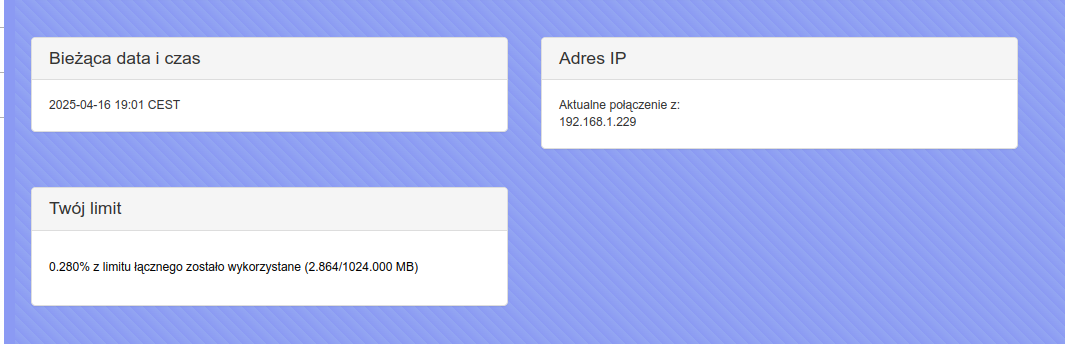
Powtórzyłem to u siebie na czystej instalacji, tyle że na ath79, bo kirkwooda nic nie mam. Działa dobrze:
root@Gargoyle:~# print_quotas
var quotaIdList = [ "192.168.1.229" ];
var quotaIpLists = [];
quotaIpLists["192.168.1.229"] = [ "192.168.1.229"];
var quotaTimes = new Array();
var quotaUsed = new Array();
var quotaLimits = new Array();
var quotaPercents = new Array();
quotaTimes["192.168.1.229"] = ["", "", "", "always"];
quotaUsed[ "192.168.1.229" ] = [];
quotaPercents[ "192.168.1.229" ] = [];
quotaLimits[ "192.168.1.229" ] = [];
quotaUsed[ "192.168.1.229" ][ "192.168.1.229" ] = [ 2969909, -1, -1 ];
quotaPercents[ "192.168.1.229" ][ "192.168.1.229" ] = [ 0.277, -1.000, -1.000 ];
quotaLimits[ "192.168.1.229" ][ "192.168.1.229" ] = [ 1073741824, -1, -1 ];root@Gargoyle:~# uci show firewall.quota_1
firewall.quota_1=quota
firewall.quota_1.combined_limit='1073741824'
firewall.quota_1.reset_interval='never'
firewall.quota_1.ip='192.168.1.229'
firewall.quota_1.id='192.168.1.229'
firewall.quota_1.enabled='1'
root@Gargoyle:~#
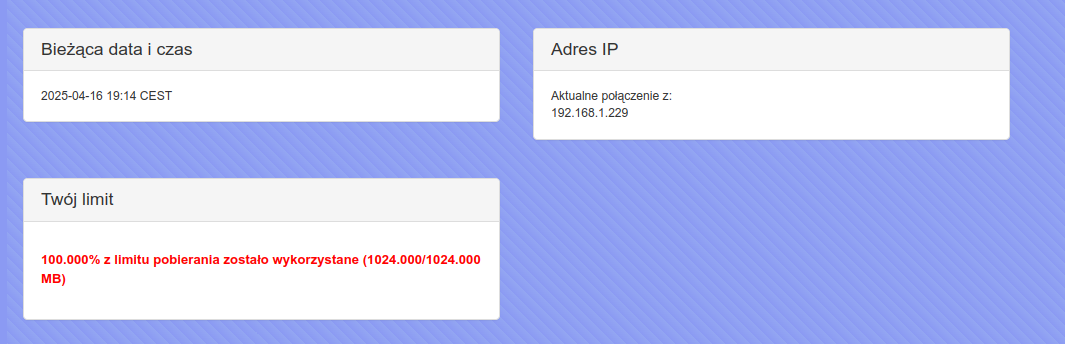
Na samo pobieranie również działa:
root@Gargoyle:~# print_quotas
var quotaIdList = [ "192.168.1.229" ];
var quotaIpLists = [];
quotaIpLists["192.168.1.229"] = [ "192.168.1.229"];
var quotaTimes    = new Array();
var quotaUsed     = new Array();
var quotaLimits   = new Array();
var quotaPercents = new Array();
quotaTimes["192.168.1.229"] = ["", "", "", "always"];
quotaUsed[ "192.168.1.229" ] = [];
quotaPercents[ "192.168.1.229" ] = [];
quotaLimits[ "192.168.1.229" ] = [];
quotaUsed[ "192.168.1.229" ][ "192.168.1.229" ] = [ -1, 2466152, -1 ];
quotaPercents[ "192.168.1.229" ][ "192.168.1.229" ] = [ -1.000,  0.230, -1.000 ];
quotaLimits[ "192.168.1.229" ][ "192.168.1.229" ] = [ -1, 1073741824, -1 ];I po chwili:
Nie napisałem tego na wstępie ale u mnie to na innych sprzętach też jak najbardziej działa poprawnie. Na Mikrotiku RB951g-2HnD, na Linkys WRT1900ACS.
Więc wstępnie wygląda to na coś specyficznego na kirkwoodzie. Dobrze by było żeby ktoś z kirkwoodem to sprawdził.
Does
cat /proc/cpuinfo
Show if it is a big or little endian system? That’s the only suspicion I have.
But I believe I have tested on both and no problem.
If these devices were cheaper I’d get one and see what is going on.
root@Gargoyle:~# cat /proc/cpuinfo
processor : 0
model name : Feroceon 88FR131 rev 1 (v5l)
BogoMIPS : 400.00
Features : swp half fastmult edsp
CPU implementer : 0x56
CPU architecture: 5TE
CPU variant : 0x2
CPU part : 0x131
CPU revision : 1
Hardware : Marvell Kirkwood (Flattened Device Tree)
Revision : 0000
Serial : 0000000000000000
Strony Poprzednia 1 2
Zaloguj się lub zarejestruj by napisać odpowiedź
eko.one.pl → Oprogramowanie / Software → Check Point L-50, Gargoyle błędne naliczanie transferu
Forum oparte o PunBB, wspierane przez Informer Technologies, Inc