Odp: ZTE MF289F - Porting OpenWRT
@smereka can you send me the output of this command?
adb shell ls -latr /firmware/image
thx
Nie jesteś zalogowany. Proszę się zalogować lub zarejestrować.
eko.one.pl → Sprzęt / Hardware → ZTE MF289F - Porting OpenWRT
Strony Poprzednia 1 … 9 10 11 12 13 … 45 Następna
Zaloguj się lub zarejestruj by napisać odpowiedź
@smereka can you send me the output of this command?
adb shell ls -latr /firmware/image
thx
stich86 napisał/a:i've fixed some issues pointed by @MiG25
https://github.com/stich86/OpenWRT-ZTE- … ild_220822
let me know
in meantime i've found another bug.. port "LAN2" has not the same id for AT1 and AT2... what a mess
So do dts with common nodes and different dts for both version.
i think it should be changed on the uci config..
i've to see which port id is LAN2 on the AT1 version.. to do this i've to enable again all ports on switch config and see the id..
stich tomorrow I will do that
Dobrze że jest wybór portu ttyUSB w pakiecie IceG. Ja czasami korzystam z smstools3 więc dobrze by było żeby się pakiety nie pogryzły

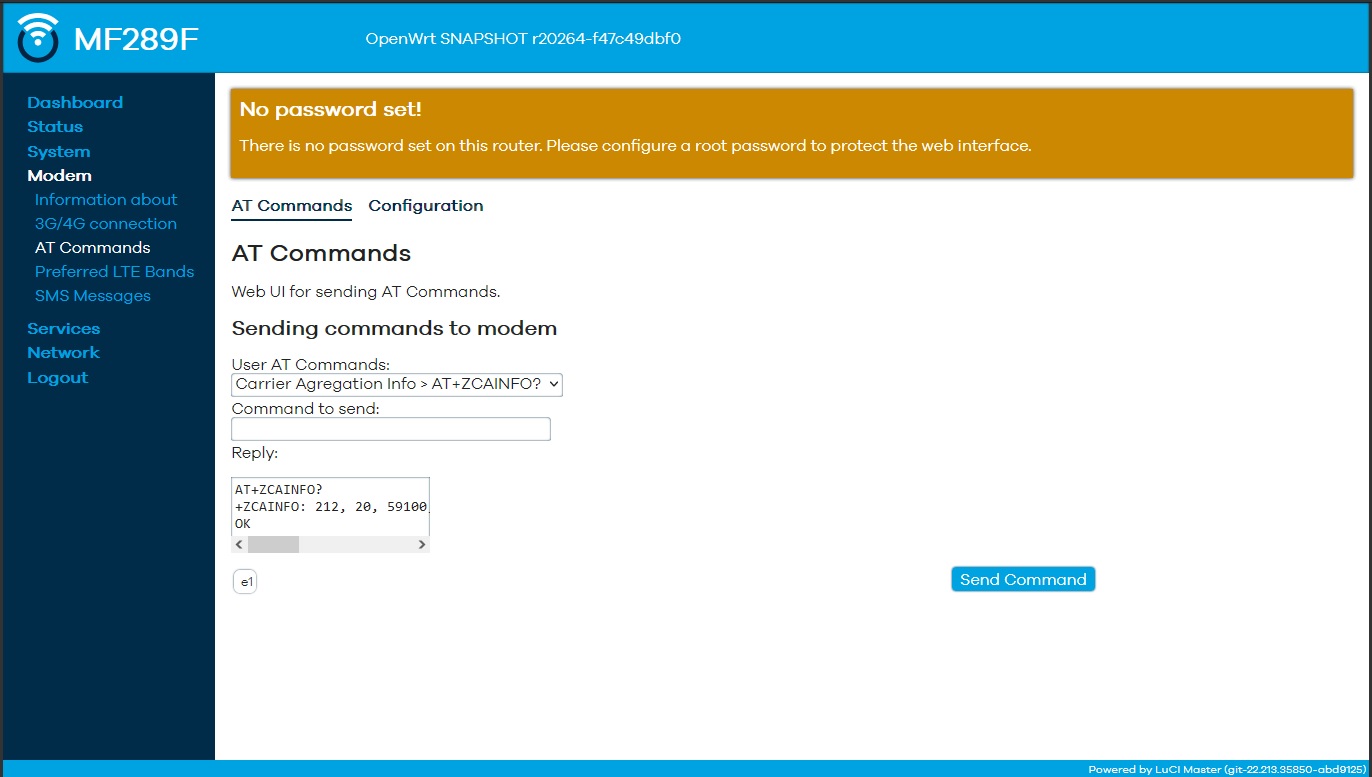
To z odpowiedzią ( Replay) szersze

Prosze, zmiencie ten motyw, oczy mnie bolą 
Pakiety robilem pod luci-theme-bootstrap, a nowy motyw przemilcze, co motyw to inne style/nazwy. Trzeba by przeprowadzic sledztwo jak w tym motywie to rozwiazali. Ktoś chętny?
ok "Connection Monitor" doesn't work because it use "wan" instead of "wwan" :\
i think that it's more standard to use wwan on a 4G router instead of wan.
What do you think guys?
ok "Connection Monitor" doesn't work because it use "wan" instead of "wwan" :\
i think that it's more standard to use wwan on a 4G router instead of wan.
What do you think guys?
No It's just a name. Lots of people use "lte", "gsm" or other names
ok "Connection Monitor" doesn't work because it use "wan" instead of "wwan" :\
i think that it's more standard to use wwan on a 4G router instead of wan.
What do you think guys?
Your compilation, your settings. Manually enter the correct name for your configuration. Add the file with the connection monitor settings to files and that's it.
stich86 napisał/a:ok "Connection Monitor" doesn't work because it use "wan" instead of "wwan" :\
i think that it's more standard to use wwan on a 4G router instead of wan.
What do you think guys?
Your compilation, your settings. Manually enter the correct name for your configuration. Add the file with the connection monitor settings to files and that's it.
I don’t want break all stuff.
Tomorrow I’ll move all WWAN to WAN like EKO and your firmware
Then I’ve to understand why eth1 is not recognized on AT1 variant
@Cezary
There is a repo for you sysinfo package?
I want to add it to my build
thx!
@Cezary
There is a repo for you sysinfo package?
I want to add it to my buildthx!
Yes, https://github.com/obsy/packages
just for your knowledge
T-Mobile PL boot on AT1 version but without working 5Ghz because there isn't QCA9984's firmare
It's nice to see blue interface instead of bad red
Regarding router board reset on modem reboot, also the stock firmware has same behaviour
i've added "rdnis" support, so the module itself can go over internet.
I'll try to test the VoIP instead of CS
But not VDFDE version ...
But not VDFDE version ...
it should work also on VDFDE, in this case modem is already on VOICE/CS mode instead of VOIP
hi all,
i've uploaded new build: https://github.com/stich86/OpenWRT-ZTE- … ild_220823
here is the change log:
- fixed switch config, now LAN1 is LAN1/WAN and LAN2 is LAN2 (tested on AT1, should be the same on AT2 pls test an report)
- added RNDIS kmod, so now the 4G module can go outside internet, next step is to test VoIP
- increased ATINOUT reply window, so no more horizontal scroll
- added sysinfo from eko.one.pl on ssh login
Not sure what is going on , but just after fistboot in LAN1/WAN is not giving any IP , you have to reconnect it.
RDNIS or RNDIS ? There is a MODEM interface , but my modem is pid 1432 ,and don't have rndis...
Replay window is now wider
and there is sysinfo.
Not sure what is going on , but just after fistboot in LAN1/WAN is not giving any IP , you have to reconnect it.
RDNIS or RNDIS ? There is a MODEM interface , but my modem is pid 1432 ,and don't have rndis...
Replay window is now wider
and there is sysinfo.
can you share an "adb shell dmesg | grep zte" ?
sure
root@MF289F:~# adb shell dmesg | grep zte
[    0.122473] (NULL device *): zte-power: qpnp boot reason: 0x20, 0x0, 0x0, 0x0
[    0.122506] (NULL device *): zte-power: boot status: event 2, poff 0x0, pon 0xaa
[    0.122513] (NULL device *): zte-power: boot status: charger 0, battery 0, vbat 0
[    0.122519] (NULL device *): zte-power: zte boot reason: 0xaa, 0x1
[    0.122523] (NULL device *): zte-power: zte boot lcd id: 0x0
[    0.122536] power zte_power: zte-power: zte_power_get_boot_reason: 1
[    0.122570] of_get_named_gpiod_flags: parsed 'power-board' property of node '/soc/zte_power[0]' - status (0)
[    0.122622] power zte_power: zte-power: gpio-power-board[id-0] 20, valid 1, dir 0, val 0
[    0.122632] of_get_named_gpiod_flags: can't parse 'power-usb' property of node '/soc/zte_power[0]'
[    0.122635] of_get_named_gpiod_flags: can't parse 'power-slic' property of node '/soc/zte_power[0]'
[    0.122639] of_get_named_gpiod_flags: can't parse 'pmu-gpio-2' property of node '/soc/zte_power[0]'
[    0.122642] of_get_named_gpiod_flags: can't parse 'pmu-gpio-6' property of node '/soc/zte_power[0]'
[    0.122647] of_get_named_gpiod_flags: can't parse 'pmu-gpio-3' property of node '/soc/zte_power[0]'
[    0.122650] of_get_named_gpiod_flags: can't parse 'mdm-gpio-38' property of node '/soc/zte_power[0]'
[    0.122654] of_get_named_gpiod_flags: can't parse 'typec-vconn-en' property of node '/soc/zte_power[0]'
[    0.122657] of_get_named_gpiod_flags: can't parse 'qcom,idt-en-gpio' property of node '/soc/zte_power[0]'
[    0.122660] of_get_named_gpiod_flags: can't parse 'qcom,idt-dsm-mode' property of node '/soc/zte_power[0]'
[    0.122674] power zte_power: zte-power: gpio-20 = 0
[    0.122691] power zte_power: zte-power: string-rtc-device[id-62] is 'rtc0'
[    0.122703] zte_bsp_netlink_register: module 0
[    0.122708] power zte_power: zte-power: success to creat zte_power device
[    0.122813] (NULL device *): zte-power: zte_power_init done
[    0.142551] zte_bsp_netlink done
[    0.241705] zhao.wl g_zte_flash_id = 0x2680ac2c
[    0.323688] 0x00000be40000-0x00000c840000 : "ztefile"
[    0.327716] 0x00000c840000-0x000015e40000 : "zterw"
[    0.596406] init zte socket here
[    3.461974] UBIFS (ubi0:1): UBIFS: mounted UBI device 0, volume 1, name "ztedata", R/O mode
[    4.040169] ubi3: attached mtd26 (name "zterw", size 150 MiB)
[    5.638071] ubi2: attached mtd25 (name "ztefile", size 10 MiB)
[    5.997805] UBIFS (ubi2:0): UBIFS: mounted UBI device 2, volume 0, name "ztefile"
[   13.848925] zte:apr_tal_link_state_cb modem_state is 1,dest 0
[   13.848931] (null) called and zte_remote_pid is 0
[   13.848936] zte_port_init: zte port init
[   13.848943] zte_get_modem_state_usb_enmuation: ZTE zte_modem_state is 1=======
[   14.240108]  do zte usb switch ------ENTER
[   14.240128] zte_usb_switch_work:
[   14.240135] zte_usb_check_read_q6_config_sucess is_smem_read_complete= 0
[   14.240143] zte_read_usb_config_args_from_q6:  sizeof(ZTE_config_args_s_type) = 628
[   14.240189]  zte wifi_adb_enable = 0
[   14.240209] zte_usb_set_net_mac_addr ZTE_USB_GET_INTERNAL_NET_MAC_ADDRESS: 34:4B:50:xx:xx:xx
[   14.240215] zte_usb_set_net_mac_addr ZTE_USB_GET_INTERNAL_NET_MAC_ADDRESS: 34:4B:50:xx:xx:xx
[   14.240219] zte_usb_autorun_download_switch ZTE nomal: =NORMAL
[   14.240223] zte_usb_autorun_download_switch ZTE autorun open: =OPEN
[   14.240227] zte_usb_autorun_download_switch ZTE tcard_enable_state=1
[   14.240241] zte_usb_autorun_init ZTE_usb_switch_devices.VID = 19d2
[   14.240247] zte_set_curent_device ZTE_usb_switch_devices.CompositionId is 0x006d
[   14.240273] zte_config_usb_by_configfs,argv[1] 0x0000,argv[2] diag,serial,modem,rmnet_gsi,ffs,argv[3] P685M135MZTED000000,argv[4] cdrom
[   15.748331] zte_config_usb_by_configfs call_usermodehelper return 0
[   19.703656] [zte_usb_soket_cmd_recv()]: skb->len= 20
[   19.703672] [zte_usb_soket_cmd_recv()]: portid is = 1466
[   19.703677] [zte_usb_soket_cmd_recv()]: Data part is = 0
[   19.703689] [zte_usb_soket_cmd_recv()]: Send request ok!
[   19.726208] power zte_power: zte-power: zte_power_get_rtc_time: 23
[   19.726221] power zte_power: zte-power: get real battery real_capacity is 0
[   20.739336] codec_id_proc_show: codec_id_proc_show entered, zte_flash_protect=1
[   21.004134] zte slic scripts up
root@MF289F:~#looks like you have usb0 on the module, also the rmnet_gis is present in the boot parameter
But in luci on Interface MODEM i have Error: Network device is not present
How this should work ? RNDIS in parallel with QMI ?
But in luci on Interface MODEM i have Error: Network device is not present
How this should work ? RNDIS in parallel with QMI ?
i think i'll remove it, doesn't seem necessary anymore
i was able to make voip working setting correct APN on CGDCONT. The module create an internal PPP (using Multi PDN), and i've successfully registered to my SIP provider
/sys/kernel/config/usb_gadget/g1 # cfg show | grep reg
voip_registration_server=sip2.olimontel.it
voip_register_status=registered
backup current nvram with "cfg show" and copy export to a txt file
if anyone want to try:
cfg set voip_outbound_proxy_enable=1
cfg set voip_account_display_account1=NUMBER
cfg set voip_display_name=NUMBER
cfg set voip_registration_server=PROXYSERVER
cfg set voip_proxy_server=PROXYSERVER
cfg set voip_sip_proxy_server1=PROXYSERVER
cfg set voip_account_auth1=NUMBER
cfg set voip_authorization_user_name=NUMBER
cfg set voip_account_password1=PASSWORD
cfg set voip_authorization_password=PASSWORD
cfg set voip_user_name=NUMBER
cfg set voip_outbound_proxy=PROXYSERVER
cfg set voip_sip_outbound_port=5060
cfg set voip_sip_outbound_server=PROXYSERVER
cfg set voip_sip_outbound_enable=1
then set module to do VoIP instead of CS with this command:
cfg set voice_work_type=VOIP
Finally save env with:
cfg save
reboot
check if the modem correctly create a PPP session on this interface:
rmnet_data0 Link encap:UNSPEC HWaddr 00-00-00-00-00-00-00-00-00-00-00-00-00-00-00-00
inet addr:10.38.80.101 Mask:255.255.255.252
UP RUNNING MTU:1500 Metric:1
RX packets:101 errors:0 dropped:0 overruns:0 frame:0
TX packets:102 errors:0 dropped:0 overruns:0 carrier:0
collisions:0 txqueuelen:1000
RX bytes:69904 (68.2 KiB) TX bytes:63226 (61.7 KiB)
this connection is created by latest profile on the AT+CGDCONT command, so in my case this is the currently output:
at+cgdcont?
+CGDCONT: 1,"IP","casa.postemobile.it","0.0.0.0",0,0,0,0
+CGDCONT: 2,"IPV4V6","mobile.vodafone.it","0.0.0.0.0.0.0.0.0.0.0.0.0.0.0.0",0,0,0,0
+CGDCONT: 3,"IPV4V6","IMS","0.0.0.0.0.0.0.0.0.0.0.0.0.0.0.0",0,0,0,0
+CGDCONT: 4,"IPV4V6","sos","0.0.0.0.0.0.0.0.0.0.0.0.0.0.0.0",0,0,0,1
+CGDCONT: 6,"IP","casa.postemobile.it","0.0.0.0",0,0,0,0
To revert back module on CS\VoLTE just do these commands:
cfg set voice_work_type=VOICE
cfg save
reboot
Nie mogę znaleźć instrukcji do wgrania openwrt na pacjenta. stich dawał linka gdzieś ale nie mogę jego tez znaleźć. Ktoś coś?
Dobra mam
Nie mogę znaleźć instrukcji do wgrania openwrt na pacjenta. stich dawał linka gdzieś ale nie mogę jego tez znaleźć. Ktoś coś?
Dobra mam
https://github.com/stich86/OpenWRT-ZTE- … uction.txt
use this last build:
https://github.com/stich86/OpenWRT-ZTE- … ild_220824
i've fixed opkg repo issue and removed RNDIS interface
5GHz work good 866 I have
Strony Poprzednia 1 … 9 10 11 12 13 … 45 Następna
Zaloguj się lub zarejestruj by napisać odpowiedź
eko.one.pl → Sprzęt / Hardware → ZTE MF289F - Porting OpenWRT
Forum oparte o PunBB, wspierane przez Informer Technologies, Inc