Witam!
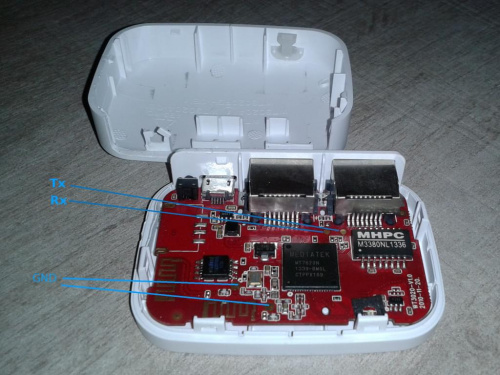
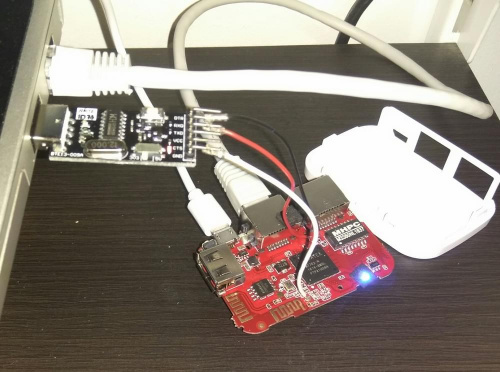
Podczas zmiany wersji openwrt ucegliłem wt3020, choć w zasadzie nie wiem dlaczego. Wcześniej był soft Cezarego openwrt 18.06 z luci, postanowiłem wgrać gargoyle z 18.06. Aktualizowałem przez gui, router nie wstaje. Tryb failsafe również nie działa, wcześniej po uruchomieniu mrugała dioda, a teraz zapala się zaraz po włączeniu i świeci. Więc podłączyłem serial przez cp2102, Wszystko idzie dobrze do momentu uruchomienia routera po wgraniu obrazu. Najpierw wyświetla się błąd, że obraz jest za duży a później jest wiązanka błędów.
Dawno temu zmieniłem flash z 8 na 16MB, programowałem go w programatorze jak dobrze pamiętam. Próbowałem już chyba wszystkich wersji z eko.one i dalej błędy...coś z pamięcią?
U-Boot 1.1.3 (Jan 3 2014 - 09:12:42)
MAX Board: Ralink APSoC DRAM: 64 MB
relocate_code Pointer at: 83fb4000
enable ephy clock...done. rf reg 29 = 5
SSC disabled.
spi_wait_nsec: 29
spi device id: ef 40 18 0 0 (40180000)
Warning: un-recognized chip ID, please update bootloader!
raspi_read: from:30000 len:1000
raspi_read: from:30000 len:1000
============================================
Ralink UBoot Version: 4.1.1.0
--------------------------------------------
ASIC 7620_MP (Port5<->None)
DRAM component: 512 Mbits DDR, width 16
DRAM bus: 16 bit
Total memory: 64 MBytes
Flash component: SPI Flash
Date:Jan 3 2014 Time:09:12:42
============================================
icache: sets:512, ways:4, linesz:32 ,total:65536
dcache: sets:256, ways:4, linesz:32 ,total:32768
##### The CPU freq = 580 MHZ ####
estimate memory size =64 Mbytes
Please choose the operation:
1: Load system code to SDRAM via TFTP.
2: Load system code then write to Flash via TFTP.
3: Boot system code via Flash (default).
4: Entr boot command line interface.
7: Load Boot Loader code then write to Flash via Serial.
9: Load Boot Loader code then write to Flash via TFTP.
You choosed 2
��� 0
raspi_read: from:40028 len:6
2: System Load Linux Kernel then write to Flash via TFTP.
Warning!! Erase Linux in Flash then burn new one. Are you sure?(Y/N)
Please Input new ones /or Ctrl-C to discard
Input device IP (192.168.0.111) ==:192.168.1.1
Input server IP (192.168.0.233) ==:192.168.1.2
Input Linux Kernel filename (root_uImage) ==:root_uimage
netboot_common, argc= 3
NetTxPacket = 0x83FE4C80
KSEG1ADDR(NetTxPacket) = 0xA3FE4C80
NetLoop,call eth_halt !
NetLoop,call eth_init !
Trying Eth0 (10/100-M)
Waitting for RX_DMA_BUSY status Start... done
ETH_STATE_ACTIVE!!
TFTP from server 192.168.1.2; our IP address is 192.168.1.1
Filename 'root_uimage'.
TIMEOUT_COUNT=10,Load address: 0x80100000
Loading: *�Got ARP REPLY, set server/gtwy eth addr (40:b0:34:e3:e1:83)
Got it
#################################################################
#################################################################
#################################################################
#################################################################
#################################################################
#################################################################
#################################################################
#################################################################
#################################################################
#################################################################
#################################################################
#################################################################
#################################################################
#################################################################
#################################################################
#################################################################
#################################################################
#################################################################
#################################################################
#################################################################
###############################Got ARP REQUEST, return our IP
##################################
#################################################################
#######################################################
done
Bytes transferred = 7602367 (7400bf hex)
NetBootFileXferSize= 007400bf
raspi_erase_write: offs:50000, count:7400bf
Abort: image size larger than 3866624!
## Booting image at bc050000 ...
raspi_read: from:50000 len:40
Image Name: MIPS OpenWrt Linux-4.14.176
Image Type: MIPS Linux Kernel Image (lzma compressed)
Data Size: 1451340 Bytes = 1.4 MB
Load Address: 80000000
Entry Point: 80000000
raspi_read: from:50040 len:16254c
Verifying Checksum ... OK
Uncompressing Kernel Image ... OK
No initrd
## Transferring control to Linux (at address 80000000) ...
## Giving linux memsize in MB, 64
Starting kernel ...
[ 0.000000] Linux version 4.14.176 (cezary@eko.one.pl) (gcc version 7.3.0 (OpenWrt GCC 7.3.0 r7935-d08a63770c)) #0 Thu Apr 16 11:24:54 2020
[ 0.000000] Board has DDR1
[ 0.000000] Analog PMU set to hw control
[ 0.000000] Digital PMU set to hw control
[ 0.000000] SoC Type: MediaTek MT7620N ver:2 eco:6
[ 0.000000] bootconsole [early0] enabled
[ 0.000000] CPU0 revision is: 00019650 (MIPS 24KEc)
[ 0.000000] MIPS: machine is Nexx WT3020 (16M)
[ 0.000000] Determined physical RAM map:
[ 0.000000] memory: 04000000 @ 00000000 (usable)
[ 0.000000] Initrd not found or empty - disabling initrd
[ 0.000000] Primary instruction cache 64kB, VIPT, 4-way, linesize 32 bytes.
[ 0.000000] Primary data cache 32kB, 4-way, PIPT, no aliases, linesize 32 bytes
[ 0.000000] Zone ranges:
[ 0.000000] Normal [mem 0x0000000000000000-0x0000000003ffffff]
[ 0.000000] Movable zone start for each node
[ 0.000000] Early memory node ranges
[ 0.000000] node 0: [mem 0x0000000000000000-0x0000000003ffffff]
[ 0.000000] Initmem setup node 0 [mem 0x0000000000000000-0x0000000003ffffff]
[ 0.000000] random: get_random_bytes called from 0x8042e730 with crng_init=0
[ 0.000000] Built 1 zonelists, mobility grouping on. Total pages: 16256
[ 0.000000] Kernel command line: console=ttyS0,57600 rootfstype=squashfs,jffs2
[ 0.000000] PID hash table entries: 256 (order: -2, 1024 bytes)
[ 0.000000] Dentry cache hash table entries: 8192 (order: 3, 32768 bytes)
[ 0.000000] Inode-cache hash table entries: 4096 (order: 2, 16384 bytes)
[ 0.000000] Writing ErrCtl register=00037440
[ 0.000000] Readback ErrCtl register=00037440
[ 0.000000] Memory: 60168K/65536K available (3624K kernel code, 179K rwdata, 468K rodata, 200K init, 215K bss, 5368K reserved, 0K cma-reserved)
[ 0.000000] SLUB: HWalign=32, Order=0-3, MinObjects=0, CPUs=1, Nodes=1
[ 0.000000] NR_IRQS: 256
[ 0.000000] CPU Clock: 580MHz
[ 0.000000] clocksource: systick: mask: 0xffff max_cycles: 0xffff, max_idle_ns: 583261500 ns
[ 0.000000] systick: enable autosleep mode
[ 0.000000] systick: running - mult: 214748, shift: 32
[ 0.000000] clocksource: MIPS: mask: 0xffffffff max_cycles: 0xffffffff, max_idle_ns: 6590553264 ns
[ 0.000010] sched_clock: 32 bits at 290MHz, resolution 3ns, wraps every 7405115902ns
[ 0.015471] Calibrating delay loop... 385.84 BogoMIPS (lpj=1929216)
[ 0.087706] pid_max: default: 32768 minimum: 301
[ 0.097129] Mount-cache hash table entries: 1024 (order: 0, 4096 bytes)
[ 0.110152] Mountpoint-cache hash table entries: 1024 (order: 0, 4096 bytes)
[ 0.129001] clocksource: jiffies: mask: 0xffffffff max_cycles: 0xffffffff, max_idle_ns: 19112604462750000 ns
[ 0.148474] futex hash table entries: 256 (order: -1, 3072 bytes)
[ 0.160650] pinctrl core: initialized pinctrl subsystem
[ 0.172241] NET: Registered protocol family 16
[ 0.203249] rt2880_gpio 10000600.gpio: registering 24 gpios
[ 0.214275] rt2880_gpio 10000600.gpio: registering 24 irq handlers
[ 0.226853] rt2880_gpio 10000660.gpio: registering 32 gpios
[ 0.237849] rt2880_gpio 10000660.gpio: registering 32 irq handlers
[ 0.250453] rt2880_gpio 10000688.gpio: registering 1 gpios
[ 0.261279] rt2880_gpio 10000688.gpio: registering 1 irq handlers
[ 0.278298] clocksource: Switched to clocksource systick
[ 0.289937] NET: Registered protocol family 2
[ 0.299511] TCP established hash table entries: 1024 (order: 0, 4096 bytes)
[ 0.313282] TCP bind hash table entries: 1024 (order: 0, 4096 bytes)
[ 0.325872] TCP: Hash tables configured (established 1024 bind 1024)
[ 0.338635] UDP hash table entries: 256 (order: 0, 4096 bytes)
[ 0.350143] UDP-Lite hash table entries: 256 (order: 0, 4096 bytes)
[ 0.362836] NET: Registered protocol family 1
[ 0.374049] rt-timer 10000100.timer: maximum frequency is 1220Hz
[ 0.386757] Crashlog allocated RAM at address 0x3f00000
[ 0.398806] workingset: timestamp_bits=30 max_order=14 bucket_order=0
[ 0.417553] squashfs: version 4.0 (2009/01/31) Phillip Lougher
[ 0.429045] jffs2: version 2.2 (NAND) (SUMMARY) (LZMA) (RTIME) (CMODE_PRIORITY) (c) 2001-2006 Red Hat, Inc.
[ 0.458792] io scheduler noop registered
[ 0.466436] io scheduler deadline registered (default)
[ 0.477609] Serial: 8250/16550 driver, 16 ports, IRQ sharing enabled
[ 0.493087] console [ttyS0] disabled
[ 0.500133] 10000c00.uartlite: ttyS0 at MMIO 0x10000c00 (irq = 20, base_baud = 2500000) is a Palmchip BK-3103
[ 0.519805] console [ttyS0] enabled
[ 0.519805] console [ttyS0] enabled
[ 0.533626] bootconsole [early0] disabled
[ 0.533626] bootconsole [early0] disabled
[ 0.557313] spi spi0.0: force spi mode3
[ 0.575991] m25p80 spi0.0: w25q128 (16384 Kbytes)
[ 0.585422] 4 fixed-partitions partitions found on MTD device spi0.0
[ 0.598081] Creating 4 MTD partitions on "spi0.0":
[ 0.607633] 0x000000000000-0x000000030000 : "u-boot"
[ 0.618477] 0x000000030000-0x000000040000 : "u-boot-env"
[ 0.629925] 0x000000040000-0x000000050000 : "factory"
[ 0.640914] 0x000000050000-0x000001000000 : "firmware"
[ 2.567643] 2 uimage-fw partitions found on MTD device firmware
[ 2.579476] 0x000000050000-0x0000001b258c : "kernel"
[ 2.590247] 0x0000001b258c-0x000001000000 : "rootfs"
[ 2.600986] mtd: device 5 (rootfs) set to be root filesystem
[ 2.613807] 1 squashfs-split partitions found on MTD device rootfs
[ 2.626186] 0x00000078c000-0x000001000000 : "rootfs_data"
[ 2.638637] libphy: Fixed MDIO Bus: probed
[ 2.648313] random: fast init done
[ 2.657664] gsw: setting port4 to ephy mode
[ 2.666066] mtk_soc_eth 10100000.ethernet eth0 (uninitialized): port 4 link up (100Mbps/Full duplex)
[ 2.685173] mtk_soc_eth 10100000.ethernet: loaded mt7620 driver
[ 2.697690] mtk_soc_eth 10100000.ethernet eth0: mediatek frame engine at 0xb0100000, irq 5
[ 2.714855] rt2880_wdt 10000120.watchdog: Initialized
[ 2.726403] NET: Registered protocol family 10
[ 2.739692] Segment Routing with IPv6
[ 2.747098] NET: Registered protocol family 17
[ 2.756059] bridge: filtering via arp/ip/ip6tables is no longer available by default. Update your scripts to load br_netfilter if you need this.
[ 2.781886] 8021q: 802.1Q VLAN Support v1.8
[ 2.791723] hctosys: unable to open rtc device (rtc0)
[ 2.807822] squashfs: SQUASHFS error: unable to read id index table
[ 2.820733] jffs2: Flash size not aligned to erasesize, reducing to 14644KiB
[ 2.837006] jffs2: jffs2_scan_eraseblock(): Magic bitmask 0x1985 not found at 0x00000000: 0x7368 instead
[ 2.855939] jffs2: jffs2_scan_eraseblock(): Magic bitmask 0x1985 not found at 0x00000004: 0x0a18 instead
[ 2.874842] jffs2: jffs2_scan_eraseblock(): Magic bitmask 0x1985 not found at 0x00000008: 0x4086 instead
[ 2.893741] jffs2: jffs2_scan_eraseblock(): Magic bitmask 0x1985 not found at 0x00000010: 0x0038 instead
[ 2.912637] jffs2: jffs2_scan_eraseblock(): Magic bitmask 0x1985 not found at 0x00000014: 0x0004 instead
[ 2.931535] jffs2: jffs2_scan_eraseblock(): Magic bitmask 0x1985 not found at 0x00000018: 0x06c0 instead
[ 2.950431] jffs2: jffs2_scan_eraseblock(): Magic bitmask 0x1985 not found at 0x0000001c: 0x0004 instead
[ 2.969329] jffs2: jffs2_scan_eraseblock(): Magic bitmask 0x1985 not found at 0x00000020: 0x0a3c instead
[ 2.988225] jffs2: jffs2_scan_eraseblock(): Magic bitmask 0x1985 not found at 0x00000028: 0x8f24 instead
[ 3.007125] jffs2: jffs2_scan_eraseblock(): Magic bitmask 0x1985 not found at 0x00000030: 0x8f1c instead
[ 3.026016] jffs2: Further such events for this erase block will not be printed
[ 3.048207] jffs2: Empty flash at 0x00000038 ends at 0x00000040
[ 3.060898] jffs2: jffs2_scan_eraseblock(): Magic bitmask 0x1985 not found at 0x00001000: 0x802f instead
[ 3.079807] jffs2: jffs2_scan_eraseblock(): Magic bitmask 0x1985 not found at 0x00001004: 0xd97d instead
[ 3.098702] jffs2: jffs2_scan_eraseblock(): Magic bitmask 0x1985 not found at 0x00001008: 0x127f instead
[ 3.117600] jffs2: jffs2_scan_eraseblock(): Magic bitmask 0x1985 not found at 0x0000100c: 0xf97b instead
[ 3.136497] jffs2: jffs2_scan_eraseblock(): Magic bitmask 0x1985 not found at 0x00001010: 0xff5d instead
[ 3.155394] jffs2: jffs2_scan_eraseblock(): Magic bitmask 0x1985 not found at 0x00001014: 0xd1f8 instead
[ 3.174291] jffs2: jffs2_scan_eraseblock(): Magic bitmask 0x1985 not found at 0x00001018: 0x3bc4 instead
[ 3.193189] jffs2: jffs2_scan_eraseblock(): Magic bitmask 0x1985 not found at 0x0000101c: 0x052d instead
[ 3.212086] jffs2: jffs2_scan_eraseblock(): Magic bitmask 0x1985 not found at 0x00001020: 0xb65c instead
[ 3.230983] jffs2: jffs2_scan_eraseblock(): Magic bitmask 0x1985 not found at 0x00001024: 0xd724 instead
[ 3.249872] jffs2: Further such events for this erase block will not be printed
[ 3.272477] jffs2: jffs2_scan_eraseblock(): Magic bitmask 0x1985 not found at 0x00002000: 0x4e41 instead
[ 3.291383] jffs2: jffs2_scan_eraseblock(): Magic bitmask 0x1985 not found at 0x00002004: 0x990c instead
[ 3.310278] jffs2: jffs2_scan_eraseblock(): Magic bitmask 0x1985 not found at 0x00002008: 0x7b0c instead
[ 3.329175] jffs2: jffs2_scan_eraseblock(): Magic bitmask 0x1985 not found at 0x0000200c: 0x90ba instead
[ 3.348071] jffs2: jffs2_scan_eraseblock(): Magic bitmask 0x1985 not found at 0x00002010: 0x7ccd instead
[ 3.366968] jffs2: jffs2_scan_eraseblock(): Magic bitmask 0x1985 not found at 0x00002014: 0x05f6 instead
[ 3.385868] jffs2: jffs2_scan_eraseblock(): Magic bitmask 0x1985 not found at 0x00002018: 0x8ed8 instead
[ 3.404765] jffs2: jffs2_scan_eraseblock(): Magic bitmask 0x1985 not found at 0x0000201c: 0xd556 instead
[ 3.423661] jffs2: jffs2_scan_eraseblock(): Magic bitmask 0x1985 not found at 0x00002020: 0x27d4 instead
[ 3.442558] jffs2: jffs2_scan_eraseblock(): Magic bitmask 0x1985 not found at 0x00002024: 0x489c instead
[ 3.461447] jffs2: Further such events for this erase block will not be printed
[ 3.484049] jffs2: jffs2_scan_eraseblock(): Magic bitmask 0x1985 not found at 0x00003000: 0xde96 instead
[ 3.502954] jffs2: jffs2_scan_eraseblock(): Magic bitmask 0x1985 not found at 0x00003004: 0x9c13 instead
[ 3.521850] jffs2: jffs2_scan_eraseblock(): Magic bitmask 0x1985 not found at 0x00003008: 0x4337 instead
[ 3.540746] jffs2: jffs2_scan_eraseblock(): Magic bitmask 0x1985 not found at 0x0000300c: 0x69b3 instead
[ 3.559643] jffs2: jffs2_scan_eraseblock(): Magic bitmask 0x1985 not found at 0x00003010: 0xf2fd instead
[ 3.578539] jffs2: jffs2_scan_eraseblock(): Magic bitmask 0x1985 not found at 0x00003014: 0x39bc instead
[ 3.597436] jffs2: jffs2_scan_eraseblock(): Magic bitmask 0x1985 not found at 0x00003018: 0x43d7 instead
[ 3.616333] jffs2: jffs2_scan_eraseblock(): Magic bitmask 0x1985 not found at 0x0000301c: 0x7507 instead
[ 3.635230] jffs2: jffs2_scan_eraseblock(): Magic bitmask 0x1985 not found at 0x00003020: 0x80b9 instead
[ 3.654126] jffs2: jffs2_scan_eraseblock(): Magic bitmask 0x1985 not found at 0x00003024: 0x0427 instead
[ 3.673025] jffs2: Further such events for this erase block will not be printed
[ 3.695628] jffs2: jffs2_scan_eraseblock(): Magic bitmask 0x1985 not found at 0x00004000: 0xdfd0 instead
[ 3.714532] jffs2: jffs2_scan_eraseblock(): Magic bitmask 0x1985 not found at 0x00004004: 0x268d instead
[ 3.733428] jffs2: jffs2_scan_eraseblock(): Magic bitmask 0x1985 not found at 0x00004008: 0x27f4 instead
[ 3.752324] jffs2: jffs2_scan_eraseblock(): Magic bitmask 0x1985 not found at 0x0000400c: 0xdf94 instead
[ 3.771221] jffs2: jffs2_scan_eraseblock(): Magic bitmask 0x1985 not found at 0x00004010: 0x2058 instead
[ 3.790117] jffs2: jffs2_scan_eraseblock(): Magic bitmask 0x1985 not found at 0x00004014: 0xc44f instead
[ 3.809014] jffs2: jffs2_scan_eraseblock(): Magic bitmask 0x1985 not found at 0x00004018: 0x13b4 instead
[ 3.827910] jffs2: jffs2_scan_eraseblock(): Magic bitmask 0x1985 not found at 0x0000401c: 0x6df1 instead
[ 3.846807] jffs2: jffs2_scan_eraseblock(): Magic bitmask 0x1985 not found at 0x00004020: 0x288c instead
[ 3.865703] jffs2: jffs2_scan_eraseblock(): Magic bitmask 0x1985 not found at 0x00004024: 0xfd30 instead
[ 3.884594] jffs2: Further such events for this erase block will not be printed
[ 3.907181] jffs2: jffs2_scan_eraseblock(): Magic bitmask 0x1985 not found at 0x00005000: 0xa752 instead
[ 3.926088] jffs2: jffs2_scan_eraseblock(): Magic bitmask 0x1985 not found at 0x00005004: 0x6931 instead
[ 3.944983] jffs2: jffs2_scan_eraseblock(): Magic bitmask 0x1985 not found at 0x00005008: 0xbee2 instead
[ 3.963880] jffs2: jffs2_scan_eraseblock(): Magic bitmask 0x1985 not found at 0x0000500c: 0xf1be instead
[ 3.982776] jffs2: jffs2_scan_eraseblock(): Magic bitmask 0x1985 not found at 0x00005010: 0xc9c2 instead
[ 4.001674] jffs2: jffs2_scan_eraseblock(): Magic bitmask 0x1985 not found at 0x00005014: 0xd627 instead
[ 4.020569] jffs2: jffs2_scan_eraseblock(): Magic bitmask 0x1985 not found at 0x00005018: 0xdd3e instead
[ 4.039467] jffs2: jffs2_scan_eraseblock(): Magic bitmask 0x1985 not found at 0x0000501c: 0x0a04 instead
[ 4.058362] jffs2: jffs2_scan_eraseblock(): Magic bitmask 0x1985 not found at 0x00005020: 0xbc74 instead
[ 4.077260] jffs2: jffs2_scan_eraseblock(): Magic bitmask 0x1985 not found at 0x00005024: 0xdd2d instead
[ 4.096149] jffs2: Further such events for this erase block will not be printed
[ 4.118749] jffs2: jffs2_scan_eraseblock(): Magic bitmask 0x1985 not found at 0x00006000: 0xd5c0 instead
[ 4.137651] jffs2: jffs2_scan_eraseblock(): Magic bitmask 0x1985 not found at 0x00006004: 0x8b6c instead
[ 4.156548] jffs2: jffs2_scan_eraseblock(): Magic bitmask 0x1985 not found at 0x00006008: 0x18c1 instead
[ 4.175445] jffs2: jffs2_scan_eraseblock(): Magic bitmask 0x1985 not found at 0x0000600c: 0xda01 instead
[ 4.194342] jffs2: jffs2_scan_eraseblock(): Magic bitmask 0x1985 not found at 0x00006010: 0xa85b instead
[ 4.213238] jffs2: jffs2_scan_eraseblock(): Magic bitmask 0x1985 not found at 0x00006014: 0x2e11 instead
[ 4.232134] jffs2: jffs2_scan_eraseblock(): Magic bitmask 0x1985 not found at 0x00006018: 0x500b instead
[ 4.251033] jffs2: jffs2_scan_eraseblock(): Magic bitmask 0x1985 not found at 0x0000601c: 0xcdcf instead
[ 4.269929] jffs2: jffs2_scan_eraseblock(): Magic bitmask 0x1985 not found at 0x00006020: 0x331c instead
[ 4.288826] jffs2: jffs2_scan_eraseblock(): Magic bitmask 0x1985 not found at 0x00006024: 0x8fb0 instead
[ 4.307715] jffs2: Further such events for this erase block will not be printed
[ 4.330311] jffs2: jffs2_scan_eraseblock(): Magic bitmask 0x1985 not found at 0x00007000: 0x39ea instead
[ 4.349216] jffs2: jffs2_scan_eraseblock(): Magic bitmask 0x1985 not found at 0x00007004: 0x9ae1 instead
[ 4.368111] jffs2: jffs2_scan_eraseblock(): Magic bitmask 0x1985 not found at 0x00007008: 0x0612 instead
[ 4.387007] jffs2: jffs2_scan_eraseblock(): Magic bitmask 0x1985 not found at 0x0000700c: 0x9b51 instead
[ 4.405908] jffs2: jffs2_scan_eraseblock(): Magic bitmask 0x1985 not found at 0x00007010: 0x4321 instead
[ 4.424804] jffs2: jffs2_scan_eraseblock(): Magic bitmask 0x1985 not found at 0x00007014: 0x80cb instead
[ 4.443701] jffs2: jffs2_scan_eraseblock(): Magic bitmask 0x1985 not found at 0x00007018: 0x17a8 instead
[ 4.462597] jffs2: jffs2_scan_eraseblock(): Magic bitmask 0x1985 not found at 0x0000701c: 0x88d1 instead
[ 4.481493] jffs2: jffs2_scan_eraseblock(): Magic bitmask 0x1985 not found at 0x00007020: 0xd7f1 instead
[ 4.500389] jffs2: jffs2_scan_eraseblock(): Magic bitmask 0x1985 not found at 0x00007024: 0x2eac instead
[ 4.519280] jffs2: Further such events for this erase block will not be printed
[ 4.541885] jffs2: jffs2_scan_eraseblock(): Magic bitmask 0x1985 not found at 0x00008000: 0x7900 instead
[ 4.560791] jffs2: jffs2_scan_eraseblock(): Magic bitmask 0x1985 not found at 0x00008004: 0x793a instead
[ 4.579687] jffs2: jffs2_scan_eraseblock(): Magic bitmask 0x1985 not found at 0x00008008: 0x28ed instead
[ 4.598583] jffs2: jffs2_scan_eraseblock(): Magic bitmask 0x1985 not found at 0x0000800c: 0x0610 instead
[ 4.617480] jffs2: jffs2_scan_eraseblock(): Magic bitmask 0x1985 not found at 0x00008010: 0x9e5c instead
[ 4.636377] jffs2: jffs2_scan_eraseblock(): Magic bitmask 0x1985 not found at 0x00008014: 0x6f64 instead
[ 4.655274] jffs2: jffs2_scan_eraseblock(): Magic bitmask 0x1985 not found at 0x00008018: 0x82c3 instead
[ 4.674170] jffs2: jffs2_scan_eraseblock(): Magic bitmask 0x1985 not found at 0x0000801c: 0x298d instead
[ 4.693073] jffs2: jffs2_scan_eraseblock(): Magic bitmask 0x1985 not found at 0x00008020: 0x93bb instead
[ 4.711968] jffs2: jffs2_scan_eraseblock(): Magic bitmask 0x1985 not found at 0x00008024: 0x2f73 instead
[ 4.730858] jffs2: Further such events for this erase block will not be printed
[ 4.753469] jffs2: jffs2_scan_eraseblock(): Magic bitmask 0x1985 not found at 0x00009000: 0x9bcb instead
[ 4.772374] jffs2: jffs2_scan_eraseblock(): Magic bitmask 0x1985 not found at 0x00009004: 0x2696 instead
[ 4.791269] jffs2: jffs2_scan_eraseblock(): Magic bitmask 0x1985 not found at 0x00009008: 0x7da2 instead
[ 4.810166] jffs2: jffs2_scan_eraseblock(): Magic bitmask 0x1985 not found at 0x0000900c: 0xd052 instead
[ 4.829062] jffs2: jffs2_scan_eraseblock(): Magic bitmask 0x1985 not found at 0x00009010: 0x600b instead
[ 4.847959] jffs2: jffs2_scan_eraseblock(): Magic bitmask 0x1985 not found at 0x00009014: 0xad4d instead
[ 4.866855] jffs2: jffs2_scan_eraseblock(): Magic bitmask 0x1985 not found at 0x00009018: 0x752c instead
[ 4.885752] jffs2: jffs2_scan_eraseblock(): Magic bitmask 0x1985 not found at 0x0000901c: 0xfd5e instead
[ 4.904648] jffs2: jffs2_scan_eraseblock(): Magic bitmask 0x1985 not found at 0x00009020: 0x811c instead
[ 4.923549] jffs2: jffs2_scan_eraseblock(): Magic bitmask 0x1985 not found at 0x00009024: 0xb507 instead
[ 4.942440] jffs2: Further such events for this erase block will not be printed
[ 4.965041] jffs2: jffs2_scan_eraseblock(): Magic bitmask 0x1985 not found at 0x0000a000: 0xf6f2 instead
[ 4.983946] jffs2: jffs2_scan_eraseblock(): Magic bitmask 0x1985 not found at 0x0000a004: 0x4e4a instead
[ 5.002841] jffs2: jffs2_scan_eraseblock(): Magic bitmask 0x1985 not found at 0x0000a008: 0x6964 instead
[ 5.021738] jffs2: jffs2_scan_eraseblock(): Magic bitmask 0x1985 not found at 0x0000a00c: 0xd359 instead
[ 5.040634] jffs2: jffs2_scan_eraseblock(): Magic bitmask 0x1985 not found at 0x0000a010: 0x1fb7 instead
[ 5.059531] jffs2: jffs2_scan_eraseblock(): Magic bitmask 0x1985 not found at 0x0000a014: 0x9a9d instead
[ 5.078429] jffs2: jffs2_scan_eraseblock(): Magic bitmask 0x1985 not found at 0x0000a018: 0x8a67 instead
[ 5.097326] jffs2: jffs2_scan_eraseblock(): Magic bitmask 0x1985 not found at 0x0000a01c: 0xa72f instead
[ 5.116222] jffs2: jffs2_scan_eraseblock(): Magic bitmask 0x1985 not found at 0x0000a020: 0x5a8e instead
[ 5.135119] jffs2: jffs2_scan_eraseblock(): Magic bitmask 0x1985 not found at 0x0000a024: 0xda87 instead
[ 5.154009] jffs2: Further such events for this erase block will not be printed
i tak w kółko z błędami...
A może błąd z bootloaderem (flashem) ?
Warning: un-recognized chip ID, please update bootloader!
Abort: image size larger than 3866624!
 (zauważyłem dopiero teraz)
 100Mb/s - 25Gb/s