Temat: WR1043ND+DD-WRT+Vlan

Czesc i czolem,

Male wprowadzenie:
Mieszkam na Litwie. Tutejsza tepsa daje za genialna cene swiatlowody 100 Mbps i kablowke IPTV (ok 80 zeta). Jedyny problem to to, ze pozwalaja uzywac wylacznie ich routery (Pirelli 125 i jakies comtrendy dla szybkich lacz po 200 Mbps - z powodu gigabitowego wanu). Nie odpowiadaja na zadne pytania jak skonfigurowac inne rutery, przekierowuja do filii, ktora zajmuje sie serwisem. A ich filia po przyjsciu i skasowaniu mowi, ze innych ruterow niz oryginalne nie robia. Normalnie monopol. Mnostwo ludzi na forach szuka odpowiedzi jak "zrobic, zeby dzialalo" na innym routerze, ale poki co zero sukcesu.

Po co uzywac innego rutera?
Dla przykladu - na oryginalnym Pirellim maksymalny transfer, jaki udalo mi sie uzyskac to 7.8 MB na sekunde. Na TP-Linku WR1043ND juz 10.2. Poza tym tutejsza tepsa ma dostep do oryginalnego routera co mi sie bardzo nie podoba.

Moj cel:
Stworzenie dzialajacej konfiguracji dla innego routera w oparciu o DD-WRT i udostepnienie jej wszystkim chetnym na forach i blogach na Litwie, zeby zlamac monopol lokalnej tepsy w dostarczaniu ruterow. A w zasadzie stworzenie tutoriala krok po kroku co i jak zrobic, zeby dzialalo.

1. Router ma normalnie zarzadzac ruchem internetowym.
2. Na porcie 4 switcha ma miec gniazdo dla Set-top boxa (takiego niby dekodera) dla IPTV
3. Fajnie by bylo, gdyby istniala mozliwosc ogladania TV takze na kompach wlaczajac w to WiFi.

Przewyzsza to niestety moj poziom wiedzy i umiejetnosci stad prosba o pomoc.

Informacje, jakie posiadam:

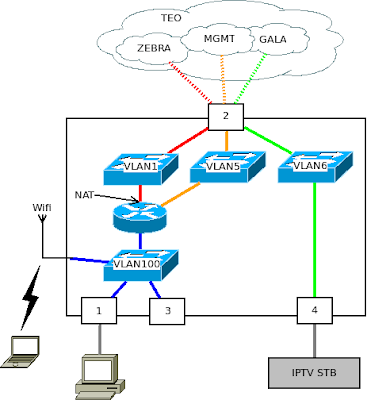
Siec wyglada w ten sposob:

schemat struktury sieci

Wyjasniam skroty:
TEO = tepsa.
ZEBRA = ich dzial ISP a takze nazwa uslugi internetowej - cos jak neostrada.
GALA = nazwa kablowki
MGMT = management jak sadze
IPTV STB = ten niby dekoder do kablowki. Wsadza sie do tego kabel ethernetowy i powinno banglac.

Znalazlem tez tutorial jak to zrobic na Debianie. Niestety jest on po litewsku (ale to mozna obejsc google translatorem w chromie) no i jest dla Debiana - nie mam pojecia jak to sie ma do DD-WRT.
Instrukcja krok po kroku jak to zrobic na Debianie, niestety po litewsku
Playlista zawierajaca adresy poszczegolnych kanalow IPTV dla VLC

Znalazlem tez blog po litewsku (znow nieoceniony chrome), na ktorym chlopaki probuja to jakos zrobic przez DD-WRT. Dzieki bogu kod jest uniwersalny.
Lista postow (5) na temat tej kablowki. PO LITEWSKU czyli tak jak po chinsku. Tylko google translator.
Próby zrobienia tego na DD-WRT

Tutaj lezy plik konfiguracji oryginalnego routera tepsy zawierajacy w zasadzie wszystko. Jedyne, co pozostaje zrobic to przelozyc/przekonwertowac to na DD-WRT... No i dodac mozliwosc ogladania TV na kompach...
Konfig routera Pirelli DRG125G

Bardzo, bardzo prosze o pomoc. Sam po prostu nie daje rady.

2

Odp: WR1043ND+DD-WRT+Vlan

Zapomnialem sprecyzowac:
Mam TP-Linka WR1043ND ze swiezo zainstalowanym DD-WRT v24-sp2 (08/07/10) std.
Próbowałem użyć tego tutoriala z dzialu supportu strony DD-WRT, ale w moim GUI kompletnie nie ma tego, co powinno byc wg tutoriala a jako, ze brak w nim kompletnie instrukcji jak to zrobic w konsoli - leze...

3

Odp: WR1043ND+DD-WRT+Vlan

Hmm, czemu na stronie odnośnie openwrt pytasz sie o dd-wrt? I czemu w ogóle dd-wrt?

Masz niepotrzebny router, uszkodzony czy nie - chętnie przygarnę go.

4

Odp: WR1043ND+DD-WRT+Vlan

O matko jestem slepy... Tydzien bezskutecznie staralem sie zrobic to z OpenWRT i stad po prostu pomylka. Nie ma znaczenia - moze byc OpenWRT jesli bedzie dzialac. Moze byc nawet sam diabel jesli ma dzialac. Swoja droga porownanie LuCi i tego webgui DD-wrt wypada bardzo niekorzystnie dla openwrt. Wlasciwie to openWRT jest zmiazdzone w tym porownaniu.

Acha - no i nie wiedzialem jeszcze jak zrobic w OpenWRT jeden myk.

Mam w sieci lokalnej serwerek www i mail. apacz serwuje wiele domen. Przekierowanie portow z DD-WRT czy dowolnego czegos innego pozwala mi na wchodzenie na strony serwowane przez lokalny serwer bez problemu. Idzie jakos "po zewnetrznej". Na openwrt nie - mimo, ze z zewnatrz dziala normalnie, z sieci wewnetrznej widze tylko konfig modemu.

Ale mniejsza z moimi problemami z openwrt. Tak jak mowilem wyzej - DD-WRT, Openwrt, Jezus-Chrystus, cokolwiek - byle dzialalo wink

5

Odp: WR1043ND+DD-WRT+Vlan

snifer napisał/a:

Jeżeli jednym kablem dostajesz dostajesz kilka usług to oczywiście styk rutera z isp leci na tagowanych vlanach, każda usługa w innym VlanID, i tu przede wszystkim musisz wiedzieć jakie VID jest używane dla poszczególnych usług, ustawienie sobie po prostu vlan1 vlan2 itp nic nie da. U mojego isp jest podobnie i klienci w różnych segmentach sieci wbijają się różnymi vlanami, standardowo używamy tu wprawdzie sprzętu Dlinka ze specjalnie zmienionym fabrycznym softem dodatkową z bramką voip ale ostatnio przerobiłem sobie wr1043 na takie coś i śmiga całkiem ładnie (oczywiście bez voipa, i tak bramkę mam osobno), używam openwrt bez gui, dla mnie to tylko zbędny balast a konfiguracja tekstowa jak już się w nią wgryźć jest bardziej przejrzysta niż graficzna, mam pełną kontrolę nad wszystkim. W skrócie u mnie wygląda to tak że mam osobny vlan do zarządzania tylko na porcie wan, na osobnym vlanie śmiga pppoe z natem na 3 portach lan i wifi z obsługą dodatkowo natywnego ipv6, jednocześnie na port wan wchodzi vlan z multicastami iptv i wylatuje nietagowany na 4 porcie lan do settopa. Dodatkowo zrobiłem sobie pptp do firmy + ruting do potrzebnych mi zasobów. Wszystko co wchodzi do portu wan jest tagowane. Jedyne czego mi brakuje to IGMP Snooping, gdybym chciał sobie podłączyć 2 lub 3 settopy to multicastami będzie dmuchało po wszystkich naraz i tu mam pytanie do Cezarego czy da się to jakoś zaimplementować w tym przełączniku? Byłoby fajnie :-)

edit: Też jestem trochę ślepy i nie doczytałem dołączonego konfigu, dobrze myślę, że ten twój ruter ma modem adsl? WR1043 nie ma więc to trochę komplikuje sprawę...

1. Oryginalny Pirelli ma modem adsl, ktory jest kompletnie nieuzywany. Router ma 1 port ten telefoniczny (zapomnialem numeru) i 4 ethernetowe. kabel od konwertera ze swiatlowodu na ethernet wpinam do portu X, settop do Y a pozostale 2 sa dla lanu.

Vlany jak na rysunku. Net leci w zasadzie chyba nietagowany bo bez rutera tez dziala. IPTV idzie na vlan6. Tego jestem pewien. Potrzebuje komend w stylu:

Zaloguj sie przez ssh
jezeli chcesz tv na porcie X, net na portach Y, Z i W a wan na A to:
nvram set blablabla #to ci tworzy interfejs blabla
nvram cosstam dalej - to tworzy vlana
... a to robi magie z igmp

Do tego, co ty chcesz zrobic jest jakis tutorial pod DD-WRT i w dodatku do starego gui. - musialbys go sobie przelozyc na openwrt.

http://www.dd-wrt.com/wiki/index.php/Se … ss_traffic

6

Odp: WR1043ND+DD-WRT+Vlan

OK. Skoro slowo IPTV az tak bardzo straszy wszystkich znanych mi adminow... Sprobujmy inaczej:

Zgodnie ze schematem wyzej mam "jakies" pakiety zaadresowane do vlan6. Prosze, pomozcie mi stworzyc vlan6 na porcie 4 i skierowac caly ruch adresowany do vlan6 na ten wlasnie port... Powinno starczyc.

7

Odp: WR1043ND+DD-WRT+Vlan

część /etc/config/network

config 'interface' 'vlan6'
option 'ifname' 'eth0.6'
option 'proto' 'none'
option 'defaultroute' '0'
option 'peerdns' '0'

config 'switch_vlan'
option 'device' 'rtl8366rb'
option 'vlan' '1'
option 'ports' '1 2 3 5t'

config 'switch_vlan'
option 'device' 'rtl8366rb'
option 'vlan' '2'
option 'ports' '0 5t'

config 'switch_vlan'
option 'device' 'rtl8366rb'
option 'vlan' '6'
option 'ports' '4t 5t'

O ile jest to vlan 6 i jest tagowany.

Masz niepotrzebny router, uszkodzony czy nie - chętnie przygarnę go.

8 (edytowany przez snifer 2011-01-22 19:20:52)

Odp: WR1043ND+DD-WRT+Vlan

Cezary napisał/a:

część /etc/config/network

config 'switch_vlan'
option 'device' 'rtl8366rb'
option 'vlan' '6'
option 'ports' '4t 5t'

O ile jest to vlan 6 i jest tagowany.

Zgodnie z rysunkiem u góry ruch tagowany wchodzi na port 2 a na settopa powinien raczej wychodzić nietagowany czyli

option 'ports' '2t 4 5t'

jeżeli vlan ma tylko przelatywać to może być bez '5t'

Przy okazji pytanie, Cezary czy da się jakoś włączyć igp snooping na wr1043nd?

Archer C7 v.2 + LEDE by Cezary http://beta.speedtest.net/pl/result/6621599402

9

Odp: WR1043ND+DD-WRT+Vlan

No tak, jeżeli to portem 2 wchodzi.

Masz niepotrzebny router, uszkodzony czy nie - chętnie przygarnę go.

10 (edytowany przez azzkickr 2011-01-27 07:27:54)

Odp: WR1043ND+DD-WRT+Vlan

Wow!

A myslalem, ze nikt sie nie pokusi...

Tak wiec - koledzy Litwini dawali mi porady jak to zrobic na linksysie jakims, ale mimo najszczerszych checi nie zadzialalo to na moim TP-Linku z DD-WRT. Przewalilem wiec z powrotem na OpenWrt i wlasnie probuje.

Niestety nie. Ale jako, ze jestem na OpenWrt juz z powrotem sluze tcpdumpem czy czym tam jeszcze moge poweszyc...

Moj /etc/config/network wyglada w tej chwili tak:

config 'interface' 'loopback'
       option 'ifname'   'lo'
       option 'proto'    'static'
       option 'ipaddr'   '127.0.0.1'
       option 'netmask'  '255.0.0.0'

config 'interface' 'lan'
        option 'ifname'   'eth0.1'
        option 'type'     'bridge'
        option 'proto'    'static'
        option 'ipaddr'   '192.168.1.1'
        option 'netmask'  '255.255.255.0'

config 'interface' 'wan'
        option 'ifname' 'eth0.2'
        option 'proto' 'dhcp'

config 'interface' 'vlan6'
        option 'ifname' 'eth0.6'
        option 'proto' 'none'
        option 'defaultroute' '0'
        option 'peerdns' '0'


config 'switch'
        option 'name' 'rtl8366rb'
        option 'reset' '1'
        option 'enable_vlan' '1'

config 'switch_vlan'
        option 'device' 'rtl8366rb'
        option 'vlan' '1'
        option 'ports' '1 2 3 5t'

config 'switch_vlan'
        option 'device' 'rtl8366rb'
        option 'vlan' '2'
        option 'ports' '0 5t'

config 'switch_vlan'
        option 'device' 'rtl8366rb'
        option 'vlan' '6'
        option 'ports' '4t 5t'

Litwini proponowali na DD-WRT zrobic:

nvram set vlan1ports="2 3 4 8t"
nvram set vlan6ports="0t 1 8t"
nvram set vlan6hwname=et0
nvram commit
reboot

co rowniez nie przynioslo rezultatu. Probowalem roznych kombinacji - po pierwsze pozamienialem 8 na 5 (podobno 8 jest dla gigabitowych ruterow. Ten moj wr1043nd niby jest gigabitowy, ale wszedzie ma 5. Niewazne...) probowalem pozniej rozne kombinacle * i t, ale jakos bezskutecznie.

11 (edytowany przez rpc 2011-01-27 11:05:13)

Odp: WR1043ND+DD-WRT+Vlan

moja propozycja to:
gdzie:
WAN - port niebieski routera port nr.0 (vlan 1-nietagowany; 5,6-tagowane)
LAN - porty nr.1,2,3 (vlan 2 nietagowany)
IPTV - port nr.4 ( vlan 6 nietagowany)
numerację portów zobaczysz sobie na rysunku http://rpc.one.pl/index.php/lista-artyk … od-openwrt

config 'interface' 'loopback'
       option 'ifname'   'lo'
       option 'proto'    'static'
       option 'ipaddr'   '127.0.0.1'
       option 'netmask'  '255.0.0.0'

config 'interface' 'lan'
        option 'ifname'   'eth0.2'
        option 'type'     'bridge'
        option 'proto'    'static'
        option 'ipaddr'   '192.168.1.1'
        option 'netmask'  '255.255.255.0'

config 'interface' 'wan'
        option 'ifname' 'eth0.1'
        option 'proto' 'dhcp'

config 'interface' 'vlan6'
        option 'ifname' 'eth0.6'
        option 'proto' 'none'
        option 'defaultroute' '0'
        option 'peerdns' '0'

config 'interface' 'vlan5'
        option 'ifname' 'eth0.5'
        option 'proto' 'none'
        option 'defaultroute' '0'
        option 'peerdns' '0'

config 'switch'
        option 'name' 'rtl8366rb'
        option 'reset' '1'
        option 'enable_vlan' '1'

config 'switch_vlan'
        option 'device' 'rtl8366rb'
        option 'vlan' '6'
        option 'ports' '0t 4 5t'

config 'switch_vlan'
        option 'device' 'rtl8366rb'
        option 'vlan' '5'
        option 'ports' '0t 5t'

config 'switch_vlan'
        option 'device' 'rtl8366rb'
        option 'vlan' '1'
        option 'ports' '0 5t'

config 'switch_vlan'
        option 'device' 'rtl8366rb'
        option 'vlan' '2'
        option 'ports' '1 2 3 5t'

UWAGA proszę zachować kolejność

czy port 4 (vlan6) ma być tagowany na wyjściu ? bo nie zdeklarowałeś tego dokładnie - dobra widze w konfigu ma być nietagowany

po ustawieniu w/w proszę o podanie na poczatek logów:

swconfig dev rtl8366rb vlan 1 show
swconfig dev rtl8366rb vlan 2 show
swconfig dev rtl8366rb vlan 5 show
swconfig dev rtl8366rb vlan 6 show

zobaczymy czy wszystko sie ustawiło poprawnie jeśli nie to może się cos poprawi
to tak na poczatek

ps. pozostaje jeszcze sprawa adresu MAC od strony WAN. Jeśli dają sprzęt to pewnie mogą kontrolować adres MAC routera.  Chyba że nie kontrolują ale my tu nie będziemy tego wiedzieć.

12

Odp: WR1043ND+DD-WRT+Vlan

Zbawco!!!

Chryste panie... siedzialem dzisiaj z kumplem nad tym do 8:30 rano. Od wczoraj, rzecz jasna. A tu kolega jednym ruchem reki ciach i po sprawie! Niesamowite...

Czy bede zbyt bezczelny pytajac jak by to ustrojstwo udostepnic teraz dla kompa?

Litwini na Pirelli 125 robia to jakos tak: (tekst z translatora)

Zaloguj się do routera. Można tego dokonać dowolnej przeglądarki wprowadzenie adresu routera. W większości przypadków router IP to 192.168.1.254. Po podłączeniu do routera, trzeba będzie wprowadzić nazwę użytkownika i hasło. Jeśli się nie mylę, standardowej konfiguracji i nazwę użytkownika i hasło są takie same - "admin".
    Włącz IGMP, IGMP fast leave unicast i multicast IGMP functionality. W celu wybierz "Zaawansowane"> "Routing" zamieszczono protokoły routingu "tick zaznaczyć odpowiednie opcje. Uaktywnij zmiany, klikając przycisk "Zastosuj"
    Włącz routing IP pomiędzy siecią wewnętrzną i GALA TV Network (VLAN6). Potrzebujesz menu wybrać "Połączenia sieciowe". Następnie należy kliknac IPTV bridge. W ten sposób otworzyć konfig podsieci Gala TV. Kolumna "Ustawienia" pod "Internet Protocol" wybierz "Uzyskaj adres IP automatycznie". Uaktywnij zmiany, klikając przycisk "Zastosuj". W kolumnie "trasy" w "trybie routingu" do "NAPT" Tick Tick "Multicast - IGMP Proxy Default" i dodać (droga) do "Destination" 239.2.0.0 netmask i "255.255.0.0. Uaktywnij zmiany, klikając przycisk "Zastosuj"
    Włącz IGMP intranet. Potrzebujesz menu wybrać "Połączenia sieciowe". Następnie należy aktywować link LAN Bridge ". W ten sposób otworzyć wewnętrznej stronie konfiguracji sieci. W kolumnie "trasy" w "Multicast - IGMP Proxy wewnętrzny" (postawić znak wyboru) i wybierz "IGMPv3.
    Przeładuj routera. Wybierz menu "Zaawansowane" a następnie "reboot". Odczekać 2-3 minut i mogą być testowane.

===

13

Odp: WR1043ND+DD-WRT+Vlan

I jeszcze odpowiedz na pytanie:

root@OpenWrt:~# swconfig dev rtl8366rb vlan 1 show
VLAN 1:
        info: VLAN 1: Ports: '05t', members=0021, untag=0001, fid=0
        ports: 0 5t
root@OpenWrt:~# swconfig dev rtl8366rb vlan 2 show
VLAN 2:
        info: VLAN 2: Ports: '1235t', members=002e, untag=000e, fid=0
        ports: 1 2 3 5t
root@OpenWrt:~# swconfig dev rtl8366rb vlan 5 show
VLAN 5:
        info: VLAN 5: Ports: '0t5t', members=0021, untag=0000, fid=0
        ports: 0t 5t
root@OpenWrt:~# swconfig dev rtl8366rb vlan 6 show
VLAN 6:
        info: VLAN 6: Ports: '0t45t', members=0031, untag=0010, fid=0
        ports: 0t 4 5t

14 (edytowany przez rpc 2011-01-27 20:31:31)

Odp: WR1043ND+DD-WRT+Vlan

z tego co widzę vlan są przydzielone poprawnie wedle założeń.

Daj logi z routera  po restarcie czyli:

ifconfig
route -n
logread

Teraz ty musisz nam coś powiedzieć bo nic z tego nie rozumiemy i nie chce nam się translatować smile. Odpowiedz na następujące pytania:
1. Jak podłączasz komputer bez routera bezpośrednio do transivera(konwerter światłowodowy) to co robisz aby uzyskać połączenie z internetem ? Opisz w punktach co robisz po kolei, daj log np. windows ipconfig, route print
2. Jaki system operacyjny na tym komputerze masz.
3.Jak rozumiem z ADSL nie korzystasz w ogóle. Gniazdo jest nieużywane ?

no i wytłumacz nam co znaczą twoje słowa "jak by to ustrojstwo udostepnic teraz dla kompa?" bo ja nie rozumiem czy masz już internet na routerze czy nie czy masz coś innego czy nie i co chcesz tak naprawdę udostępnić. Staraj się pisać po kolei a nie wszystkiego po trochu.

15

Odp: WR1043ND+DD-WRT+Vlan

root@OpenWrt:~# ifconfig
br-lan    Link encap:Ethernet  HWaddr 74:EA:3A:DA:8D:96
          inet addr:192.168.1.1  Bcast:192.168.1.255  Mask:255.255.255.0
          UP BROADCAST RUNNING MULTICAST  MTU:1500  Metric:1
          RX packets:329041 errors:0 dropped:0 overruns:0 frame:0
          TX packets:204780 errors:0 dropped:0 overruns:0 carrier:0
          collisions:0 txqueuelen:0
          RX bytes:294168975 (280.5 MiB)  TX bytes:42456430 (40.4 MiB)

eth0      Link encap:Ethernet  HWaddr 74:EA:3A:DA:8D:96
          UP BROADCAST RUNNING MULTICAST  MTU:1500  Metric:1
          RX packets:2188919 errors:0 dropped:0 overruns:0 frame:0
          TX packets:579196 errors:0 dropped:0 overruns:0 carrier:0
          collisions:0 txqueuelen:1000
          RX bytes:2310280844 (2.1 GiB)  TX bytes:346831319 (330.7 MiB)
          Interrupt:4

eth0.1    Link encap:Ethernet  HWaddr 74:EA:3A:DA:8D:96
          inet addr:88.118.11.101  Bcast:88.118.15.255  Mask:255.255.240.0
          UP BROADCAST RUNNING MULTICAST  MTU:1500  Metric:1
          RX packets:231763 errors:0 dropped:0 overruns:0 frame:0
          TX packets:350609 errors:0 dropped:0 overruns:0 carrier:0
          collisions:0 txqueuelen:0
          RX bytes:41842578 (39.9 MiB)  TX bytes:301002521 (287.0 MiB)

eth0.2    Link encap:Ethernet  HWaddr 74:EA:3A:DA:8D:96
          UP BROADCAST RUNNING MULTICAST  MTU:1500  Metric:1
          RX packets:352612 errors:0 dropped:0 overruns:0 frame:0
          TX packets:228582 errors:0 dropped:0 overruns:0 carrier:0
          collisions:0 txqueuelen:0
          RX bytes:297402462 (283.6 MiB)  TX bytes:45827575 (43.7 MiB)

eth0.5    Link encap:Ethernet  HWaddr 74:EA:3A:DA:8D:96
          UP BROADCAST RUNNING MULTICAST  MTU:1500  Metric:1
          RX packets:0 errors:0 dropped:0 overruns:0 frame:0
          TX packets:0 errors:0 dropped:0 overruns:0 carrier:0
          collisions:0 txqueuelen:0
          RX bytes:0 (0.0 B)  TX bytes:0 (0.0 B)

eth0.6    Link encap:Ethernet  HWaddr 74:EA:3A:DA:8D:96
          UP BROADCAST RUNNING MULTICAST  MTU:1500  Metric:1
          RX packets:1603883 errors:0 dropped:0 overruns:0 frame:0
          TX packets:0 errors:0 dropped:0 overruns:0 carrier:0
          collisions:0 txqueuelen:0
          RX bytes:1940328602 (1.8 GiB)  TX bytes:0 (0.0 B)

lo        Link encap:Local Loopback
          inet addr:127.0.0.1  Mask:255.0.0.0
          UP LOOPBACK RUNNING  MTU:16436  Metric:1
          RX packets:0 errors:0 dropped:0 overruns:0 frame:0
          TX packets:0 errors:0 dropped:0 overruns:0 carrier:0
          collisions:0 txqueuelen:0
          RX bytes:0 (0.0 B)  TX bytes:0 (0.0 B)

mon.wlan0 Link encap:UNSPEC  HWaddr 74-EA-3A-DA-8D-96-00-00-00-00-00-00-00-00-00                                                                             -00
          UP BROADCAST RUNNING MULTICAST  MTU:1500  Metric:1
          RX packets:781 errors:0 dropped:0 overruns:0 frame:0
          TX packets:0 errors:0 dropped:0 overruns:0 carrier:0
          collisions:0 txqueuelen:1000
          RX bytes:56171 (54.8 KiB)  TX bytes:0 (0.0 B)

wlan0     Link encap:Ethernet  HWaddr 74:EA:3A:DA:8D:96
          UP BROADCAST RUNNING MULTICAST  MTU:1500  Metric:1
          RX packets:25792 errors:0 dropped:0 overruns:0 frame:0
          TX packets:29404 errors:0 dropped:0 overruns:0 carrier:0
          collisions:0 txqueuelen:1000
          RX bytes:3263930 (3.1 MiB)  TX bytes:4108168 (3.9 MiB)

root@OpenWrt:~#
root@OpenWrt:~# route -n
Kernel IP routing table
Destination     Gateway         Genmask         Flags Metric Ref    Use Iface
192.168.1.0     0.0.0.0         255.255.255.0   U     0      0        0 br-lan
88.118.0.0      0.0.0.0         255.255.240.0   U     0      0        0 eth0.1
0.0.0.0         88.118.15.254   0.0.0.0         UG    0      0        0 eth0.1
root@OpenWrt:~#
root@OpenWrt:~# logread
Nov 19 19:28:00 OpenWrt user.info kernel: Inode-cache hash table entries: 2048 (order: 1, 8192 bytes)
Nov 19 19:28:00 OpenWrt user.warn kernel: Primary instruction cache 64kB, VIPT, 4-way, linesize 32 bytes.
Nov 19 19:28:00 OpenWrt user.warn kernel: Primary data cache 32kB, 4-way, VIPT, cache aliases, linesize 32 bytes
Nov 19 19:28:00 OpenWrt user.info kernel: Writing ErrCtl register=00000000
Nov 19 19:28:00 OpenWrt user.info kernel: Readback ErrCtl register=00000000
Nov 19 19:28:00 OpenWrt user.info kernel: Memory: 29304k/32768k available (2113k kernel code, 3464k reserved, 395k data, 152k init, 0k highmem)
Nov 19 19:28:00 OpenWrt user.info kernel: SLUB: Genslabs=7, HWalign=32, Order=0-3, MinObjects=0, CPUs=1, Nodes=1
Nov 19 19:28:00 OpenWrt user.info kernel: Hierarchical RCU implementation.
Nov 19 19:28:00 OpenWrt user.info kernel: NR_IRQS:56
Nov 19 19:28:00 OpenWrt user.info kernel: Calibrating delay loop... 266.24 BogoMIPS (lpj=1331200)
Nov 19 19:28:00 OpenWrt user.warn kernel: Mount-cache hash table entries: 512
Nov 19 19:28:00 OpenWrt user.info kernel: NET: Registered protocol family 16
Nov 19 19:28:00 OpenWrt user.notice kernel: MIPS: machine is TP-LINK TL-WR1043ND
Nov 19 19:28:00 OpenWrt user.warn kernel: bio: create slab <bio-0> at 0
Nov 19 19:28:00 OpenWrt user.info kernel: Switching to clocksource MIPS
Nov 19 19:28:00 OpenWrt user.info kernel: NET: Registered protocol family 2
Nov 19 19:28:00 OpenWrt user.info kernel: IP route cache hash table entries: 1024 (order: 0, 4096 bytes)
Nov 19 19:28:00 OpenWrt user.info kernel: TCP established hash table entries: 1024 (order: 1, 8192 bytes)
Nov 19 19:28:00 OpenWrt user.info kernel: TCP bind hash table entries: 1024 (order: 0, 4096 bytes)
Nov 19 19:28:00 OpenWrt user.info kernel: TCP: Hash tables configured (established 1024 bind 1024)
Nov 19 19:28:00 OpenWrt user.info kernel: TCP reno registered
Nov 19 19:28:00 OpenWrt user.info kernel: NET: Registered protocol family 1
Nov 19 19:28:00 OpenWrt user.info kernel: squashfs: version 4.0 (2009/01/31) Phillip Lougher
Nov 19 19:28:00 OpenWrt user.warn kernel: Registering mini_fo version $Id$
Nov 19 19:28:00 OpenWrt user.info kernel: JFFS2 version 2.2. (NAND) (SUMMARY)  Š 2001-2006 Red Hat, Inc.
Nov 19 19:28:00 OpenWrt user.warn kernel: yaffs Nov 19 2010 20:21:41 Installing.
Nov 19 19:28:00 OpenWrt user.info kernel: msgmni has been set to 57
Nov 19 19:28:00 OpenWrt user.info kernel: io scheduler noop registered
Nov 19 19:28:00 OpenWrt user.info kernel: io scheduler deadline registered (default)
Nov 19 19:28:00 OpenWrt user.info kernel: Serial: 8250/16550 driver, 1 ports, IRQ sharing disabled
Nov 19 19:28:00 OpenWrt user.info kernel: serial8250.0: ttyS0 at MMIO 0x18020000 (irq = 11) is a 16550A
Nov 19 19:28:00 OpenWrt user.info kernel: console [ttyS0] enabled, bootconsole disabled
Nov 19 19:28:00 OpenWrt user.info kernel: Atheros AR71xx SPI Controller driver version 0.2.4
Nov 19 19:28:01 OpenWrt user.debug kernel: ar71xx: pll_reg 0xb8050014: 0x1a000000
Nov 19 19:28:01 OpenWrt user.info kernel: eth0: link up (1000Mbps/Full duplex)
Nov 19 19:28:02 OpenWrt user.info kernel: device eth0.2 entered promiscuous mode
Nov 19 19:28:02 OpenWrt user.info kernel: device eth0 entered promiscuous mode
Nov 19 19:28:02 OpenWrt user.info kernel: br-lan: port 1(eth0.2) entering forwarding state
Nov 19 19:28:02 OpenWrt user.info kernel: Compat-wireless backport release: compat-wireless-2010-10-14-7-gab01eca
Nov 19 19:28:02 OpenWrt user.info kernel: Backport based on wireless-testing.git master-2010-10-19
Nov 19 19:28:03 OpenWrt user.info kernel: cfg80211: Calling CRDA to update world regulatory domain
Nov 19 19:28:04 OpenWrt user.info kernel: usbcore: registered new interface driver usbfs
Nov 19 19:28:04 OpenWrt user.info kernel: usbcore: registered new interface driver hub
Nov 19 19:28:05 OpenWrt user.info kernel: usbcore: registered new device driver usb
Nov 19 19:28:07 OpenWrt user.info kernel: cfg80211: World regulatory domain updated:
Nov 19 19:28:07 OpenWrt user.info kernel:     (start_freq - end_freq @ bandwidth), (max_antenna_gain, max_eirp)
Nov 19 19:28:07 OpenWrt user.info kernel:     (2402000 KHz - 2472000 KHz @ 40000 KHz), (300 mBi, 2000 mBm)
Nov 19 19:28:07 OpenWrt user.info kernel:     (2457000 KHz - 2482000 KHz @ 20000 KHz), (300 mBi, 2000 mBm)
Nov 19 19:28:07 OpenWrt user.info kernel:     (2474000 KHz - 2494000 KHz @ 20000 KHz), (300 mBi, 2000 mBm)
Nov 19 19:28:07 OpenWrt user.info kernel:     (5170000 KHz - 5250000 KHz @ 40000 KHz), (300 mBi, 2000 mBm)
Nov 19 19:28:07 OpenWrt user.info kernel:     (5735000 KHz - 5835000 KHz @ 40000 KHz), (300 mBi, 2000 mBm)
Nov 19 19:28:08 OpenWrt user.debug kernel: ath: EEPROM regdomain: 0x0
Nov 19 19:28:08 OpenWrt user.debug kernel: ath: EEPROM indicates default country code should be used
Nov 19 19:28:08 OpenWrt user.debug kernel: ath: doing EEPROM country->regdmn map search
Nov 19 19:28:08 OpenWrt user.debug kernel: ath: country maps to regdmn code: 0x3a
Nov 19 19:28:08 OpenWrt user.debug kernel: ath: Country alpha2 being used: US
Nov 19 19:28:08 OpenWrt user.debug kernel: ath: Regpair used: 0x3a
Nov 19 19:28:08 OpenWrt user.debug kernel: ieee80211 phy0: Selected rate control algorithm 'minstrel_ht'
Nov 19 19:28:08 OpenWrt user.info kernel: ieee80211 phy0: Atheros AR9100 MAC/BB Rev:0 AR2133 RF Rev:a2 mem=0xb80c0000, irq=2
Nov 19 19:28:08 OpenWrt user.info kernel: cfg80211: Calling CRDA for country: US
Nov 19 19:28:08 OpenWrt user.info kernel: cfg80211: Regulatory domain changed to country: US
Nov 19 19:28:08 OpenWrt user.info kernel:     (start_freq - end_freq @ bandwidth), (max_antenna_gain, max_eirp)
Nov 19 19:28:08 OpenWrt user.info kernel:     (2402000 KHz - 2472000 KHz @ 40000 KHz), (300 mBi, 2700 mBm)
Nov 19 19:28:08 OpenWrt user.info kernel:     (5170000 KHz - 5250000 KHz @ 40000 KHz), (300 mBi, 1700 mBm)
Nov 19 19:28:08 OpenWrt user.info kernel:     (5250000 KHz - 5330000 KHz @ 40000 KHz), (300 mBi, 2000 mBm)
Nov 19 19:28:08 OpenWrt user.info kernel:     (5490000 KHz - 5600000 KHz @ 40000 KHz), (300 mBi, 2000 mBm)
Nov 19 19:28:08 OpenWrt user.info kernel:     (5650000 KHz - 5710000 KHz @ 40000 KHz), (300 mBi, 2000 mBm)
Nov 19 19:28:08 OpenWrt user.info kernel:     (5735000 KHz - 5835000 KHz @ 40000 KHz), (300 mBi, 3000 mBm)
Nov 19 19:28:08 OpenWrt user.info kernel: PPP generic driver version 2.4.2
Nov 19 19:28:08 OpenWrt user.info kernel: ip_tables: (C) 2000-2006 Netfilter Core Team
Nov 19 19:28:08 OpenWrt user.info kernel: NET: Registered protocol family 24
Nov 19 19:28:09 OpenWrt user.info kernel: ehci_hcd: USB 2.0 'Enhanced' Host Controller (EHCI) Driver
Nov 19 19:28:09 OpenWrt user.info kernel: ar71xx-ehci ar71xx-ehci: Atheros AR91xx built-in EHCI controller
Nov 19 19:28:09 OpenWrt user.info kernel: ar71xx-ehci ar71xx-ehci: new USB bus registered, assigned bus number 1
Nov 19 19:28:09 OpenWrt user.info kernel: ar71xx-ehci ar71xx-ehci: irq 3, io mem 0x1b000000
Nov 19 19:28:09 OpenWrt user.info kernel: ar71xx-ehci ar71xx-ehci: USB 2.0 started, EHCI 1.00
Nov 19 19:28:09 OpenWrt user.info kernel: usb usb1: configuration #1 chosen from 1 choice
Nov 19 19:28:09 OpenWrt user.info kernel: hub 1-0:1.0: USB hub found
Nov 19 19:28:09 OpenWrt user.info kernel: hub 1-0:1.0: 1 port detected
Nov 19 19:28:09 OpenWrt user.warn kernel: nf_conntrack version 0.5.0 (460 buckets, 1840 max)
Nov 19 19:28:09 OpenWrt user.warn kernel: CONFIG_NF_CT_ACCT is deprecated and will be removed soon. Please use
Nov 19 19:28:09 OpenWrt user.warn kernel: nf_conntrack.acct=1 kernel parameter, acct=1 nf_conntrack module option or
Nov 19 19:28:09 OpenWrt user.warn kernel: sysctl net.netfilter.nf_conntrack_acct=1 to enable it.
Nov 19 19:28:10 OpenWrt user.warn kernel: ath_hal: module license 'Proprietary' taints kernel.
Nov 19 19:28:10 OpenWrt user.warn kernel: Disabling lock debugging due to kernel taint
Nov 19 19:28:10 OpenWrt user.info kernel: ath_hal: 2009-05-08 (AR5210, AR5211, AR5212, AR5416, RF5111, RF5112, RF2413, RF5413, RF2133, RF2425, REGOPS_FUNC, XR)
Nov 19 19:28:10 OpenWrt user.info kernel: ath_pci: trunk
Nov 19 19:28:10 OpenWrt user.info kernel: wlan: trunk
Nov 19 19:28:10 OpenWrt user.info kernel: wlan: mac acl policy registered
Nov 19 19:28:10 OpenWrt user.info kernel: ath_rate_minstrel: Minstrel automatic rate control algorithm 1.2 (trunk)
Nov 19 19:28:10 OpenWrt user.info kernel: ath_rate_minstrel: look around rate set to 10%
Nov 19 19:28:10 OpenWrt user.info kernel: ath_rate_minstrel: EWMA rolloff level set to 75%
Nov 19 19:28:10 OpenWrt user.info kernel: ath_rate_minstrel: max segment size in the mrr set to 6000 us
Nov 19 19:28:10 OpenWrt user.info kernel: ohci_hcd: USB 1.1 'Open' Host Controller (OHCI) Driver
Nov 19 19:28:13 OpenWrt user.info kernel: device wlan0 entered promiscuous mode
Nov 19 19:28:13 OpenWrt user.info kernel: br-lan: port 2(wlan0) entering forwarding state
Jan 27 18:02:33 OpenWrt user.notice rdate: Synced with ptbtime2.ptb.de
Jan 27 18:02:34 OpenWrt user.info kernel: device wlan0 left promiscuous mode
Jan 27 18:02:34 OpenWrt user.info kernel: br-lan: port 2(wlan0) entering disabled state
Jan 27 18:02:34 OpenWrt user.info kernel: device wlan0 entered promiscuous mode
Jan 27 18:02:34 OpenWrt user.info kernel: br-lan: port 2(wlan0) entering forwarding state
Jan 27 18:02:35 OpenWrt user.info sysinit: Loading defaults
Jan 27 18:02:35 OpenWrt user.info sysinit: Loading synflood protection
Jan 27 18:02:35 OpenWrt user.info sysinit: Adding custom chains
Jan 27 18:02:36 OpenWrt user.info sysinit: Loading zones
Jan 27 18:02:36 OpenWrt user.info sysinit: Loading forwarding
Jan 27 18:02:36 OpenWrt user.info sysinit: Loading redirects
Jan 27 18:02:36 OpenWrt user.info sysinit: Loading rules
Jan 27 18:02:36 OpenWrt user.info sysinit: Loading includes
Jan 27 18:02:36 OpenWrt user.info sysinit: Loading zone defaults
Jan 27 18:02:37 OpenWrt user.notice root: adding lan (br-lan) to firewall zone lan
Jan 27 18:02:37 OpenWrt user.notice root: adding wan (eth0.1) to firewall zone wan
Jan 27 18:02:39 OpenWrt authpriv.info dropbear[1415]: Running in background
Jan 27 18:02:39 OpenWrt user.notice dnsmasq: DNS rebinding protection is active, will discard upstream RFC1918 responses!
Jan 27 18:02:39 OpenWrt user.notice dnsmasq: Allowing 127.0.0.0/8 responses
Jan 27 18:02:41 OpenWrt daemon.info hostapd: wlan0: STA 00:21:5a:3d:9b:fc IEEE 802.11: authenticated
Jan 27 18:02:41 OpenWrt daemon.info hostapd: wlan0: STA 00:21:5a:3d:9b:fc IEEE 802.11: associated (aid 1)
Jan 27 18:02:41 OpenWrt daemon.info hostapd: wlan0: STA 00:21:5a:3d:9b:fc WPA: received EAPOL-Key 2/4 Pairwise with unexpected replay counter
Jan 27 18:02:41 OpenWrt daemon.info hostapd: wlan0: STA 00:21:5a:3d:9b:fc WPA: pairwise key handshake completed (RSN)
Jan 27 18:02:43 OpenWrt daemon.info dnsmasq[1469]: started, version 2.55 cachesize 150
Jan 27 18:02:43 OpenWrt daemon.info dnsmasq[1469]: compile time options: IPv6 GNU-getopt no-DBus no-I18N DHCP TFTP
Jan 27 18:02:43 OpenWrt daemon.info dnsmasq-dhcp[1469]: DHCP, IP range 192.168.1.100 -- 192.168.1.250, lease time 12h
Jan 27 18:02:43 OpenWrt daemon.info dnsmasq[1469]: using local addresses only for domain lan
Jan 27 18:02:43 OpenWrt daemon.info dnsmasq[1469]: reading /tmp/resolv.conf.auto
Jan 27 18:02:43 OpenWrt daemon.info dnsmasq[1469]: using nameserver 212.59.2.2#53
Jan 27 18:02:43 OpenWrt daemon.info dnsmasq[1469]: using nameserver 212.59.1.1#53
Jan 27 18:02:43 OpenWrt daemon.info dnsmasq[1469]: using local addresses only for domain lan
Jan 27 18:02:43 OpenWrt daemon.info dnsmasq[1469]: read /etc/hosts - 1 addresses
Jan 27 18:02:43 OpenWrt daemon.info dnsmasq-dhcp[1469]: read /etc/ethers - 0 addresses
Jan 27 18:02:43 OpenWrt user.info sysinit: setting up led WLAN
Jan 27 18:02:43 OpenWrt user.debug kernel: ar71xx-wdt: enabling watchdog timer
Jan 27 18:02:45 OpenWrt daemon.info hostapd: wlan0: STA 90:21:55:66:cb:90 IEEE 802.11: authenticated
Jan 27 18:02:45 OpenWrt daemon.info hostapd: wlan0: STA 90:21:55:66:cb:90 IEEE 802.11: associated (aid 2)
Jan 27 18:02:45 OpenWrt daemon.info hostapd: wlan0: STA 90:21:55:66:cb:90 WPA: pairwise key handshake completed (RSN)
Jan 27 18:02:49 OpenWrt daemon.info dnsmasq-dhcp[1469]: DHCPDISCOVER(br-lan) 90:21:55:66:cb:90
Jan 27 18:02:49 OpenWrt daemon.info dnsmasq-dhcp[1469]: DHCPOFFER(br-lan) 192.168.1.189 90:21:55:66:cb:90
Jan 27 18:02:49 OpenWrt daemon.info dnsmasq-dhcp[1469]: DHCPREQUEST(br-lan) 192.168.1.189 90:21:55:66:cb:90
Jan 27 18:02:49 OpenWrt daemon.info dnsmasq-dhcp[1469]: DHCPACK(br-lan) 192.168.1.189 90:21:55:66:cb:90 android_20014688babe5ff6
Jan 27 18:03:04 OpenWrt daemon.warn dnsmasq-dhcp[1469]: DHCP packet received on eth0.6 which has no address
Jan 27 18:03:06 OpenWrt daemon.warn dnsmasq-dhcp[1469]: DHCP packet received on eth0.6 which has no address
Jan 27 18:03:07 OpenWrt daemon.warn dnsmasq-dhcp[1469]: DHCP packet received on eth0.6 which has no address
Jan 27 18:03:11 OpenWrt daemon.info hostapd: wlan0: STA 00:21:5a:3d:9b:fc IEEE 802.11: authenticated
Jan 27 18:03:11 OpenWrt daemon.info hostapd: wlan0: STA 00:21:5a:3d:9b:fc IEEE 802.11: associated (aid 1)
Jan 27 18:03:12 OpenWrt daemon.info hostapd: wlan0: STA 00:21:5a:3d:9b:fc WPA: received EAPOL-Key 2/4 Pairwise with unexpected replay counter
Jan 27 18:03:12 OpenWrt daemon.info hostapd: wlan0: STA 00:21:5a:3d:9b:fc WPA: pairwise key handshake completed (RSN)
Jan 27 18:04:36 OpenWrt daemon.warn dnsmasq-dhcp[1469]: DHCP packet received on eth0.6 which has no address
Jan 27 18:05:12 OpenWrt daemon.warn dnsmasq-dhcp[1469]: DHCP packet received on eth0.6 which has no address
Jan 27 18:12:03 OpenWrt authpriv.info dropbear[1711]: Child connection from 192.168.1.3:51296
Jan 27 18:12:08 OpenWrt authpriv.notice dropbear[1711]: password auth succeeded for 'root' from 192.168.1.3:51296
Jan 27 18:12:34 OpenWrt daemon.info hostapd: wlan0: STA 00:21:5a:3d:9b:fc WPA: group key handshake completed (RSN)
Jan 27 18:12:35 OpenWrt daemon.info hostapd: wlan0: STA 90:21:55:66:cb:90 WPA: group key handshake completed (RSN)
Jan 27 18:12:35 OpenWrt daemon.info hostapd: wlan0: STA 90:21:55:66:cb:90 WPA: received EAPOL-Key 2/2 Group with unexpected replay counter
Jan 27 18:22:34 OpenWrt daemon.info hostapd: wlan0: STA 00:21:5a:3d:9b:fc WPA: group key handshake completed (RSN)
Jan 27 18:22:35 OpenWrt daemon.info hostapd: wlan0: STA 90:21:55:66:cb:90 WPA: group key handshake completed (RSN)
Jan 27 18:22:35 OpenWrt daemon.info hostapd: wlan0: STA 90:21:55:66:cb:90 WPA: received EAPOL-Key 2/2 Group with unexpected replay counter
Jan 27 18:32:34 OpenWrt daemon.info hostapd: wlan0: STA 00:21:5a:3d:9b:fc WPA: group key handshake completed (RSN)
Jan 27 18:32:35 OpenWrt daemon.info hostapd: wlan0: STA 90:21:55:66:cb:90 WPA: group key handshake completed (RSN)
Jan 27 18:32:35 OpenWrt daemon.info hostapd: wlan0: STA 90:21:55:66:cb:90 WPA: received EAPOL-Key 2/2 Group with unexpected replay counter
Jan 27 18:35:12 OpenWrt daemon.warn dnsmasq-dhcp[1469]: DHCP packet received on eth0.6 which has no address
Jan 27 18:42:34 OpenWrt daemon.info hostapd: wlan0: STA 00:21:5a:3d:9b:fc WPA: group key handshake completed (RSN)
Jan 27 18:42:35 OpenWrt daemon.info hostapd: wlan0: STA 90:21:55:66:cb:90 WPA: group key handshake completed (RSN)
Jan 27 18:42:35 OpenWrt daemon.info hostapd: wlan0: STA 90:21:55:66:cb:90 WPA: received EAPOL-Key 2/2 Group with unexpected replay counter
Jan 27 18:52:34 OpenWrt daemon.info hostapd: wlan0: STA 00:21:5a:3d:9b:fc WPA: group key handshake completed (RSN)
Jan 27 18:52:35 OpenWrt daemon.info hostapd: wlan0: STA 90:21:55:66:cb:90 WPA: group key handshake completed (RSN)
Jan 27 18:52:35 OpenWrt daemon.info hostapd: wlan0: STA 90:21:55:66:cb:90 WPA: received EAPOL-Key 2/2 Group with unexpected replay counter
Jan 27 19:00:10 OpenWrt daemon.warn dnsmasq-dhcp[1469]: DHCP packet received on eth0.6 which has no address
Jan 27 19:02:34 OpenWrt daemon.info hostapd: wlan0: STA 00:21:5a:3d:9b:fc WPA: group key handshake completed (RSN)
Jan 27 19:02:34 OpenWrt daemon.info hostapd: wlan0: STA 90:21:55:66:cb:90 WPA: group key handshake completed (RSN)
root@OpenWrt:~#

1. Nic. No dobra - podlaczam UTP kat 5 ze zlaczem RJ45 do odpowiedniego portu karty sieciowej. Karte przestawiam na DHCP. Czasem ISP sie pluje, ze mac sie zmienil i kaze zmienic w formularzu. Ostatnio raczej nie. Czyli nic.
2. Na tym konkretnie mam Win7 ale mam tez laptopa z ubuntu i z backtrackiem.
3. W oryginalnym routerze od ISP jest gniazdo ADSL. Nieuzywane. W WR1043ND nie ma.
4. Spiesze z wyjasnieniami: Wszystko pieknie smiga. Net dziala jak pan bog przykazal. TV tez. Wifi tez. Marzenie. Ale jako, ze zawsze mogloby byc lepiej - i jak czlowiekowi dadza palec to cala reke upierdzieli - zachcialo mi sie wiecej. Na tym blogu jest instrukcja (po litewsku, a jakze!) jak umozliwic ogladanie TV przez kompa a nie tylko przez settopa. Chlopaki pisza, ze wszystko ladnie dziala - niemozliwe jest jedynie ogladanie tego samego kanalu na dwoch odbiornikach jednoczesnie, i - ze po resecie rutera albo poweroffie settopa konfig trzeba przywracac do defaultowego (IPTV jedynie na porcie dla settopa) i ustawiac wszystko od nowa. (co nie jest specjalnym problemem, jako, ze router mam na UPS'ie a settopa nie wylaczam z pradu praktycznie nigdy.)

Ich instrukcja, w skrocie, kaze:
1. zalogowac sie na router
2. w sekcji Advanced -> Routing wlaczyc IGMP, IGMP fast leave i IGMP multicast.
3. Wlaczyc routing miedzy lanem i siecia GalaTV (vlan6) poprzez:
Otworzyc konfig podsieci TV Gala wchodzac do Polaczenia sieciowe -> IPTV bridge
W karcie "Ustawienia" pod "Internet Protocol" wybierz "Uzyskaj IP automatycznie"
Zastosuj.
W karcie "Routing" zmien tryb routingu na NAPT, zaznacz Multicast - IGMP Proxy Default i dodac route do Destination: 239.2.0.0/16 (kanaly sa dostepne pod adresami udp://239.2.3.XX:1234 - Patrz playlista)
Zastosuj
4. Wlacz IGMP intranet - wejdz do "Polaczenia Sieciowe" -> Lan Bridge" W karcie Routing zaznaczyc Multicast - IGMP Proxy Internal i ponizej wybrac wersje IGMPv3
Zastosowac
5. Reboot


Nie wiem na ile to jest pomocne, ale wracajac do celu - chcialbym moc ogladac TV na kompie, takze przez WiFi.

Pozdrawiam
16

Odp: WR1043ND+DD-WRT+Vlan

możesz też na próbę zobaczyć czy interfejs eth0.5 i eth0.6 czyli  vlan5 i vlan6 dostają automatycznie adres ip
tak do testu na chwilę zamień poniższy wiersz i potem restart routera

config 'interface' 'vlan5'
        option 'ifname' 'eth0.5'
        option 'proto' 'dhcp'
        option 'metric' '10'

config 'interface' 'vlan6'
        option 'ifname' 'eth0.6'
        option 'proto' 'dhcp'
        option 'metric' '20'

tak z ciekawości czy również nadają jakieś adresy ip na vlan5 i vlan6, sprawdzasz wydając komendy

ifconfig
route -n

wynik wklej tutaj

==================================================================================================

po tych wszystkich testach wklej tu wyniki i przywróć poprzedni plik konfiguracyjny a następnie
pokaż zawartość pliku

/etc/config/dhcp

odremuj wiersz

#list notinterface    lo

i zmień go na

list notinterface    eth0.6


bo w logach sie eth0.6 drze. Po zmianie i restarcie podaj znów loga

logread

=================================================================================================

A wracając do telewizji
czy jak podłączysz komputer do transivera (bez routera) i ustawisz na nim vlan6 to możesz na komputerze oglądać TV telewizję ?
jakie adresy dostaje wtedy komputer ?

17

Odp: WR1043ND+DD-WRT+Vlan

Czesc,

Wiem na pewno, ze vlan6 dostaje IP - bo przeprowadzenie wyzej wspomnianej konfiguracji na ruterze pirelli - wlaczenie dhcpclienta dla vlan6 skutkuje przydzieleniem adresu z zakresu 10.costam.costam. Vlana 5 nie dotykalem, nie wiem.

Zaraz sprawdze to, o co prosiles tylko skoncze karmic rodzine a pizza mi w piekarniku dochodzi.

A wracajac do telewizji
Podlaczenie golego kabla wanowego do settopa nie skutkuje niczym pozytywnym (w sensie nie widac TV) wiec nie sadze. A komp na tym porcie dostaje jakis dziwny adres. Jak wszyscy zjedza to sprawdze.

18

Odp: WR1043ND+DD-WRT+Vlan

no jak dostaje adres ip vlan6 no może vlan5 to zostaw te zmiany które przydzielają routerowi adresy
Wtedy będziemy mieć pełniejszy obraz sytuacji jaka jest od strony dostawcy.
Oczywiście pełne logi tutaj proszę wkleić

zainstaluj sobie na openwrt igmpproxy

opkg update
opkg install igmpproxy

może się przydać

19

Odp: WR1043ND+DD-WRT+Vlan

1 Zamienilem. TV nadal dziala. Internet, jak widac, tez.

root@OpenWrt:~# ifconfig
br-lan    Link encap:Ethernet  HWaddr 74:EA:3A:DA:8D:96
          inet addr:192.168.1.1  Bcast:192.168.1.255  Mask:255.255.255.0
          UP BROADCAST RUNNING MULTICAST  MTU:1500  Metric:1
          RX packets:1527 errors:0 dropped:0 overruns:0 frame:0
          TX packets:780 errors:0 dropped:0 overruns:0 carrier:0
          collisions:0 txqueuelen:0
          RX bytes:287995 (281.2 KiB)  TX bytes:125010 (122.0 KiB)

eth0      Link encap:Ethernet  HWaddr 74:EA:3A:DA:8D:96
          UP BROADCAST RUNNING MULTICAST  MTU:1500  Metric:1
          RX packets:22811 errors:0 dropped:0 overruns:0 frame:0
          TX packets:2505 errors:0 dropped:0 overruns:0 carrier:0
          collisions:0 txqueuelen:1000
          RX bytes:23877898 (22.7 MiB)  TX bytes:459041 (448.2 KiB)
          Interrupt:4

eth0.1    Link encap:Ethernet  HWaddr 74:EA:3A:DA:8D:96
          inet addr:88.118.11.101  Bcast:88.118.15.255  Mask:255.255.240.0
          UP BROADCAST RUNNING MULTICAST  MTU:1500  Metric:1
          RX packets:1040 errors:0 dropped:0 overruns:0 frame:0
          TX packets:1391 errors:0 dropped:0 overruns:0 carrier:0
          collisions:0 txqueuelen:0
          RX bytes:136583 (133.3 KiB)  TX bytes:280060 (273.4 KiB)

eth0.2    Link encap:Ethernet  HWaddr 74:EA:3A:DA:8D:96
          UP BROADCAST RUNNING MULTICAST  MTU:1500  Metric:1
          RX packets:1775 errors:0 dropped:0 overruns:0 frame:0
          TX packets:1097 errors:0 dropped:0 overruns:0 carrier:0
          collisions:0 txqueuelen:0
          RX bytes:311497 (304.1 KiB)  TX bytes:175112 (171.0 KiB)

eth0.5    Link encap:Ethernet  HWaddr 74:EA:3A:DA:8D:96
          inet addr:10.225.56.184  Bcast:10.225.255.255  Mask:255.255.0.0
          UP BROADCAST RUNNING MULTICAST  MTU:1500  Metric:1
          RX packets:3 errors:0 dropped:0 overruns:0 frame:0
          TX packets:9 errors:0 dropped:0 overruns:0 carrier:0
          collisions:0 txqueuelen:0
          RX bytes:674 (674.0 B)  TX bytes:1755 (1.7 KiB)

eth0.6    Link encap:Ethernet  HWaddr 74:EA:3A:DA:8D:96
          inet addr:10.218.169.123  Bcast:10.218.255.255  Mask:255.255.0.0
          UP BROADCAST RUNNING MULTICAST  MTU:1500  Metric:1
          RX packets:19479 errors:0 dropped:0 overruns:0 frame:0
          TX packets:4 errors:0 dropped:0 overruns:0 carrier:0
          collisions:0 txqueuelen:0
          RX bytes:23033426 (21.9 MiB)  TX bytes:945 (945.0 B)

lo        Link encap:Local Loopback
          inet addr:127.0.0.1  Mask:255.0.0.0
          UP LOOPBACK RUNNING  MTU:16436  Metric:1
          RX packets:0 errors:0 dropped:0 overruns:0 frame:0
          TX packets:0 errors:0 dropped:0 overruns:0 carrier:0
          collisions:0 txqueuelen:0
          RX bytes:0 (0.0 B)  TX bytes:0 (0.0 B)

mon.wlan0 Link encap:UNSPEC  HWaddr 74-EA-3A-DA-8D-96-00-00-00-00-00-00-00-00-00-00
          UP BROADCAST RUNNING MULTICAST  MTU:1500  Metric:1
          RX packets:26 errors:0 dropped:0 overruns:0 frame:0
          TX packets:0 errors:0 dropped:0 overruns:0 carrier:0
          collisions:0 txqueuelen:1000
          RX bytes:1899 (1.8 KiB)  TX bytes:0 (0.0 B)

wlan0     Link encap:Ethernet  HWaddr 74:EA:3A:DA:8D:96
          UP BROADCAST RUNNING MULTICAST  MTU:1500  Metric:1
          RX packets:381 errors:0 dropped:0 overruns:0 frame:0
          TX packets:441 errors:0 dropped:0 overruns:0 carrier:0
          collisions:0 txqueuelen:1000
          RX bytes:52605 (51.3 KiB)  TX bytes:61155 (59.7 KiB)

root@OpenWrt:~#
root@OpenWrt:~# route -n
Kernel IP routing table
Destination     Gateway         Genmask         Flags Metric Ref    Use Iface
192.168.1.0     0.0.0.0         255.255.255.0   U     0      0        0 br-lan
88.118.0.0      0.0.0.0         255.255.240.0   U     0      0        0 eth0.1
10.225.0.0      0.0.0.0         255.255.0.0     U     0      0        0 eth0.5
10.218.0.0      0.0.0.0         255.255.0.0     U     0      0        0 eth0.6
0.0.0.0         88.118.15.254   0.0.0.0         UG    0      0        0 eth0.1

Config przywrocono.

2. /etc/config/dhcp

root@OpenWrt:~# cat /etc/config/d
/etc/config/dhcp      /etc/config/dropbear
root@OpenWrt:~# cat /etc/config/dhcp
config dnsmasq
        option domainneeded     1
        option boguspriv        1
        option filterwin2k      0  # enable for dial on demand
        option localise_queries 1
        option rebind_protection 1  # disable if upstream must serve RFC1918 addresses
        option rebind_localhost 1  # enable for RBL checking and similar services
        #list rebind_domain example.lan  # whitelist RFC1918 responses for domains
        option local    '/lan/'
        option domain   'lan'
        option expandhosts      1
        option nonegcache       0
        option authoritative    1
        option readethers       1
        option leasefile        '/tmp/dhcp.leases'
        option resolvfile       '/tmp/resolv.conf.auto'
        #list server            '/mycompany.local/1.2.3.4'
        #option nonwildcard     1
        #list interface         br-lan
        #list notinterface      lo
        #list bogusnxdomain     '64.94.110.11'

config dhcp lan
        option interface        lan
        option start    100
        option limit    150
        option leasetime        12h

config dhcp wan
        option interface        wan
        option ignore   1

list notinterface podmienione.

3. po reboocie logread:

root@OpenWrt:~# logread
Nov 19 19:28:00 OpenWrt syslog.info syslogd started: BusyBox v1.15.3
Nov 19 19:28:00 OpenWrt user.notice kernel: klogd started: BusyBox v1.15.3 (2010-11-11 22:22:00 PST)
Nov 19 19:28:00 OpenWrt user.notice kernel: Linux version 2.6.32.25 (openwrt@ampere) (gcc version 4.3.3 (GCC) ) #1 Fri Nov 19 20:27:50 PST 2010
Nov 19 19:28:00 OpenWrt user.debug kernel: prom: fw_arg0=00000007, fw_arg1=a1f77fb0, fw_arg2=a1f78440, fw_arg3=00000008
Nov 19 19:28:00 OpenWrt user.debug kernel: MyLoader: sysp=ffffffff, boardp=ffffffff, parts=ffffffff
Nov 19 19:28:00 OpenWrt user.info kernel: bootconsole [early0] enabled
Nov 19 19:28:00 OpenWrt user.info kernel: CPU revision is: 00019374 (MIPS 24Kc)
Nov 19 19:28:00 OpenWrt user.info kernel: Atheros AR9132 rev 2, CPU:400.000 MHz, AHB:200.000 MHz, DDR:400.000 MHz
Nov 19 19:28:00 OpenWrt user.info kernel: Determined physical RAM map:
Nov 19 19:28:00 OpenWrt user.info kernel:  memory: 02000000 @ 00000000 (usable)
Nov 19 19:28:00 OpenWrt user.info kernel: Initrd not found or empty - disabling initrd
Nov 19 19:28:00 OpenWrt user.warn kernel: Zone PFN ranges:
Nov 19 19:28:00 OpenWrt user.warn kernel:   Normal   0x00000000 -> 0x00002000
Nov 19 19:28:00 OpenWrt user.warn kernel: Movable zone start PFN for each node
Nov 19 19:28:00 OpenWrt user.warn kernel: early_node_map[1] active PFN ranges
Nov 19 19:28:00 OpenWrt user.warn kernel:     0: 0x00000000 -> 0x00002000
Nov 19 19:28:00 OpenWrt user.debug kernel: On node 0 totalpages: 8192
Nov 19 19:28:00 OpenWrt user.debug kernel: free_area_init_node: node 0, pgdat 802d2710, node_mem_map 81000000
Nov 19 19:28:00 OpenWrt user.debug kernel:   Normal zone: 64 pages used for memmap
Nov 19 19:28:00 OpenWrt user.debug kernel:   Normal zone: 0 pages reserved
Nov 19 19:28:00 OpenWrt user.debug kernel:   Normal zone: 8128 pages, LIFO batch:0
Nov 19 19:28:00 OpenWrt user.warn kernel: Built 1 zonelists in Zone order, mobility grouping on.  Total pages: 8128
Nov 19 19:28:00 OpenWrt user.notice kernel: Kernel command line: rootfstype=squashfs,yaffs,jffs2 noinitrd console=ttyS0,115200 board=TL-WR1043ND
Nov 19 19:28:00 OpenWrt user.info kernel: PID hash table entries: 128 (order: -3, 512 bytes)
Nov 19 19:28:00 OpenWrt user.info kernel: Dentry cache hash table entries: 4096 (order: 2, 16384 bytes)
Nov 19 19:28:00 OpenWrt user.info kernel: Inode-cache hash table entries: 2048 (order: 1, 8192 bytes)
Nov 19 19:28:00 OpenWrt user.warn kernel: Primary instruction cache 64kB, VIPT, 4-way, linesize 32 bytes.
Nov 19 19:28:00 OpenWrt user.warn kernel: Primary data cache 32kB, 4-way, VIPT, cache aliases, linesize 32 bytes
Nov 19 19:28:00 OpenWrt user.info kernel: Writing ErrCtl register=00000000
Nov 19 19:28:00 OpenWrt user.info kernel: Readback ErrCtl register=00000000
Nov 19 19:28:00 OpenWrt user.info kernel: Memory: 29304k/32768k available (2113k kernel code, 3464k reserved, 395k data, 152k init, 0k highmem)
Nov 19 19:28:00 OpenWrt user.info kernel: SLUB: Genslabs=7, HWalign=32, Order=0-3, MinObjects=0, CPUs=1, Nodes=1
Nov 19 19:28:00 OpenWrt user.info kernel: Hierarchical RCU implementation.
Nov 19 19:28:00 OpenWrt user.info kernel: NR_IRQS:56
Nov 19 19:28:00 OpenWrt user.info kernel: Calibrating delay loop... 266.24 BogoMIPS (lpj=1331200)
Nov 19 19:28:00 OpenWrt user.warn kernel: Mount-cache hash table entries: 512
Nov 19 19:28:00 OpenWrt user.info kernel: NET: Registered protocol family 16
Nov 19 19:28:00 OpenWrt user.notice kernel: MIPS: machine is TP-LINK TL-WR1043ND
Nov 19 19:28:00 OpenWrt user.warn kernel: bio: create slab <bio-0> at 0
Nov 19 19:28:00 OpenWrt user.info kernel: Switching to clocksource MIPS
Nov 19 19:28:00 OpenWrt user.info kernel: NET: Registered protocol family 2
Nov 19 19:28:00 OpenWrt user.info kernel: IP route cache hash table entries: 1024 (order: 0, 4096 bytes)
Nov 19 19:28:00 OpenWrt user.info kernel: TCP established hash table entries: 1024 (order: 1, 8192 bytes)
Nov 19 19:28:00 OpenWrt user.info kernel: TCP bind hash table entries: 1024 (order: 0, 4096 bytes)
Nov 19 19:28:00 OpenWrt user.info kernel: TCP: Hash tables configured (established 1024 bind 1024)
Nov 19 19:28:00 OpenWrt user.info kernel: TCP reno registered
Nov 19 19:28:00 OpenWrt user.info kernel: NET: Registered protocol family 1
Nov 19 19:28:00 OpenWrt user.info kernel: squashfs: version 4.0 (2009/01/31) Phillip Lougher
Nov 19 19:28:00 OpenWrt user.warn kernel: Registering mini_fo version $Id$
Nov 19 19:28:00 OpenWrt user.info kernel: JFFS2 version 2.2. (NAND) (SUMMARY)  Š 2001-2006 Red Hat, Inc.
Nov 19 19:28:00 OpenWrt user.warn kernel: yaffs Nov 19 2010 20:21:41 Installing.
Nov 19 19:28:00 OpenWrt user.info kernel: msgmni has been set to 57
Nov 19 19:28:00 OpenWrt user.info kernel: io scheduler noop registered
Nov 19 19:28:00 OpenWrt user.info kernel: io scheduler deadline registered (default)
Nov 19 19:28:00 OpenWrt user.info kernel: Serial: 8250/16550 driver, 1 ports, IRQ sharing disabled
Nov 19 19:28:00 OpenWrt user.info kernel: serial8250.0: ttyS0 at MMIO 0x18020000 (irq = 11) is a 16550A
Nov 19 19:28:00 OpenWrt user.info kernel: console [ttyS0] enabled, bootconsole disabled
Nov 19 19:28:00 OpenWrt user.info kernel: Atheros AR71xx SPI Controller driver version 0.2.4
Nov 19 19:28:01 OpenWrt user.debug kernel: ar71xx: pll_reg 0xb8050014: 0x1a000000
Nov 19 19:28:01 OpenWrt user.info kernel: eth0: link up (1000Mbps/Full duplex)
Nov 19 19:28:01 OpenWrt user.info kernel: device eth0.2 entered promiscuous mode
Nov 19 19:28:01 OpenWrt user.info kernel: device eth0 entered promiscuous mode
Nov 19 19:28:01 OpenWrt user.info kernel: br-lan: port 1(eth0.2) entering forwarding state
Nov 19 19:28:02 OpenWrt user.info kernel: Compat-wireless backport release: compat-wireless-2010-10-14-7-gab01eca
Nov 19 19:28:02 OpenWrt user.info kernel: Backport based on wireless-testing.git master-2010-10-19
Nov 19 19:28:03 OpenWrt user.info kernel: cfg80211: Calling CRDA to update world regulatory domain
Nov 19 19:28:05 OpenWrt user.info kernel: usbcore: registered new interface driver usbfs
Nov 19 19:28:05 OpenWrt user.info kernel: usbcore: registered new interface driver hub
Nov 19 19:28:05 OpenWrt user.info kernel: usbcore: registered new device driver usb
Nov 19 19:28:07 OpenWrt user.info kernel: cfg80211: World regulatory domain updated:
Nov 19 19:28:07 OpenWrt user.info kernel:     (start_freq - end_freq @ bandwidth), (max_antenna_gain, max_eirp)
Nov 19 19:28:07 OpenWrt user.info kernel:     (2402000 KHz - 2472000 KHz @ 40000 KHz), (300 mBi, 2000 mBm)
Nov 19 19:28:07 OpenWrt user.info kernel:     (2457000 KHz - 2482000 KHz @ 20000 KHz), (300 mBi, 2000 mBm)
Nov 19 19:28:07 OpenWrt user.info kernel:     (2474000 KHz - 2494000 KHz @ 20000 KHz), (300 mBi, 2000 mBm)
Nov 19 19:28:07 OpenWrt user.info kernel:     (5170000 KHz - 5250000 KHz @ 40000 KHz), (300 mBi, 2000 mBm)
Nov 19 19:28:07 OpenWrt user.info kernel:     (5735000 KHz - 5835000 KHz @ 40000 KHz), (300 mBi, 2000 mBm)
Nov 19 19:28:08 OpenWrt user.debug kernel: ath: EEPROM regdomain: 0x0
Nov 19 19:28:08 OpenWrt user.debug kernel: ath: EEPROM indicates default country code should be used
Nov 19 19:28:08 OpenWrt user.debug kernel: ath: doing EEPROM country->regdmn map search
Nov 19 19:28:08 OpenWrt user.debug kernel: ath: country maps to regdmn code: 0x3a
Nov 19 19:28:08 OpenWrt user.debug kernel: ath: Country alpha2 being used: US
Nov 19 19:28:08 OpenWrt user.debug kernel: ath: Regpair used: 0x3a
Nov 19 19:28:08 OpenWrt user.debug kernel: ieee80211 phy0: Selected rate control algorithm 'minstrel_ht'
Nov 19 19:28:08 OpenWrt user.info kernel: ieee80211 phy0: Atheros AR9100 MAC/BB Rev:0 AR2133 RF Rev:a2 mem=0xb80c0000, irq=2
Nov 19 19:28:08 OpenWrt user.info kernel: cfg80211: Calling CRDA for country: US
Nov 19 19:28:08 OpenWrt user.info kernel: cfg80211: Regulatory domain changed to country: US
Nov 19 19:28:08 OpenWrt user.info kernel:     (start_freq - end_freq @ bandwidth), (max_antenna_gain, max_eirp)
Nov 19 19:28:08 OpenWrt user.info kernel:     (2402000 KHz - 2472000 KHz @ 40000 KHz), (300 mBi, 2700 mBm)
Nov 19 19:28:08 OpenWrt user.info kernel:     (5170000 KHz - 5250000 KHz @ 40000 KHz), (300 mBi, 1700 mBm)
Nov 19 19:28:08 OpenWrt user.info kernel:     (5250000 KHz - 5330000 KHz @ 40000 KHz), (300 mBi, 2000 mBm)
Nov 19 19:28:08 OpenWrt user.info kernel:     (5490000 KHz - 5600000 KHz @ 40000 KHz), (300 mBi, 2000 mBm)
Nov 19 19:28:08 OpenWrt user.info kernel:     (5650000 KHz - 5710000 KHz @ 40000 KHz), (300 mBi, 2000 mBm)
Nov 19 19:28:08 OpenWrt user.info kernel:     (5735000 KHz - 5835000 KHz @ 40000 KHz), (300 mBi, 3000 mBm)
Nov 19 19:28:08 OpenWrt user.info kernel: PPP generic driver version 2.4.2
Nov 19 19:28:08 OpenWrt user.info kernel: ip_tables: (C) 2000-2006 Netfilter Core Team
Nov 19 19:28:08 OpenWrt user.info kernel: NET: Registered protocol family 24
Nov 19 19:28:09 OpenWrt user.info kernel: ehci_hcd: USB 2.0 'Enhanced' Host Controller (EHCI) Driver
Nov 19 19:28:09 OpenWrt user.info kernel: ar71xx-ehci ar71xx-ehci: Atheros AR91xx built-in EHCI controller
Nov 19 19:28:09 OpenWrt user.info kernel: ar71xx-ehci ar71xx-ehci: new USB bus registered, assigned bus number 1
Nov 19 19:28:09 OpenWrt user.info kernel: ar71xx-ehci ar71xx-ehci: irq 3, io mem 0x1b000000
Nov 19 19:28:09 OpenWrt user.info kernel: ar71xx-ehci ar71xx-ehci: USB 2.0 started, EHCI 1.00
Nov 19 19:28:09 OpenWrt user.info kernel: usb usb1: configuration #1 chosen from 1 choice
Nov 19 19:28:09 OpenWrt user.info kernel: hub 1-0:1.0: USB hub found
Nov 19 19:28:09 OpenWrt user.info kernel: hub 1-0:1.0: 1 port detected
Nov 19 19:28:09 OpenWrt user.warn kernel: nf_conntrack version 0.5.0 (460 buckets, 1840 max)
Nov 19 19:28:09 OpenWrt user.warn kernel: CONFIG_NF_CT_ACCT is deprecated and will be removed soon. Please use
Nov 19 19:28:09 OpenWrt user.warn kernel: nf_conntrack.acct=1 kernel parameter, acct=1 nf_conntrack module option or
Nov 19 19:28:09 OpenWrt user.warn kernel: sysctl net.netfilter.nf_conntrack_acct=1 to enable it.
Nov 19 19:28:10 OpenWrt user.warn kernel: ath_hal: module license 'Proprietary' taints kernel.
Nov 19 19:28:10 OpenWrt user.warn kernel: Disabling lock debugging due to kernel taint
Nov 19 19:28:10 OpenWrt user.info kernel: ath_hal: 2009-05-08 (AR5210, AR5211, AR5212, AR5416, RF5111, RF5112, RF2413, RF5413, RF2133, RF2425, REGOPS_FUNC, XR)
Nov 19 19:28:10 OpenWrt user.info kernel: ath_pci: trunk
Nov 19 19:28:10 OpenWrt user.info kernel: wlan: trunk
Nov 19 19:28:10 OpenWrt user.info kernel: wlan: mac acl policy registered
Nov 19 19:28:10 OpenWrt user.info kernel: ath_rate_minstrel: Minstrel automatic rate control algorithm 1.2 (trunk)
Nov 19 19:28:10 OpenWrt user.info kernel: ath_rate_minstrel: look around rate set to 10%
Nov 19 19:28:10 OpenWrt user.info kernel: ath_rate_minstrel: EWMA rolloff level set to 75%
Nov 19 19:28:10 OpenWrt user.info kernel: ath_rate_minstrel: max segment size in the mrr set to 6000 us
Nov 19 19:28:11 OpenWrt user.info kernel: ohci_hcd: USB 1.1 'Open' Host Controller (OHCI) Driver
Nov 19 19:28:13 OpenWrt user.info kernel: device wlan0 entered promiscuous mode
Nov 19 19:28:13 OpenWrt user.info kernel: br-lan: port 2(wlan0) entering forwarding state
Nov 19 19:28:14 OpenWrt user.notice rdate: Failed to sync with ac-ntp0.net.cmu.edu
Jan 27 20:40:40 OpenWrt user.notice rdate: Synced with ptbtime2.ptb.de
Jan 27 20:40:42 OpenWrt user.info kernel: device wlan0 left promiscuous mode
Jan 27 20:40:42 OpenWrt user.info kernel: br-lan: port 2(wlan0) entering disabled state
Jan 27 20:40:42 OpenWrt user.info kernel: device wlan0 entered promiscuous mode
Jan 27 20:40:42 OpenWrt user.info kernel: br-lan: port 2(wlan0) entering forwarding state
Jan 27 20:40:42 OpenWrt user.info sysinit: Loading defaults
Jan 27 20:40:43 OpenWrt user.info sysinit: Loading synflood protection
Jan 27 20:40:43 OpenWrt user.info sysinit: Adding custom chains
Jan 27 20:40:43 OpenWrt user.info sysinit: Loading zones
Jan 27 20:40:43 OpenWrt user.info sysinit: Loading forwarding
Jan 27 20:40:43 OpenWrt user.info sysinit: Loading redirects
Jan 27 20:40:43 OpenWrt daemon.info hostapd: wlan0: STA 90:21:55:66:cb:90 IEEE 802.11: authenticated
Jan 27 20:40:43 OpenWrt daemon.info hostapd: wlan0: STA 90:21:55:66:cb:90 IEEE 802.11: associated (aid 1)
Jan 27 20:40:44 OpenWrt daemon.info hostapd: wlan0: STA 90:21:55:66:cb:90 WPA: pairwise key handshake completed (RSN)
Jan 27 20:40:44 OpenWrt user.info sysinit: Loading rules
Jan 27 20:40:44 OpenWrt user.info sysinit: Loading includes
Jan 27 20:40:44 OpenWrt user.info sysinit: Loading zone defaults
Jan 27 20:40:44 OpenWrt user.notice root: adding lan (br-lan) to firewall zone lan
Jan 27 20:40:45 OpenWrt user.notice root: adding wan (eth0.1) to firewall zone wan
Jan 27 20:40:46 OpenWrt authpriv.info dropbear[1436]: Running in background
Jan 27 20:40:47 OpenWrt user.notice dnsmasq: DNS rebinding protection is active, will discard upstream RFC1918 responses!
Jan 27 20:40:47 OpenWrt user.notice dnsmasq: Allowing 127.0.0.0/8 responses
Jan 27 20:40:47 OpenWrt daemon.info hostapd: wlan0: STA 00:21:5a:3d:9b:fc IEEE 802.11: authenticated
Jan 27 20:40:47 OpenWrt daemon.info hostapd: wlan0: STA 00:21:5a:3d:9b:fc IEEE 802.11: associated (aid 2)
Jan 27 20:40:47 OpenWrt daemon.info hostapd: wlan0: STA 00:21:5a:3d:9b:fc WPA: received EAPOL-Key 2/4 Pairwise with unexpected replay counter
Jan 27 20:40:47 OpenWrt daemon.info hostapd: wlan0: STA 00:21:5a:3d:9b:fc WPA: pairwise key handshake completed (RSN)
Jan 27 20:40:49 OpenWrt authpriv.info dropbear[1483]: Child connection from 192.168.1.3:50433
Jan 27 20:40:50 OpenWrt daemon.info dnsmasq[1493]: started, version 2.55 cachesize 150
Jan 27 20:40:50 OpenWrt daemon.info dnsmasq[1493]: compile time options: IPv6 GNU-getopt no-DBus no-I18N DHCP TFTP
Jan 27 20:40:50 OpenWrt daemon.info dnsmasq-dhcp[1493]: DHCP, IP range 192.168.1.100 -- 192.168.1.250, lease time 12h
Jan 27 20:40:50 OpenWrt daemon.info dnsmasq[1493]: using local addresses only for domain lan
Jan 27 20:40:50 OpenWrt daemon.info dnsmasq[1493]: reading /tmp/resolv.conf.auto
Jan 27 20:40:50 OpenWrt daemon.info dnsmasq[1493]: using nameserver 212.59.2.2#53
Jan 27 20:40:50 OpenWrt daemon.info dnsmasq[1493]: using nameserver 212.59.1.1#53
Jan 27 20:40:50 OpenWrt daemon.info dnsmasq[1493]: using local addresses only for domain lan
Jan 27 20:40:50 OpenWrt daemon.info dnsmasq[1493]: read /etc/hosts - 1 addresses
Jan 27 20:40:50 OpenWrt daemon.info dnsmasq-dhcp[1493]: read /etc/ethers - 0 addresses
Jan 27 20:40:50 OpenWrt user.info sysinit: setting up led WLAN
Jan 27 20:40:50 OpenWrt user.debug kernel: ar71xx-wdt: enabling watchdog timer
Jan 27 20:40:54 OpenWrt authpriv.notice dropbear[1483]: password auth succeeded for 'root' from 192.168.1.3:50433
Jan 27 20:40:58 OpenWrt daemon.info dnsmasq-dhcp[1493]: DHCPDISCOVER(br-lan) 90:21:55:66:cb:90
Jan 27 20:40:58 OpenWrt daemon.info dnsmasq-dhcp[1493]: DHCPOFFER(br-lan) 192.168.1.189 90:21:55:66:cb:90
Jan 27 20:40:58 OpenWrt daemon.info dnsmasq-dhcp[1493]: DHCPREQUEST(br-lan) 192.168.1.189 90:21:55:66:cb:90
Jan 27 20:40:58 OpenWrt daemon.info dnsmasq-dhcp[1493]: DHCPACK(br-lan) 192.168.1.189 90:21:55:66:cb:90 android_20014688babe5ff6

20

Odp: WR1043ND+DD-WRT+Vlan

OK, przywracam w /etc/config/network

config 'interface' 'vlan5'
        option 'ifname' 'eth0.5'
        option 'proto' 'dhcp'
        option 'metric' '10'

config 'interface' 'vlan6'
        option 'ifname' 'eth0.6'
        option 'proto' 'dhcp'
        option 'metric' '20'

.

Zainstalowalem igmpproxy. Co z nim dalej robic?

21

Odp: WR1043ND+DD-WRT+Vlan

na początek ustaw /etc/config/dhcp na (rezygnujemy z opcji notinterface tak jak poprzednio pisałem)

config dnsmasq
        option domainneeded     1
        option boguspriv        1
        option filterwin2k      0  # enable for dial on demand
        option localise_queries 1
        option rebind_protection 1  # disable if upstream must serve RFC1918 addresses
        option rebind_localhost 1  # enable for RBL checking and similar services
        #list rebind_domain example.lan  # whitelist RFC1918 responses for domains
        option local    '/lan/'
        option domain   'lan'
        option expandhosts      1
        option nonegcache       0
        option authoritative    1
        option readethers       1
        option leasefile        '/tmp/dhcp.leases'
        option resolvfile       '/tmp/resolv.conf.auto'
        #list server            '/mycompany.local/1.2.3.4'
        #option nonwildcard     1
        #list interface         br-lan
        #list notinterface      lo
        #list bogusnxdomain     '64.94.110.11'

config dhcp lan
        option interface        lan
        option start    100
        option limit    150
        option leasetime        12h

config dhcp wan
        option interface        wan
        option ignore   1

config dhcp vlan5
        option interface        vlan5
        option ignore   1

config dhcp vlan6
        option interface        vlan6
        option ignore   1

podaj jeszcze log z komendy

ip route

plik konfiguracji igmpproxy masz:

/etc/igmpproxy.conf

22

Odp: WR1043ND+DD-WRT+Vlan

1. /etc/config/dhcp zmieniony
2. Not found

root@OpenWrt:~# ip route
-ash: ip: not found
root@OpenWrt:~#

3. Wiem gdzie jest wink Ale kompletnie nie wiem co w nim wpisac... Bede strzelal:

quickleave
phyint ee nie mam pojecia. Does not compute ;)

Nie wiem co tu jest upstreamem - przeciez ja tylko w dol lece, prawda? W sensie downstream. Downstream powiniem pewnie wygladac

phyint vlan6 downstream ratelimit 0 threshold 1

ale to dziki strzal na oslep...

Pozdro, Gabriel

23 (edytowany przez rpc 2011-01-28 01:02:10)

Odp: WR1043ND+DD-WRT+Vlan

zainstaluj ip czyli

opkg update
opkg install ip

i masz komendy ip
i daj wreszcie log z

ip route

z racji tego że nie miałem z iptv nic do czynienia to musisz sam ustawić firewall i igmpproxy
może inny forumowicz będzie wiedział więcej na ten temat


to wszystko co napiszę to tylko domysły i internet więc nie wiem czy w ogóle będzie działać

iptables -I INPUT -p igmp -j ACCEPT
iptables -I FORWARD -i eth0.6 -p udp -j ACCEPT
iptables -I INPUT -i eth0.6 -d 239.2.0.0/16 -j ACCEPT

insmod ipt_TTL
iptables -t filter -I INPUT -d 239.0.0.0/240.0.0.0 -i eth0.6 -j ACCEPT
iptables -t filter -I INPUT -s 239.0.0.0/240.0.0.0 -i eth0.6 -j ACCEPT
iptables -t filter -I FORWARD -d 239.0.0.0/240.0.0.0 -j ACCEPT
iptables -t filter -I FORWARD -s 239.0.0.0/240.0.0.0 -j ACCEPT
iptables -t mangle -I PREROUTING -d 239.0.0.0/240.0.0.0 -p udp -j TTL --ttl-inc 1
iptables -t nat -I POSTROUTING -o eth0.6 -j MASQUERADE

co do igmpproxy to myślę że może wyglądać następująco:

quickleave
phyint eth0.6 upstream ratelimit 0 threshold 1
altnet 239.0.0.0/8
phyint br-lan downstream ratelimit 0 threshold 1
phyint eth0.5 disabled
phyint eth0.1 disabled

ja bym jeszcze trase dodał

ip route add 244.0.0.0/4 dev eth0.6

to jak idą pakiety możesz podejrzeć

tcpdump -vvv -ni eth0 igmp

24

Odp: WR1043ND+DD-WRT+Vlan

no i jak uda ci się ustawić podziel się z nami działającą w pełni konfiguracją. Będzie dla potomnych

25

Odp: WR1043ND+DD-WRT+Vlan

IP route:

root@OpenWrt:~# ip route
192.168.1.0/24 dev br-lan  proto kernel  scope link  src 192.168.1.1
88.118.0.0/20 dev eth0.1  proto kernel  scope link  src 88.118.11.101
10.225.0.0/16 dev eth0.5  proto kernel  scope link  src 10.225.56.184
10.218.0.0/16 dev eth0.6  proto kernel  scope link  src 10.218.169.123
default via 88.118.15.254 dev eth0.1
root@OpenWrt:~#

iptables nie tykam poki nie powiesz mi jak wrocic do stanu sprzed grzebania smile

Tcpdump bez zmiany iptables nie pokazuje nic.

root@OpenWrt:~# tcpdump -vvv -ni eth0 igmp
tcpdump: WARNING: eth0: no IPv4 address assigned
tcpdump: listening on eth0, link-type EN10MB (Ethernet), capture size 96 bytes

A jak wszystko bedzie smigac to oczywiscie podziele sie calym configiem wink O to wlasnie chodzilo od poczatku - zeby to rozwiazac i zlamac ruterowy monopol.