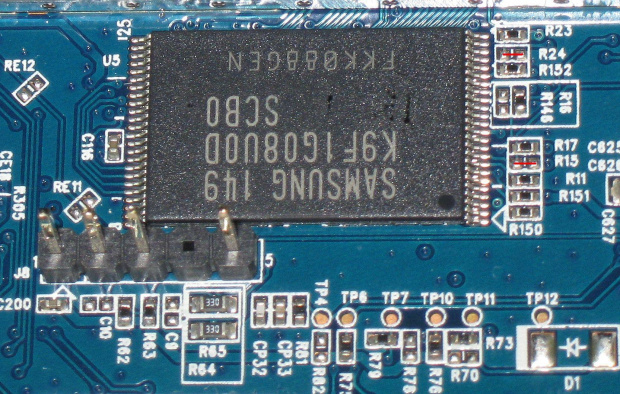
ah, co to była za noc na kablu 64 b/s... z diagnozą powolnego połączenia prawdopodobnie trafiłeś w sedno. ale od początku.
ustawiłem w tera term połączenie 115200,8,none,1,none. dodatkowo, nie pamiętam gdzie o tym doczytałem, opóźnienie 1ms/char potrzebne do uploadu pliku *.asc. po zwarciu rezystorów w terminalu pojawiło się:
ROM VER: 1.0.5
CFG 04
UART
i proces uruchamiania się zatrzymał. z menu tera teram: File -> Send file wybrałem plik openwrt-lantiq-p2812hnufx_ram-u-boot.asc i czekałem na koniec transmisji. ten nadszedł po 3 godzinach  prędkość przesyłu to 64 b/s. później doczytałem Twoją uwagę, że prędkość powinna być też ustawiona w managerze urządzeń wykorzystywanego portu COM, i faktycznie -- tam było ustawione 9600. nie wiedziałem o tym, sądziłem, że program sam to sobie ustawia wg. podanych wartości. jak dotąd nie dane mi było sprawdzenie z ustawieniem 115200, ale przypuszczam że był to powód niskiej prędkości transmisji. tak czy siak, po 3 godzinach transfer się zakończył. i nic. wyglądało to tak:

jak widać brak charakterystycznych znaków # i ciemny ekran. doszedłem do wniosku, że coś poszło nie tak. wyłączenie, zwieracze na rezystory, włączenie, ponowny upload (i 3h w plecy, bo to nie był jeszcze ten moment gdy zapoznałem się z Twoją odpowiedzią ).
tym razem zaczęło to wyglądać sensownie!
ROM VER: 1.0.5
CFG 04
UART
#################################################
#################################################
[ucięto]
#################################################

U-Boot 2014.01-openwrt2 (Nov 15 2014 - 14:06:52) P-2812HNU-Fx

Board: ZyXEL P-2812HNU-Fx
SoC:   Lantiq VRX288 v1.1
CPU:   125 MHz
IO:    125 MHz
BUS:   125 MHz
BOOT:  UART
DRAM:  256 MiB
Flash: 8 MiB
NAND:  128 MiB
Using default environment

In:    serial
Out:   serial
Err:   serial
Net:   ltq-eth
P-2812HNU-Fx #
dalej leciałem już wg. opisu wiki http://wiki.openwrt.org/toh/zyxel/p2812hnu-f3
P-2812HNU-Fx # protect off all
Un-Protect Flash Bank # 1
....................................................................................................................................... done
P-2812HNU-Fx # erase all
Erase Flash Bank # 1
....................................................................................................................................... done
P-2812HNU-Fx # tftp 0x80700000 openwrt-lantiq-p2812hnufx_nor-u-boot.img
ltq_phy: addr 0, link 1, speed 100, duplex 1
ltq_phy: addr 1, link 0, speed 10, duplex 0
ltq_phy: addr 17, link 0, speed 10, duplex 0
ltq_phy: addr 19, link 0, speed 10, duplex 0
ltq_phy: addr 5, link 0, speed 10, duplex 0
Using ltq-eth device
TFTP from server 192.168.1.2; our IP address is 192.168.1.1
Filename 'openwrt-lantiq-p2812hnufx_nor-u-boot.img'.
Load address: 0x80700000
Loading: ######################
         1.5 MiB/s
done
Bytes transferred = 318632 (4dca8 hex)
P-2812HNU-Fx # cp.b 0x80700000 0xb0000000 0x4dca8
Copy to Flash... done
P-2812HNU-Fx # tftp 0x80800000 openwrt-lantiq-xrx200-P2812HNUF3-uImage
ltq_phy: addr 0, link 1, speed 100, duplex 1
ltq_phy: addr 1, link 0, speed 10, duplex 0
ltq_phy: addr 17, link 0, speed 10, duplex 0
ltq_phy: addr 19, link 0, speed 10, duplex 0
ltq_phy: addr 5, link 0, speed 10, duplex 0
Using ltq-eth device
TFTP from server 192.168.1.2; our IP address is 192.168.1.1
Filename 'openwrt-lantiq-xrx200-P2812HNUF3-uImage'.
Load address: 0x80800000
Loading: #################################################################
         ##################################
         1.8 MiB/s
done
Bytes transferred = 1448568 (161a78 hex)
P-2812HNU-Fx # nand erase.chip

NAND erase.chip: device 0 whole chip
Skipping bad block at  0x00a00000
Skipping bad block at  0x02700000
Skipping bad block at  0x03e40000
Skipping bad block at  0x05ce0000
Erasing at 0x7fe0000 -- 100% complete.
OK
P-2812HNU-Fx # nand write 0x80800000 0x0 0x200000

NAND write: device 0 offset 0x0, size 0x200000
 2097152 bytes written: OK

P-2812HNU-Fx # tftpboot 0x80800000 openwrt-lantiq-xrx200-P2812HNUF3-uImage-initramfs
ltq_phy: addr 0, link 1, speed 100, duplex 1
ltq_phy: addr 1, link 0, speed 10, duplex 0
ltq_phy: addr 17, link 0, speed 10, duplex 0
ltq_phy: addr 19, link 0, speed 10, duplex 0
ltq_phy: addr 5, link 0, speed 10, duplex 0
Using ltq-eth device
TFTP from server 192.168.1.2; our IP address is 192.168.1.1
Filename 'openwrt-lantiq-xrx200-P2812HNUF3-uImage-initramfs'.
Load address: 0x80800000
Loading: #################################################################
         #################################################################
         #################################################################
         #################################################################
         ####################################################
         1.8 MiB/s
done
Bytes transferred = 4568229 (45b4a5 hex)
kolejne polecenie:
P-2812HNU-Fx # bootm 0x80800000
i zonk.. kernel zaczął się uruchamiać:
## Booting kernel from Legacy Image at 80800000 ...
   Image Name:   MIPS OpenWrt Linux-3.10.49
   Created:      2014-12-21  14:26:46 UTC
   Image Type:   MIPS Linux Kernel Image (lzma compressed)
   Data Size:    4568165 Bytes = 4.4 MiB
   Load Address: 80002000
   Entry Point:  80002000
   Verifying Checksum ... OK
   Uncompressing Kernel Image ... OK

Starting kernel ...

[    0.000000] Linux version 3.10.49 (sylwek@WRT) (gcc version 4.8.3 (OpenWrt/Linaro GCC 4.8-2014.04 r43483) ) #2 Sun Dec 21 15:26:23 CET 2014
[    0.000000] SoC: VR9 rev 1.1
[    0.000000] bootconsole [early0] enabled
[    0.000000] CPU revision is: 00019555 (MIPS 34Kc)
[    0.000000] MIPS: machine is P2812HNUF3 - ZyXEL P-2812HNU-F3
[    0.000000] Determined physical RAM map:
[    0.000000]  memory: 08000000 @ 00000000 (usable)
[    0.000000] Initrd not found or empty - disabling initrd
[    0.000000] Zone ranges:
[    0.000000]   Normal   [mem 0x00000000-0x07ffffff]
ale po chwili przesłał i zawisł. wszystkie diody się świeciły jak oszalałe:
[    1.568000] Switching to clocksource MIPS
[    1.708000] NET: Registered protocol family 2
[    1.752000] TCP established hash table entries: 1024 (order: 1, 8192 bytes)
[    1.764000] TCP bind hash table entries: 1024 (order: 0, 4096 bytes)
[    1.772000] TCP: Hash tables configured (established 1024 bind 1024)
[    1.784000] TCP: reno registered
[    1.788000] UDP hash table entries: 256 (order: 0, 4096 bytes)
[    1.800000] UDP-Lite hash table entries: 256 (order: 0, 4096 bytes)
[    1.824000] NET: Registered protocol family 1
doszedłem do wniosku, że skoro u-boot jest już wgrany to zrestartuję ruter (nie zrobiłem tego po wgraniu u-boota wcześniej) i ponowię wgrywanie openwrt. poszło!
ROM VER: ©©ď#!„Dó

U-Boot 2014.01-openwrt2 (Nov 15 2014 - 14:05:27) P-2812HNU-Fx

Board: ZyXEL P-2812HNU-Fx
SoC:   Lantiq VRX288 v1.1
CPU:   500 MHz
IO:    250 MHz
BUS:   250 MHz
BOOT:  NOR
DRAM:  128 MiB
Flash: 8 MiB
NAND:  128 MiB
*** Warning - bad CRC, using default environment

In:    serial
Out:   serial
Err:   serial
Net:   ltq-eth
Hit any key to stop autoboot:  0
P-2812HNU-Fx # tftp 0x80800000 openwrt-lantiq-xrx200-P2812HNUF3-uImage
ltq_phy: addr 0, link 1, speed 100, duplex 1
ltq_phy: addr 1, link 0, speed 10, duplex 0
ltq_phy: addr 17, link 0, speed 10, duplex 0
ltq_phy: addr 19, link 0, speed 10, duplex 0
ltq_phy: addr 5, link 0, speed 10, duplex 0
Using ltq-eth device
TFTP from server 192.168.1.2; our IP address is 192.168.1.1
Filename 'openwrt-lantiq-xrx200-P2812HNUF3-uImage'.
Load address: 0x80800000
Loading: #################################################################
         ##################################
         1.7 MiB/s
done
Bytes transferred = 1448568 (161a78 hex)
P-2812HNU-Fx # nand erase.chip

NAND erase.chip: device 0 whole chip
Skipping bad block at  0x00a00000
Skipping bad block at  0x02700000
Skipping bad block at  0x03e40000
Skipping bad block at  0x05ce0000
Erasing at 0x7fe0000 -- 100% complete.
OK
P-2812HNU-Fx # nand write 0x80800000 0x0 0x200000

NAND write: device 0 offset 0x0, size 0x200000
 2097152 bytes written: OK
P-2812HNU-Fx # tftpboot 0x80800000 openwrt-lantiq-xrx200-P2812HNUF3-uImage-initramfs
ltq_phy: addr 0, link 1, speed 100, duplex 1
ltq_phy: addr 1, link 0, speed 10, duplex 0
ltq_phy: addr 17, link 0, speed 10, duplex 0
ltq_phy: addr 19, link 0, speed 10, duplex 0
ltq_phy: addr 5, link 0, speed 10, duplex 0
Using ltq-eth device
TFTP from server 192.168.1.2; our IP address is 192.168.1.1
Filename 'openwrt-lantiq-xrx200-P2812HNUF3-uImage-initramfs'.
Load address: 0x80800000
Loading: #################################################################
         #################################################################
         #################################################################
         #################################################################
         ####################################################
         1.8 MiB/s
done
Bytes transferred = 4568229 (45b4a5 hex)
ponownie polecenie
P-2812HNU-Fx # bootm 0x80800000
i system pięknie uruchomił się do końca:
BusyBox v1.22.1 (2014-12-21 15:15:42 CET) built-in shell (ash)
Enter 'help' for a list of built-in commands.

  _______                     ________        __
 |       |.-----.-----.-----.|  |  |  |.----.|  |_
 |   -   ||  _  |  -__|     ||  |  |  ||   _||   _|
 |_______||   __|_____|__|__||________||__|  |____|
          |__| W I R E L E S S   F R E E D O M
 -----------------------------------------------------
 BARRIER BREAKER (Barrier Breaker, r43483)
 -----------------------------------------------------
  * 1/2 oz Galliano         Pour all ingredients into
  * 4 oz cold Coffee        an irish coffee mug filled
  * 1 1/2 oz Dark Rum       with crushed ice. Stir.
  * 2 tsp. Creme de Cacao
 -----------------------------------------------------
root@OpenWrt:/#
zmieniłem hasło (passwd), przy pomocy winscp wgrałem do /tmp plik openwrt-lantiq-xrx200-P2812HNUF3-squashfs-ubinized.bin. pozostały jeszcze jakieś "drobiazgi", ale jak wiadomo diabeł tkwi w szczegółach. nie było inaczej i tym razem.
wydałem polecenie:
root@OpenWrt:/# ubidetach -p /dev/mtd4
i zonk:
ubidetach: error!: cannot detach "/dev/mtd4"
           error 19 (No such device)
porównałem wpisy na wiki z tymi podanymi przez Ciebie.
http://wiki.openwrt.org/toh/zyxel/p2812hnu-f3
https://www.dropbox.com/sh/9aup68dv6oq5 … t.txt?dl=0
i jest różnica. na wiki widnieje /dev/mtd4 podczas gdy w pliku z dropboxa /dev/mtd5. edycja: zgłosiłem na forum openwrt i już poprawili. podanie /dev/mtd5 zadziałało. prawdopodobnie polecenie mount może być pomocne w określeniu właściwej partycji.
root@OpenWrt:/# ubidetach -p /dev/mtd5
[ 1191.436000] UBI: detaching mtd5 from ubi0
[ 1191.440000] UBI: mtd5 is detached from ubi0
root@OpenWrt:/# ubiformat /dev/mtd5 -f /tmp/openwrt-lantiq-xrx200-P2812HNUF3-squashfs-ubinized.bin
ubiformat: mtd5 (nand), size 132120576 bytes (126.0 MiB), 1008 eraseblocks of 131072 bytes (128.0 KiB), min. I/O size 2048 bytes
libscan: scanning eraseblock 1007 -- 100 % complete
ubiformat: 1004 eraseblocks have valid erase counter, mean value is 1
ubiformat: 4 bad eraseblocks found, numbers: 64, 296, 482, 727
ubiformat: flashing eraseblock 28 -- 100 % complete
ubiformat: formatting eraseblock 1007 -- 100 % complete
na końcu restart, przerwanie bootowania u-boota i ustawienie zmiennych:
ROM VER: ©©ď#!„Dó

U-Boot 2014.01-openwrt2 (Nov 15 2014 - 14:05:27) P-2812HNU-Fx

Board: ZyXEL P-2812HNU-Fx
SoC:   Lantiq VRX288 v1.1
CPU:   500 MHz
IO:    250 MHz
BUS:   250 MHz
BOOT:  NOR
DRAM:  128 MiB
Flash: 8 MiB
NAND:  128 MiB
*** Warning - bad CRC, using default environment

In:    serial
Out:   serial
Err:   serial
Net:   ltq-eth
Hit any key to stop autoboot:  0
P-2812HNU-Fx # setenv nboot ' nand read 0x80800000 0x0 0x200000; bootm 0x80800000'
P-2812HNU-Fx # setenv bootcmd 'run nboot'
P-2812HNU-Fx # saveenv
Saving Environment to Flash...
. done
Un-Protected 1 sectors
Erasing Flash...
. done
Erased 1 sectors
Writing to Flash... done
. done
Protected 1 sectors
P-2812HNU-Fx #
koniec!
mam nadzieję, że komuś się przyda ten wątek jako że ruter jest całkiem dobry, ma niezłe parametry, można go tanio kupić i przerobić na przyzwoitą maszynkę domowej sieci.
Scotch - bardzo dziękuję za pomoc! wskazówki i linki są bardzo pomocne!
pozdrawiam
geos