Temat: Huawei B970b alt oprogramowanie
Witam,
czy istnieje możliwość skompilowania gargoyle'a/openwrt na to cudo?
Nie jesteś zalogowany. Proszę się zalogować lub zarejestrować.
eko.one.pl → Oprogramowanie / Software → Huawei B970b alt oprogramowanie
Zaloguj się lub zarejestruj by napisać odpowiedź
Witam,
czy istnieje możliwość skompilowania gargoyle'a/openwrt na to cudo?
A "b" czym się różni od normalnego? Zwykły jest wpierany.
z tego co czytam to chyba samym oprogramowaniem - soft od e970 powinien pasowac do b970? Dobrze myśle Cezary?
Router brandowany na T-Mobile.
Jest ktos w stanie nakierowac jak zflashowac ten router?
Wgraj soft po prosty to zwykły broadcom jest.
Staram się mu wcisnąć poprzez panel bin lub trx ale za kazdym razem mam errora  brodki się jakoś specyficznie flashuje - chodzi o CFE?
Wiki wspomina o możliwości dostania sie telnetem tam. Możesz się dostać?
Szukaj, może masz tam jakiś tryb awaryjny czy coś takiego. W ostateczności zostaje bootloader i port szeregowy.
Mam e960, to starsza wersja. Obecnie żadna wersja firmware z openwrt nie wejdzie na ten router.
Za duża, moja wersja i e(b)970 mają tylko 4MB flash, a że kernel musi być spakowany gzipem,
to od razu tracimy ~300kB i nic nowego się nie mieści. Tylko stare AA z odpowiednim patchem wchodzi.
@secam7 o jakim patchu mówisz?
http://patchwork.openwrt.org/patch/2749/
Tylko z nim i z AA udało się mi skompilować działający firmware.
http://patchwork.openwrt.org/patch/2749/
Tylko z nim i z AA udało się mi skompilować działający firmware.
W BB on normalnie już jest.
Jest w BB i CC, ale co z tego jak jest za duży i nie wejdzie.
openwrt-e970-squashfs-gz.bin 02-Oct-2014 07:28 4198500
Przypomnę że router ma 4MB flash, to ciekawe jak to się ma tam zmieścić??
Skompiluj samodzielnie i np. wywal ipv6.
Jak wgrać openwrt np. chaos calmer'a do tego routera ?
Przez webserwer nie wchodzi.
Pójdzie tylko poprzez konsolę ?
https://openwrt.org/_detail/media/huawe … wei%3Ae970
Czy ktoś podpowie gdzie jest rs232 ttl ?
Na bazie zdjęcia z poprzedniego linku spróbowałem w ten sposób ale konsola się nie odzywa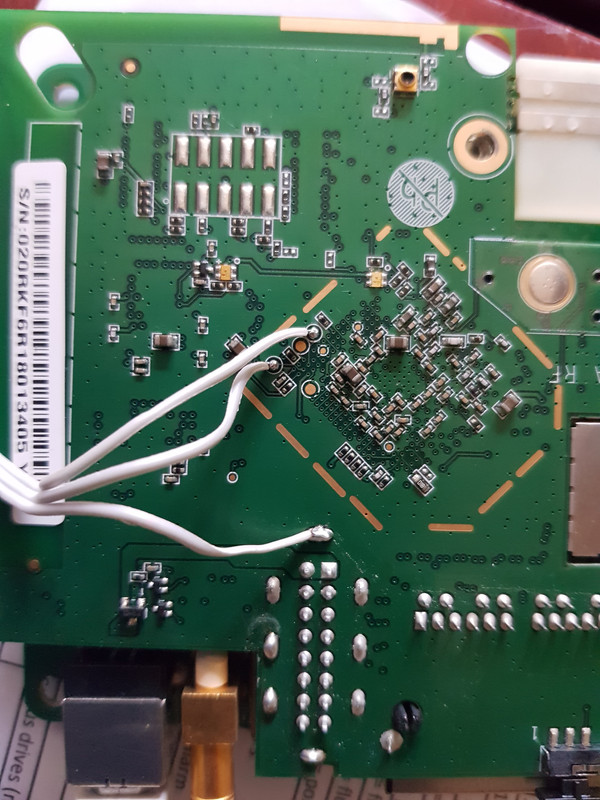
Działa rs232. Miałem popsutą przejściówkę. Upewniłem się że rs232 jest dobrze zrobiony na podstawie tego wpisu.
http://hornosty.blogspot.com/2015/05/op … -b970.html
Log z uruchomienia
▒▒{▒@@▒*▒@D▒ƞ ▒Decompressing...........done


CFE version 1.0.37 for BCM947XX (32bit,SP,LE)
Build Date: Mon Feb 27 11:17:46 CST 2012 (bcm@bcm-1)
Copyright (C) 2000-2008 Broadcom Corporation.

Init Arena
Init Devs.
Boot partition size = 262144(0x40000)
et0: Broadcom BCM47xx 10/100 Mbps Ethernet Controller
CFE reboot no init flag0 = 0xf96eaca6,flag1 = 0x737e1406,flag2 = 0xf68df1aa,numb                                                                                                                                                             er = 0xff267594
CFE reboot flag0 = 0x12345678, flag1 = 0x0,flag2 = 0xffffffff,reboot_number = 0x                                                                                                                                                             1
CPU type 0x29029: 240MHz
Tot mem: 32768 KBytes

CFE mem:    0x80400000 - 0x804A0910 (657680)
Data:       0x80434670 - 0x80439130 (19136)
BSS:        0x80439130 - 0x8043A910 (6112)
Heap:       0x8043A910 - 0x8049E910 (409600)
Stack:      0x8049E910 - 0x804A0910 (8192)
Text:       0x80400000 - 0x80434668 (214632)

Compare factory.
Device eth0:  hwaddr 1C-1D-67-8E-50-B2, ipaddr 192.168.1.1, mask 255.255.255.0
        gateway not set, nameserver not set
Loader:raw Filesys:raw Dev:flash0.os File: Options:(null)
Loading: ...... 1802240 bytes read
Entry at 0x80001000
Closing network.
Starting program at 0x80001000
Kernel addr reboot flag = 0xa1fff000, reboot_number = 0xa1fff004
Kernel physical_mem =0x2000000 reboot flag = 0x12345678, reboot_number = 0x0
CPU ProcId is: 0x00029029, options: 0x0000014d
Primary instruction cache 16kb, linesize 16 bytes (4 ways)
Primary data cache 16kb, linesize 16 bytes (2 ways)
Linux version 2.4.20 (bcm@bcm-1) (gcc version 3.2.3 with Broadcom modifications)                                                                                                                                                              #2 Mon Feb 27 11:16:55 CST 2012
Setting the PFC to its default value
Determined physical RAM map:
 memory: 01fff000 @ 00000000 (usable)
On node 0 totalpages: 8191
zone(0): 8191 pages.
zone(1): 0 pages.
zone(2): 0 pages.
Kernel command line: root=/dev/mtdblock2 noinitrd console=ttyS0,115200
CPU: BCM5354 rev 3 at 240 MHz
Calibrating delay loop... 239.20 BogoMIPS
Memory: 30452k/32764k available (1563k kernel code, 2312k reserved, 112k data, 6                                                                                                                                                             8k init, 0k highmem)
Dentry cache hash table entries: 4096 (order: 3, 32768 bytes)
Inode cache hash table entries: 2048 (order: 2, 16384 bytes)
Mount-cache hash table entries: 512 (order: 0, 4096 bytes)
Buffer-cache hash table entries: 1024 (order: 0, 4096 bytes)
Page-cache hash table entries: 8192 (order: 3, 32768 bytes)
Checking for 'wait' instruction...  unavailable.
POSIX conformance testing by UNIFIX
PCI: no core
PCI: Fixing up bus 0
Linux NET4.0 for Linux 2.4
Based upon Swansea University Computer Society NET3.039
Initializing RT netlink socket
Starting kswapd
devfs: v1.12c (20020818) Richard Gooch (rgooch@atnf.csiro.au)
devfs: boot_options: 0x1
squashfs: version 3.2-r2 (2007/01/15) Phillip Lougher
Serial driver version 5.05c (2001-07-08) with MANY_PORTS SHARE_IRQ SERIAL_PCI en                                                                                                                                                             abled
ttyS00 at 0xb8000300 (irq = 3) is a 16550A
ttyS01 at 0xb8000400 (irq = 0) is a 16550A
PPP generic driver version 2.4.2
 Amd/Fujitsu Extended Query Table v1.3 at 0x0040
cfi->id=7e
cfi->mfr=1
Not ST Flash!
bootloc=3
Physically mapped flash: Swapping erase regions for broken CFI table.
number of CFI chips: 1
Flash device: 0x400000 at 0x1c000000
Physically mapped flash: squash filesystem with lzma found at block 1014
Creating 6 MTD partitions on "Physically mapped flash":
0x00000000-0x00040000 : "cfe"
0x00040000-0x00380000 : "linux"
0x000fd83c-0x00380000 : "rootfs"
0x00380000-0x003e0000 : "resource"
0x003e0000-0x003f0000 : "factory"
0x003f0000-0x00400000 : "nvram"
Found a 0MB  serial flash
sflash: found no supported devices
usb.c: registered new driver usbdevfs
usb.c: registered new driver hub
USB20H fcr: 0x64
USB20H shim cr: 0x8f7
USB20H syn01 register : 0xfe00fe
USB20H syn03 register : 0x1
ehci-hcd 00:03.1: PCI device 14e4:471a
ehci-hcd 00:03.1: irq 6, pci mem b8003800
usb.c: new USB bus registered, assigned bus number 1
ehci-hcd 00:03.1: illegal capability!
PCI: 00:03.1 PCI cache line size set incorrectly (0 bytes) by BIOS/FW, correctin                                                                                                                                                             g to 32
ehci-hcd 00:03.1: USB 0.0 enabled, EHCI 1.00, driver 2003-Jan-22
hub.c: USB hub found
hub.c: 2 ports detected
usb.c: registered new driver acm
acm.c: v0.21:USB Abstract Control Model driver for USB modems and ISDN adapters
usb.c: registered new driver serial
usbserial.c: USB Serial support registered for Generic
usbserial.c: USB Serial Driver core v1.4
NET4: Linux TCP/IP 1.0 for NET4.0
IP Protocols: ICMP, UDP, TCP
IP: routing cache hash table of 512 buckets, 4Kbytes
TCP: Hash tables configured (established 2048 bind 4096)
IPv4 over IPv4 tunneling driver
GRE over IPv4 tunneling driver
ip_nat_pptp version 1.5 loaded
ip_tables: (C) 2000-2002 Netfilter core team
ipt_time loading
NET4: Unix domain sockets 1.0/SMP for Linux NET4.0.
NET4: Ethernet Bridge 008 for NET4.0
802.1Q VLAN Support v1.7 Ben Greear <greearb@candelatech.com>
All bugs added by David S. Miller <davem@redhat.com>
msm gpio 0xcb
devfs_register(gpio): could not append to parent, err: -17
VFS: Mounted root (squashfs filesystem) readonly.
Mounted devfs on /dev
Freeing unused kernel memory: 68k freed
rc.c 911: link www/* to 3w/* OK
Using /lib/modules/2.4.20/kernel/drivers/net/emf/emf.o
Using /lib/modules/2.4.20/kernel/drivers/net/igs/igs.o
rc.c 958 : insmod module [et]
Using /lib/modules/2.4.20/kernel/drivers/net/et/et.o
rc.c 958 : insmod module [bcm57xx]
Using /lib/modules/2.4.20/kernel/drivers/net/bcm57xx/bcm57xx.o
insmod: init_module: bcm57xx: No such device
rc.c 958 : insmod module [wl]
Using /lib/modules/2.4.20/kernel/drivers/net/wl/wl.o
Hit enter to continue...[main,1183]exit func regist ok
waitpid: No child processes
Hint_Mem_Init,43
Hint_Mem_Init,53
[75] enter get_Hint_Info
[get_hint_info,122] the get_ hint_info  is OK
[492] enter get_Var_Info
vlan0: Operation not supported
[get_Var_Info,521] the get var leng name info OK
[423] enter get_Country_Info
[392] enter Country_Mem_Init
[get_Country_Info,468] the get country info  OK
Get g_MsgRcvQ_ID error
eth1: Operation not supported
eth1: Invalid argument
eth1: Invalid argument
info, udhcp server (v0.9.8) started
Podpowiedziałby ktoś w jaki sposób mogę spróbować wgrać obraz openwrt ?
CFE masz, więc go przerwij (ctrl-c) chyba, zrób help i zobacz czy masz polecenie flashimage czy coś podobnego.
Nie mam polecenia flashimage
# help

Built-in commands:
-------------------
        . : break cd continue eval exec exit export help login newgrp
        read readonly set shift times trap umask wait


# ls /bin
wps_monitor  rmdir        mv           mkdir        grep         cp
wps_ap       rm           msh          ls           echo         chmod
umount       pwd          mount        login        eapd         cat
sleep        ps           more         ln           dd           busybox
sh           ping         mknod        kill         date
#


# ls /usr/sbin
wrt54g.small.ico  syswatch          iptables          drvtest
wrt54g.large.ico  sendpack          ip                dnsmasq
wlconf            pppd              igs               diagd
wl                nvram             igmp              ddns
vconfig           ntpclient         icon.ico          brctl
upnp              nas               httpd             ats
udhcpd            modload           factory           at
udhcpc            looptest          et
testmode          lld2d.conf        epi_ttcp
tc                lld2d             emf
#


/usr/bin
# ls /usr/bin
wget        telnetd     nc          free
traceroute  route       killall     find
#


# ls /sbin
write     stats     reboot    preinit   klogd     init      hotplug
syslogd   rmmod     rc        lsmod     insmod    ifconfig  erase
#Ale ty jesteś w jego systemie operacyjnym a nie bootloaderze. Przerwij cfe i w nim zrób help.
Nie wiem jak przerwać ten bootloader. Obojętnie co bym nie wciskał to nie reaguje na nic.
To poza wylutowaniem flash nie masz jak tego zrobić. Próbuj, może że linie źle podlutowałeś.
Szkoda.
Początek bootloga wygląda tak
CFE version 1.0.37 for BCM947XX (32bit,SP,LE)
Build Date: Mon Feb 27 11:17:46 CST 2012 (bcm@bcm-1)
Copyright (C) 2000-2008 Broadcom Corporation.

Init Arena
Init Devs.
Boot partition size = 262144(0x40000)
et0: Broadcom BCM47xx 10/100 Mbps Ethernet Controller
CFE reboot no init flag0 = 0x1000400,flag1 = 0xffffffff,flag2 = 0x30010000,number = 0xc0040000
CFE reboot flag0 = 0x12345678, flag1 = 0x0,flag2 = 0xffffffff,reboot_number = 0x1
CPU type 0x29029: 240MHz
Tot mem: 32768 KBytes

CFE mem:    0x80400000 - 0x804A0910 (657680)
Data:       0x80434670 - 0x80439130 (19136)
BSS:        0x80439130 - 0x8043A910 (6112)
Heap:       0x8043A910 - 0x8049E910 (409600)
Stack:      0x8049E910 - 0x804A0910 (8192)
Text:       0x80400000 - 0x80434668 (214632)

Compare factory.
Device eth0:  hwaddr 1C-1D-67-8E-50-B2, ipaddr 192.168.1.1, mask 255.255.255.0
        gateway not set, nameserver not set
Loader:raw Filesys:raw Dev:flash0.os File: Options:(null)
Loading: ...... 1802240 bytes read
Entry at 0x80001000
Closing network.
Starting program at 0x80001000
Kernel addr reboot flag = 0xa1fff000, reboot_number = 0xa1fff004
Kernel physical_mem =0x2000000 reboot flag = 0x12345678, reboot_number = 0x0
CPU ProcId is: 0x00029029, options: 0x0000014d
Primary instruction cache 16kb, linesize 16 bytes (4 ways)
Primary data cache 16kb, linesize 16 bytes (2 ways)
Linux version 2.4.20 (bcm@bcm-1) (gcc version 3.2.3 with Broadcom modifications) #2 Mon Feb 27 11:16:55 CST 2012
Setting the PFC to its default value
Determined physical RAM map:
 memory: 01fff000 @ 00000000 (usable)
On node 0 totalpages: 8191
zone(0): 8191 pages.
zone(1): 0 pages.
zone(2): 0 pages.
Kernel command line: root=/dev/mtdblock2 noinitrd console=ttyS0,115200
CPU: BCM5354 rev 3 at 240 MHz
Calibrating delay loop... 239.20 BogoMIPS
Memory: 30452k/32764k available (1563k kernel code, 2312k reserved, 112k data, 68k init, 0k highmem)
Dentry cache hash table entries: 4096 (order: 3, 32768 bytes)
Inode cache hash table entries: 2048 (order: 2, 16384 bytes)
Mount-cache hash table entries: 512 (order: 0, 4096 bytes)
Buffer-cache hash table entries: 1024 (order: 0, 4096 bytes)
Page-cache hash table entries: 8192 (order: 3, 32768 bytes)
Checking for 'wait' instruction...  unavailable.
POSIX conformance testing by UNIFIX
PCI: no core
PCI: Fixing up bus 0
Linux NET4.0 for Linux 2.4
Based upon Swansea University Computer Society NET3.039
Initializing RT netlink socket
Starting kswapd
devfs: v1.12c (20020818) Richard Gooch (rgooch@atnf.csiro.au)
devfs: boot_options: 0x1
squashfs: version 3.2-r2 (2007/01/15) Phillip Lougher
Serial driver version 5.05c (2001-07-08) with MANY_PORTS SHARE_IRQ SERIAL_PCI enabled
ttyS00 at 0xb8000300 (irq = 3) is a 16550A
ttyS01 at 0xb8000400 (irq = 0) is a 16550A
PPP generic driver version 2.4.2
 Amd/Fujitsu Extended Query Table v1.3 at 0x0040
cfi->id=7e
cfi->mfr=1
Not ST Flash!
bootloc=3
Physically mapped flash: Swapping erase regions for broken CFI table.
number of CFI chips: 1
Flash device: 0x400000 at 0x1c000000
Physically mapped flash: squash filesystem with lzma found at block 1014
Creating 6 MTD partitions on "Physically mapped flash":
0x00000000-0x00040000 : "cfe"
0x00040000-0x00380000 : "linux"
0x000fd83c-0x00380000 : "rootfs"
0x00380000-0x003e0000 : "resource"
0x003e0000-0x003f0000 : "factory"
0x003f0000-0x00400000 : "nvram"
Found a 0MB  serial flash
sflash: found no supported devices
usb.c: registered new driver usbdevfs
usb.c: registered new driver hub
USB20H fcr: 0x64
USB20H shim cr: 0x8f7
USB20H syn01 register : 0xfe00fe
USB20H syn03 register : 0x1
ehci-hcd 00:03.1: PCI device 14e4:471a
ehci-hcd 00:03.1: irq 6, pci mem b8003800
usb.c: new USB bus registered, assigned bus number 1
ehci-hcd 00:03.1: illegal capability!
PCI: 00:03.1 PCI cache line size set incorrectly (0 bytes) by BIOS/FW, correcting to 32
ehci-hcd 00:03.1: USB 0.0 enabled, EHCI 1.00, driver 2003-Jan-22
hub.c: USB hub found
hub.c: 2 ports detected
usb.c: registered new driver acm
acm.c: v0.21:USB Abstract Control Model driver for USB modems and ISDN adapters
usb.c: registered new driver serial
usbserial.c: USB Serial support registered for Generic
usbserial.c: USB Serial Driver core v1.4
NET4: Linux TCP/IP 1.0 for NET4.0
IP Protocols: ICMP, UDP, TCP
IP: routing cache hash table of 512 buckets, 4Kbytes
TCP: Hash tables configured (established 2048 bind 4096)
IPv4 over IPv4 tunneling driver
GRE over IPv4 tunneling driver
ip_nat_pptp version 1.5 loaded
ip_tables: (C) 2000-2002 Netfilter core team
ipt_time loading
NET4: Unix domain sockets 1.0/SMP for Linux NET4.0.
NET4: Ethernet Bridge 008 for NET4.0
802.1Q VLAN Support v1.7 Ben Greear <greearb@candelatech.com>
All bugs added by David S. Miller <davem@redhat.com>
msm gpio 0x4b
devfs_register(gpio): could not append to parent, err: -17
VFS: Mounted root (squashfs filesystem) readonly.
Mounted devfs on /dev
Freeing unused kernel memory: 68k freed
rc.c 911: link www/* to 3w/* OK
Using /lib/modules/2.4.20/kernel/drivers/net/emf/emf.o
Using /lib/modules/2.4.20/kernel/drivers/net/igs/igs.o
rc.c 958 : insmod module [et]
Using /lib/modules/2.4.20/kernel/drivers/net/et/et.o
rc.c 958 : insmod module [bcm57xx]
Using /lib/modules/2.4.20/kernel/drivers/net/bcm57xx/bcm57xx.oŚciągnij sobie najstarszą wersję openwrt jaką znajdziesz dla tego modelu i zobacz czy wejdzie przez gui. Jeżeli się uda to później będzie prościej to zaktualizować do ostatniej możliwej.
Zaloguj się lub zarejestruj by napisać odpowiedź
eko.one.pl → Oprogramowanie / Software → Huawei B970b alt oprogramowanie
Forum oparte o PunBB, wspierane przez Informer Technologies, Inc
