super
dzieki jeszcze raz !!!
Nie jesteś zalogowany. Proszę się zalogować lub zarejestrować.
Opcje wyszukiwania (Strona 1 z 2)
eko.one.pl → Posty przez dzik
Znalezione posty: 1 do 25 z 37
1 2025-09-26 11:23:51
Odp: MR3020 V3.20 powrót do oryginału (9 odpowiedzi, napisanych Oprogramowanie / Software)
2 2025-09-26 11:14:18
Odp: MR3020 V3.20 powrót do oryginału (9 odpowiedzi, napisanych Oprogramowanie / Software)
Petarda ! działa
Dzięki wielkie za pomoc !!!
tak nawiasem co to za wersja ? 
3 2025-09-26 09:39:16
Odp: MR3020 V3.20 powrót do oryginału (9 odpowiedzi, napisanych Oprogramowanie / Software)
tak, próbowałem i efekt ten sam (zapalają sie wszystkie diody potem zostaje power i ethernet i reset)
4 2025-09-26 01:42:12
Temat: MR3020 V3.20 powrót do oryginału (9 odpowiedzi, napisanych Oprogramowanie / Software)
Witam serdecznie
Niestety na moim MR3020 V3.20 wraz z Gargoylem nie jestem w stanie skonfigurowac portu ethernet jako WAN (tryb AP) i jestem zmuszony wrócic do oryginału...
ale tutaj zaczyna się problem
zgodnie z poradnikiem usunąłem bootloader
dd if=orig.bin of=tplink.bin skip=257 bs=512i po próbie wgrania przez tftp - router wpada w bootlopa (diody się zapalają i gasną)
p.s ponowne wgranie Gargoyla działa
5 2025-09-06 10:56:32
Odp: MR3020 & ecoNET 300 Lazar - bootloop (66 odpowiedzi, napisanych Oprogramowanie / Software)
Ale to musiałbym ustawić sobie port mirroring albo TAP adapter bo normalnie to plik poleci do urządzenia bezposrednio z internetu...
6 2025-09-06 10:31:08
Odp: MR3020 & ecoNET 300 Lazar - bootloop (66 odpowiedzi, napisanych Oprogramowanie / Software)
Witam serdecznie.
Mam nadzieje ze nie zostanę zlinczowany za mały offtop...
Kupiłem taki nowy sterownik i cały czas mam opcje aktualizacji oprogramowania. Czy istnieje jakiś sposób na przechwycenie tego oprogramowania?
7 2025-02-16 16:02:31
Odp: Gargoyle 1.6.2.2 (r42647) + OpenVPN - problem Android (2 odpowiedzi, napisanych Oprogramowanie / Software)
Ok juz wiem co zrobilem zle.. Trzeba bylo usunąć z konfiga i ovpn. Teraz działa
8 2025-02-16 15:37:06
Temat: Gargoyle 1.6.2.2 (r42647) + OpenVPN - problem Android (2 odpowiedzi, napisanych Oprogramowanie / Software)
Witam.
Mam postawiony serwer na OpenVPN na 1043nd z Gargoyle 1.6.2.2.
Od jakiegoś czasu nie mogę się łączyć do serwera z poziomu telefonu (android) dostaję komunikat: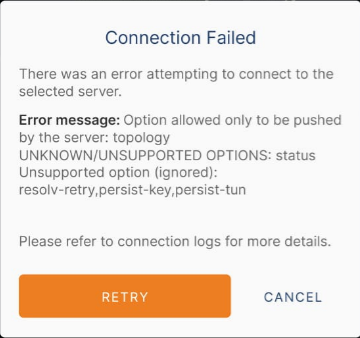
Jak ugryźć taki temat?
[lut 16, 2025, 15:29:04] ----- OpenVPN Start -----

[lut 16, 2025, 15:29:04] EVENT: CORE_THREAD_ACTIVE

[lut 16, 2025, 15:29:04] OpenVPN core 3.10.1(3.git::a65eb196:RelWithDebInfo) android arm64 64-bit PT_PROXY

[lut 16, 2025, 15:29:04] Frame=512/2112/512 mssfix-ctrl=1250

[lut 16, 2025, 15:29:04] NOTE: This configuration contains options that were not used:

[lut 16, 2025, 15:29:04] Option allowed only to be pushed by the server

[lut 16, 2025, 15:29:04] 0 [topology] [subnet]

[lut 16, 2025, 15:29:04] UNKNOWN/UNSUPPORTED OPTIONS

[lut 16, 2025, 15:29:04] 0 [status] [current_status]

[lut 16, 2025, 15:29:04] Unsupported option (ignored)

[lut 16, 2025, 15:29:04] 0 [resolv-retry] [infinite]

[lut 16, 2025, 15:29:04] 1 [persist-key]

[lut 16, 2025, 15:29:04] 2 [persist-tun]

[lut 16, 2025, 15:29:04] EVENT: UNUSED_OPTIONS_ERROR info='Option allowed only to be pushed by the server: topology
UNKNOWN/UNSUPPORTED OPTIONS: status
Unsupported option (ignored): resolv-retry,persist-key,persist-tun
'

[lut 16, 2025, 15:29:04] EVENT: CORE_THREAD_DONE9 2024-11-08 22:11:16
Odp: MR3020 & ecoNET 300 Lazar - bootloop (66 odpowiedzi, napisanych Oprogramowanie / Software)
/etc/config/networkTutaj podmieniłem i w
/sys/class/net/eth0/adress osiągnąlem zamierzony efekt
dziękuję !!!
10 2024-11-08 22:00:10
Odp: MR3020 & ecoNET 300 Lazar - bootloop (66 odpowiedzi, napisanych Oprogramowanie / Software)
Tak więc,
odblokowałem partycje, wgrałem zmofyfikowaną mtd6 z porządanym MAC adresem (dla sprawdzenia zrobiłem ponownie dump i jest tam) następnie zgodnie z zaleceniami
zreserowałem kompa oraz mr3020, wyczyściłem arp
ip neigh flush dev XXXi nadal arp mi pokazuje inny adres MAC
ale najwazniejsze co potrzebuję osiągnąć to zeby ten MAC pojawił mi się w pliku adress
/sys/class/net/eth0a w nim pojawia się nadal ten sam oryginalny MAC...
11 2024-11-03 00:27:48
Odp: MR3020 & ecoNET 300 Lazar - bootloop (66 odpowiedzi, napisanych Oprogramowanie / Software)
Panie Cezary - Dziękuję bardzo za dotychczasową pomoc !!
ale mam jeszcze jedno malutkie pytanie odnośnie zmiany MAC adresu. Zrobiłem zrzut partycji mtd6 (factory), podmieniłem pod adresem F100(HxD) adres mac na porządany - i teraz najwazniejsze - jak wgrać tą partycje do routera?
@edit
probowałem komend na zmianę mac adresu ale komenda
arp -azwraca mi inny adres mac dla 192.168.1.1
Wpisałem mac AC:84:C6:XX:XX:XX
a komenda arp -a pokazuje mi adres: ac:84:C9:YY:YY:YY
dodam że oryginalny mac adres routera zaczynał się od 40
12 2024-11-01 20:08:01
Odp: MR3020 & ecoNET 300 Lazar - bootloop (66 odpowiedzi, napisanych Oprogramowanie / Software)
root@OpenWrt:/# mkdir /tmp/a
root@OpenWrt:/# mount -t jffs2 /dev/mtd4 /tmp/a
[ 1701.870091] MTD: Couldn't look up '/dev/mtd4': -15
mount: mounting /dev/mtd4 on /tmp/a failed: Block device required
root@OpenWrt:/#
Takie coś otrzymałem
13 2024-11-01 19:58:25
Odp: MR3020 & ecoNET 300 Lazar - bootloop (66 odpowiedzi, napisanych Oprogramowanie / Software)
Witam
Udało mi się zrzucić partycje więc połowa sukcesu
Czy z poziomu putty da się przejrzeć zawartość mtd4? bo jeżeli dobrze myslę to obecnie to co widzę w winscp to zawartość initramfs.
14 2024-10-15 12:16:14
Odp: MR3020 & ecoNET 300 Lazar - bootloop (66 odpowiedzi, napisanych Oprogramowanie / Software)
Witam ponownie.
W jaki sposób mogę dokonać takiego backupu? połączyć się WinSCP i zgrać poprostu?
Czy może jest możliwość zdumpowania całego firmwaru (jezeli jest to jak tego dokonac) do postaci bin (tak zebym mogl wgrać sobie to na nowe urządzenie)
a i jeszcze jedno pytanie: jak zmienic MAC adress tego urządzenia z poziomu OpenWRT?
15 2024-10-02 10:34:38
Odp: MR3020 & ecoNET 300 Lazar - bootloop (66 odpowiedzi, napisanych Oprogramowanie / Software)
Chcę mieć backup w postaci bin wszystkiego co obecnie sie znajduje w tym uszkodzonym firmwarze.
A potem chciałbym aby ktoś kto ma doświadczenie w tych tematach, nakierował mnie co zrobic aby naprawic tego bootloopa.
16 2024-10-02 10:13:04
Odp: MR3020 & ecoNET 300 Lazar - bootloop (66 odpowiedzi, napisanych Oprogramowanie / Software)
MT7628 # tftpboot 0x81000000 test.bin

 netboot_common, argc= 3

 NetTxPacket = 0x83FE74C0

 KSEG1ADDR(NetTxPacket) = 0xA3FE74C0

 NetLoop,call eth_halt !

 NetLoop,call eth_init !
Trying Eth0 (10/100-M)

 Waitting for RX_DMA_BUSY status Start... done


 ETH_STATE_ACTIVE!!
TFTP from server 192.168.0.225; our IP address is 192.168.0.2
Filename 'test.bin'.

 TIMEOUT_COUNT=10,Load address: 0x81000000
Loading: checksum bad
checksum bad
checksum bad
checksum bad
checksum bad
checksum bad
checksum bad
checksum bad
checksum bad
checksum bad
checksum bad
checksum bad
checksum bad
Got ARP REPLY, set server/gtwy eth addr (4c:cc:6a:24:94:b2)
Got it
#################################################################
         #################################################################
         #################################################################
         #################################################################
         #################################################################
         #################################################################
         #################################################################
         #################################################################
         #################################################################
         #################################################################
         #################################################################
         #################################################################
         #################################################################
         #################################################################
         #################################################################
         #################################################################
         #################################################################
         #############
done
Bytes transferred = 5719157 (574475 hex)
NetBootFileXferSize= 00574475
MT7628 # bootm 0x81000000
do_bootm:argc=2, addr=0x81000000
## Booting image at 81000000 ...
   Uncompressing Kernel Image ... OK
No initrd
## Transferring control to Linux (at address 80000000) ...
## Giving linux memsize in MB, 64

Starting kernel ...

[    0.000000] Linux version 5.10.221 (builder@buildhost) (mipsel-openwrt-linux-musl-gcc (OpenWrt GCC 11.2.0 r20341-591b7e93d3) 11.2.0, GNU ld (GNU Binutils) 2.37) #0 Mon Jul 15 22:25:54 2024
[    0.000000] Board has DDR2
[    0.000000] Analog PMU set to hw control
[    0.000000] Digital PMU set to hw control
[    0.000000] SoC Type: MediaTek MT7628AN ver:1 eco:2
[    0.000000] printk: bootconsole [early0] enabled
[    0.000000] CPU0 revision is: 00019655 (MIPS 24KEc)
[    0.000000] MIPS: machine is TP-Link TL-MR3020 v3
[    0.000000] Initrd not found or empty - disabling initrd
[    0.000000] Primary instruction cache 64kB, VIPT, 4-way, linesize 32 bytes.
[    0.000000] Primary data cache 32kB, 4-way, PIPT, no aliases, linesize 32 bytes
[    0.000000] Zone ranges:
[    0.000000]   Normal   [mem 0x0000000000000000-0x0000000003ffffff]
[    0.000000] Movable zone start for each node
[    0.000000] Early memory node ranges
[    0.000000]   node   0: [mem 0x0000000000000000-0x0000000003ffffff]
[    0.000000] Initmem setup node 0 [mem 0x0000000000000000-0x0000000003ffffff]
[    0.000000] Built 1 zonelists, mobility grouping on.  Total pages: 16240
[    0.000000] Kernel command line: console=ttyS0,115200 rootfstype=squashfs,jffs2
[    0.000000] Dentry cache hash table entries: 8192 (order: 3, 32768 bytes, linear)
[    0.000000] Inode-cache hash table entries: 4096 (order: 2, 16384 bytes, linear)
[    0.000000] Writing ErrCtl register=0004da4e
[    0.000000] Readback ErrCtl register=0004da4e
[    0.000000] mem auto-init: stack:off, heap alloc:off, heap free:off
[    0.000000] Memory: 52956K/65536K available (5730K kernel code, 620K rwdata, 700K rodata, 4588K init, 210K bss, 12580K reserved, 0K cma-reserved)
[    0.000000] SLUB: HWalign=32, Order=0-3, MinObjects=0, CPUs=1, Nodes=1
[    0.000000] NR_IRQS: 256
[    0.000000] intc: using register map from devicetree
[    0.000000] CPU Clock: 580MHz
[    0.000000] timer_probe: no matching timers found
[    0.000000] clocksource: MIPS: mask: 0xffffffff max_cycles: 0xffffffff, max_idle_ns: 6590553264 ns
[    0.000010] sched_clock: 32 bits at 290MHz, resolution 3ns, wraps every 7405115902ns
[    0.007649] Calibrating delay loop... 385.84 BogoMIPS (lpj=1929216)
[    0.073571] pid_max: default: 32768 minimum: 301
[    0.078202] Mount-cache hash table entries: 1024 (order: 0, 4096 bytes, linear)
[    0.085217] Mountpoint-cache hash table entries: 1024 (order: 0, 4096 bytes, linear)
[    0.095137] dyndbg: Ignore empty _ddebug table in a CONFIG_DYNAMIC_DEBUG_CORE build
[    0.106552] clocksource: jiffies: mask: 0xffffffff max_cycles: 0xffffffff, max_idle_ns: 19112604462750000 ns
[    0.116069] futex hash table entries: 256 (order: -1, 3072 bytes, linear)
[    0.122718] pinctrl core: initialized pinctrl subsystem
[    0.132733] NET: Registered protocol family 16
[    0.137877] thermal_sys: Registered thermal governor 'step_wise'
[    0.201643] clocksource: Switched to clocksource MIPS
[    0.213739] NET: Registered protocol family 2
[    0.218180] IP idents hash table entries: 2048 (order: 2, 16384 bytes, linear)
[    0.226102] tcp_listen_portaddr_hash hash table entries: 512 (order: 0, 4096 bytes, linear)
[    0.234237] TCP established hash table entries: 1024 (order: 0, 4096 bytes, linear)
[    0.241593] TCP bind hash table entries: 1024 (order: 0, 4096 bytes, linear)
[    0.248426] TCP: Hash tables configured (established 1024 bind 1024)
[    0.254674] UDP hash table entries: 256 (order: 0, 4096 bytes, linear)
[    0.260948] UDP-Lite hash table entries: 256 (order: 0, 4096 bytes, linear)
[    0.268071] NET: Registered protocol family 1
[    0.272319] PCI: CLS 0 bytes, default 32
[    6.550634] workingset: timestamp_bits=14 max_order=14 bucket_order=0
[    6.562306] squashfs: version 4.0 (2009/01/31) Phillip Lougher
[    6.567889] jffs2: version 2.2 (NAND) (SUMMARY) (LZMA) (RTIME) (CMODE_PRIORITY) (c) 2001-2006 Red Hat, Inc.
[    6.579542] Block layer SCSI generic (bsg) driver version 0.4 loaded (major 252)
[    6.589240] mt7621_gpio 10000600.gpio: registering 32 gpios
[    6.594951] mt7621_gpio 10000600.gpio: registering 32 gpios
[    6.600517] mt7621_gpio 10000600.gpio: registering 32 gpios
[    6.606235] Serial: 8250/16550 driver, 16 ports, IRQ sharing enabled
[    6.615124] printk: console [ttyS0] disabled
[    6.619289] 10000c00.uartlite: ttyS0 at MMIO 0x10000c00 (irq = 28, base_baud = 2500000) is a 16550A
[    6.628076] printk: console [ttyS0] enabled
[    6.628076] printk: console [ttyS0] enabled
[    6.636477] printk: bootconsole [early0] disabled
[    6.636477] printk: bootconsole [early0] disabled
[    6.647485] spi-mt7621 10000b00.spi: sys_freq: 193333333
[    6.672719] spi-nor spi0.0: gd25q64 (8192 Kbytes)
[    6.677576] 4 fixed-partitions partitions found on MTD device spi0.0
[    6.684148] OF: Bad cell count for /palmbus@10000000/spi@b00/flash@0/partitions
[    6.691579] OF: Bad cell count for /palmbus@10000000/spi@b00/flash@0/partitions
[    6.699396] OF: Bad cell count for /palmbus@10000000/spi@b00/flash@0/partitions
[    6.706880] OF: Bad cell count for /palmbus@10000000/spi@b00/flash@0/partitions
[    6.714880] Creating 4 MTD partitions on "spi0.0":
[    6.719758] 0x000000000000-0x000000020000 : "boot"
[    6.728704] 0x000000020000-0x0000007c0000 : "firmware"
[    6.735449] 2 tplink-fw partitions found on MTD device firmware
[    6.741473] Creating 2 MTD partitions on "firmware":
[    6.746598] 0x000000000000-0x00000013ca8a : "kernel"
[    6.751640] mtd: partition "kernel" doesn't end on an erase/write block -- force read-only
[    6.763157] 0x00000013ca8c-0x0000007a0000 : "rootfs"
[    6.768212] mtd: partition "rootfs" doesn't start on an erase/write block boundary -- force read-only
[    6.778784] mtd: setting mtd3 (rootfs) as root device
[    6.785010] 1 squashfs-split partitions found on MTD device rootfs
[    6.791309] 0x000000490000-0x0000007a0000 : "rootfs_data"
[    6.798088] 0x0000007c0000-0x0000007d0000 : "config"
[    6.806222] 0x0000007d0000-0x000000800000 : "factory"
[    6.840482] rt3050-esw 10110000.esw: mediatek esw at 0xb0110000, irq 25 initialized
[    6.849256] mtk_soc_eth 10100000.ethernet eth0: mediatek frame engine at 0xb0100000, irq 5
[    6.859577] NET: Registered protocol family 10
[    6.870002] Segment Routing with IPv6
[    6.873948] NET: Registered protocol family 17
[    6.878545] bridge: filtering via arp/ip/ip6tables is no longer available by default. Update your scripts to load br_netfilter if you need this.
[    6.891724] 8021q: 802.1Q VLAN Support v1.8
[    6.896865] gpio-export gpio_export: 1 gpio(s) exported
[    6.930046] Freeing unused kernel memory: 4588K
[    6.934688] This architecture does not have kernel memory protection.
[    6.941228] Run /init as init process
[    7.602766] init: Console is alive
[    7.606798] init: - watchdog -
[    7.636957] kmodloader: loading kernel modules from /etc/modules-boot.d/*
[    7.655490] kmodloader: done loading kernel modules from /etc/modules-boot.d/*
[    7.675375] init: - preinit -
[    7.989277] random: jshn: uninitialized urandom read (4 bytes read)
[    8.106170] random: jshn: uninitialized urandom read (4 bytes read)
[    8.212011] random: jshn: uninitialized urandom read (4 bytes read)
Press the [f] key and hit [enter] to enter failsafe mode
Press the [1], [2], [3] or [4] key and hit [enter] to select the debug level
[   12.749080] procd: - early -
[   12.753230] procd: - watchdog -
[   13.228894] rt3050-esw 10110000.esw: port 0 link up
[   13.405479] procd: - watchdog -
[   13.409155] procd: - ubus -
[   13.422665] random: ubusd: uninitialized urandom read (4 bytes read)
[   13.462716] random: ubusd: uninitialized urandom read (4 bytes read)
[   13.469870] random: ubusd: uninitialized urandom read (4 bytes read)
[   13.480510] procd: - init -
Please press Enter to activate this console.
[   14.282090] kmodloader: loading kernel modules from /etc/modules.d/*
[   14.855670] Loading modules backported from Linux version v5.15.162-0-gf45bea23c39cb
[   14.863613] Backport generated by backports.git v5.15.162-1-0-g9fa1c65c
[   15.024858] mt76_wmac 10300000.wmac: ASIC revision: 76280001
[   16.073070] mt76_wmac 10300000.wmac: Firmware Version: 20151201
[   16.079097] mt76_wmac 10300000.wmac: Build Time: 20151201183641
[   16.131660] mt76_wmac 10300000.wmac: firmware init done
[   16.539164] PPP generic driver version 2.4.2
[   16.572685] NET: Registered protocol family 24
[   16.627718] kmodloader: done loading kernel modules from /etc/modules.d/*
[   17.132308] urngd: v1.0.2 started.
[   18.108608] random: jshn: uninitialized urandom read (4 bytes read)
[   18.458756] random: jshn: uninitialized urandom read (4 bytes read)
[   18.759890] random: jshn: uninitialized urandom read (4 bytes read)
[   19.304999] random: jshn: uninitialized urandom read (4 bytes read)
[   20.424081] random: crng init done
[   20.427554] random: 27 urandom warning(s) missed due to ratelimiting
[   42.939167] rt3050-esw 10110000.esw: port 0 link down
[   46.571741] rt3050-esw 10110000.esw: port 0 link up
[   50.699979] br-lan: port 1(eth0.1) entered blocking state
[   50.705576] br-lan: port 1(eth0.1) entered disabled state
[   50.711440] device eth0.1 entered promiscuous mode
[   50.716550] device eth0 entered promiscuous mode
[   50.748651] br-lan: port 1(eth0.1) entered blocking state
[   50.754213] br-lan: port 1(eth0.1) entered forwarding state
[   51.702181] IPv6: ADDRCONF(NETDEV_CHANGE): br-lan: link becomes ready

BusyBox v1.35.0 (2024-07-15 22:25:54 UTC) built-in shell (ash)

  _______                     ________        __
 |       |.-----.-----.-----.|  |  |  |.----.|  |_
 |   -   ||  _  |  -__|     ||  |  |  ||   _||   _|
 |_______||   __|_____|__|__||________||__|  |____|
          |__| W I R E L E S S   F R E E D O M
 -----------------------------------------------------
 OpenWrt 22.03.7, r20341-591b7e93d3
 -----------------------------------------------------
=== WARNING! =====================================
There is no root password defined on this device!
Use the "passwd" command to set up a new password
in order to prevent unauthorized SSH logins.
--------------------------------------------------
root@OpenWrt:/#
Ok wydaje sie ze sie laduje i mam mozliwosc wejscia do command linu.
17 2024-09-29 21:20:02
Odp: MR3020 & ecoNET 300 Lazar - bootloop (66 odpowiedzi, napisanych Oprogramowanie / Software)
teraz uzywam pliku openwrt-ramips-mt76x8-tplink_tl-mr3020-v3-initramfs-kernel i zamienilem mu nazwe na test.bin
MT7628 # tftpboot

 netboot_common, argc= 1

 NetTxPacket = 0x83FE74C0

 KSEG1ADDR(NetTxPacket) = 0xA3FE74C0

 NetLoop,call eth_halt !

 NetLoop,call eth_init !
Trying Eth0 (10/100-M)

 Waitting for RX_DMA_BUSY status Start... done


 ETH_STATE_ACTIVE!!
*** Warning: no boot file name; using 'test.bin'
TFTP from server 192.168.0.225; our IP address is 192.168.0.2
Filename 'test.bin'.

 TIMEOUT_COUNT=10,Load address: 0x80100000
Loading: checksum bad
checksum bad
checksum bad
checksum bad
checksum bad
checksum bad
checksum bad
checksum bad
checksum bad
Got ARP REPLY, set server/gtwy eth addr (4c:cc:6a:24:94:b2)
Got it
#################################################################
         #################################################################
         #################################################################
         #################################################################
         #################################################################
         #################################################################
         #################################################################
         #################################################################
         #################################################################
         #################################################################
         #################################################################
         #################################################################
         #################################################################
         #################################################################
         #################################################################
         #################################################################
         #################################################################
         #############
done
Bytes transferred = 5719157 (574475 hex)
NetBootFileXferSize= 00574475
próba bootm 0x80100000
konczy się
MT7628 # bootm 0x80100000
do_bootm:argc=2, addr=0x80100000
## Booting image at 80100000 ...
   Uncompressing Kernel Image ... LZMA ERROR 1 - must RESET board to recover
[04060C09][04060C0B]
DDR Calibration DQS reg = 0000888718 2024-09-29 20:53:48
Odp: MR3020 & ecoNET 300 Lazar - bootloop (66 odpowiedzi, napisanych Oprogramowanie / Software)
tftpboot [loadAddress] [bootfilename]a test.bin to plik tplink_tl-mr3020-v3-squashfs-tftp-recovery.bin
próba uzycia argumentu 0x80100000 jako loadAddress nie zmienia praktycznie nic.
MT7628 # tftpboot 0x80100000

 netboot_common, argc= 2

 KSEG1ADDR(NetTxPacket) = 0xA3FE74C0

 NetLoop,call eth_halt !

 NetLoop,call eth_init !
Trying Eth0 (10/100-M)

 ETH_STATE_ACTIVE!!
*** Warning: no boot file name; using 'test.bin'
TFTP from server 192.168.0.225; our IP address is 192.168.0.2
Filename 'test.bin'.

 TIMEOUT_COUNT=10,Load address: 0x80100000
Loading: Got ARP REPLY, set server/gtwy eth addr (4c:cc:6a:24:94:b2)
Got it
#################################################################
         #################################################################
         #################################################################
         #################################################################
         #################################################################
         #################################################################
         #################################################################
         #################################################################
         #################################################################
         #################################################################
         #################################################################
         #################################################################
         #################################################################
         #################################################################
         #################################################################
         #################################################################
         #################################################################
         #################################################################
         #################################################################
         #################################################################
         #################################################################
         #################################################################
         #################################################################
         #################################################################
         ############################
done
Bytes transferred = 8126464 (7c0000 hex)
NetBootFileXferSize= 007c000019 2024-09-29 19:38:19
Odp: MR3020 & ecoNET 300 Lazar - bootloop (66 odpowiedzi, napisanych Oprogramowanie / Software)
MT7628 # tftpboot

 netboot_common, argc= 1

 NetTxPacket = 0x83FE74C0

 KSEG1ADDR(NetTxPacket) = 0xA3FE74C0

 NetLoop,call eth_halt !

 NetLoop,call eth_init !
Trying Eth0 (10/100-M)

 Waitting for RX_DMA_BUSY status Start... done


 ETH_STATE_ACTIVE!!
*** Warning: no boot file name; using 'test.bin'
TFTP from server 192.168.0.225; our IP address is 192.168.0.2
Filename 'test.bin'.

 TIMEOUT_COUNT=10,Load address: 0x80100000
Loading: checksum bad
checksum bad
checksum bad
checksum bad
checksum bad
checksum bad
checksum bad
checksum bad
checksum bad


Got ARP REPLY, set server/gtwy eth addr (4c:cc:6a:24:94:b2)
Got it
#################################################################
         #################################################################
         #################################################################
         #################################################################
         #################################################################
         #################################################################
         #################################################################
         #################################################################
         #################################################################
         #################################################################
         #################################################################
         #################################################################
         #################################################################
         #################################################################
         #################################################################
         #################################################################
         #################################################################
         #################################################################
         #################################################################
         #################################################################
         #################################################################
         #################################################################
         #################################################################
         #################################################################
         ############################
done
Bytes transferred = 8126464 (7c0000 hex)
NetBootFileXferSize= 007c0000
MT7628 #
więc wpisalem
bootm 0x80100000i rezultat
MT7628 # bootm 0x80100000
do_bootm:argc=2, addr=0x80100000
## Booting image at 80100000 ...
   Uncompressing Kernel Image ... OK
No initrd
## Transferring control to Linux (at address 00000000) ...
## Giving linux memsize in MB, 64

Starting kernel ...20 2024-09-29 14:41:54
Odp: MR3020 & ecoNET 300 Lazar - bootloop (66 odpowiedzi, napisanych Oprogramowanie / Software)
MT7628 # help tftpboot
tftpboot [loadAddress] [bootfilename]

MT7628 # tftpboot 192.168.0.225 test.bin

 netboot_common, argc= 3

 NetTxPacket = 0x83FE74C0

 KSEG1ADDR(NetTxPacket) = 0xA3FE74C0

 NetLoop,call eth_halt !

 NetLoop,call eth_init !
Trying Eth0 (10/100-M)

 Waitting for RX_DMA_BUSY status Start... done


 ETH_STATE_ACTIVE!!
TFTP from server 192.168.0.225; our IP address is 192.168.0.2
Filename 'test.bin'.

 TIMEOUT_COUNT=10,Load address: 0x192
Loading: checksum bad
checksum bad
checksum bad
checksum bad
checksum bad
checksum bad
checksum bad
checksum bad
checksum bad
checksum bad
checksum bad
checksum bad
checksum bad
checksum bad
checksum bad
checksum bad
checksum bad
checksum bad
checksum bad
T Got ARP REPLY, set server/gtwy eth addr (4c:cc:6a:24:94:b2)
Got it
#################################################################
         #################################################################
         #################################################################
         #################################################################
         #################################################################
         #################################################################
         #################################################################
         #################################################################
         #################################################################
         #################################################################
         #################################################################
         #################################################################
         #################################################################
         #################################################################
         #################################################################
         #################################################################
         #################################################################
         #################################################################
         #################################################################
         #################################################################
         #################################################################
         #################################################################
         #################################################################
         #################################################################
         ############################
done
Bytes transferred = 8126464 (7c0000 hex)
NetBootFileXferSize= 007c0000
MT7628 #
obraz OpenWRT nazwalem test.bin
21 2024-09-29 14:19:13
Odp: MR3020 & ecoNET 300 Lazar - bootloop (66 odpowiedzi, napisanych Oprogramowanie / Software)
Klikanie 1 nie daje skutku.
W konsoli bootloadera czego uzyc:
1
bootp - boot image via network using BootP/TFTP protocol2
tftpboot- boot image via network using TFTP protocol3
rarpboot- boot image via network using RARP/TFTP protocoli jak potem wymusić bootowanie tego obrazu?
22 2024-09-29 11:49:00
Odp: MR3020 & ecoNET 300 Lazar - bootloop (66 odpowiedzi, napisanych Oprogramowanie / Software)
Niestety nie jestem w stanie uzyc komendy tpl
U-Boot 1.1.3 (Dec  6 2017 - 18:20:36)

Board: Ralink APSoC DRAM:  64 MB
relocate_code Pointer at: 83fb8000
******************************
Software System Reset Occurred
******************************
gpiomode1 54050404.
gpiomode1 54150404.
gpiomode2 05540554.
gpiomode2 00000000.
gpiomode2 05550555.
######GPIO CTRL 0 for GPIO 0~32 OUTPUT tmp(0x0000000c)#####
##########Led gpio info: power(37),wps(2),lan(3),wan_green(43),wlan(44)#########
flash manufacture id: c8, device id 40 17
find flash: GD25Q64B
============================================
Ralink UBoot Version: 4.3.0.0
--------------------------------------------
ASIC 7628_MP (Port5<->None)
DRAM component: 512 Mbits DDR, width 16
DRAM bus: 16 bit
Total memory: 64 MBytes
Flash component: SPI Flash
Date:Dec  6 2017  Time:18:20:36
============================================
icache: sets:512, ways:4, linesz:32 ,total:65536
dcache: sets:256, ways:4, linesz:32 ,total:32768

 ##### The CPU freq = 575 MHZ ####
 estimate memory size =64 Mbytes
RESET MT7628 PHY!!!!!!
continue to starting system.
disable switch phyport...

3: System Boot system code via Flash.(0xbc020000)
do_bootm:argc=2, addr=0xbc020000
## Booting image at bc020000 ...
   Uncompressing Kernel Image ... OK
No initrd
## Transferring control to Linux (at address 80000000) ...
## Giving linux memsize in MB, 64

Starting kernel ...

[    0.000000] Linux version 4.14.82 (karols@171c) (gcc version 7.3.0 (OpenWrt GCC 7.3.0 r7395-c4dffded4e)) #0 Thu Jun 4 09:29:45 2020
[    0.000000] Board has DDR2
[    0.000000] Analog PMU set to hw control
[    0.000000] Digital PMU set to hw control
[    0.000000] SoC Type: MediaTek MT7628AN ver:1 eco:2
[    0.000000] bootconsole [early0] enabled
[    0.000000] CPU0 revision is: 00019655 (MIPS 24KEc)
[    0.000000] MIPS: machine is TP-Link TL-MR3020 v3
[    0.000000] Determined physical RAM map:
[    0.000000]  memory: 04000000 @ 00000000 (usable)
[    0.000000] Initrd not found or empty - disabling initrd
[    0.000000] Primary instruction cache 64kB, VIPT, 4-way, linesize 32 bytes.
[    0.000000] Primary data cache 32kB, 4-way, PIPT, no aliases, linesize 32 bytes
[    0.000000] Zone ranges:
[    0.000000]   Normal   [mem 0x0000000000000000-0x0000000003ffffff]
[    0.000000] Movable zone start for each node
[    0.000000] Early memory node ranges
[    0.000000]   node   0: [mem 0x0000000000000000-0x0000000003ffffff]
[    0.000000] Initmem setup node 0 [mem 0x0000000000000000-0x0000000003ffffff]
[    0.000000] random: get_random_bytes called from 0x803b972c with crng_init=0
[    0.000000] Built 1 zonelists, mobility grouping on.  Total pages: 16256
[    0.000000] Kernel command line: console=ttyS0,115200 rootfstype=squashfs,jffs2
[    0.000000] PID hash table entries: 256 (order: -2, 1024 bytes)
[    0.000000] Dentry cache hash table entries: 8192 (order: 3, 32768 bytes)
[    0.000000] Inode-cache hash table entries: 4096 (order: 2, 16384 bytes)
[    0.000000] Writing ErrCtl register=0004dace
[    0.000000] Readback ErrCtl register=0004dace
[    0.000000] Memory: 60720K/65536K available (3301K kernel code, 170K rwdata, 332K rodata, 156K init, 200K bss, 4816K reserved, 0K cma-reserved)
[    0.000000] SLUB: HWalign=32, Order=0-3, MinObjects=0, CPUs=1, Nodes=1
[    0.000000] NR_IRQS: 256
[    0.000000] intc: using register map from devicetree
[    0.000000] CPU Clock: 580MHz
[    0.000000] timer_probe: no matching timers found
[    0.000000] clocksource: MIPS: mask: 0xffffffff max_cycles: 0xffffffff, max_idle_ns: 6590553264 ns
[    0.000010] sched_clock: 32 bits at 290MHz, resolution 3ns, wraps every 7405115902ns
[    0.007538] Calibrating delay loop... 385.84 BogoMIPS (lpj=1929216)
[    0.073491] pid_max: default: 32768 minimum: 301
[    0.078163] Mount-cache hash table entries: 1024 (order: 0, 4096 bytes)
[    0.084506] Mountpoint-cache hash table entries: 1024 (order: 0, 4096 bytes)
[    0.096439] clocksource: jiffies: mask: 0xffffffff max_cycles: 0xffffffff, max_idle_ns: 19112604462750000 ns
[    0.105922] futex hash table entries: 256 (order: -1, 3072 bytes)
[    0.111874] pinctrl core: initialized pinctrl subsystem
[    0.117399] NET: Registered protocol family 16
[    0.125562] Can't analyze schedule() prologue at 80335334
[    0.146719] mt7621_gpio 10000600.gpio: registering 32 gpios
[    0.152360] mt7621_gpio 10000600.gpio: registering 32 gpios
[    0.157871] mt7621_gpio 10000600.gpio: registering 32 gpios
[    0.167428] clocksource: Switched to clocksource MIPS
[    0.173413] NET: Registered protocol family 2
[    0.178407] TCP established hash table entries: 1024 (order: 0, 4096 bytes)
[    0.185095] TCP bind hash table entries: 1024 (order: 0, 4096 bytes)
[    0.191278] TCP: Hash tables configured (established 1024 bind 1024)
[    0.197553] UDP hash table entries: 256 (order: 0, 4096 bytes)
[    0.203149] UDP-Lite hash table entries: 256 (order: 0, 4096 bytes)
[    0.209423] NET: Registered protocol family 1
[    0.218165] workingset: timestamp_bits=30 max_order=14 bucket_order=0
[    0.229657] squashfs: version 4.0 (2009/01/31) Phillip Lougher
[    0.235230] jffs2: version 2.2 (NAND) (SUMMARY) (LZMA) (RTIME) (CMODE_PRIORITY) (c) 2001-2006 Red Hat, Inc.
[    0.254777] io scheduler noop registered
[    0.258562] io scheduler deadline registered (default)
[    0.264263] Serial: 8250/16550 driver, 3 ports, IRQ sharing disabled
[    0.271531] console [ttyS0] disabled
[    0.274967] 10000c00.uartlite: ttyS0 at MMIO 0x10000c00 (irq = 28, base_baud = 2500000) is a 16550A
[    0.283738] console [ttyS0] enabled
[    0.283738] console [ttyS0] enabled
[    0.290727] bootconsole [early0] disabled
[    0.290727] bootconsole [early0] disabled
[    0.299297] cacheinfo: Failed to find cpu0 device node
[    0.304508] cacheinfo: Unable to detect cache hierarchy for CPU 0
[    0.311385] spi-mt7621 10000b00.spi: sys_freq: 193333333
[    0.339636] m25p80 spi0.0: gd25q64 (8192 Kbytes)
[    0.344366] 4 fixed-partitions partitions found on MTD device spi0.0
[    0.350820] Creating 4 MTD partitions on "spi0.0":
[    0.355684] 0x000000000000-0x000000020000 : "boot"
[    0.361454] 0x000000020000-0x0000007c0000 : "firmware"
[    0.416809] 2 tplink-fw partitions found on MTD device firmware
[    0.422853] 0x000000020000-0x00000015ca8a : "kernel"
[    0.428805] 0x00000015ca8c-0x0000007c0000 : "rootfs"
[    0.434537] mtd: device 3 (rootfs) set to be root filesystem
[    0.441795] 1 squashfs-split partitions found on MTD device rootfs
[    0.448132] 0x0000004b0000-0x0000007c0000 : "rootfs_data"
[    0.454486] 0x0000007c0000-0x0000007d0000 : "config"
[    0.460395] 0x0000007d0000-0x000000800000 : "factory"
[    0.467003] libphy: Fixed MDIO Bus: probed
[    0.483087] rt3050-esw 10110000.esw: link changed 0x00
[    0.489850] mtk_soc_eth 10100000.ethernet eth0: mediatek frame engine at 0xb0100000, irq 5
[    0.499929] NET: Registered protocol family 10
[    0.508127] Segment Routing with IPv6
[    0.511944] NET: Registered protocol family 17
[    0.516494] 8021q: 802.1Q VLAN Support v1.8
[    0.531840] VFS: Mounted root (squashfs filesystem) readonly on device 31:3.
[    0.539899] Freeing unused kernel memory: 156K
[    0.544403] This architecture does not have kernel memory protection.
[    1.609696] SQUASHFS error: xz decompression failed, data probably corrupt
[    1.616683] SQUASHFS error: squashfs_read_data failed to read block 0x71d7e
[    1.623757] SQUASHFS error: Unable to read fragment cache entry [71d7e]
[    1.630468] SQUASHFS error: Unable to read page, block 71d7e, size 15dc4
[    1.637292] SQUASHFS error: Unable to read fragment cache entry [71d7e]
[    1.644005] SQUASHFS error: Unable to read page, block 71d7e, size 15dc4
[    1.650819] SQUASHFS error: Unable to read fragment cache entry [71d7e]
[    1.657532] SQUASHFS error: Unable to read page, block 71d7e, size 15dc4
[    1.664341] SQUASHFS error: Unable to read fragment cache entry [71d7e]
[    1.671052] SQUASHFS error: Unable to read page, block 71d7e, size 15dc4
Error loading shared library libblobmsg_json.so: I/O error (needed by /sbin/init)
[    1.707543] Kernel panic - not syncing: Attempted to kill init! exitcode=0x00007f00
[    1.707543]
[    1.716821] Rebooting in 1 seconds..
[04060C0A][04060C0C]
DDR Calibration DQS reg = 00008988
a tak nawiasem to przepraszam - zapomniałem napisać ze owe urządzenie to sterownik pieca oparty na routerze MR3020 z wgranym OpenWRT i jakimiś dodatkami
23 2024-09-29 10:41:50
Odp: MR3020 & ecoNET 300 Lazar - bootloop (66 odpowiedzi, napisanych Oprogramowanie / Software)
Taki zamysł mi się kreował w głowie ale:
1) czy nie skasuje zawartości pamięci (mam na mysli wszelkie dodatki, programy wgrane przez producenta w celu uruchomienia usługi ecoNET)
2)czy z poziomu bootloadera da się odczytać obecną wersje OpenWRT?
2)czy da się to zrobić bez hasła roota?
3)czy ewentualnie z poziomu bootloadera da się zrobic dump całej pamięci (tak awaryjnie bo koszt nowego urządzenia to ok 8krotność ceny MR3020)?
p.s nie do końca znam się na linuksie oraz pochodnych ale wielokrotnie udało się wskrzecić moj poprzedni router z poziomu bootloadera za pomocą poradników z tego forum
24 2024-09-29 10:29:49
Temat: MR3020 & ecoNET 300 Lazar - bootloop (66 odpowiedzi, napisanych Oprogramowanie / Software)
Dzień Dobry
Tak jak w temacie - urządzenie wpadło w bootloopa. Czy da się jakoś go ożywić? i najlepiej zrobić backup całej pamięci?
Cena nowego troche powala z nóg.
Z góry dziękuję za pomoc
p.s router mam już otworzony także dostęp do UART jest
25 2023-11-20 21:41:21
Odp: Gargoyle + openvpn + switch (4 odpowiedzi, napisanych Oprogramowanie / Software)
Do WAN miałem podpięte cały czas i działało bezproblemowo. Chęć podłączenia pod LAN wynika z dostępności do urządzeń niezaleznie pod ktory router jestem podłączony. Czyli jak rozumiem, innej opcji jak port forwarding na Gargoyle to nie ma aby urządzenia były widoczne w obu przypadkach?
Znalezione posty: 1 do 25 z 37
eko.one.pl → Posty przez dzik
Forum oparte o PunBB, wspierane przez Informer Technologies, Inc