ok i've found the "issue", tested with MiG25 and now leds\rj11 works again
PLEASE DON'T DOWNLOAD the current images from Mega.
I've to fix all SYSFS and upload them again
I let you know when done
Nie jesteś zalogowany. Proszę się zalogować lub zarejestrować.
eko.one.pl → Posty przez stich86
ok i've found the "issue", tested with MiG25 and now leds\rj11 works again
PLEASE DON'T DOWNLOAD the current images from Mega.
I've to fix all SYSFS and upload them again
I let you know when done
Cezary a ten modem co mi dałeś i powiedziałeś, że całkowity trup do od czego on jest bo on zdaje się być chyba na marvelu czy on przypadkiem nie jest od jakiegoś mikroticzka?
A tutaj jakiś trop tego NZHA3
https://forum.mikrotik.com/viewtopic.php?t=181639
@Stich86
Maybe you have packages for the modem from the mf287 board. Because it has the same pins as in mf289f, which introduces it into something like EDL 9008, but Windows identifies it as NZHA3 and unfortunately I don't know if there are drivers. I'll be looking tomorrow. Please let me know
for EDL stuff you need to dump module itself before.
It's an MDM9230, i think that there should be a loader for it
Ill take a look later
Can someone send me a “ps w” of a MF286/289 modem over adb?
Thanks
!!BE AWARE GUYS!!
we have found with MiG25 that swapping firmware on the module will break LED and RJ-11 port
Now we are trying to understand why..
ok guys.. as promised i've put all infos into my GIT repo
https://github.com/stich86/ZTE-MF289F-R … /tree/main
let's take a look, if you find any issues\imperfection feel free to open a PR\Issue so I can fix it

good news guys
EDL recovery was succesfull, so my repack files are good.
Now i've to clean up QCN and check next steps to bring module back to it's normal operation
Hope to finish it tomorrow 
Gdyby ktoś chciał podbić oprogramowanie Telia B02, B06 do najnowszej wersji przed przejściem na OpenWrt to tutaj można znaleźć opis jak to zrobić: https://eko.one.pl/forum/viewtopic.php?id=23563
nice project!
Will you be releasing a method and tool for flashing the module on the 9008?
stich86 napisał/a:oh sorry, you're right
just short them to each other while plug the module into USB port, when you get 9008 COM you can remove the short
when it's done yes, also repack files for the dump that i've (Vodafone IT AT1\AT2, Vodafone DE, T-Mobile PL), otherwise istructions are useless
working in progress...
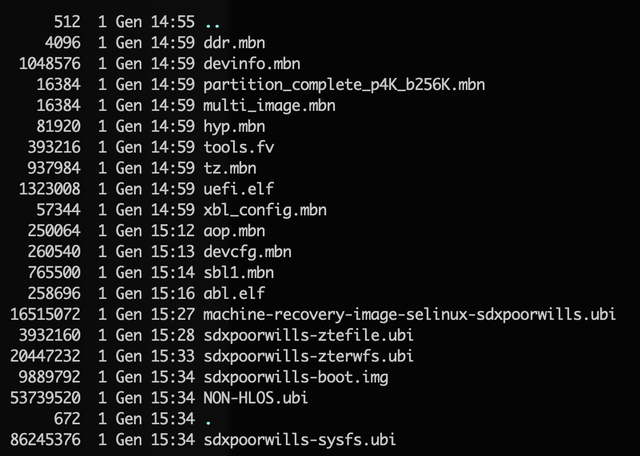
Need to finish rawprogram0.xml to test it with QFIL.
Hope tomorrow to make a test flash to see what will happens (these files are reworked from an Vodafone IT AT.1 file, just boot\kernel\modem are from Vodafone DE)
From my experience with MC7010/801A, some of them can be "swapped" between units
oh sorry, you're right
just short them to each other while plug the module into USB port, when you get 9008 COM you can remove the short
Fajnie, że wyprowadzili w tym modelu blisko łącza mpcie. Mam 3 modemy zdechnięte od innego modelu być może nawet i ZTE więc posprawdzam sobie te piny. A nóż któryś to EDL boot point
have you tested into an mPCIe slot? because on it's original router is in USB3.0
And this is very good news for the end of the year
if we use QFIL (instead of SB3.0) it will be more easily to flash
Let me work on repack stuff, now that I've HW EDL is it more easy to flash
@smereka
another user has finally found hardware EDL point for that module
here is it:

Just short these two pins each other until attached to USB port, it will popup as 9008 in Windows\Linux
many many thanks to checkin665 for this gift on year's last day 
Ok I have already seen that the mf286d has an easy-to-remove modem, because after removing it, we revived it together. However, I did not remove the one from the mf289f, that's why I'm asking you about it. If you say that it is easy to remove and is not glued to the motherboard, then great. Next week or when I find some time, I will take it out and test it with a fluke meter and maybe I will find this whole EDL point. I will let you know then and we will try to pass it with your qpst and qfil packages
Thanks
Waiting for your feedback
stich, I can take apart the router. I've already gutted 6-7 pieces, but that's not what I mean
I’m not understanding..
MF289D/F doesn’t have the modem glued…
Do you have any photos of the inside of the modem? And how did I remove it? When I was gutting the motherboard, I had the impression that this modem was glued to the mf289f model, have you checked this?
Look here how to open it: https://forum.fibra.click/d/32421-zte-m … dello-vfit
You need to remove all screw to get modem that is behind the mounting cover. Then it slide Mf286d, remove the two screw and it can be removed from the slot
stich, have you gutted this modem? Have you checked whether there is a boot point at all? I have two working ones. I really feel like gutting and searching, but I can do it for science and sacrifice one for possible death. I will let you know if I find a boot point. Would you tell me if I managed to find the boot point? Is it possible to upload the firmware to it like for the mf286d?
if we have boot point yes, we can use EDL to load using SB3.0 or QFIL
let me know if you find it, i've one in broken state.
The small point near the CPU doesn't seem and EDL
As I've promised here is all stuff created to swap firmware on MF289F module:
https://mega.nz/folder/Lpx20LgJ#bxxiLuF2AH2B78T0vd6vGA
inside there are needed files to change firmware (boot, system, modem and config), qcn and istructions.
Take care when do the swap, if you erase wrong partition (different from boot, system, modem), you can send module into recovery (like MF286D). There are no NPRG/EPRG loaders and also no known EDL boot point, i've the firehose for EDL but without put it in 9008 mode is useless.
As for now, I've enabled VoLTE on two different modules but only in Italy (three different providers), same procedure seems to not work with PLUS sim on T-Mobile module (tested with MiG25)
ok guys, i've also repacked VFDE firmware, and this is the newer one (2022-05-11), it has also a better LTE CA-Combos
https://uecapability.smartphonecombo.it … 65b4058098
I was also able to enable VoLTE for "non supported" provider, tested successfully on Vodafone IT and Wind IT. On such firmware TIM Italy was already working with VoLTE
I'll post repacked firmware, QCN and relative files to enable VoLTE in the next days, so anyone that want to replace it's firmware can do it.
Note that at this moment is not possible to fully restore the modem if something goes wrong, because i've not found the hardware EDL point 
I want to publicly thank MiG25 for the dump of T-Mobile unit.
Thanks to my experience on ZTE MC7010/801A I was able to repack firmware for MF289F module, now one on my module that was Vodafone IT (AT2 fw) was converted to T-Mobile PL:
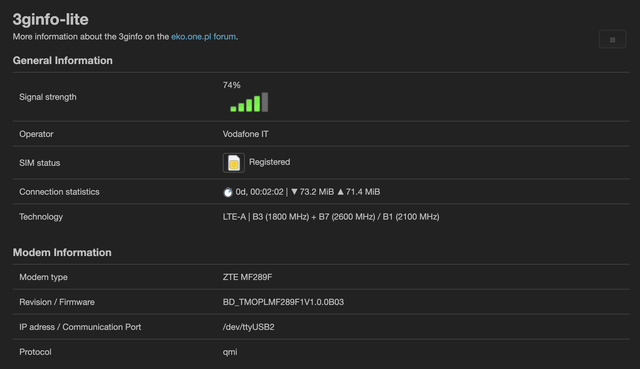
Here is also a little speedtest:

Let's see if I can get VoLTE working
Is it possible to create files from the files that I extract from the modem that I can provide to qpst and it will feed the modem in EDL mode, just like it had in mf286d?
Needs to be reworked like I did for ZTE MC801A/7010
I’ve a spare MF289F module, I’ll check di EDL point is working so I can make some useful test to create a correct package
ok let's try to summarize (i've tried to create a procedure for Windows, but the modem kill itself after some seconds).
First of all you have to install or use LiveDVD from https://github.com/bkerler/edl/
When booted on this Linux Live, open a terminal. Check if you have adb installed, in case just type:
sudo apt install adb
Then download this firehose programmer: https://mega.nz/file/6g5nQSDD#mr1E2x2sG … KSpwgBHHkg and put on desktop folder
go into desktop folder from the terminal (usually 'cd Desktop' if you are in your home)
then attach the modem with USB adapter, wait 5 minutes and type this command: adb reboot edl
wait 2 minutes then type these commands:
mkdir dump_by_parts
edl rl dump_by_parts --memory=NAND --loader=prog_firehose_mf289f.mbn
If anything was fine it will start to dump all partition inside that folder
When finished, copy that folder into an usb stick and upload files into a Mega folder
Regarding QCN i think that anyone know how to do it, in case with EFSPro remove IMEI
I’m searching something less branded. VFDE it’s similar to VFIT. I think the only really “clean” is Play/TMO
I remember that someone has it..
I’ll share procedure next week, it’s very simple but you need to have a Linux machine (or run a live distro) and USB adapter to connect the modem board on the PC
hello guys,
loooong time from my last post
now that i've knowledge on reflash also embedded module, i'm searching a different one from Vodafone (that has some issue when you enable VoLTE).
I need a dump of the module itself (plus the board and QCN). Let me know if anyone can help me, I can share procedure to dump it (needs linux machine)
Thanks in advance!
Hi guys,
i need someone that can be a "donor" for these firmware:
ZTE MC7010 H3G UK H3G_GB_MC7010DV1.0.0B08 or H3G_GB_MC7010DV1.0.0B09 + QCN
ZTE MF289F (internal modem) + QCN, I got VDF IT T1/T2 unit, need to dump a different one.
For the last module i'm working to "repack" firmware so we have it in case of module brick like I did for the MF286D module
I can do everything via TeamViewer or instruct how to do the dump.
Thanks in advance!
eko.one.pl → Posty przez stich86
Forum oparte o PunBB, wspierane przez Informer Technologies, Inc