Odp: zyxel nr7101
No ciekawe co odpowiedzą.
Masz niepotrzebny router, uszkodzony czy nie - chętnie przygarnę go.
Nie jesteś zalogowany. Proszę się zalogować lub zarejestrować.
eko.one.pl → Inne → zyxel nr7101
Strony Poprzednia 1 … 9 10 11 12 13 … 20 Następna
Zaloguj się lub zarejestruj by napisać odpowiedź
No ciekawe co odpowiedzą.
Cezary a może być tak, że jakby te Rx i Tx od tej konsoli podpiął pod USB w laptopie pod zaciski A i B to mi w windowsie normalnie wykryje porty czy to raczej do tego celu jest inny interfejs?
Uart to nie usb, nie ten protokół...
Usb to masz tam gdzieś na płytce - znajdź datasheet od mt7621, zobaczysz gdzie ma usb i spróbuj wyśledzić ścieżki. Choć pewnie i tak za dużo ścieżek od tego chipu nie będzie szło.
No o tym właśnie myślę. Żeby do tych ewentualnie ścieżek się wlutować i wówczas pewnie qfilem (QPST) dałby się to opędzlować
W poniedziałek wypatroszę swojego nr7101 działającego i zobaczę jak tam wyglądają logi i czym się różnią...
Na chwilę odstawiam temat 2 umarlaka - wrócę do niego niebawem. Ale wracam do 5G w ów sprzęcie na pierwszym ożywionym umarlaku. Otóż jako, że musiałem nabyć nowy telefon no to wiadomo wybrałem już z 5G. Dawno się nie zagłębiałem w temat telefonów toteż wybór zajął 2-3 miesiące - przeżyłem rozstrojenie nerwowe jak przejrzałem rynek jaki teraz szajs robią pokastrowali telefony z podstawowych rzeczy ech.... Znaleźć coś w miarę sensownego to ciężka sprawa. Ale w końcu wybrałem samsunga, choć wolę swojego starego samsunga A8 (któremu nic oprócz szybszego procka i ram nie brakuje) no i wsadziłem kartę orange która na nr7101 za chiny nie łączyła się z 5G. No i myślę jak już teraz nie zadziała dzwonie do tych dziadów i niech robią cokolwiek ale ma działać wszakże modem telefonu rekomendowany przez nich. Ale koniec końców o dziwno na tel ujrzałem 5G. No to myk z powrotem karta do nr7101 i o dziwo taki efekt:
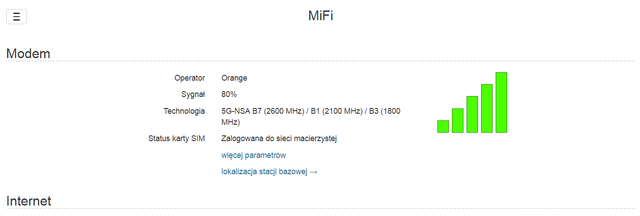
no i po at:
at+qnwinfo
+QNWINFO: "FDD LTE","26003","LTE BAND 7",3025
+QNWINFO: "FDD NR5G","26003","NR5G BAND 1",423410
Można by rzec hurra. Teraz pytanie czy oni włączyli w końcu faktycznie na mojej karcie 5G a wcześniej po prostu były zwodzenia i gadanie czy włożenie karty do tel spowodowało jakąś aktywację na karcie 5G a potem wiadomo siłą rzeczy zaczęło działać na zyxeliku 
Podsumowując chyba ten modem w I umarlaku jest pełno sprawny - a przynajmniej na protezie 5G od orange
P.S Jak widzisz Cezary zyxelik cały czas jedzie na Twoim sofcie mifi. Na nim chodzi to najlepiej i nic a nic nie zrywa sesji i zawsze po włączeniu się łączy czego nie mogę napisać o luci i zwykłym openwrt
Czasami nie zaktualizowało się coś na karcie lub nie zostało włączone?
Może tak być - a poza tym orange teraz do końca roku chyba wszystkim prepaidowacom włączył dostęp do 5G. Więc może to spowodowało, że działa. Ale reasumując jak pisałeś na LTE jest jednak szybciej niż na protezie.
No dobra jednak Cezary jest coś w tym, że wsadziłem tym razem kartę Plusa do samsunga z 5G. Pomimo, że ani na karcie do rozmów ani na karcie stricte do internetu nie miałem włączonej dodatkowej usługi za 5zł netto bodajże a mam i taką i taką po włożeniu do tel pięknie pokazały 5G. Dodatkowo po wpisaniu na samsungu *#0011# sprawdziłem tam w parametrach i łączy się na N41. Zasuwa ponad 100Mb i taką prędkość to ja rozumiem. Podczas, gdy tylko przełączę na LTE to mam max 10Mb - mowa oczywiście o warszawskim Targówku okolice szpitala bródnowskiego. No dobra to teraz myk i karta do zyxela i oto:
AT+qeng="servingcell"
+QENG: "servingcell","NOCONN"
+QENG: "LTE","FDD",260,01,400303,475,1300,3,5,5,2AFA,-101,-14,-66,10,7,205,-
+QENG: "NR5G-NSA",260,01,893,-104,13,-13,518910,41,6,1
Prędkość ta sama co na na samsungu ponad 100Mb i masz pasmo 41. Dodatkowo LTE na B3(1800)
Ale zasuwa - niesamowite. Pełnosprawny modem. Nie rozumiem tylko jak to jest, że włożenie karty do tel to spowodowało zarówno na orange jak i na plusie - przypadek?
Trzeba ratować jakoś umarlaka 2. Odpisali mi na forum quectela że chcą logi z trybu debug modemu ale jak w ten tryb wejść?
Inny forumowicz napisał, że może sekcja zasilania modemu ma problem podczas testowania torów transmisyjnych i dlatego wywala się na magistrali.
To samo napisałem w #242. Strzelam że będą chcieli odpalić jakiś specjalny programik który podłączy się do jednego z interfejsów i pozbiera dane.
Rozbebeszyłem działająca sztukę i takie są logi na uarcie żywego modemu:
Format: Log Type - Time(microsec) - Message - Optional Info
Log Type: B - Since Boot(Power On Reset), D - Delta, S - Statistic
S - QC_IMAGE_VERSION_STRING=BOOT.SBL.4.1-00188
S - IMAGE_VARIANT_STRING=MAATANAZA
S - OEM_IMAGE_VERSION_STRING=HF-SW-PANDA
S - Boot Interface: NAND
S - Secure Boot: Off
S - Boot Config @ 0x00786070 = 0x00000041
S - JTAG ID @ 0x00786130 = 0x200cf0e1
S - OEM ID @ 0x00786138 = 0x00000000
S - Serial Number @ 0x00786134 = 0xb9812a71
S - OEM Config Row 0 @ 0x007841c8 = 0x0000000000000000
S - OEM Config Row 1 @ 0x007841d0 = 0x0000000000000000
S - Feature Config Row 0 @ 0x007841e0 = 0x0040200000000010
S - Feature Config Row 1 @ 0x007841e8 = 0x0800001010000000
B - 381 - PBL, Start
B - 3682 - bootable_media_detect_entry
B - 4887 - bootable_media_detect_success
B - 5158 - elf_loader_entry
B - 7745 - auth_hash_seg_entry
B - 8282 - auth_hash_seg_exit
B - 103459 - elf_segs_hash_verify_entry
B - 110664 - elf_segs_hash_verify_exit
B - 110915 - xbl_sec_auth_hash_seg_entry
B - 118647 - xbl_sec_auth_hash_seg_exit
B - 118648 - xbl_sec_segs_Hash_verify_entry
B - 119642 - xbl_sec_segs_Hash_verify_exit
B - 119672 - PBL, End
B - 3276 - PBL, Delta
B - 158905 - SBL1, Start (Qtimer timestamp = 143706)
B - 293257 - boot_config_data_table_init, Start
D - 140788 - boot_config_data_table_init, Delta - (28 Bytes)
B - 438285 - CDT version:3,Platform ID:8,Major ID:1,Minor ID:0,Subtype:5
B - 444415 - PlatformInfo_CDTInit: Received CDT: Version 3, Platform 8, Subty
B - 467839 - pm_device_init, Start
B - 469578 - PM: Device Init # Reset counter: 27
B - 471103 - PM: PM 4=0x400008000000020:0x0
B - 473817 - PM: POWER ON by PON1,POWER OFF by RAW_XVDD_SHD
B - 519567 - PM_SET_VAL:Skip
B - 519567 - PM: Device Init # Reset counter: 0
B - 522709 - PM: Device Init # skip_pass3 flag: 0
B - 525240 - PM: Device Init # SPMI Transn: 2863
D - 62098 - pm_device_init, Delta
B - 533262 - pm_driver_init, Start
B - 539240 - PM: Driver Init # SPMI Transn: 201
D - 4422 - pm_driver_init, Delta
B - 544577 - sbl1_ddr_set_params, Start
B - 548634 - Pre_DDR_clock_init, Start
D - 61 - Pre_DDR_clock_init, Delta
D - 0 - sbl1_ddr_set_params, Delta
B - 559675 - boot_flash_init, Start
D - 23302 - boot_flash_init, Delta
B - 586850 - OEM_MISC Image Load, Start
D - 1251 - Auth Metadata
D - 702 - Segments hash check
D - 6344 - OEM_MISC Image Loaded, Delta - (7480 Bytes)
B - 598715 - xblconfig_init, Start
D - 30 - xblconfig_init, Delta
B - 605333 - sbl1_ddr_init, Start
D - 2897 - sbl1_ddr_init, Delta
B - 611830 - DSF version = 105.6, DSF SHRM version = 60.1
B - 617442 - Manufacturer ID = ff, Device Type = 7
B - 622139 - Rank 0 size = 512 MB, Rank 1 size = 0 MB
B - 628147 - Frequency = 1018 MHz
B - 630984 - Enter ddi entry
B - 633241 - Exit ddi entry
B - 643062 - clock_init, Start
D - 61 - clock_init, Delta
B - 643184 - [MF] quec_multi_fota_process entry
B - 647393 - [MF] paraments page size = 4096, page_per_block = 64
B - 678442 - [MF] SBL partable: misc, offset: 424
B - 678777 - [MF]Get multi fota flag: 0
B - 680546 - quec_multi_fota_process return:0
B - 686799 - APDP Image Load, Start
D - 2471 - Auth Metadata
D - 1006 - Segments hash check
D - 7808 - APDP Image Loaded, Delta - (7980 Bytes)
B - 700493 - Product:RG502Q-EA
B - 702354 - Manuf:Quectel
B - 706410 - QSEE Dev Config Image Load, Start
D - 3111 - Auth Metadata
D - 1250 - Segments hash check
D - 12505 - QSEE Dev Config Image Loaded, Delta - (37155 Bytes)
B - 721752 - QSEE Image Load, Start
D - 17385 - Auth Metadata
D - 10736 - Segments hash check
D - 94215 - QSEE Image Loaded, Delta - (890548 Bytes)
D - 976 - boot_pm_post_tz_device_init, Delta
B - 822371 - QHEE Image Load, Start
D - 3080 - Auth Metadata
D - 1342 - Segments hash check
D - 15220 - QHEE Image Loaded, Delta - (78968 Bytes)
B - 842837 - PM: PM Total Mem Allocated: 828
B - 1177849 - AOP Image Load, Start
D - 2562 - Auth Metadata
D - 2410 - Segments hash check
D - 17781 - AOP Image Loaded, Delta - (149296 Bytes)
B - 1198375 - APPSBL Image Load, Start
D - 2013 - Auth Metadata
D - 6100 - Segments hash check
D - 87566 - APPSBL Image Loaded, Delta - (1186408 Bytes)
B - 1288137 - sbl1_efs_handle_cookies, Start
D - 0 - sbl1_efs_handle_cookies, Delta
B - 1296707 - SBL1, End
D - 1139876 - SBL1, Delta
S - Throughput, 7000 KB/s (2359755 Bytes, 308988 us)
S - DDR Frequency, 1017 MHz
S - Core 0 Frequency, 1497 MHz
UEFI Start [ 1370]
- 0x08F701000 [ 1386] Sec.efi
PROD Mode : On
ASLR : On
Timer Delta : +21 mS
RAM Entry 0 : Base 0x0000000080000000 Size 0x0000000020000000
Could not find the DBI Dump region .
UEFI Ver : 5.0.210122.BOOT.UEFI.4.0-00195-SDX55LEZB-2
Build Info : 32b Jan 22 2021 01:00:53
Boot Device : NAND
DEP Enabled
PM3: 33, PM4: 42,
UsbConfigPortsQueryConnectionChange: Failed to get UsbCGetPortState, falling bac
-----------------------------
Platform Init [ 1597] BDS
UEFI Ver : 5.0.210122.BOOT.UEFI.4.0-00195-SDX55LEZB-2
Platform : MTP
Subtype : 5
Chip Name : SDX55
Chip Ver : 2.0
Core 0 Freq: 1497 MHz
-----------------------------
UEFI Total : 228 ms
POST Time [ 1598] OS Loader
Loader Build Info: Feb 3 2021 16:02:15
VB: RWDeviceState: Succeed using devinfo!
Total DDR Size: 0x0000000020000000
BootMode:0, BootReason:0
Fastboot=0, Recovery:0
GetVmData: No Vm data present! Status = (0x80000003)
VM Hyp calls not present
Booting Into Mission Mode
Loading Image Start : 1654 ms
Loading Image Done : 1660 ms
Total Image Read size : 4096 Bytes
Loading Image Start : 1660 ms
Loading Image Done : 2293 ms
Total Image Read size : 10674176 Bytes
No dtbo partition is found, Skip dtbo
VB: verification skipped for debug builds
GetVmData: No Vm data present! Status = (0x80000003)
Memory Base Address: 0x80000000
BootLinux: failed to get dtbo image
Best match DTB tags 357/05010008/0x00000005/20000/0/0/0/20021/(offset)0x84B44869
Using pmic info 0x0/0x0/0x0/0x20021 for device 0x0/0x0/0x0/0x20021
Memory Base Address: 0x80000000
Failed to get Boot Device Base address, Buffer Too Small
Failed to get Boot Device: Buffer Too Small
Unable to get Panel Config, Not Found
Partition not found : usb_qti
USB Composition Magic verification Failed
Partition not found : usb_qti
USB Composition Magic verification Failed
Partition not found : usb_qti
USB Composition Magic verification Failed
Cmdline: noinitrd ro rootwait console=ttyMSM0,115200,n8 androidboot.hardware=qco=0 atlantic_fwd.rx
RAM Partitions
Add Base: 0x0000000080000000 Available Length: 0x0000000020000000
Failed to get MinPasrSize, Status = Unsupported
Unable to get splash buffer info, Not Found
Update Device Tree total time: 15 ms
Shutting Down UEFI Boot Services: 2339 ms
BDS: LogFs sync skipped, No Media
App Log Flush : 75 ms
Exit BS [2417] UEFI End
Welcome to mdm 202202221921!
[ OK ] Created slice User and Session Slice.
[ OK ] Reached target Slices.
[ OK ] Listening on initctl Compatibility Named Pipe.
[ OK ] Created slice system-getty.slice.
[ OK ] Listening on udev Control Socket.
[FAILED] Failed to listen on Journal Socket (/dev/log).
See 'systemctl status systemd-journald-dev-log.socket' for details.
[FAILED] Failed to listen on Journal Socket.
See 'systemctl status systemd-journald.socket' for details.
[ OK ] Started Forward Password Requests to Wall Directory Watch.
Starting QCMAP_copybind service...
Mounting Kernel Debug File System...
Starting Port bridge Service...
[ OK ] Reached target Timers.
[ OK ] Reached target Remote File Systems.
Starting Apply Kernel Variables...
[ OK ] Started Dispatch Password Requests to Console Directory Watch.
Starting time serviced Service...
Starting chgrp-diag Service...
[ OK ] Reached target Swap.
Mounting Temporary Directory (/tmp)...
Mounting POSIX Message Queue File System...
[ OK ] Started QCMAP_Bootup service.
[ OK ] Started SSREQ server Service.
Mounting Kernel Configuration File System...
Starting Mount firmware partition to /firmware mount point...
[ OK ] Created slice system-serial\x2dgetty.slice.
[ OK ] Listening on udev Kernel Socket.
[ OK ] Started qrtr-ns Service.
Starting Load/Save Random Seed...
[ OK ] Reached target Paths.
[ OK ] Started irsc-util Service.
[ OK ] Started Netmgrd Service.
Starting Create Static Device Nodes in /dev...
[ OK ] Mounted Kernel Debug File System.
[ OK ] Started Port bridge Service.
[ OK ] Started Apply Kernel Variables.
[ OK ] Started chgrp-diag Service.
[ OK ] Mounted Temporary Directory (/tmp).
[ OK ] Mounted POSIX Message Queue File System.
[ OK ] Mounted Kernel Configuration File System.
[ OK ] Started Load/Save Random Seed.
[ OK ] Started time serviced Service.
[ OK ] Started Create Static Device Nodes in /dev.
[ OK ] Reached target Local File Systems (Pre).
Mounting /var/volatile...
Starting udev Kernel Device Manager...
[ OK ] Started Mount firmware partition to /firmware mount point.
[ OK ] Started QCMAP_copybind service.
[ OK ] Mounted /var/volatile.
[ OK ] Reached target Local File Systems.
Starting Create Volatile Files and Directories...
Starting IPA FW Service...
[ OK ] Started Staring tftp server.
[ OK ] Started IPA FW Service.
Starting pcie Service...
[FAILED] Failed to start pcie Service.
See 'systemctl status pcie.service' for details.
Starting usb Service...
[ OK ] Started udev Kernel Device Manager.
[ OK ] Started Create Volatile Files and Directories.
Starting IPACM Service...
[ OK ] Reached target System Initialization.
[ OK ] Listening on D-Bus System Message Bus Socket.
[ OK ] Started D-Bus System Message Bus.
[ OK ] Started IPACM Service.
Starting QCMAP connectionManager service...
[ OK ] Started usb Service.
Starting adbd Service...
[ OK ] Started adbd Service.
[ OK ] Created slice system-dnsmasq_service.slice.
Starting dnsmasq service...
[ OK ] Started dnsmasq service.
[ OK ] Started QCMAP connectionManager service.
[ OK ] Started emac service.
Starting Modem Init Service...
[ OK ] Started Modem Init Service.
[ OK ] Reached target Sockets.
[ OK ] Reached target Basic System.
[ OK ] Started ql-voice-server daemon Service.
Starting Thermal Engine Service...
[ OK ] Started IPACM Perf Service.
Starting leprop Service...
[ OK ] Started Setting the power config.
Starting start_qxdmlog Service...
[ OK ] Started Charger Policy Service.
[ OK ] Started qmi_ip_multiclient service.
[ OK ] Started Setup avtp routing service.
Starting diagrebootapp service...
Starting Lightning Fast Webserver With Light System Requirements...
[ OK ] Started start wlan services.
Starting Qseecomd Service...
[ OK ] Started start quectel thermal.
[ OK ] Started Embms kernel service.
[ OK ] Started start quectel remotefs daemon.
Starting Bluetooth Power Service...
[ OK ] Started data-init service.
Starting Qmuxbridge Service...
Starting QTI Mobile Broadband Service...
Starting adpl service...
Starting qti service...
Starting System Logging Service...
[ OK ] Started pcie-diag Service.
[ OK ] Started QUECTEL NW msg Services.
[ OK ] Started fs-scrub-daemon Service.
[ OK ] Started start quectel daemon.
[ OK ] Started GPS Location process launcher.
[ OK ] Started AQC IPA Offload.
[ OK ] Started Crypto modules installation service.
[ OK ] Started reboot-daemon service.
Starting qti_ppp service...
[ OK ] Started Atfwd_daemon Service.
Starting Audio Init Service...
Starting Login Service...
[ OK ] Started Reset reboot cookie.
[ OK ] Started set_core_pattern Service.
[ OK ] Started QUECTEL NET Services.
Starting udev Coldplug all Devices...
[ OK ] Started Thermal Engine Service.
[ OK ] Started leprop Service.
[ OK ] Started start_qxdmlog Service.
[ OK ] Started Qseecomd Service.
[ OK ] Started Bluetooth Power Service.
[ OK ] Started adpl service.
[ OK ] Started System Logging Service.
[ OK ] Started qti_ppp service.
[FAILED] Failed to start Qmuxbridge Service.
See 'systemctl status qmuxbridged.service' for details.
[ OK ] Started qti service.
[FAILED] Failed to start Audio Init Service.
See 'systemctl status init_audio.service' for details.
[ OK ] Started Login Service.
[ OK ] Started QTI Mobile Broadband Service.
[ OK ] Stopped Audio Init Service.
Starting Audio Init Service...
[ OK ] Stopped Qmuxbridge Service.
Starting Qmuxbridge Service...
[ OK ] Started Load audio dlkm service.
[ OK ] Started sfs configuration Service.
[ OK ] Started ql-voice-server daemon Service.
[ OK ] Started quectel-le964x-daemon daemon Service.
[ OK ] Started quectel ktfota daemon Service.
[ OK ] Started quectel-si3218x-daemon daemon Service.
[ OK ] Started diagrebootapp service.
[FAILED] Failed to start Audio Init Service.
See 'systemctl status init_audio.service' for details.
[ OK ] Started Qmuxbridge Service.
[ OK ] Started init csd server.
[ OK ] Stopped Audio Init Service.
Starting Audio Init Service...
[ OK ] Started Audio Init Service.
[ OK ] Started Lightning Fast Webserver With Light System Requirements.
[ OK ] Started udev Coldplug all Devices.
[ OK ] Found device /dev/ttyMSM0.
[ OK ] Started Serial Getty on ttyMSM0.
[ OK ] Reached target Login Prompts.
[ OK ] Found device /dev/input/event0.
[ OK ] Started Modem Shutdown Service.
[ OK ] Found device /dev/diag.
[ OK ] Started IPACM DIAG Service.
[ OK ] Reached target Multi-User System.
mdm 1932 sdxprairie ttyMSM0
sdxprairie login:
Coś Cezary z porównania żywego a umarłym wynika może? Na forum quectela napisali zeby jakiś debug mode ale nie wiem o co im chodzi zadałem pytanie ale strasznie wolno odpisują - tak jakby im w ogóle nie zależało na nowym doświadczeniu z ich produktem.
Przy próbie logowania jako root:
sdxprairie login: root
quectel-v : v1.0
quectel-ID : 31122499
Password:
Niestety login root i hasło: oelinux123 jak to miało miejsce w modemie od mf286d nie działa 
[FAILED] Failed to start Qmuxbridge Service
masz jak się wykłada. Tylko nie masz jak wgrać softu jak się cały czas resetuje...
Właśnie też nad tym Qmuxbridge Service się zastanawiałem...
No nic będę wertował fora a może ktoś tutaj podrzuci pomysł albo spece od quectela coś wymedytują
Moim zdaniem to nie jest problem zasilania bo modem jakby świadomie się rebootuje o czym tez niejako informuje w logach...
Ha znalazłem ten skubany usb boot point i vdd_ext (1,8V), które trzeba zewrzeć przez 10kOhm rezystor. Cały weekend studiowałem datasheeta od tego i przeglądałem i mierzyłem multimetrem płytę i udało się. Całe szczęście wyprowadzili go z pinu na modemie oznaczonego jako 81 choć w takim miejscu, że na czuja badałem ryzykując usmażenie modemu lub nawet płyty całej. Jest tam rezystor około 4,6kOhm wiec dodałem 7,5kOhm bo taki miałem i jest hurra wprowadziłem w ten sam tryb co był umarlak z mf286d. Ale teraz bez waszej pomocy to nie wiem czy dam radę dalęj. Cezary da się zrobić jakimś socatem czy czymś innym aby ten port usb wystawić na widowsa po tcp (czy czymś nie wiem może jak to fachowo nazwać) żeby go program gflash od quectela zobaczył lub qfil?
Tak jest teraz w trybie EDL widoczny na Twoim sofcie:
T: Bus=01 Lev=01 Prnt=01 Port=00 Cnt=01 Dev#= 2 Spd=480 MxCh= 0
D: Ver= 2.00 Cls=00(>ifc ) Sub=00 Prot=00 MxPS=64 #Cfgs= 1
P: Vendor=05c6 ProdID=9008 Rev= 0.00
S: Manufacturer=Qualcomm CDMA Technologies MSM
S: Product=QUSB_BULK_CID:0410_SN:9E7BFE4F
C:* #Ifs= 1 Cfg#= 1 Atr=a0 MxPwr= 2mA
I:* If#= 0 Alt= 0 #EPs= 2 Cls=ff(vend.) Sub=ff Prot=11 Driver=(none)
E: Ad=81(I) Atr=02(Bulk) MxPS= 512 Ivl=0ms
E: Ad=01(O) Atr=02(Bulk) MxPS= 512 Ivl=0ms
Noo... tylko że wszystkie softy są pod windowsa. A linuksowych wersji do tych modemów nie posiadam.
Cezary ale mi chodzi, żeby jakoś zwirtualizować port usb widziany przez zyxela na komputer pc - na razie bez wpierdzialania się na chama w D+ i D- bo te też najprawdopodobniej namierzyłem i jak nie będzie innej drogi no to tak zrobię. Próbuje z pakietem usbip i o ile na starym nexie3020 i jakimś starym CC wsadzony pendrive elegancko widzę na windows 7 tak po zainstalowaniu na zyxelu usbip wywala mi takie coś:
root@OpenWrt:~# usbip list -l
- busid 1-1 (05c6:9008)
Qualcomm, Inc. : Gobi Wireless Modem (QDL mode) (05c6:9008)
root@OpenWrt:~# usbipd -D; usbip bind -b 1-1; usbip attach -r 192.168.200.1 -b 1
-1; sleep 5; usbip detach -p 0
usbip: info: bind device on busid 1-1: complete
libusbip: error: no available usb controllers
usbip: error: open vhci_driver
libusbip: error: no available usb controllers
usbip: error: open vhci_driver
root@OpenWrt:~#
A tak to jest na windowsie jak próbuje się połączyć:
:\USBIP test\usbip>usbip -l 192.168.200.1
usbip for windows ($Id$)
- 192.168.200.1
1-1: unknown vendor : unknown product (05c6:9008)
: /sys/devices/platform/1e1c0000.xhci/usb1/1-1
: (Defined at Interface level) (00/00/00)
D:\USBIP test\usbip>usbip -a 192.168.200.1 1-1
usbip for windows ($Id$)
*** ERROR: cannot find device
D:\USBIP test\usbip>
Tego nie wiem - nie używam usbip. Może jakiegoś starszego windowsa wymaga?
Opiąłem całkowicie magistralę usb 2.0 od procka i na linuxie na laptopie widzi mi modem w trybie edl ale firehose nie dostaje odpowiedzi na pakiet hello - jest timeout. Na Windowsie wali konuikat o nierozpoznanym urządzeniu - sterowniki mam od quectela więc powinno widzieć. Poczytałem i okazuje się, że qfrehoue jest zaszyty w oprogramowanie ROOter. Cezary czy ja mogę przejść na ten soft przy pomocy sysupgrade? Coś Ci na ten temat wiadomo?
A jest rooter na ten zyxel? Jeżeli tak to tak.
Podobno jest. Będę próbował. Czy mogę bezpośrednio z Twojego openwrt?
Tak, bez zachowania konfiguracji, z ew wymuszeniem, bo nie wiem którą wersję oni używają.
Ok. Może wówczas zabangla. Bo już kończą mi się pomysły. Mozę jest jakieś gpio co steruje zasilaniem modemu (coś takiego jak VUSB niby jest w datasheet) a ja wpinając się na chama w D+ i D- moze coś pomijam. Zobaczymy...
W MF289F kolega @stich86 ładnie to wystawia przez sieć :https://forum.fibra.click/d/32421-zte-mf289f-vodafone-fwa-sblocco-aggregazione-b20-su-modello-vfit
Ciekawe ,co to jest ten remserial_7e w fw ZTE , bo tu by się przydało.
EDIT: Wygląda na to: https://github.com/hunterli/remserial
Może da się to skompilować na tą platformę...
Strony Poprzednia 1 … 9 10 11 12 13 … 20 Następna
Zaloguj się lub zarejestruj by napisać odpowiedź
eko.one.pl → Inne → zyxel nr7101
Forum oparte o PunBB, wspierane przez Informer Technologies, Inc