Cezary napisał/a:
Pokaż jeszcze ls -al /tmp/usb_mount/dev_sda1
root@Gargoyle:~# ls -al /tmp/usb_mount/dev_sda1
lrwxrwxrwx 1 root root 26 Jan 17 20:04 /tmp/usb_mount/dev_sda1 -> /tmp/usb_mount/d2d42247-01
Nie jesteś zalogowany. Proszę się zalogować lub zarejestrować.
eko.one.pl → Posty przez Laurier07
Pokaż jeszcze ls -al /tmp/usb_mount/dev_sda1
root@Gargoyle:~# ls -al /tmp/usb_mount/dev_sda1
lrwxrwxrwx 1 root root 26 Jan 17 20:04 /tmp/usb_mount/dev_sda1 -> /tmp/usb_mount/d2d42247-01
Pokaż
mount
ls -al /tmp/usb_mount/dev_sda1/camOraz logi z ftp.
root@Gargoyle:~# ls -al /tmp/usb_mount/dev_sda1/cam
drwxrwxrwx 2 root root 4096 Jan 16 22:11 .
drwxrwxrwx 4 root root 4096 Jan 16 22:11 ..
log z ftp
Connect to: (2018-01-17 21:10:58)
hostname=192.168.2.1
username=marekott
startdir=
192.168.2.1=192.168.2.1
220 ftp server ready
USER marekott
331 Please specify the password.
PASS ***********
230 Login successful.
SYST
215 UNIX Type: L8
FEAT
211-Features:
EPRT
EPSV
MDTM
PASV
REST STREAM
SIZE
TVFS
UTF8
211 End
HELP SITE
214-The following commands are recognized.
ABOR ACCT ALLO APPE CDUP CWD DELE EPRT EPSV FEAT HELP LIST MDTM MKD
MODE NLST NOOP OPTS PASS PASV PORT PWD QUIT REIN REST RETR RMD RNFR
RNTO SITE SIZE SMNT STAT STOR STOU STRU SYST TYPE USER XCUP XCWD XMKD
XPWD XRMD
214 Help OK.
OPTS UTF8 ON
200 Always in UTF8 mode.
Connect ok!
PWD
257 "/" is the current directory
Pobierz katalog
TYPE A
200 Switching to ASCII mode.
PORT 192,168,2,103,195,109
200 PORT command successful. Consider using PASV.
LIST
150 Here comes the directory listing.
Ściąganie
Czekam na serwer...
226 Directory send OK.
TYPE I
200 Switching to Binary mode.
PORT 192,168,2,103,195,110
200 PORT command successful. Consider using PASV.
STOR fpl.txt
550 Permission denied.
Pobierz katalog
TYPE A
200 Switching to ASCII mode.
PORT 192,168,2,103,195,111
200 PORT command successful. Consider using PASV.
LIST
150 Here comes the directory listing.
Ściąganie
Czekam na serwer...
226 Directory send OK.
Zrób
chmod -R 777 /tmp/usb_mount/dev_sda1/cam
Niestety bez zmian 
Jaki błąd wyskakuje podczas próby zapisu? (patrz komunikaty i kody błędów ftp gdzieś w logowaniu sesji).
Total Commander wywala blad "550 Permission denied "
W logach Gargoyle brak informacji, widnieje tylko log ze podłaczyłem się prawidłowo z serwerem ftp
Tue Jan 16 22:39:12 2018 ftp.info vsftpd[29494]: [marekott] OK LOGIN: Client "192.168.2.103"
Tue Jan 16 22:39:15 2018 daemon.info hostapd: wlan0: STA f4:b7:e2:f1:e3:6f WPA: group key handshake completed (RSN)
Tue Jan 16 22:39:15 2018 daemon.info hostapd: wlan0: STA a0:f3:c1:1e:e8:b5 WPA: group key handshake completed (RSN)
Tue Jan 16 22:39:15 2018 daemon.info hostapd: wlan0: STA 40:40:a7:55:f5:a0 WPA: group key handshake completed (RSN)
Success
Podepnę się pod temat.
Podłączyłem do routera PenDrive 8GB, chciałbym móc po lokalu wysyłać i pobierać pliki, np. przez total commandera.
Konfiguracja wygląda tak:
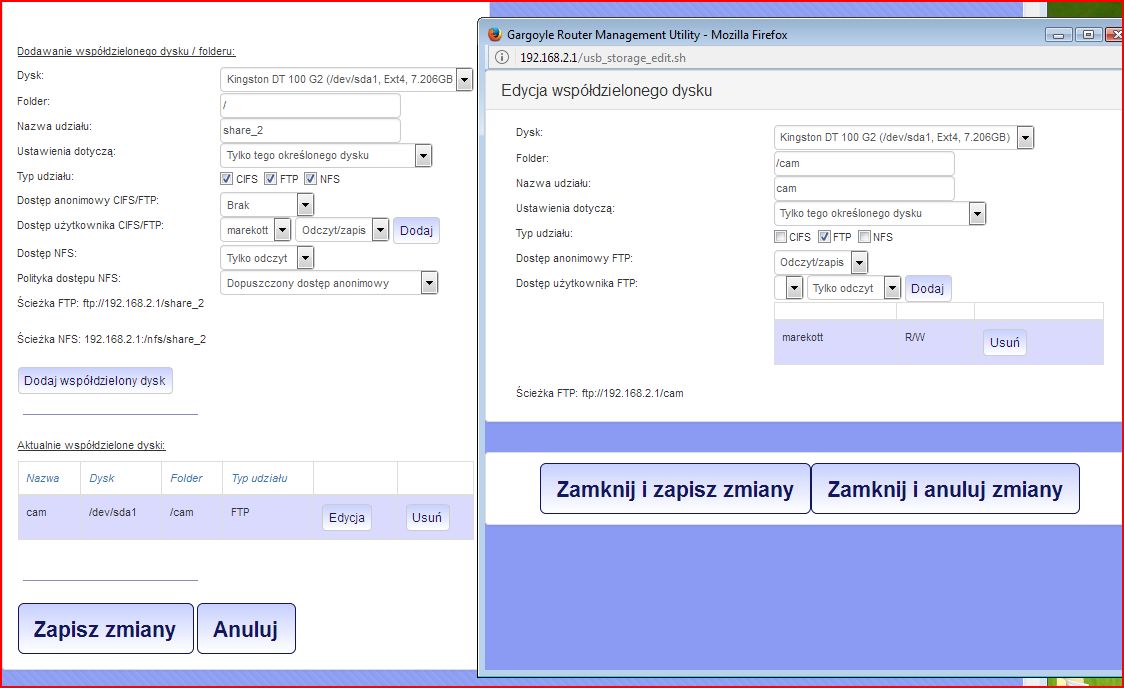
Mogę połączyć się na serwer, jednak nie mogę nic na niego przesłać (oczywiście przy konfiguracji właczona opcja odczytu/zapisu)
Domyślnie chciałbym skonfigurować podłączyć dużo większy dysk przenośny, na który co parę dni zostanie przesłana paczka filmów z kamery IP.
Cezary, zastosowałem się do Twoich zaleceń, przywróciłem ustawienia fabryczne, ustawiłem na nowo wszytsko, niestety dalej router nie daje sygnału 5g, a przynajmniej nie znajdują go żadne urządzenia, nawet w bliskiej odległości od routera .. Masz jeszcze jakaś propozycje?
"Skrypy" to html, źródło strony.
Tego nie ruszasz, co najwyżej przywróć ustawienia domyślne.
Czy przywrocenie ustawień fabrycznych spowoduje usunięcie także wtyczek zainstalowanych poza interfacem ? Głównie chodzi mi oscama. Czy będę musiał go na nowo instalować ?
Zrób podgląd źródła strony i wklej zawartość na pastebin.com a później podaj tu linka. Jest jakiś błąd w danych i skrypt się rozjechał.
Cezary, a jest jakas możliwość by wystartować na nowo ten skrypt przez putty itp ?
Nie widzę tu problemów. Weź go zrestartuj jeszcze raz.
Niestety każdorazowy reset uruchamia interface w takiej formie. Najdziwniejsze jest to że wszystko działa prawidłowo mimo iż w wspomnianym menu wyświetla prawidłowo.
Zobacz https://wiki.openwrt.org/toh/netgear/wndr4300#g_radio
Choć u ciebie radio jest uruchomione i działa.
Trafiłem już wcześniej na to, ale niestety mam praktycznie identycznie.
Dziwna rzecz się stała, resetowałem ten router i interface gargoyle zrobił się jakiś taki rozbudowany ... WTF ?>

Ahh i jeszcze zaraz po uruchomieniu:
root@Gargoyle:~# logread
Mon Sep 18 21:36:07 2017 daemon.notice netifd: Interface 'wan' is now up
Mon Sep 18 21:36:08 2017 daemon.notice netifd: radio1 (1682): Configuration file: /var/run/hostapd-phy1.conf
Mon Sep 18 21:36:08 2017 kern.info kernel: [ 31.300000] device wlan1 entered promiscuous mode
Mon Sep 18 21:36:08 2017 kern.info kernel: [ 31.300000] br-lan: port 2(wlan1) entered forwarding state
Mon Sep 18 21:36:08 2017 kern.info kernel: [ 31.310000] br-lan: port 2(wlan1) entered forwarding state
Mon Sep 18 21:36:08 2017 daemon.notice netifd: radio1 (1682): wlan1: interface state UNINITIALIZED->COUNTRY_UPDATE
Mon Sep 18 21:36:08 2017 daemon.notice netifd: radio1 (1682): Using interface wlan1 with hwaddr 64:66:b3:ce:1e:e2 and ssid "Zaksa2_5g"
Mon Sep 18 21:36:08 2017 kern.info kernel: [ 31.360000] br-lan: port 2(wlan1) entered disabled state
Mon Sep 18 21:36:09 2017 daemon.notice netifd: radio0 (1681): Configuration file: /var/run/hostapd-phy0.conf
Mon Sep 18 21:36:09 2017 kern.info kernel: [ 31.660000] device wlan0 entered promiscuous mode
Mon Sep 18 21:36:09 2017 kern.info kernel: [ 31.660000] br-lan: port 3(wlan0) entered forwarding state
Mon Sep 18 21:36:09 2017 kern.info kernel: [ 31.670000] br-lan: port 3(wlan0) entered forwarding state
Mon Sep 18 21:36:09 2017 daemon.notice netifd: radio0 (1681): wlan0: interface state UNINITIALIZED->COUNTRY_UPDATE
Mon Sep 18 21:36:09 2017 daemon.notice netifd: radio0 (1681): Using interface wlan0 with hwaddr 64:66:b3:ce:1e:e1 and ssid "Zaksa2"
Mon Sep 18 21:36:09 2017 kern.info kernel: [ 32.360000] br-lan: port 3(wlan0) entered disabled state
Mon Sep 18 21:36:10 2017 kern.info kernel: [ 33.120000] br-lan: port 2(wlan1) entered forwarding state
Mon Sep 18 21:36:10 2017 kern.info kernel: [ 33.120000] br-lan: port 2(wlan1) entered forwarding state
Mon Sep 18 21:36:10 2017 daemon.notice netifd: radio1 (1682): wlan1: interface state COUNTRY_UPDATE->ENABLED
Mon Sep 18 21:36:10 2017 daemon.notice netifd: radio1 (1682): wlan1: AP-ENABLED
Mon Sep 18 21:36:11 2017 authpriv.info dropbear[2103]: Child connection from 123.183.209.140:21658
Mon Sep 18 21:36:11 2017 kern.info kernel: [ 33.500000] br-lan: port 3(wlan0) entered forwarding state
Mon Sep 18 21:36:11 2017 kern.info kernel: [ 33.500000] br-lan: port 3(wlan0) entered forwarding state
Mon Sep 18 21:36:11 2017 daemon.notice netifd: radio0 (1681): wlan0: interface state COUNTRY_UPDATE->ENABLED
Mon Sep 18 21:36:11 2017 daemon.notice netifd: radio0 (1681): wlan0: AP-ENABLED
Mon Sep 18 21:36:11 2017 daemon.notice netifd: Network device 'wlan1' link is up
Mon Sep 18 21:36:11 2017 daemon.notice netifd: Network device 'wlan0' link is up
Mon Sep 18 21:36:11 2017 user.err syslog: error starting threads: errno 89 (Function not implemented)
Mon Sep 18 21:36:11 2017 user.emerg syslog: exportfs: could not open /var/lib/nfs/.etab.lock for locking: errno 2 (No such file or directory)
Mon Sep 18 21:36:11 2017 user.emerg syslog: exportfs: can't lock /var/lib/nfs/etab for writing
Mon Sep 18 21:36:11 2017 user.emerg syslog: exportfs: could not open /var/lib/nfs/.xtab.lock for locking: errno 2 (No such file or directory)
Mon Sep 18 21:36:11 2017 user.emerg syslog: exportfs: can't lock /var/lib/nfs/xtab for writing
Mon Sep 18 21:36:11 2017 user.emerg syslog: Command failed: Not found
Mon Sep 18 21:36:11 2017 daemon.info hostapd: wlan0: STA f4:ec:38:c1:60:80 IEEE 802.11: authenticated
Mon Sep 18 21:36:11 2017 daemon.info hostapd: wlan0: STA f4:ec:38:c1:60:80 IEEE 802.11: associated (aid 1)
Mon Sep 18 21:36:12 2017 kern.info kernel: [ 35.120000] br-lan: port 2(wlan1) entered forwarding state
Mon Sep 18 21:36:12 2017 daemon.info hostapd: wlan0: STA f4:ec:38:c1:60:80 WPA: pairwise key handshake completed (RSN)
Mon Sep 18 21:36:13 2017 kern.info kernel: [ 35.500000] br-lan: port 3(wlan0) entered forwarding state
Mon Sep 18 21:36:15 2017 kern.notice kernel: [ 37.480000] random: nonblocking pool is initialized
Mon Sep 18 21:36:16 2017 daemon.info ddns_gargoyle[2334]: Forcing update:
Mon Sep 18 21:36:16 2017 daemon.info ddns_gargoyle[2334]: service provider=changeip.com
Mon Sep 18 21:36:16 2017 daemon.info ddns_gargoyle[2334]: domain=okim2016.wha.la
Mon Sep 18 21:36:16 2017 daemon.info ddns_gargoyle[2334]: Could not determine local ip from url: http://checkmyip.com
Mon Sep 18 21:36:16 2017 daemon.info ddns_gargoyle[2334]: Successfully retrieved local ip from url: http://www.ipchicken.com
Mon Sep 18 21:36:16 2017 daemon.info ddns_gargoyle[2334]: local IP = 91.235.18.172
Mon Sep 18 21:36:16 2017 daemon.info ddns_gargoyle[2334]: remote IP cannot be determined
Mon Sep 18 21:36:17 2017 daemon.info ddns_gargoyle[2334]: Update successfulMon Sep 18 21:36:17 2017 daemon.info ddns_gargoyle[2334]: Forcing update:
Mon Sep 18 21:36:17 2017 daemon.info ddns_gargoyle[2334]: service provider=no-ip.pl
Mon Sep 18 21:36:17 2017 daemon.info ddns_gargoyle[2334]: domain=okim2016.no-ip.eu
Mon Sep 18 21:36:17 2017 daemon.info ddns_gargoyle[2334]: local IP = 91.235.18.172
Mon Sep 18 21:36:17 2017 daemon.info ddns_gargoyle[2334]: remote IP cannot be determined
Mon Sep 18 21:36:17 2017 daemon.info ddns_gargoyle[2334]: Update failedMon Sep 18 21:36:17 2017 authpriv.info dropbear[2103]: Exit before auth: Exited normally
Mon Sep 18 21:36:17 2017 daemon.info dnsmasq[2364]: started, version 2.73 cachesize 150
Mon Sep 18 21:36:17 2017 daemon.info dnsmasq[2364]: compile time options: no-IPv6 GNU-getopt no-DBus no-i18n no-IDN DHCP no-DHCPv6 no-Lua TFTP no-conntrack no-ipset no-auth no-DNSSEC loop-detect inotify
Mon Sep 18 21:36:17 2017 daemon.info dnsmasq[2364]: DNS service limited to local subnets
Mon Sep 18 21:36:17 2017 daemon.info dnsmasq-dhcp[2364]: DHCP, IP range 192.168.1.100 -- 192.168.1.249, lease time 12h
Mon Sep 18 21:36:17 2017 daemon.info dnsmasq[2364]: using nameserver 95.142.171.235#53 for domain micro
Mon Sep 18 21:36:17 2017 daemon.info dnsmasq[2364]: using nameserver 95.211.32.162#53 for domain micro
Mon Sep 18 21:36:17 2017 daemon.info dnsmasq[2364]: using nameserver 66.244.95.20#53 for domain micro
Mon Sep 18 21:36:17 2017 daemon.info dnsmasq[2364]: using nameserver 95.142.171.235#53 for domain oss
Mon Sep 18 21:36:17 2017 daemon.info dnsmasq[2364]: using nameserver 95.211.32.162#53 for domain oss
Mon Sep 18 21:36:17 2017 daemon.info dnsmasq[2364]: using nameserver 66.244.95.20#53 for domain oss
Mon Sep 18 21:36:17 2017 daemon.info dnsmasq[2364]: using nameserver 95.142.171.235#53 for domain null
Mon Sep 18 21:36:17 2017 daemon.info dnsmasq[2364]: using nameserver 95.211.32.162#53 for domain null
Mon Sep 18 21:36:17 2017 daemon.info dnsmasq[2364]: using nameserver 66.244.95.20#53 for domain null
Mon Sep 18 21:36:17 2017 daemon.info dnsmasq[2364]: using nameserver 95.142.171.235#53 for domain ing
Mon Sep 18 21:36:17 2017 daemon.info dnsmasq[2364]: using nameserver 95.211.32.162#53 for domain ing
Mon Sep 18 21:36:17 2017 daemon.info dnsmasq[2364]: using nameserver 66.244.95.20#53 for domain ing
Mon Sep 18 21:36:17 2017 daemon.info dnsmasq[2364]: using nameserver 95.142.171.235#53 for domain indy
Mon Sep 18 21:36:17 2017 daemon.info dnsmasq[2364]: using nameserver 95.211.32.162#53 for domain indy
Mon Sep 18 21:36:17 2017 daemon.info dnsmasq[2364]: using nameserver 66.244.95.20#53 for domain indy
Mon Sep 18 21:36:17 2017 daemon.info dnsmasq[2364]: using nameserver 95.142.171.235#53 for domain gopher
Mon Sep 18 21:36:17 2017 daemon.info dnsmasq[2364]: using nameserver 95.211.32.162#53 for domain gopher
Mon Sep 18 21:36:17 2017 daemon.info dnsmasq[2364]: using nameserver 66.244.95.20#53 for domain gopher
Mon Sep 18 21:36:17 2017 daemon.info dnsmasq[2364]: using nameserver 95.142.171.235#53 for domain geek
Mon Sep 18 21:36:17 2017 daemon.info dnsmasq[2364]: using nameserver 95.211.32.162#53 for domain geek
Mon Sep 18 21:36:17 2017 daemon.info dnsmasq[2364]: using nameserver 66.244.95.20#53 for domain geek
Mon Sep 18 21:36:17 2017 daemon.info dnsmasq[2364]: using nameserver 95.142.171.235#53 for domain fur
Mon Sep 18 21:36:17 2017 daemon.info dnsmasq[2364]: using nameserver 95.211.32.162#53 for domain fur
Mon Sep 18 21:36:17 2017 daemon.info dnsmasq[2364]: using nameserver 66.244.95.20#53 for domain fur
Mon Sep 18 21:36:17 2017 daemon.info dnsmasq[2364]: using nameserver 95.142.171.235#53 for domain free
Mon Sep 18 21:36:17 2017 daemon.info dnsmasq[2364]: using nameserver 95.211.32.162#53 for domain free
Mon Sep 18 21:36:17 2017 daemon.info dnsmasq[2364]: using nameserver 66.244.95.20#53 for domain free
Mon Sep 18 21:36:17 2017 daemon.info dnsmasq[2364]: using nameserver 95.142.171.235#53 for domain bbs
Mon Sep 18 21:36:17 2017 daemon.info dnsmasq[2364]: using nameserver 95.211.32.162#53 for domain bbs
Mon Sep 18 21:36:17 2017 daemon.info dnsmasq[2364]: using nameserver 66.244.95.20#53 for domain bbs
Mon Sep 18 21:36:17 2017 daemon.info dnsmasq[2364]: using nameserver 95.142.171.235#53 for domain dyn
Mon Sep 18 21:36:17 2017 daemon.info dnsmasq[2364]: using nameserver 95.211.32.162#53 for domain dyn
Mon Sep 18 21:36:17 2017 daemon.info dnsmasq[2364]: using nameserver 66.244.95.20#53 for domain dyn
Mon Sep 18 21:36:17 2017 daemon.info dnsmasq[2364]: using nameserver 95.142.171.235#53 for domain parody
Mon Sep 18 21:36:17 2017 daemon.info dnsmasq[2364]: using nameserver 95.211.32.162#53 for domain parody
Mon Sep 18 21:36:17 2017 daemon.info dnsmasq[2364]: using nameserver 66.244.95.20#53 for domain parody
Mon Sep 18 21:36:17 2017 daemon.info dnsmasq[2364]: using nameserver 95.142.171.235#53 for domain glue
Mon Sep 18 21:36:17 2017 daemon.info dnsmasq[2364]: using nameserver 95.211.32.162#53 for domain glue
Mon Sep 18 21:36:17 2017 daemon.info dnsmasq[2364]: using nameserver 66.244.95.20#53 for domain glue
Mon Sep 18 21:36:17 2017 daemon.info dnsmasq[2364]: using nameserver 176.58.118.172#53 for domain bit
Mon Sep 18 21:36:17 2017 daemon.info dnsmasq[2364]: using nameserver 106.187.47.17#53 for domain bit
Mon Sep 18 21:36:17 2017 daemon.info dnsmasq[2364]: using nameserver 178.32.31.41#53 for domain bit
Mon Sep 18 21:36:17 2017 daemon.info dnsmasq[2364]: using local addresses only for domain lan
Mon Sep 18 21:36:17 2017 daemon.info dnsmasq[2364]: reading /tmp/resolv.conf.auto
Mon Sep 18 21:36:17 2017 daemon.info dnsmasq[2364]: using nameserver 95.142.171.235#53 for domain micro
Mon Sep 18 21:36:17 2017 daemon.info dnsmasq[2364]: using nameserver 95.211.32.162#53 for domain micro
Mon Sep 18 21:36:17 2017 daemon.info dnsmasq[2364]: using nameserver 66.244.95.20#53 for domain micro
Mon Sep 18 21:36:17 2017 daemon.info dnsmasq[2364]: using nameserver 95.142.171.235#53 for domain oss
Mon Sep 18 21:36:17 2017 daemon.info dnsmasq[2364]: using nameserver 95.211.32.162#53 for domain oss
Mon Sep 18 21:36:17 2017 daemon.info dnsmasq[2364]: using nameserver 66.244.95.20#53 for domain oss
Mon Sep 18 21:36:17 2017 daemon.info dnsmasq[2364]: using nameserver 95.142.171.235#53 for domain null
Mon Sep 18 21:36:17 2017 daemon.info dnsmasq[2364]: using nameserver 95.211.32.162#53 for domain null
Mon Sep 18 21:36:17 2017 daemon.info dnsmasq[2364]: using nameserver 66.244.95.20#53 for domain null
Mon Sep 18 21:36:17 2017 daemon.info dnsmasq[2364]: using nameserver 95.142.171.235#53 for domain ing
Mon Sep 18 21:36:17 2017 daemon.info dnsmasq[2364]: using nameserver 95.211.32.162#53 for domain ing
Mon Sep 18 21:36:17 2017 daemon.info dnsmasq[2364]: using nameserver 66.244.95.20#53 for domain ing
Mon Sep 18 21:36:17 2017 daemon.info dnsmasq[2364]: using nameserver 95.142.171.235#53 for domain indy
Mon Sep 18 21:36:17 2017 daemon.info dnsmasq[2364]: using nameserver 95.211.32.162#53 for domain indy
Mon Sep 18 21:36:17 2017 daemon.info dnsmasq[2364]: using nameserver 66.244.95.20#53 for domain indy
Mon Sep 18 21:36:17 2017 daemon.info dnsmasq[2364]: using nameserver 95.142.171.235#53 for domain gopher
Mon Sep 18 21:36:17 2017 daemon.info dnsmasq[2364]: using nameserver 95.211.32.162#53 for domain gopher
Mon Sep 18 21:36:17 2017 daemon.info dnsmasq[2364]: using nameserver 66.244.95.20#53 for domain gopher
Mon Sep 18 21:36:17 2017 daemon.info dnsmasq[2364]: using nameserver 95.142.171.235#53 for domain geek
Mon Sep 18 21:36:17 2017 daemon.info dnsmasq[2364]: using nameserver 95.211.32.162#53 for domain geek
Mon Sep 18 21:36:17 2017 daemon.info dnsmasq[2364]: using nameserver 66.244.95.20#53 for domain geek
Mon Sep 18 21:36:17 2017 daemon.info dnsmasq[2364]: using nameserver 95.142.171.235#53 for domain fur
Mon Sep 18 21:36:17 2017 daemon.info dnsmasq[2364]: using nameserver 95.211.32.162#53 for domain fur
Mon Sep 18 21:36:17 2017 daemon.info dnsmasq[2364]: using nameserver 66.244.95.20#53 for domain fur
Mon Sep 18 21:36:17 2017 daemon.info dnsmasq[2364]: using nameserver 95.142.171.235#53 for domain free
Mon Sep 18 21:36:17 2017 daemon.info dnsmasq[2364]: using nameserver 95.211.32.162#53 for domain free
Mon Sep 18 21:36:17 2017 daemon.info dnsmasq[2364]: using nameserver 66.244.95.20#53 for domain free
Mon Sep 18 21:36:17 2017 daemon.info dnsmasq[2364]: using nameserver 95.142.171.235#53 for domain bbs
Mon Sep 18 21:36:17 2017 daemon.info dnsmasq[2364]: using nameserver 95.211.32.162#53 for domain bbs
Mon Sep 18 21:36:17 2017 daemon.info dnsmasq[2364]: using nameserver 66.244.95.20#53 for domain bbs
Mon Sep 18 21:36:17 2017 daemon.info dnsmasq[2364]: using nameserver 95.142.171.235#53 for domain dyn
Mon Sep 18 21:36:17 2017 daemon.info dnsmasq[2364]: using nameserver 95.211.32.162#53 for domain dyn
Mon Sep 18 21:36:17 2017 daemon.info dnsmasq[2364]: using nameserver 66.244.95.20#53 for domain dyn
Mon Sep 18 21:36:17 2017 daemon.info dnsmasq[2364]: using nameserver 95.142.171.235#53 for domain parody
Mon Sep 18 21:36:17 2017 daemon.info dnsmasq[2364]: using nameserver 95.211.32.162#53 for domain parody
Mon Sep 18 21:36:17 2017 daemon.info dnsmasq[2364]: using nameserver 66.244.95.20#53 for domain parody
Mon Sep 18 21:36:17 2017 daemon.info dnsmasq[2364]: using nameserver 95.142.171.235#53 for domain glue
Mon Sep 18 21:36:17 2017 daemon.info dnsmasq[2364]: using nameserver 95.211.32.162#53 for domain glue
Mon Sep 18 21:36:17 2017 daemon.info dnsmasq[2364]: using nameserver 66.244.95.20#53 for domain glue
Mon Sep 18 21:36:17 2017 daemon.info dnsmasq[2364]: using nameserver 176.58.118.172#53 for domain bit
Mon Sep 18 21:36:17 2017 daemon.info dnsmasq[2364]: using nameserver 106.187.47.17#53 for domain bit
Mon Sep 18 21:36:17 2017 daemon.info dnsmasq[2364]: using nameserver 178.32.31.41#53 for domain bit
Mon Sep 18 21:36:17 2017 daemon.info dnsmasq[2364]: using local addresses only for domain lan
Mon Sep 18 21:36:17 2017 daemon.warn dnsmasq[2364]: ignoring nameserver 192.168.1.1 - local interface
Mon Sep 18 21:36:17 2017 daemon.info dnsmasq[2364]: using nameserver 81.210.63.225#53
Mon Sep 18 21:36:17 2017 daemon.info dnsmasq[2364]: using nameserver 81.210.63.238#53
Mon Sep 18 21:36:17 2017 daemon.info dnsmasq[2364]: using nameserver 81.210.63.229#53
Mon Sep 18 21:36:17 2017 daemon.info dnsmasq[2364]: read /etc/hosts - 7 addresses
Mon Sep 18 21:36:17 2017 daemon.info dnsmasq[2364]: read /tmp/hosts/dhcp - 1 addresses
Mon Sep 18 21:36:17 2017 daemon.info dnsmasq-dhcp[2364]: read /etc/ethers - 1 addresses
Mon Sep 18 21:36:41 2017 user.notice root: vsftpd init: mounted = 0
Mon Sep 18 21:36:41 2017 user.emerg syslog: ERROR: No drives attached, no directories to share!
Mon Sep 18 21:37:06 2017 user.emerg syslog: setting up led USB1
Mon Sep 18 21:37:06 2017 user.emerg syslog: setting up led USB2
Mon Sep 18 21:37:06 2017 user.emerg syslog: setting up led WLAN2G
Mon Sep 18 21:37:06 2017 daemon.info procd: - init complete -
Mon Sep 18 21:37:14 2017 user.notice firewall: Reloading firewall due to ifup of wan6 (eth0.2)
Mon Sep 18 21:37:16 2017 daemon.info hostapd: wlan0: STA 50:8f:4c:45:01:9a IEEE 802.11: authenticated
Mon Sep 18 21:37:16 2017 daemon.info hostapd: wlan0: STA 50:8f:4c:45:01:9a IEEE 802.11: associated (aid 2)
Mon Sep 18 21:37:16 2017 daemon.info hostapd: wlan0: STA 50:8f:4c:45:01:9a WPA: pairwise key handshake completed (RSN)
Mon Sep 18 21:37:16 2017 authpriv.info dropbear[2992]: Child connection from 123.183.209.140:26583
Mon Sep 18 21:37:17 2017 user.notice firewall: Reloading firewall due to ifup of wan (eth0.2)
Mon Sep 18 21:37:19 2017 daemon.info dnsmasq-dhcp[2364]: DHCPDISCOVER(br-lan) 50:8f:4c:45:01:9a
Mon Sep 18 21:37:19 2017 daemon.info dnsmasq-dhcp[2364]: DHCPOFFER(br-lan) 192.168.1.236 50:8f:4c:45:01:9a
Mon Sep 18 21:37:19 2017 daemon.info dnsmasq-dhcp[2364]: DHCPREQUEST(br-lan) 192.168.1.236 50:8f:4c:45:01:9a
Mon Sep 18 21:37:19 2017 daemon.info dnsmasq-dhcp[2364]: DHCPACK(br-lan) 192.168.1.236 50:8f:4c:45:01:9a RedmiNote4-MargotXia
Mon Sep 18 21:37:24 2017 kern.warn kernel: [ 81.670000] ipt_bandwidth: timezone shift of 120 minutes detected, adjusting
Mon Sep 18 21:37:24 2017 kern.warn kernel: [ 81.670000] old minutes west=0, new minutes west=-120
Mon Sep 18 21:37:30 2017 authpriv.info dropbear[2992]: Exit before auth: Exited normally
Mon Sep 18 21:37:31 2017 daemon.info ddns_gargoyle[2334]: Checking whether update needed:
Mon Sep 18 21:37:31 2017 daemon.info ddns_gargoyle[2334]: service provider=changeip.com
Mon Sep 18 21:37:31 2017 daemon.info ddns_gargoyle[2334]: domain=okim2016.wha.la
Mon Sep 18 21:37:32 2017 daemon.info ddns_gargoyle[2334]: Successfully retrieved local ip from url: http://www.tracemyip.org
Mon Sep 18 21:37:32 2017 daemon.info ddns_gargoyle[2334]: local IP = 91.235.18.172
Mon Sep 18 21:37:32 2017 daemon.info ddns_gargoyle[2334]: remote IP = 91.235.18.172
Mon Sep 18 21:37:32 2017 daemon.info ddns_gargoyle[2334]: Update not needed, IPs matchMon Sep 18 21:37:32 2017 daemon.info ddns_gargoyle[2334]: Forcing update:
Mon Sep 18 21:37:32 2017 daemon.info ddns_gargoyle[2334]: service provider=no-ip.pl
Mon Sep 18 21:37:32 2017 daemon.info ddns_gargoyle[2334]: domain=okim2016.no-ip.eu
Mon Sep 18 21:37:32 2017 daemon.info ddns_gargoyle[2334]: local IP = 91.235.18.172
Mon Sep 18 21:37:32 2017 daemon.info ddns_gargoyle[2334]: remote IP cannot be determined
Mon Sep 18 21:37:32 2017 daemon.info ddns_gargoyle[2334]: Update failedMon Sep 18 21:37:37 2017 authpriv.info dropbear[3851]: Child connection from 192.168.1.242:50029
Mon Sep 18 21:37:45 2017 authpriv.notice dropbear[3851]: Password auth succeeded for 'root' from 192.168.1.242:50029
Mam identyczny router, identyczne ustawienia i problem co kolega @yaroslavik. Także mimo ustawień w interface routera żadne urządzenie nie znajduje sieci 5ghz. Podaję logi:
root@Gargoyle:~# uci show wireless
wireless.radio0=wifi-device
wireless.radio0.type='mac80211'
wireless.radio0.hwmode='11g'
wireless.radio0.path='platform/ar934x_wmac'
wireless.radio0.noscan='1'
wireless.radio0.country='PL'
wireless.radio0.channel='1'
wireless.radio0.htmode='HT40+'
wireless.radio1=wifi-device
wireless.radio1.type='mac80211'
wireless.radio1.hwmode='11a'
wireless.radio1.path='pci0000:00/0000:00:00.0'
wireless.radio1.noscan='1'
wireless.radio1.country='PL'
wireless.radio1.channel='44'
wireless.radio1.htmode='HT20'
wireless.ap_g=wifi-iface
wireless.ap_g.device='radio0'
wireless.ap_g.mode='ap'
wireless.ap_g.network='lan'
wireless.ap_g.disassoc_low_ack='0'
wireless.ap_g.ssid='Zaksa2'
wireless.ap_g.encryption='psk2'
wireless.ap_g.key='OttawaSenators'
wireless.ap_a=wifi-iface
wireless.ap_a.device='radio1'
wireless.ap_a.mode='ap'
wireless.ap_a.network='lan'
wireless.ap_a.disassoc_low_ack='0'
wireless.ap_a.ssid='Zaksa2_5g'
wireless.ap_a.encryption='psk2'
wireless.ap_a.key='OttawaSenators'
root@Gargoyle:~# iwinfo
wlan0 ESSID: "Zaksa2"
Access Point: 64:66:B3:CE:1E:E1
Mode: Master Channel: 1 (2.412 GHz)
Tx-Power: 17 dBm Link Quality: 38/70
Signal: -72 dBm Noise: -95 dBm
Bit Rate: 55.2 MBit/s
Encryption: WPA2 PSK (CCMP)
Type: nl80211 HW Mode(s): 802.11bgn
Hardware: unknown [Generic MAC80211]
TX power offset: unknown
Frequency offset: unknown
Supports VAPs: yes PHY name: phy0wlan1 ESSID: "Zaksa2_5g"
Access Point: 64:66:B3:CE:1E:E2
Mode: Master Channel: 44 (5.220 GHz)
Tx-Power: 15 dBm Link Quality: unknown/70
Signal: unknown Noise: -92 dBm
Bit Rate: unknown
Encryption: WPA2 PSK (CCMP)
Type: nl80211 HW Mode(s): 802.11an
Hardware: 168C:0033 168C:A120 [Atheros AR9580]
TX power offset: none
Frequency offset: none
Supports VAPs: yes PHY name: phy1
PS. Mam nadzieję, że ta odpowiedź tym razem nie była "bardzo sroga"
heheh.
Dzięki.
Nie zastanawiałbym się ani chwili, gdybym miał montować kilka kamer, na pewno kupiłbym wtedy jakiś solidny rejestrator IP, ale przy jednej kamerze, chcę spróbować alternatyw. Wiem z WR842N to bida, ale jak coś mam jeszcze drugi router główny WR4300. Jak i na tym słabo poleci to albo wymienię kamerę na taką z rejestracją np. na karte SD, albo pokuszę się o jakiś tani rejestrator, może na alli  .
.
Czyli ogólnie kicha , motion instalowalem z opkg, gdzieś tam w Twoich opisach znalazłem komendy do instalacji.
Nie, jeżeli by się zainstalowało to by to napisał. Uruchom i poczekaj.
rzeczywiście po jakimś czasie poszło .
A wiec teraz po uruchomieniu motion mam takie cos:
----------------------------------------------------------------
root@Gargoyle:~# motion
[0] [NTC] [ALL] conf_load: Processing thread 0 - config file /etc/motion/motion.conf
[0] [ALR] [ALL] conf_cmdparse: Unknown config option "ffmpeg_output_movies"
[0] [ALR] [ALL] conf_cmdparse: Unknown config option "ffmpeg_output_debug_movies"
[0] [ALR] [ALL] conf_cmdparse: Unknown config option "ffmpeg_timelapse"
[0] [ALR] [ALL] conf_cmdparse: Unknown config option "ffmpeg_timelapse_mode"
[0] [ALR] [ALL] conf_cmdparse: Unknown config option "ffmpeg_bps"
[0] [ALR] [ALL] conf_cmdparse: Unknown config option "ffmpeg_variable_bitrate"
[0] [ALR] [ALL] conf_cmdparse: Unknown config option "ffmpeg_video_codec"
[0] [ALR] [ALL] conf_cmdparse: Unknown config option "ffmpeg_deinterlace"
[0] [ALR] [ALL] conf_cmdparse: Unknown config option "movie_filename"
[0] [ALR] [ALL] conf_cmdparse: Unknown config option "timelapse_filename"
[0] [NTC] [ALL] motion_startup: Motion 3.4.0-Git-78ba2da Started
[0] [NTC] [ALL] motion_startup: Logging to syslog
[0] [NTC] [ALL] motion_startup: Using log type (ALL) log level (NTC)
[0] [NTC] [ALL] main: Thread 1 is from /etc/motion/motion.conf
[0] [NTC] [ALL] main: Thread 1 is device: rtsp://192.168.2.197/live/ch0 input -1
[0] [NTC] [ALL] main: Stream port 8081
[0] [NTC] [ALL] main: Waiting for threads to finish, pid: 11873
[1] [NTC] [ALL] motion_init: Thread 1 started , motion detection Enabled
[1] [ALR] [NET] netcam_start: Network Camera thread starting... for url (rtsp://192.168.2.197/live/ch0)
[0] [NTC] [STR] httpd_run: motion-httpd testing : IPV4 addr: 127.0.0.1 port: 8080
[0] [ERR] [STR] httpd_run: motion-httpd failed bind() interface 127.0.0.1 / port 8080, retrying: Address already in use
[0] [ERR] [STR] httpd_run: motion-httpd socket failed interface 127.0.0.1 / port 8080, retrying: Address already in use
[0] [CRT] [STR] httpd_run: motion-httpd ERROR bind() [interface 127.0.0.1 port 8080]: Address already in use
[0] [NTC] [STR] motion_web_control: motion-httpd thread exit
[1] [ERR] [NET] netcam_setup_rtsp: FFmpeg/Libav not found on computer. No RTSP support
[1] [WRN] [ALL] motion_init: Could not fetch initial image from camera Motion continues using width and height from config file(s)
[1] [NTC] [ALL] image_ring_resize: Resizing pre_capture buffer to 1 items
[1] [NTC] [STR] http_bindsock: motion-stream testing : IPV4 addr: 0.0.0.0 port: 8081
[1] [CRT] [STR] http_bindsock: motion-stream bind() failed, retrying: Address already in use
[1] [ERR] [STR] http_bindsock: motion-stream socket failed, retrying: Address already in use
[1] [CRT] [STR] http_bindsock: motion-stream creating socket/bind ERROR: Address already in use
[1] [ERR] [ALL] motion_init: Problem enabling motion-stream server in port 8081: Address already in use
[1] [NTC] [ALL] motion_loop: Thread exiting
[0] [NTC] [ALL] main: Motion thread 1 restart
[1] [NTC] [ALL] motion_init: Thread 1 started , motion detection Enabled
[1] [ALR] [NET] netcam_start: Network Camera thread starting... for url (rtsp://192.168.2.197/live/ch0)
[1] [ERR] [NET] netcam_setup_rtsp: FFmpeg/Libav not found on computer. No RTSP support
[1] [WRN] [ALL] motion_init: Could not fetch initial image from camera Motion continues using width and height from config file(s)
[1] [NTC] [ALL] image_ring_resize: Resizing pre_capture buffer to 1 items
[1] [NTC] [STR] http_bindsock: motion-stream testing : IPV4 addr: 0.0.0.0 port: 8081
[1] [CRT] [STR] http_bindsock: motion-stream bind() failed, retrying: Address already in use
[1] [ERR] [STR] http_bindsock: motion-stream socket failed, retrying: Address already in use
[1] [CRT] [STR] http_bindsock: motion-stream creating socket/bind ERROR: Address already in use
[1] [ERR] [ALL] motion_init: Problem enabling motion-stream server in port 8081: Address already in use
[1] [NTC] [ALL] motion_loop: Thread exiting
[0] [NTC] [ALL] main: Motion thread 1 restart
[1] [NTC] [ALL] motion_init: Thread 1 started , motion detection Enabled
[1] [ALR] [NET] netcam_start: Network Camera thread starting... for url (rtsp://192.168.2.197/live/ch0)
[1] [ERR] [NET] netcam_setup_rtsp: FFmpeg/Libav not found on computer. No RTSP support
[1] [WRN] [ALL] motion_init: Could not fetch initial image from camera Motion continues using width and height from config file(s)
[1] [NTC] [ALL] image_ring_resize: Resizing pre_capture buffer to 1 items
[1] [NTC] [STR] http_bindsock: motion-stream testing : IPV4 addr: 0.0.0.0 port: 8081
[1] [CRT] [STR] http_bindsock: motion-stream bind() failed, retrying: Address already in use
[1] [ERR] [STR] http_bindsock: motion-stream socket failed, retrying: Address already in use
[1] [CRT] [STR] http_bindsock: motion-stream creating socket/bind ERROR: Address already in use
[1] [ERR] [ALL] motion_init: Problem enabling motion-stream server in port 8081: Address already in use
[1] [NTC] [ALL] motion_loop: Thread exiting
[0] [NTC] [ALL] main: Motion thread 1 restart
[1] [NTC] [ALL] motion_init: Thread 1 started , motion detection Enabled
[1] [ALR] [NET] netcam_start: Network Camera thread starting... for url (rtsp://192.168.2.197/live/ch0)
[1] [ERR] [NET] netcam_setup_rtsp: FFmpeg/Libav not found on computer. No RTSP support
[1] [WRN] [ALL] motion_init: Could not fetch initial image from camera Motion continues using width and height from config file(s)
[1] [NTC] [ALL] image_ring_resize: Resizing pre_capture buffer to 1 items
[1] [NTC] [STR] http_bindsock: motion-stream testing : IPV4 addr: 0.0.0.0 port: 8081
[1] [CRT] [STR] http_bindsock: motion-stream bind() failed, retrying: Address already in use
[1] [ERR] [STR] http_bindsock: motion-stream socket failed, retrying: Address already in use
[1] [CRT] [STR] http_bindsock: motion-stream creating socket/bind ERROR: Address already in use
[1] [ERR] [ALL] motion_init: Problem enabling motion-stream server in port 8081: Address already in use
[1] [NTC] [ALL] motion_loop: Thread exiting
^Z[1]+ Stopped motion
No właśnie i tu mam problem, bo puszczam na konsoli to:
#opkg update
#opkg install ffmpeg libavl
ale konsola się zatrzymuje i stoi
root@Gargoyle:~# opkg update
Downloading package list for chaos_calmer_base source...
Package list for chaos_calmer_base downloaded successfully.Downloading package list for chaos_calmer_packages source...
Package list for chaos_calmer_packages downloaded successfully.Downloading package list for chaos_calmer_telephony source...
Package list for chaos_calmer_telephony downloaded successfully.Downloading package list for gargoyle_pl source...
Package list for gargoyle_pl downloaded successfully.Downloading package list for chaos_calmer_routing source...
Package list for chaos_calmer_routing downloaded successfully.Downloading package list for eko_one_pl source...
Package list for eko_one_pl downloaded successfully.Downloading package list for chaos_calmer_management source...
Package list for chaos_calmer_management downloaded successfully.root@Gargoyle:~# opkg install ffmpeg libavl
więc ostatecznie nie wiem czy się doinstalowało czy nie...
a więc po poprace mam tak:
root@Gargoyle:~# motion
[0] [NTC] [ALL] conf_load: Processing thread 0 - config file /etc/motion/motion.conf
[0] [ALR] [ALL] conf_cmdparse: Unknown config option "ffmpeg_output_movies"
[0] [ALR] [ALL] conf_cmdparse: Unknown config option "ffmpeg_output_debug_movies"
[0] [ALR] [ALL] conf_cmdparse: Unknown config option "ffmpeg_timelapse"
[0] [ALR] [ALL] conf_cmdparse: Unknown config option "ffmpeg_timelapse_mode"
[0] [ALR] [ALL] conf_cmdparse: Unknown config option "ffmpeg_bps"
[0] [ALR] [ALL] conf_cmdparse: Unknown config option "ffmpeg_variable_bitrate"
[0] [ALR] [ALL] conf_cmdparse: Unknown config option "ffmpeg_video_codec"
[0] [ALR] [ALL] conf_cmdparse: Unknown config option "ffmpeg_deinterlace"
[0] [ALR] [ALL] conf_cmdparse: Unknown config option "movie_filename"
[0] [ALR] [ALL] conf_cmdparse: Unknown config option "timelapse_filename"
[0] [NTC] [ALL] motion_startup: Motion 3.4.0-Git-78ba2da Started
[0] [NTC] [ALL] motion_startup: Logging to syslog
[0] [NTC] [ALL] motion_startup: Using log type (ALL) log level (NTC)
[0] [NTC] [ALL] main: Thread 1 is from /etc/motion/motion.conf
[0] [NTC] [ALL] main: Thread 1 is device: rtsp://192.168.2.197/live/ch0 input -1
[0] [NTC] [ALL] main: Stream port 8081
[0] [NTC] [ALL] main: Waiting for threads to finish, pid: 18347
[1] [NTC] [ALL] motion_init: Thread 1 started , motion detection Enabled
[1] [ALR] [NET] netcam_start: Network Camera thread starting... for url (rtsp://192.168.2.197/live/ch0)
[1] [ERR] [NET] netcam_setup_rtsp: FFmpeg/Libav not found on computer. No RTSP support
[1] [WRN] [ALL] motion_init: Could not fetch initial image from camera Motion continues using width and height from config file(s)
[1] [NTC] [ALL] image_ring_resize: Resizing pre_capture buffer to 1 items
[0] [NTC] [STR] httpd_run: motion-httpd testing : IPV4 addr: 127.0.0.1 port: 8080
[0] [ERR] [STR] httpd_run: motion-httpd failed bind() interface 127.0.0.1 / port 8080, retrying: Address already in use
[0] [ERR] [STR] httpd_run: motion-httpd socket failed interface 127.0.0.1 / port 8080, retrying: Address already in use
[0] [CRT] [STR] httpd_run: motion-httpd ERROR bind() [interface 127.0.0.1 port 8080]: Address already in use
[0] [NTC] [STR] motion_web_control: motion-httpd thread exit
[1] [NTC] [STR] http_bindsock: motion-stream testing : IPV4 addr: 127.0.0.1 port: 8081
[1] [CRT] [STR] http_bindsock: motion-stream bind() failed, retrying: Address already in use
[1] [ERR] [STR] http_bindsock: motion-stream socket failed, retrying: Address already in use
[1] [CRT] [STR] http_bindsock: motion-stream creating socket/bind ERROR: Address already in use
[1] [ERR] [ALL] motion_init: Problem enabling motion-stream server in port 8081: Address already in use
[1] [NTC] [ALL] motion_loop: Thread exiting
[0] [NTC] [ALL] main: Motion thread 1 restart
[1] [NTC] [ALL] motion_init: Thread 1 started , motion detection Enabled
[1] [ALR] [NET] netcam_start: Network Camera thread starting... for url (rtsp://192.168.2.197/live/ch0)
[1] [ERR] [NET] netcam_setup_rtsp: FFmpeg/Libav not found on computer. No RTSP support
[1] [WRN] [ALL] motion_init: Could not fetch initial image from camera Motion continues using width and height from config file(s)
[1] [NTC] [ALL] image_ring_resize: Resizing pre_capture buffer to 1 items
[1] [NTC] [STR] http_bindsock: motion-stream testing : IPV4 addr: 127.0.0.1 port: 8081
[1] [CRT] [STR] http_bindsock: motion-stream bind() failed, retrying: Address already in use
[1] [ERR] [STR] http_bindsock: motion-stream socket failed, retrying: Address already in use
[1] [CRT] [STR] http_bindsock: motion-stream creating socket/bind ERROR: Address already in use
[1] [ERR] [ALL] motion_init: Problem enabling motion-stream server in port 8081: Address already in use
[1] [NTC] [ALL] motion_loop: Thread exiting
[0] [NTC] [ALL] main: Motion thread 1 restart
[1] [NTC] [ALL] motion_init: Thread 1 started , motion detection Enabled
[1] [ALR] [NET] netcam_start: Network Camera thread starting... for url (rtsp://192.168.2.197/live/ch0)
[1] [ERR] [NET] netcam_setup_rtsp: FFmpeg/Libav not found on computer. No RTSP support
[1] [WRN] [ALL] motion_init: Could not fetch initial image from camera Motion continues using width and height from config file(s)
[1] [NTC] [ALL] image_ring_resize: Resizing pre_capture buffer to 1 items
[1] [NTC] [STR] http_bindsock: motion-stream testing : IPV4 addr: 127.0.0.1 port: 8081
[1] [CRT] [STR] http_bindsock: motion-stream bind() failed, retrying: Address already in use
[1] [ERR] [STR] http_bindsock: motion-stream socket failed, retrying: Address already in use
[1] [CRT] [STR] http_bindsock: motion-stream creating socket/bind ERROR: Address already in use
[1] [ERR] [ALL] motion_init: Problem enabling motion-stream server in port 8081: Address already in use
[1] [NTC] [ALL] motion_loop: Thread exiting
^Z[1]+ Stopped motion
; netcam_url
Jest komentarzem. Tak masz w pliku konfiguracyjnym czy bez ;?
niestety miałem z ";".. myślałem że tylko jak jest "#" to jest wyłączone= jest komentarzem.
Jak wrócę do domu, usunę ";" i odpalę jeszcze raz i dam znać.
Włącze już drugi dzień z podłączeniem kamery IP (Overmax Camspot 4.4) pod router, tak by obraz zgrywał się na dysku podłączonym do routera postawionym na Gargoyle.
IP kamery to 192.168.2.197, IP routera 192.168.2.1. Przez przeglądarkę łącze się z kamerą bezproblemowo. Na podstawie postów @mar_w odczytałem scieżkę strumienia która dla mojej kamery jest:
# URL to use if you are using a network camera, size will be autodetected (incl http:// ftp:// mjpg:// rtsp:// mjpeg:// or file:///)
# Must be a URL that returns single jpeg pictures or a raw mjpeg stream. Default: Not defined
; netcam_url rtsp://192.168.2.197/live/ch0# Username and password for network camera (only if required). Default: not defined
# Syntax is user:password
; netcam_userpass marek:senators
Pytanie, czy w dobrym miejscu wpisałem login i haslo ?
Przy wpisani wpisanej ścieżki do VLC, pojawia mi się zapytanie o login i hasło, po poprawnym wpisaniu, uruchamia się podgląd. A więc scieżka odczytana poprawnie.
Motion zainstalowany z opkg, przeniosłem plik motion.conf do dev/motion/ zgodnie z zaleceniem @mar_w
Wyłączyłem też (chyba) USB
###########################################################
# Capture device options
############################################################# Videodevice to be used for capturing (default /dev/video0)
# for FreeBSD default is /dev/bktr0
# videodevice /dev/video0
Po uruchomieniu w putty motion otrzymuje takie info:
root@Gargoyle:~# motion
[0] [NTC] [ALL] conf_load: Processing thread 0 - config file /etc/motion/motion.conf
[0] [ALR] [ALL] conf_cmdparse: Unknown config option "ffmpeg_output_movies"
[0] [ALR] [ALL] conf_cmdparse: Unknown config option "ffmpeg_output_debug_movies"
[0] [ALR] [ALL] conf_cmdparse: Unknown config option "ffmpeg_timelapse"
[0] [ALR] [ALL] conf_cmdparse: Unknown config option "ffmpeg_timelapse_mode"
[0] [ALR] [ALL] conf_cmdparse: Unknown config option "ffmpeg_bps"
[0] [ALR] [ALL] conf_cmdparse: Unknown config option "ffmpeg_variable_bitrate"
[0] [ALR] [ALL] conf_cmdparse: Unknown config option "ffmpeg_video_codec"
[0] [ALR] [ALL] conf_cmdparse: Unknown config option "ffmpeg_deinterlace"
[0] [ALR] [ALL] conf_cmdparse: Unknown config option "movie_filename"
[0] [ALR] [ALL] conf_cmdparse: Unknown config option "timelapse_filename"
[0] [NTC] [ALL] motion_startup: Motion 3.4.0-Git-78ba2da Started
[0] [NTC] [ALL] motion_startup: Logging to syslog
[0] [NTC] [ALL] motion_startup: Using log type (ALL) log level (NTC)
[0] [NTC] [ALL] main: Thread 1 is from /etc/motion/motion.conf
[0] [NTC] [ALL] main: Thread 1 is device: /dev/video0 input -1
[0] [NTC] [ALL] main: Stream port 8081
[0] [NTC] [STR] httpd_run: motion-httpd testing : IPV4 addr: 127.0.0.1 port: 8080
[0] [ERR] [STR] httpd_run: motion-httpd failed bind() interface 127.0.0.1 / port 8080, retrying: Address already in use
[0] [ERR] [STR] httpd_run: motion-httpd socket failed interface 127.0.0.1 / port 8080, retrying: Address already in use
[0] [CRT] [STR] httpd_run: motion-httpd ERROR bind() [interface 127.0.0.1 port 8080]: Address already in use
[0] [NTC] [STR] motion_web_control: motion-httpd thread exit
[1] [NTC] [ALL] motion_init: Thread 1 started , motion detection Enabled
[1] [NTC] [VID] vid_v4lx_start: Using videodevice /dev/video0 and input -1
[1] [ALR] [VID] vid_v4lx_start: Failed to open video device /dev/video0: No such file or directory
[1] [WRN] [ALL] motion_init: Could not fetch initial image from camera Motion continues using width and height from config file(s)
[1] [NTC] [ALL] image_ring_resize: Resizing pre_capture buffer to 1 items
[0] [NTC] [ALL] main: Waiting for threads to finish, pid: 16612
[1] [NTC] [STR] http_bindsock: motion-stream testing : IPV4 addr: 127.0.0.1 port: 8081
[1] [CRT] [STR] http_bindsock: motion-stream bind() failed, retrying: Address already in use
[1] [ERR] [STR] http_bindsock: motion-stream socket failed, retrying: Address already in use
[1] [CRT] [STR] http_bindsock: motion-stream creating socket/bind ERROR: Address already in use
[1] [ERR] [ALL] motion_init: Problem enabling motion-stream server in port 8081:Address already in use
[1] [NTC] [ALL] motion_loop: Thread exiting
[0] [NTC] [ALL] main: Motion thread 1 restart
[1] [NTC] [ALL] motion_init: Thread 1 started , motion detection Enabled
[1] [NTC] [VID] vid_v4lx_start: Using videodevice /dev/video0 and input -1
[1] [ALR] [VID] vid_v4lx_start: Failed to open video device /dev/video0: No suchfile or directory
[1] [WRN] [ALL] motion_init: Could not fetch initial image from camera Motion continues using width and height from config file(s)
[1] [NTC] [ALL] image_ring_resize: Resizing pre_capture buffer to 1 items
[1] [NTC] [STR] http_bindsock: motion-stream testing : IPV4 addr: 127.0.0.1 port: 8081
[1] [CRT] [STR] http_bindsock: motion-stream bind() failed, retrying: Address already in use
[1] [ERR] [STR] http_bindsock: motion-stream socket failed, retrying: Address already in use
[1] [CRT] [STR] http_bindsock: motion-stream creating socket/bind ERROR: Address already in use
[1] [ERR] [ALL] motion_init: Problem enabling motion-stream server in port 8081:Address already in use
[1] [NTC] [ALL] motion_loop: Thread exiting
[0] [NTC] [ALL] main: Motion thread 1 restart
Coś chyba jest nie tak .. nie za bardzo wiem co
Kamera podobna do tych z serii "super niania" p2p itd.
1. Jeżeli możesz (gdy jest taka opcja), to ustaw w opcjach kamery ścieżkę do serwera gdzie będzie mogła zapisywać dane. Serwerem będzie Gargoyle z tym dyskiem. Konfiguracja podobnych kamer przez apkę na Windowsie, bo może nie wszystkie opcje będą w jej GUI po http.2. Inna metoda: Możesz łapać obraz pod warunkiem że wywąchasz ścieżkę pod jaką idzie obraz np wg tego posta: http://eko.one.pl/forum/viewtopic.php?pid=31991#p31991
3. Możesz użyć pakietu Motion i tam skonfigurować ścieżkę w opcji: http://www.lavrsen.dk/foswiki/bin/view/ … nNetcamUrl
Ścieżki mogą być różne, w zależności od kamery, producenta itd... https://www.ispyconnect.com/man.aspx?n=Overmax
Dzięki za bardzo srogą odpowiedź.
Ogólnie sprawdza się to ? Nie potrzebuje wiele, od jakiegoś czasu ktoś notorycznie rysuje mi samochód, wczoraj to już przesada, więc muszę zainwestować. Kamera będzie monitorować samochód stojący przed domem jakieś 10-15 metrów od kamery. Mam nadzieję że to dobra opcja.
Czy ktoś używa tej kamery OVERMAX CAMSPOT 4.4 HD IP WIFI do Routera z gargoyle na pokładzie.
Głównie chodzi mi o możliwość nagrywania obrazu na dysk USB podłączony do np. TpLinka WR842N
Powinien. 32Mbps to nie jest jakaś zabójcza prędkość.
jest jeszcze wersja 150 Mb/s, czyli TL-WA701ND, tylko nie wiem czy też jest na atheosie. Jest tańsza, a w sumie 150 tez wystarczy na 32Mbps, nie ma co chyba przepłacać.
Myślisz że nadał by się TL-WA801ND N 300Mb/s, podobno na Atheosie
eko.one.pl → Posty przez Laurier07
Forum oparte o PunBB, wspierane przez Informer Technologies, Inc
