dzięki za cierpliwość, ale jak go teraz reanimować?
Strony 1
Nie jesteś zalogowany. Proszę się zalogować lub zarejestrować.
eko.one.pl → Posty przez rafalg
Strony 1
dzięki za cierpliwość, ale jak go teraz reanimować?
dobra, chyba zrobiłem coś głupiego - zaintalowałem pakiet 'kernel' z Twojego folderu (kernel_5.15.137-1-41790b3352413d089590c210066e8035_mips_24kc.ipk)
od tej pory router się nie uruchamia, w kółko się rebootuje.
czy już jest 'bricked'? Reset nie działa, wcisniecie przycisku powoduje tylko szybciutkie miganie leda
dzięki, a podpowiesz jak dokładnie tę instalcję przeprowadzić? Np sciagnąłem od Ciebie kmod-usb-printer_5.15.137-1_mips_24k
no i:
root@OpenWrt:~# opkg --force-checksum --force-depends install ./kmod-usb-printer_5.15.137-1_mips_24k
c.ipk
Unknown package 'kmod-usb-printer'.
Collected errors:
* pkg_hash_check_unresolved: cannot find dependency kernel (= 5.15.137-1-41790b3352413d089590c210066e8035) for kmod-usb-printer
* pkg_hash_fetch_best_installation_candidate: Packages for kmod-usb-printer found, but incompatible with the architectures configured
* opkg_install_cmd: Cannot install package kmod-usb-printer.
No tak, to port usb jest, ale nie mogę zainstalować żadnych modułów, np do obsługi drukarki na usb
root@OpenWrt:~# opkg install kmod-usb-printer
Unknown package 'kmod-usb-printer'.
Collected errors:
* pkg_hash_check_unresolved: cannot find dependency kernel (= 5.15.137-1-db5fae317c7dec03ba9a83c32ababa81) for kmod-usb-printer
* pkg_hash_fetch_best_installation_candidate: Packages for kmod-usb-printer found, but incompatible with the architectures configured
* opkg_install_cmd: Cannot install package kmod-usb-printer.
root@OpenWrt:~# opkg update
Downloading https://downloads.openwrt.org/releases/ … ackages.gz
Updated list of available packages in /var/opkg-lists/openwrt_core
Downloading https://downloads.openwrt.org/releases/ … ckages.sig
Signature check passed.
Downloading https://downloads.openwrt.org/releases/ … ackages.gz
Updated list of available packages in /var/opkg-lists/openwrt_base
Downloading https://downloads.openwrt.org/releases/ … ckages.sig
Signature check passed.
Downloading https://downloads.openwrt.org/releases/ … ackages.gz
Updated list of available packages in /var/opkg-lists/openwrt_luci
Downloading https://downloads.openwrt.org/releases/ … ckages.sig
Signature check passed.
Downloading https://downloads.openwrt.org/releases/ … ackages.gz
*** Failed to download the package list from https://downloads.openwrt.org/releases/ … ackages.gz
root@OpenWrt:~# cat /sys/kernel/debug/usb/devices
T: Bus=01 Lev=00 Prnt=00 Port=00 Cnt=00 Dev#= 1 Spd=480 MxCh= 1
B: Alloc= 0/800 us ( 0%), #Int= 0, #Iso= 0
D: Ver= 2.00 Cls=09(hub ) Sub=00 Prot=01 MxPS=64 #Cfgs= 1
P: Vendor=1d6b ProdID=0002 Rev= 5.15
S: Manufacturer=Linux 5.15.137 ehci_hcd
S: Product=EHCI Host Controller
S: SerialNumber=1b000000.usb
C:* #Ifs= 1 Cfg#= 1 Atr=e0 MxPwr= 0mA
I:* If#= 0 Alt= 0 #EPs= 1 Cls=09(hub ) Sub=00 Prot=00 Driver=hub
E: Ad=81(I) Atr=03(Int.) MxPS= 4 Ivl=256ms
root@OpenWrt:~#
-----------
no i zadziałało, nawet wykrywa podłączony pendrive
root@OpenWrt:~# lsusb
Bus 001 Device 002: ID 08ec:0008 Kingston DataTraveler 2.0
Bus 001 Device 001: ID 1d6b:0002 Linux 5.15.137 ehci_hcd EHCI Host Controller
----
tylko mam problemy z instalacją pakietów potrzebnych dla usb/pendrive
root@OpenWrt:/# opkg install kmod-usb3
Unknown package 'kmod-usb3'.
Collected errors:
* pkg_hash_check_unresolved: cannot find dependency kernel (= 5.15.137-1-db5fae317c7dec03ba9a8
baba81) for kmod-usb-xhci-hcd
* pkg_hash_fetch_best_installation_candidate: Packages for kmod-usb-xhci-hcd found, but incomp
e with the architectures configured
* pkg_hash_check_unresolved: cannot find dependency kernel (= 5.15.137-1-db5fae317c7dec03ba9a8
baba81) for kmod-usb3
* pkg_hash_fetch_best_installation_candidate: Packages for kmod-usb3 found, but incompatible w
he architectures configured
* opkg_install_cmd: Cannot install package kmod-usb3.
anyway, dzięki za pomoc, temat instalacji pakietów będę jeszcze badał
dzięki @enriquepleksiglas, dam znać czy działa. Być może to ten sam autor co na tym forum pisał.
to instalowałem ręcznie, wszystkie możliwe kmod-usb
może rzeczywiście opewrt jest kompilowany bez obsługi USB na to urządzenie - ale jest jakiś sposób żeby to sprawdzić?
tu jest wspomniane że potrzebny build z obsługą USB. Ale linki do downloadu wyglądają na nieaktualne.
https://forum.openwrt.org/t/support-aio … 09?page=15
------------------------------ dmesg - nie wiem czy tam coś można znaleźć o USB oprócz tego że ładowane są moduły usb
[ 0.000000] Linux version 5.15.134 (builder@buildhost) (mips-openwrt-linux-musl-gcc (OpenWrt GCC 12.3.0 r23497-6637af95aa) 12.3.0, GNU ld (GNU Binutils) 2.40.0) #0 Mon Oct 9 21:45:35 2023
[ 0.000000] printk: bootconsole [early0] enabled
[ 0.000000] CPU0 revision is: 00019750 (MIPS 74Kc)
[ 0.000000] MIPS: machine is Xiaomi AIoT AC2350
[ 0.000000] SoC: Qualcomm Atheros QCA956X ver 1 rev 0
[ 0.000000] Initrd not found or empty - disabling initrd
[ 0.000000] Primary instruction cache 64kB, VIPT, 4-way, linesize 32 bytes.
[ 0.000000] Primary data cache 32kB, 4-way, VIPT, cache aliases, linesize 32 bytes
[ 0.000000] Zone ranges:
[ 0.000000] Normal [mem 0x0000000000000000-0x0000000007ffffff]
[ 0.000000] Movable zone start for each node
[ 0.000000] Early memory node ranges
[ 0.000000] node 0: [mem 0x0000000000000000-0x0000000007ffffff]
[ 0.000000] Initmem setup node 0 [mem 0x0000000000000000-0x0000000007ffffff]
[ 0.000000] pcpu-alloc: s0 r0 d32768 u32768 alloc=1*32768
[ 0.000000] pcpu-alloc: [0] 0
[ 0.000000] Built 1 zonelists, mobility grouping on. Total pages: 32480
[ 0.000000] Kernel command line: console=ttyS0,115200n8 rootfstype=squashfs,jffs2
[ 0.000000] Dentry cache hash table entries: 16384 (order: 4, 65536 bytes, linear)
[ 0.000000] Inode-cache hash table entries: 8192 (order: 3, 32768 bytes, linear)
[ 0.000000] Writing ErrCtl register=00000000
[ 0.000000] Readback ErrCtl register=00000000
[ 0.000000] mem auto-init: stack:off, heap alloc:off, heap free:off
[ 0.000000] Memory: 120884K/131072K available (6077K kernel code, 591K rwdata, 780K rodata, 1184K init, 217K bss, 10188K reserved, 0K cma-reserved)
[ 0.000000] SLUB: HWalign=32, Order=0-3, MinObjects=0, CPUs=1, Nodes=1
[ 0.000000] NR_IRQS: 51
[ 0.000000] CPU clock: 775.000 MHz
[ 0.000000] clocksource: MIPS: mask: 0xffffffff max_cycles: 0xffffffff, max_idle_ns: 4932285024 ns
[ 0.000001] sched_clock: 32 bits at 387MHz, resolution 2ns, wraps every 5541893118ns
[ 0.008290] Calibrating delay loop... 385.84 BogoMIPS (lpj=1929216)
[ 0.074815] pid_max: default: 32768 minimum: 301
[ 0.080516] Mount-cache hash table entries: 1024 (order: 0, 4096 bytes, linear)
[ 0.088251] Mountpoint-cache hash table entries: 1024 (order: 0, 4096 bytes, linear)
[ 0.102857] clocksource: jiffies: mask: 0xffffffff max_cycles: 0xffffffff, max_idle_ns: 19112604462750000 ns
[ 0.113270] futex hash table entries: 256 (order: -1, 3072 bytes, linear)
[ 0.120620] pinctrl core: initialized pinctrl subsystem
[ 0.127855] NET: Registered PF_NETLINK/PF_ROUTE protocol family
[ 0.134661] thermal_sys: Registered thermal governor 'step_wise'
[ 0.146161] clocksource: Switched to clocksource MIPS
[ 0.159154] NET: Registered PF_INET protocol family
[ 0.164513] IP idents hash table entries: 2048 (order: 2, 16384 bytes, linear)
[ 0.173058] tcp_listen_portaddr_hash hash table entries: 512 (order: 0, 4096 bytes, linear)
[ 0.181950] Table-perturb hash table entries: 65536 (order: 6, 262144 bytes, linear)
[ 0.190134] TCP established hash table entries: 1024 (order: 0, 4096 bytes, linear)
[ 0.198235] TCP bind hash table entries: 1024 (order: 0, 4096 bytes, linear)
[ 0.205675] TCP: Hash tables configured (established 1024 bind 1024)
[ 0.212532] UDP hash table entries: 256 (order: 0, 4096 bytes, linear)
[ 0.219489] UDP-Lite hash table entries: 256 (order: 0, 4096 bytes, linear)
[ 0.227253] NET: Registered PF_UNIX/PF_LOCAL protocol family
[ 0.233264] PCI: CLS 0 bytes, default 32
[ 0.240724] workingset: timestamp_bits=14 max_order=15 bucket_order=1
[ 0.252303] squashfs: version 4.0 (2009/01/31) Phillip Lougher
[ 0.258526] jffs2: version 2.2 (NAND) (SUMMARY) (LZMA) (RTIME) (CMODE_PRIORITY) (c) 2001-2006 Red Hat, Inc.
[ 0.270134] Block layer SCSI generic (bsg) driver version 0.4 loaded (major 251)
[ 0.281574] pinctrl-single 1804002c.pinmux: 544 pins, size 68
[ 0.288407] gpio-export gpio-export: 2 gpio(s) exported
[ 0.294826] Serial: 8250/16550 driver, 16 ports, IRQ sharing enabled
[ 0.304140] printk: console [ttyS0] disabled
[ 0.308764] 18020000.uart: ttyS0 at MMIO 0x18020000 (irq = 9, base_baud = 1562500) is a 16550A
[ 0.317885] printk: console [ttyS0] enabled
[ 0.326952] printk: bootconsole [early0] disabled
[ 0.355904] spi-nor spi0.0: en25qh128 (16384 Kbytes)
[ 0.361160] 8 fixed-partitions partitions found on MTD device spi0.0
[ 0.367789] OF: Bad cell count for /ahb/spi@1f000000/flash@0/partitions
[ 0.374651] OF: Bad cell count for /ahb/spi@1f000000/flash@0/partitions
[ 0.381935] OF: Bad cell count for /ahb/spi@1f000000/flash@0/partitions
[ 0.388861] OF: Bad cell count for /ahb/spi@1f000000/flash@0/partitions
[ 0.395901] Creating 8 MTD partitions on "spi0.0":
[ 0.400894] 0x000000000000-0x000000030000 : "Bootloader"
[ 0.411006] 0x000000030000-0x000000040000 : "Nvram"
[ 0.417091] 0x000000040000-0x000000050000 : "Bdata"
[ 0.424635] 0x000000050000-0x000000060000 : "crash"
[ 0.430856] 0x000000060000-0x000000070000 : "art"
[ 0.438274] 0x000000070000-0x000000090000 : "cfg_bak"
[ 0.444546] 0x000000090000-0x000000200000 : "overlay"
[ 0.452291] 0x000000200000-0x000001000000 : "firmware"
[ 0.458866] 2 uimage-fw partitions found on MTD device firmware
[ 0.465000] Creating 2 MTD partitions on "firmware":
[ 0.470170] 0x000000000000-0x000000240000 : "kernel"
[ 0.477774] 0x000000240000-0x000000e00000 : "rootfs"
[ 0.483828] mtd: setting mtd9 (rootfs) as root device
[ 0.489935] 1 squashfs-split partitions found on MTD device rootfs
[ 0.496404] 0x000000650000-0x000000e00000 : "rootfs_data"
[ 1.240243] switch0: Atheros AR8337 rev. 2 switch registered on mdio.0
[ 1.897798] ag71xx 19000000.eth: connected to PHY at mdio.0:00 [uid=004dd036, driver=Atheros AR8216/AR8236/AR8316]
[ 1.909192] eth0: Atheros AG71xx at 0xb9000000, irq 4, mode: sgmii
[ 1.916094] i2c_dev: i2c /dev entries driver
[ 1.923024] NET: Registered PF_INET6 protocol family
[ 1.938726] Segment Routing with IPv6
[ 1.942599] In-situ OAM (IOAM) with IPv6
[ 1.946817] NET: Registered PF_PACKET protocol family
[ 1.952105] bridge: filtering via arp/ip/ip6tables is no longer available by default. Update your scripts to load br_netfilter if you need this.
[ 1.965815] 8021q: 802.1Q VLAN Support v1.8
[ 1.971392] PCI host bridge to bus 0000:00
[ 1.975640] pci_bus 0000:00: root bus resource [mem 0x12000000-0x13ffffff]
[ 1.982797] pci_bus 0000:00: root bus resource [io 0x0000]
[ 1.988566] pci_bus 0000:00: No busn resource found for root bus, will use [bus 00-ff]
[ 1.996805] pci 0000:00:00.0: [168c:0046] type 00 class 0x028000
[ 2.003051] pci 0000:00:00.0: reg 0x10: [mem 0x00000000-0x001fffff 64bit]
[ 2.010208] pci 0000:00:00.0: PME# supported from D0 D3hot D3cold
[ 2.016544] pci 0000:00:00.0: 2.000 Gb/s available PCIe bandwidth, limited by 2.5 GT/s PCIe x1 link at 0000:00:00.0 (capable of 4.000 Gb/s with 5.0 GT/s PCIe x1 link)
[ 2.032850] pci_bus 0000:00: busn_res: [bus 00-ff] end is updated to 00
[ 2.039753] pci 0000:00:00.0: BAR 0: assigned [mem 0x12000000-0x121fffff 64bit]
[ 2.056524] VFS: Mounted root (squashfs filesystem) readonly on device 31:9.
[ 2.070246] Freeing unused kernel image (initmem) memory: 1184K
[ 2.076399] This architecture does not have kernel memory protection.
[ 2.083059] Run /sbin/init as init process
[ 2.087294] with arguments:
[ 2.087299] /sbin/init
[ 2.087304] with environment:
[ 2.087308] HOME=/
[ 2.087312] TERM=linux
[ 2.668149] init: Console is alive
[ 2.672158] init: - watchdog -
[ 3.848708] kmodloader: loading kernel modules from /etc/modules-boot.d/*
[ 3.915642] kmodloader: done loading kernel modules from /etc/modules-boot.d/*
[ 3.933641] init: - preinit -
[ 5.158408] random: jshn: uninitialized urandom read (4 bytes read)
[ 5.501807] random: jshn: uninitialized urandom read (4 bytes read)
[ 5.674892] random: jshn: uninitialized urandom read (4 bytes read)
[ 6.935626] Atheros AR8216/AR8236/AR8316 mdio.0:00: Port 3 is up
[ 6.949932] eth0: link up (1000Mbps/Full duplex)
[ 6.954755] IPv6: ADDRCONF(NETDEV_CHANGE): eth0: link becomes ready
[ 6.976830] IPv6: ADDRCONF(NETDEV_CHANGE): eth0.1: link becomes ready
[ 6.990151] random: procd: uninitialized urandom read (4 bytes read)
[ 9.283508] jffs2: notice: (421) jffs2_build_xattr_subsystem: complete building xattr subsystem, 64 of xdatum (23 unchecked, 41 orphan) and 86 of xref (6 dead, 47 orphan) found.
[ 9.303655] mount_root: switching to jffs2 overlay
[ 9.312835] overlayfs: upper fs does not support tmpfile.
[ 9.326593] urandom-seed: Seeding with /etc/urandom.seed
[ 9.411377] eth0: link down
[ 9.436493] procd: - early -
[ 9.439794] procd: - watchdog -
[ 10.182586] procd: - watchdog -
[ 10.186479] procd: - ubus -
[ 10.265664] random: ubusd: uninitialized urandom read (4 bytes read)
[ 10.275050] random: ubusd: uninitialized urandom read (4 bytes read)
[ 10.287894] random: ubusd: uninitialized urandom read (4 bytes read)
[ 10.299153] procd: - init -
[ 11.753627] kmodloader: loading kernel modules from /etc/modules.d/*
[ 12.471409] usbcore: registered new interface driver usbfs
[ 12.477214] usbcore: registered new interface driver hub
[ 12.482787] usbcore: registered new device driver usb
[ 12.562744] ehci_hcd: USB 2.0 'Enhanced' Host Controller (EHCI) Driver
[ 12.947553] SCSI subsystem initialized
[ 13.018604] fsl-ehci: Freescale EHCI Host controller driver
[ 13.047829] ehci-platform: EHCI generic platform driver
[ 13.113688] ohci_hcd: USB 1.1 'Open' Host Controller (OHCI) Driver
[ 13.132417] ohci-platform: OHCI generic platform driver
[ 13.139177] urngd: v1.0.2 started.
[ 13.173348] uhci_hcd: USB Universal Host Controller Interface driver
[ 13.237843] Loading modules backported from Linux version v6.1.24-0-g0102425ac76b
[ 13.245586] Backport generated by backports.git v5.15.92-1-44-gd6ea70fafd36
[ 13.569500] usbcore: registered new interface driver usb-storage
[ 14.325413] PPP generic driver version 2.4.2
[ 14.357115] NET: Registered PF_PPPOX protocol family
[ 14.451992] ath10k 5.15 driver, optimized for CT firmware, probing pci device: 0x46.
[ 14.487380] ath10k_pci 0000:00:00.0: enabling device (0000 -> 0002)
[ 14.494155] ath10k_pci 0000:00:00.0: pci irq legacy oper_irq_mode 1 irq_mode 0 reset_mode 0
[ 14.951292] random: crng init done
[ 14.954823] random: 27 urandom warning(s) missed due to ratelimiting
[ 17.077351] ath10k_pci 0000:00:00.0: qca9984/qca9994 hw1.0 target 0x01000000 chip_id 0x00000000 sub 168c:cafe
[ 17.087651] ath10k_pci 0000:00:00.0: kconfig debug 0 debugfs 1 tracing 0 dfs 1 testmode 0
[ 17.106680] ath10k_pci 0000:00:00.0: firmware ver 10.4b-ct-9984-fW-13-5ae337bb1 api 5 features mfp,peer-flow-ctrl,txstatus-noack,wmi-10.x-CT,ratemask-CT,regdump-CT,txrate-CT,flush-all-CT,pingpong-CT,ch-regs-CT,nop-CT,set-special-CT,tx-rc-CT,cust-stats-CT,txrate2-CT,beacon-cb-CT,wmi-block-ack-CT,wmi-bcn-rc-CT crc32 7ea63dc5
[ 19.442665] ath10k_pci 0000:00:00.0: Loading BDF type 0
[ 19.473997] ath10k_pci 0000:00:00.0: failed to fetch board data for bus=pci,bmi-chip-id=0,bmi-board-id=16 from ath10k/QCA9984/hw1.0/board-2.bin
[ 19.688622] ath10k_pci 0000:00:00.0: board_file api 1 bmi_id 0:16 crc32 cfedd8e7
[ 23.289524] ath10k_pci 0000:00:00.0: 10.4 wmi init: vdevs: 16 peers: 48 tid: 96
[ 23.297336] ath10k_pci 0000:00:00.0: msdu-desc: 2500 skid: 32
[ 23.379244] ath10k_pci 0000:00:00.0: wmi print 'P 48/48 V 16 K 144 PH 176 T 186 msdu-desc: 2500
nic
root@OpenWrt:~# cat /sys/kernel/debug/usb/devices
root@OpenWrt:~#
w sumie mogłem choć sprawdzić przed wycinaniem tych scieżek jaki jest rezultat i czy inny niż teraz.
A może cięcie nie było skuteczne? Niestety nie wiem jak sprawdzic bo nie mam pojęcia gdzie te ścieżki mają drugi koniec.
Tak, próbowałem przeciąć dwie ścieżki od pinów D+/D- do chipa
5V jest zaraz obok wyprowadzeń USB
Znalazłem zdjęcie na jednym rosyjskim forum
Ale tak czy siak kicha. Może to przecięcie się nie udało, albo udało za bardzo. Generalnie to są tak maleńkie ścieżki że gołym okiem ich prawie nie widzę, a jakiekolwiek narzedzie wydaje się za duże i za tępe.
To wspomniane zdjęcia z informacją gdzie ciąć i lutować. 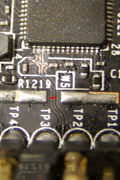
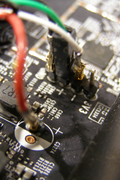
Pierwsza próba nieudana, wlutowałem się w podane złącze ale glucho - nic się nie dzieje, nic nie wykrywa. Nie wiem czy nawet jakiś kontroler USB jest wykrywany przez kernel.
czesc, router AC2350 nie ma portu USB, przynajmniej dostępnego z zewnątrz. Ale podobno wewnętrznie ma on USB i można się do niego podpiąć po jakiejś modyfikacji. Czy ktoś może coś wie więcej na ten temat - rzeczywiscie tak jest, może gdzieś przeróbka jest opisana?
Dzięki
R
Witam, mam dwa routery na luci które działały bez problemu ze dwa lata. Ale ostatnio zaczeły się w obu problemy, przestaje działać sieć albo działa tylko częściowo. Totolink 5000 oraz Xiaomi ac-costam nie pamiętam. Czy może system jakoś sam się aktualizuje i z tego powodu posypały się na raz, a może chodzi o temperatury? W logach nic ciekawego nie widzę,
Może powinienem kupić coś bardziej stabilnego co będzie działać latami bezobsługowo,tylko jakich urządzeń szukać?
Cześć, podłączylem sobie chińską kamerę IP do sieci wifi (Tuya, Nous..), wygląda na użyteczną i w związku z tym planuję dodać jeszcze jedną. Ale ta kamerka działa tylko przez chmurę, tzn transmituje video poprzez jakieś serwery producenta a podgląd jest przez dedykowaną apkę na telefonie.
No i tu pytanie - wpuszczam do sieci urządzenie które coś tam transmituje do producenta, ściąga aktualizacje, diabli wiedzą co jeszcze. Każde jest inne, producenci generalnie nieznani. Ze względów bezpieczeństwa najlepiej by było trzymać te kamerki w jakiejś wyizolowanej sieci tak żeby nie miały możliwości komunikacji z innymi urządzeniami w tej sieci. Nie chcę stawiać osobnego routera tylko dla nich, da się w openwrt zrobić jakąś sensowną i prostą konfigurację takiej izolowanej podsieci?
Dzięki
RG
Czesc, czy pod OpenWRT/Gargoylem można uruchomić Javę (normalną, nie 'J2ME' czy coś w tym rodzaju)
Jest jakiś router który da radę to pociągnąć?
A jeśli nie, to ktoś wie jak wygląda sprawa z uruchomieniem MongoDB + jakiegoś php?
Dzięki
R
Strony 1
eko.one.pl → Posty przez rafalg
Forum oparte o PunBB, wspierane przez Informer Technologies, Inc