Ok we should add AWKFILTER also on ZCELLINFO, missing “;”
Nie jesteś zalogowany. Proszę się zalogować lub zarejestrować.
Opcje wyszukiwania (Strona 8 z 16)
eko.one.pl → Posty przez stich86
Znalezione posty: 176 do 200 z 393
176 2022-08-07 19:28:13
Odp: ZTE MF289F - Porting OpenWRT (1,110 odpowiedzi, napisanych Sprzęt / Hardware)
177 2022-08-07 19:24:53
Odp: ZTE MF289F - Porting OpenWRT (1,110 odpowiedzi, napisanych Sprzęt / Hardware)
MiG25 napisał/a:
I belive AT+ZCELLINFO? gives CellID ....
I’ll try to take a look tomorrow and fix that one, then send PR to 4IceG
Regarding TAC/LAC we should get from another part
If you have suggestion are welcome 
178 2022-08-07 19:11:34
Odp: ZTE MF289F - Porting OpenWRT (1,110 odpowiedzi, napisanych Sprzęt / Hardware)
MiG25 napisał/a:
@IceG, 3ginfor from @stich86 missing infos about CellID , LAC and TAC...
It has also default 3 of agregated bands.... what if somone will have 4....Also good solution about EARFCN &PCI ....
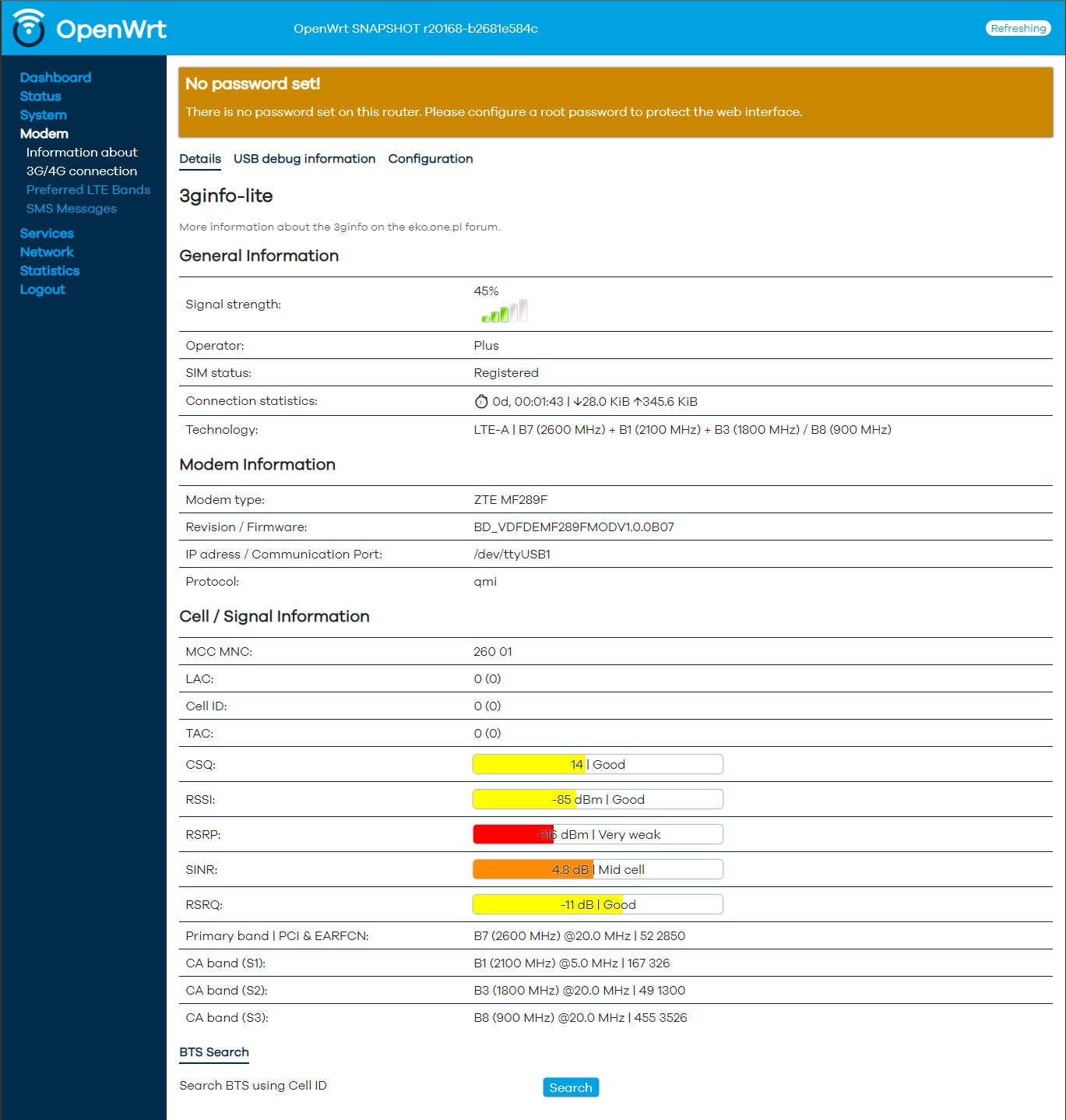
The script get cellid/tac from AT+CREG, but MF289F doesn’t give these informations thru that command.
I think we need to get it from uqmi
EDIT: Why do you say that is only 3? You have all 4 bands in both lines..
I think it should replace “/“ with “+” on the 4th band and add EARFCN&PCI on the CA addon Banda
179 2022-08-07 18:43:31
Odp: ZTE MF289F - Porting OpenWRT (1,110 odpowiedzi, napisanych Sprzęt / Hardware)
Ok i solved the 6h reboot.. was watchcat plugin
180 2022-08-06 20:42:55
Odp: Modem od routera MF286D (893 odpowiedzi, napisanych Sprzęt / Hardware)
@smereka
Pls update the mega link, this is the new one:
181 2022-08-06 10:54:41
Odp: ZTE MF289F - Porting OpenWRT (1,110 odpowiedzi, napisanych Sprzęt / Hardware)
Cezary napisał/a:
Fajnie że do kolekcji dochodzi następny model ZTE (i nawiązaniu do mojej delikatnej sugestii - nie, ZTE się nie odezwało
I should have access on the next month to a ZTE MC7070 (outdoor MC801a variant?)
Let’s see what’s inside
182 2022-08-06 09:59:38
Odp: ZTE MF289F - Porting OpenWRT (1,110 odpowiedzi, napisanych Sprzęt / Hardware)
MiG25 napisał/a:
Sprawdzę , natomiast na pewno ten modem jest w stanie agregować 4 pasma ( jak nie pięć - ale takich nadajników to ma tylko T-Mobile w kilku miejscach) , więc może jesteś w stanie wyświetlać te linie tylko wtedy ,jak faktycznie ta agregacja większej ilości bandów jest.
Changing some files on the nvram it can do 5CA. We are working with other guys in Italy to see if it can be done.
Regarding the plug-in, as I’ve said this modem present itself as MF286/A I’d, so the 3ginfo form 4IceG is using the addon for that modem that display wrong data for the awk filter that doesn’t match the output of AT commands on the MF289F modem. I’ve added some checks and also the other bands to display. The plug-in was already tested on another AT2 version, but if other people can test it and give us feedback is better 
183 2022-08-05 23:27:30
Odp: ZTE MF289F - Porting OpenWRT (1,110 odpowiedzi, napisanych Sprzęt / Hardware)
MiG25 napisał/a:
mtd16 should not be touched by openwrt , only mtd17 should be enough ( on mf286d restoring mtd9 only works).
I had to restore also 16, otherwise I get error when trying to access web interface of OFW.
Funny thing: VFIT use the module as VoIP (not
voice over LTE), but the module itself cannot access internet so any configuration doesn’t work 
It’s possible to switch voice changing an nvram value in the module thru ADB.
I see that module has a br-lan and usb0 interface, but in router just wwan (that should be a bridge created by QMI) is exposed.
do you know if it’s possible to give access to the modem thru router bridge?
I was able to enable VoLTE wringing back mcfg_sw.mbn with EfsTools.
All stuff are inside /firmware of the module, there are a lot of configuration for various telco provider
184 2022-08-05 23:16:41
Odp: ZTE MF289F - Porting OpenWRT (1,110 odpowiedzi, napisanych Sprzęt / Hardware)
MiG25 napisał/a:
stich86 napisał/a:Create a simple http server on your pc where router is connected and put the busybox_armv7l into the root (you can download from this link)
https://busybox.net/downloads/binaries/1.21.1/
Then on the router via serial console use cURL to download that binary and make it executable with “chmod +x”
After that you can use ./busybox_armv7l nc to run netcat client and send as STDIN all mtd to your pc using nc as server (in listening mode)
Let me know if you have understood
I just make backup of 19 mtd's running on initramfs , looks ok ,hopfully it will be possible to restore mtd17
on owf i tried wget , and i belive also curl , and booth commands where not availble....
You should restore mtd16 for web and mtd17 for root_uimage_s (the commands are presen on uBoot, make sure to do nand erase from root_uImage otherwise ubi stuff fails in first attempt
cURL is present on both firmware. I’ve done a backup for both VFIT and VFDE variant using that method
185 2022-08-05 21:16:02
Odp: ZTE MF289F - Porting OpenWRT (1,110 odpowiedzi, napisanych Sprzęt / Hardware)
MiG25 napisał/a:
Do you know under with shild it should be ? : https://fccid.io/SRQ-MF289F/Internal-Ph … 333543.pdf
I have another not expected problem , tried to use prepaid card Plush , and it can't connect.. In WEB this swith is always on OFF , and when i try to turn it on it said connection failed..... Have two of these cards and each of them works on MF286D ,and other routers , but not on MF289F... Another cards works fine and connects ( also Aero2 with use the same PLUS BTS...)
May be APN is not configured…
You should use AT or QMI to force it, I had same problem with mine 
186 2022-08-05 21:14:42
Odp: ZTE MF289F - Porting OpenWRT (1,110 odpowiedzi, napisanych Sprzęt / Hardware)
MiG25 napisał/a:
How to made a buckup of all mtd without usb ?
Create a simple http server on your pc where router is connected and put the busybox_armv7l into the root (you can download from this link)
https://busybox.net/downloads/binaries/1.21.1/
Then on the router via serial console use cURL to download that binary and make it executable with “chmod +x”
After that you can use ./busybox_armv7l nc to run netcat client and send as STDIN all mtd to your pc using nc as server (in listening mode)
Let me know if you have understood
187 2022-08-05 14:32:51
Odp: ZTE MF289F - Porting OpenWRT (1,110 odpowiedzi, napisanych Sprzęt / Hardware)
MiG25 napisał/a:
Ok , i'll test it , have one of them.
EDIT I got it , and it have:
Software Version CR_VDFDEMF289FV1.0.0B04
Hardware Version Ver.A(T1)Exacly how this is wrote ,even that on the label it is written HW Version:T2...
ZTE is very consistent in their inconsistency ( same with MF286 ,MF286A ....)
Result of ATI:
Manufacturer: ZTE CORPORATION
Model: MF289F
Revision: BD_VDFDEMF289FMODV1.0.0B07
SVN: 04
And placed inside MF286D it represents like this:
T:  Bus=02 Lev=01 Prnt=01 Port=00 Cnt=01 Dev#=  2 Spd=5000 MxCh= 0
D:  Ver= 3.20 Cls=00(>ifc ) Sub=00 Prot=00 MxPS= 9 #Cfgs=  1
P:  Vendor=19d2 ProdID=1432 Rev=58.11
S:  Manufacturer=ZTE,Incorporated
S:  Product=ZTE Mobile Broadband
S:  SerialNumber=P685M135MZTED000000
C:* #Ifs= 5 Cfg#= 1 Atr=80 MxPwr=896mA
I:* If#= 0 Alt= 0 #EPs= 2 Cls=ff(vend.) Sub=ff Prot=ff Driver=option
E:  Ad=81(I) Atr=02(Bulk) MxPS=1024 Ivl=0ms
E:  Ad=01(O) Atr=02(Bulk) MxPS=1024 Ivl=0ms
I:* If#= 1 Alt= 0 #EPs= 3 Cls=ff(vend.) Sub=ff Prot=ff Driver=option
E:  Ad=83(I) Atr=03(Int.) MxPS=  10 Ivl=32ms
E:  Ad=82(I) Atr=02(Bulk) MxPS=1024 Ivl=0ms
E:  Ad=02(O) Atr=02(Bulk) MxPS=1024 Ivl=0ms
I:* If#= 2 Alt= 0 #EPs= 3 Cls=ff(vend.) Sub=ff Prot=ff Driver=option
E:  Ad=85(I) Atr=03(Int.) MxPS=  10 Ivl=32ms
E:  Ad=84(I) Atr=02(Bulk) MxPS=1024 Ivl=0ms
E:  Ad=03(O) Atr=02(Bulk) MxPS=1024 Ivl=0ms
I:* If#= 3 Alt= 0 #EPs= 3 Cls=ff(vend.) Sub=ff Prot=ff Driver=qmi_wwan
E:  Ad=86(I) Atr=03(Int.) MxPS=   8 Ivl=32ms
E:  Ad=8e(I) Atr=02(Bulk) MxPS=1024 Ivl=0ms
E:  Ad=0f(O) Atr=02(Bulk) MxPS=1024 Ivl=0ms
I:* If#= 4 Alt= 0 #EPs= 2 Cls=ff(vend.) Sub=42 Prot=01 Driver=(none)
E:  Ad=04(O) Atr=02(Bulk) MxPS=1024 Ivl=0ms
E:  Ad=87(I) Atr=02(Bulk) MxPS=1024 Ivl=0ms
It only turn on power diode and 3G/4G , no signal bar ,
And it agregtes 4 bands:+ZCAINFO: 262, 20, 59100, 6350, 10.0; 367, 2, 1, 225, 15.0; 100, 1, 3, 1599, 10.0; 118, 2, 7, 3175, 15.0;
to confirm if it's T1 check if you have 3rd chip on the board or into "dmesg" of original firmware if it loads QCA9984
188 2022-08-05 10:51:04
Odp: ZTE MF289F - Porting OpenWRT (1,110 odpowiedzi, napisanych Sprzęt / Hardware)
MiG25 napisał/a:
And what about adding microusb ? from list there are identical no of usb ports...
i've to buy micro-USB smd connector. There is a pad near the nanoSIM\reset button that should
189 2022-08-05 10:40:54
Odp: ZTE MF289F - Porting OpenWRT (1,110 odpowiedzi, napisanych Sprzęt / Hardware)
MiG25 napisał/a:
This feature was added in MF286D ,since on ofw when you type reboot modem is not rebooting ( only mf286d it self) , but it working ok there.
Maybe it is triggering wrong gpio ?
yes on MF286D rebooting the modem doens't take down the board router
i'll take look to the original DTS to see the mapping
190 2022-08-05 10:30:48
Odp: ZTE MF289F - Porting OpenWRT (1,110 odpowiedzi, napisanych Sprzęt / Hardware)
Cezary napisał/a:
@stich86 could you show me output of cat /sys/kernel/debug/usb/devices from T1 and T2?
yes, see below:
AT1
T: Bus=01 Lev=00 Prnt=00 Port=00 Cnt=00 Dev#= 1 Spd=480 MxCh= 1
B: Alloc= 0/800 us ( 0%), #Int= 0, #Iso= 0
D: Ver= 2.00 Cls=09(hub ) Sub=00 Prot=01 MxPS=64 #Cfgs= 1
P: Vendor=1d6b ProdID=0002 Rev= 5.10
S: Manufacturer=Linux 5.10.131 xhci-hcd
S: Product=xHCI Host Controller
S: SerialNumber=xhci-hcd.0.auto
C:* #Ifs= 1 Cfg#= 1 Atr=e0 MxPwr= 0mA
I:* If#= 0 Alt= 0 #EPs= 1 Cls=09(hub ) Sub=00 Prot=00 Driver=hub
E: Ad=81(I) Atr=03(Int.) MxPS= 4 Ivl=256msT: Bus=02 Lev=00 Prnt=00 Port=00 Cnt=00 Dev#= 1 Spd=5000 MxCh= 1
B: Alloc= 0/800 us ( 0%), #Int= 0, #Iso= 0
D: Ver= 3.00 Cls=09(hub ) Sub=00 Prot=03 MxPS= 9 #Cfgs= 1
P: Vendor=1d6b ProdID=0003 Rev= 5.10
S: Manufacturer=Linux 5.10.131 xhci-hcd
S: Product=xHCI Host Controller
S: SerialNumber=xhci-hcd.0.auto
C:* #Ifs= 1 Cfg#= 1 Atr=e0 MxPwr= 0mA
I:* If#= 0 Alt= 0 #EPs= 1 Cls=09(hub ) Sub=00 Prot=00 Driver=hub
E: Ad=81(I) Atr=03(Int.) MxPS= 4 Ivl=256msT: Bus=02 Lev=01 Prnt=01 Port=00 Cnt=01 Dev#= 2 Spd=5000 MxCh= 0
D: Ver= 3.20 Cls=00(>ifc ) Sub=00 Prot=00 MxPS= 9 #Cfgs= 1
P: Vendor=19d2 ProdID=1485 Rev=58.11
S: Manufacturer=ZTE,Incorporated
S: Product=ZTE Mobile Broadband
S: SerialNumber=P685M135MZTED000000
C:* #Ifs= 7 Cfg#= 1 Atr=80 MxPwr=896mA
A: FirstIf#= 0 IfCount= 2 Cls=e0(wlcon) Sub=01 Prot=03
I:* If#= 0 Alt= 0 #EPs= 1 Cls=e0(wlcon) Sub=01 Prot=03 Driver=(none)
E: Ad=82(I) Atr=03(Int.) MxPS= 8 Ivl=32ms
I:* If#= 1 Alt= 0 #EPs= 2 Cls=0a(data ) Sub=00 Prot=00 Driver=(none)
E: Ad=81(I) Atr=02(Bulk) MxPS=1024 Ivl=0ms
E: Ad=01(O) Atr=02(Bulk) MxPS=1024 Ivl=0ms
I:* If#= 2 Alt= 0 #EPs= 2 Cls=ff(vend.) Sub=ff Prot=ff Driver=option
E: Ad=83(I) Atr=02(Bulk) MxPS=1024 Ivl=0ms
E: Ad=02(O) Atr=02(Bulk) MxPS=1024 Ivl=0ms
I:* If#= 3 Alt= 0 #EPs= 3 Cls=ff(vend.) Sub=ff Prot=ff Driver=option
E: Ad=85(I) Atr=03(Int.) MxPS= 10 Ivl=32ms
E: Ad=84(I) Atr=02(Bulk) MxPS=1024 Ivl=0ms
E: Ad=03(O) Atr=02(Bulk) MxPS=1024 Ivl=0ms
I:* If#= 4 Alt= 0 #EPs= 3 Cls=ff(vend.) Sub=ff Prot=ff Driver=option
E: Ad=87(I) Atr=03(Int.) MxPS= 10 Ivl=32ms
E: Ad=86(I) Atr=02(Bulk) MxPS=1024 Ivl=0ms
E: Ad=04(O) Atr=02(Bulk) MxPS=1024 Ivl=0ms
I:* If#= 5 Alt= 0 #EPs= 3 Cls=ff(vend.) Sub=ff Prot=ff Driver=qmi_wwan
E: Ad=88(I) Atr=03(Int.) MxPS= 8 Ivl=32ms
E: Ad=8e(I) Atr=02(Bulk) MxPS=1024 Ivl=0ms
E: Ad=0f(O) Atr=02(Bulk) MxPS=1024 Ivl=0ms
I:* If#= 6 Alt= 0 #EPs= 2 Cls=ff(vend.) Sub=42 Prot=01 Driver=(none)
E: Ad=05(O) Atr=02(Bulk) MxPS=1024 Ivl=0ms
E: Ad=89(I) Atr=02(Bulk) MxPS=1024 Ivl=0msT: Bus=03 Lev=00 Prnt=00 Port=00 Cnt=00 Dev#= 1 Spd=480 MxCh= 1
B: Alloc= 0/800 us ( 0%), #Int= 0, #Iso= 0
D: Ver= 2.00 Cls=09(hub ) Sub=00 Prot=01 MxPS=64 #Cfgs= 1
P: Vendor=1d6b ProdID=0002 Rev= 5.10
S: Manufacturer=Linux 5.10.131 xhci-hcd
S: Product=xHCI Host Controller
S: SerialNumber=xhci-hcd.1.auto
C:* #Ifs= 1 Cfg#= 1 Atr=e0 MxPwr= 0mA
I:* If#= 0 Alt= 0 #EPs= 1 Cls=09(hub ) Sub=00 Prot=00 Driver=hub
E: Ad=81(I) Atr=03(Int.) MxPS= 4 Ivl=256msT: Bus=04 Lev=00 Prnt=00 Port=00 Cnt=00 Dev#= 1 Spd=5000 MxCh= 0
B: Alloc= 0/800 us ( 0%), #Int= 0, #Iso= 0
D: Ver= 3.00 Cls=09(hub ) Sub=00 Prot=03 MxPS= 9 #Cfgs= 1
P: Vendor=1d6b ProdID=0003 Rev= 5.10
S: Manufacturer=Linux 5.10.131 xhci-hcd
S: Product=xHCI Host Controller
S: SerialNumber=xhci-hcd.1.auto
C:* #Ifs= 1 Cfg#= 1 Atr=e0 MxPwr= 0mA
I:* If#= 0 Alt= 0 #EPs= 1 Cls=09(hub ) Sub=00 Prot=00 Driver=(none)
E: Ad=81(I) Atr=03(Int.) MxPS= 4 Ivl=256ms
AT2
T: Bus=01 Lev=00 Prnt=00 Port=00 Cnt=00 Dev#= 1 Spd=480 MxCh= 1
B: Alloc= 0/800 us ( 0%), #Int= 0, #Iso= 0
D: Ver= 2.00 Cls=09(hub ) Sub=00 Prot=01 MxPS=64 #Cfgs= 1
P: Vendor=1d6b ProdID=0002 Rev= 5.10
S: Manufacturer=Linux 5.10.131 xhci-hcd
S: Product=xHCI Host Controller
S: SerialNumber=xhci-hcd.0.auto
C:* #Ifs= 1 Cfg#= 1 Atr=e0 MxPwr= 0mA
I:* If#= 0 Alt= 0 #EPs= 1 Cls=09(hub ) Sub=00 Prot=00 Driver=hub
E: Ad=81(I) Atr=03(Int.) MxPS= 4 Ivl=256msT: Bus=02 Lev=00 Prnt=00 Port=00 Cnt=00 Dev#= 1 Spd=5000 MxCh= 1
B: Alloc= 0/800 us ( 0%), #Int= 0, #Iso= 0
D: Ver= 3.00 Cls=09(hub ) Sub=00 Prot=03 MxPS= 9 #Cfgs= 1
P: Vendor=1d6b ProdID=0003 Rev= 5.10
S: Manufacturer=Linux 5.10.131 xhci-hcd
S: Product=xHCI Host Controller
S: SerialNumber=xhci-hcd.0.auto
C:* #Ifs= 1 Cfg#= 1 Atr=e0 MxPwr= 0mA
I:* If#= 0 Alt= 0 #EPs= 1 Cls=09(hub ) Sub=00 Prot=00 Driver=hub
E: Ad=81(I) Atr=03(Int.) MxPS= 4 Ivl=256msT: Bus=02 Lev=01 Prnt=01 Port=00 Cnt=01 Dev#= 2 Spd=5000 MxCh= 0
D: Ver= 3.20 Cls=00(>ifc ) Sub=00 Prot=00 MxPS= 9 #Cfgs= 1
P: Vendor=19d2 ProdID=1432 Rev=58.11
S: Manufacturer=ZTE,Incorporated
S: Product=ZTE Mobile Broadband
S: SerialNumber=P685M135MZTED000000
C:* #Ifs= 5 Cfg#= 1 Atr=80 MxPwr=896mA
I:* If#= 0 Alt= 0 #EPs= 2 Cls=ff(vend.) Sub=ff Prot=ff Driver=option
E: Ad=81(I) Atr=02(Bulk) MxPS=1024 Ivl=0ms
E: Ad=01(O) Atr=02(Bulk) MxPS=1024 Ivl=0ms
I:* If#= 1 Alt= 0 #EPs= 3 Cls=ff(vend.) Sub=ff Prot=ff Driver=option
E: Ad=83(I) Atr=03(Int.) MxPS= 10 Ivl=32ms
E: Ad=82(I) Atr=02(Bulk) MxPS=1024 Ivl=0ms
E: Ad=02(O) Atr=02(Bulk) MxPS=1024 Ivl=0ms
I:* If#= 2 Alt= 0 #EPs= 3 Cls=ff(vend.) Sub=ff Prot=ff Driver=option
E: Ad=85(I) Atr=03(Int.) MxPS= 10 Ivl=32ms
E: Ad=84(I) Atr=02(Bulk) MxPS=1024 Ivl=0ms
E: Ad=03(O) Atr=02(Bulk) MxPS=1024 Ivl=0ms
I:* If#= 3 Alt= 0 #EPs= 3 Cls=ff(vend.) Sub=ff Prot=ff Driver=qmi_wwan
E: Ad=86(I) Atr=03(Int.) MxPS= 8 Ivl=32ms
E: Ad=8e(I) Atr=02(Bulk) MxPS=1024 Ivl=0ms
E: Ad=0f(O) Atr=02(Bulk) MxPS=1024 Ivl=0ms
I:* If#= 4 Alt= 0 #EPs= 2 Cls=ff(vend.) Sub=42 Prot=01 Driver=(none)
E: Ad=04(O) Atr=02(Bulk) MxPS=1024 Ivl=0ms
E: Ad=87(I) Atr=02(Bulk) MxPS=1024 Ivl=0msT: Bus=03 Lev=00 Prnt=00 Port=00 Cnt=00 Dev#= 1 Spd=480 MxCh= 1
B: Alloc= 0/800 us ( 0%), #Int= 0, #Iso= 0
D: Ver= 2.00 Cls=09(hub ) Sub=00 Prot=01 MxPS=64 #Cfgs= 1
P: Vendor=1d6b ProdID=0002 Rev= 5.10
S: Manufacturer=Linux 5.10.131 xhci-hcd
S: Product=xHCI Host Controller
S: SerialNumber=xhci-hcd.1.auto
C:* #Ifs= 1 Cfg#= 1 Atr=e0 MxPwr= 0mA
I:* If#= 0 Alt= 0 #EPs= 1 Cls=09(hub ) Sub=00 Prot=00 Driver=hub
E: Ad=81(I) Atr=03(Int.) MxPS= 4 Ivl=256msT: Bus=04 Lev=00 Prnt=00 Port=00 Cnt=00 Dev#= 1 Spd=5000 MxCh= 0
B: Alloc= 0/800 us ( 0%), #Int= 0, #Iso= 0
D: Ver= 3.00 Cls=09(hub ) Sub=00 Prot=03 MxPS= 9 #Cfgs= 1
P: Vendor=1d6b ProdID=0003 Rev= 5.10
S: Manufacturer=Linux 5.10.131 xhci-hcd
S: Product=xHCI Host Controller
S: SerialNumber=xhci-hcd.1.auto
C:* #Ifs= 1 Cfg#= 1 Atr=e0 MxPwr= 0mA
I:* If#= 0 Alt= 0 #EPs= 1 Cls=09(hub ) Sub=00 Prot=00 Driver=(none)
E: Ad=81(I) Atr=03(Int.) MxPS= 4 Ivl=256ms
Do you know how to remove gpio-restart? Looks like that sometime it's triggerd, and is also triggered if you reboot the modem module.
Thx
191 2022-08-05 10:23:35
Odp: ZTE MF289F - Porting OpenWRT (1,110 odpowiedzi, napisanych Sprzęt / Hardware)
MiG25 napisał/a:
@stich86 , ddo you have working compilations ?
I got MF289F T2 version from vodafone germany , so during weekend i could do some tests...
Hi MiG25,
yes i've a working build that you can find on my MEGA folder:
https://mega.nz/folder/v4ZiBQxJ#5trHUVXNsZgS6mmuSxf7sw
the build contains also the 4IceG package (3ginfo-lite, modemband, sms-tool)
some caveats:
- because the module of T2 revision present it with different VID\PID, you have to copy the script into path /usr/share/3ginfo-lite/3ginfo-addon/ 19d21485 (one used by MF286D module) over 19d21432 (one used by MF286\286A)
- all tools form 4IceG need to be reconfigured on ttyUSB1 or 2, default they point to USB0 that is the DIAG port, so on first boot it's necessary to make this change otherwise they don't work
- don't flag "Restart WAN\Modem" on the modemband plugin, looks like the modem doesn't like the restart and it change the band dynamically without any disconnection\reconnection
Let me know
192 2022-08-04 15:10:24
Odp: ZTE MF289F - Porting OpenWRT (1,110 odpowiedzi, napisanych Sprzęt / Hardware)
another funny thing:
T2 rev modem, is exposed with a different PID\VID from T1 rev.
T1 has same as MF286D, while T2 same as MF286\286A
193 2022-08-04 12:09:41
Odp: ZTE MF289F - Porting OpenWRT (1,110 odpowiedzi, napisanych Sprzęt / Hardware)
ok adding into DTS the wifi1 (and leaving @wifi2 as pci-E), the 5Ghz on T2 rev is recognized (also without custom board-2), because is using same board-ID (20/21) of MF286D
5Ghz Wi-Fi speed on T2 rev are very bad compared to T1 :\
194 2022-08-03 21:04:29
Odp: ZTE MF289F - Porting OpenWRT (1,110 odpowiedzi, napisanych Sprzęt / Hardware)
MiG25 napisał/a:
Maybe there is simpler way to vary them. In label there is HW version , on German probably there is T2 ( i found some picture from label of germn one). What is on Italian ?
T1
Rev 2 is cheaper….
195 2022-08-03 19:09:50
Odp: ZTE MF289F - Porting OpenWRT (1,110 odpowiedzi, napisanych Sprzęt / Hardware)
Cezary napisał/a:
Different revision?
It seems. Board has space for the third radio, but on VFDE is not soldered, while in VFIT the 5G radio in IPQ4019 missing some RF chip because signal is worse and doesn’t transmit anything
196 2022-08-03 18:06:55
Odp: ZTE MF289F - Porting OpenWRT (1,110 odpowiedzi, napisanych Sprzęt / Hardware)
Leo-PL napisał/a:
Maybe defining two variants is needed then, or just defining . Either way, congratulations!
A nitpick:spi-nand@0 {
spi-nand@1 {
the nand is the same, only difference is the 5Ghz radio.
VFDE doesn't have it, while VFID has it, very vary strange
EDIT: may be I’ve misunderstood your message.
You suggest to use @1 because is an index Also if the name of the object is different?
197 2022-08-03 17:50:37
Odp: ZTE MF289F - Porting OpenWRT (1,110 odpowiedzi, napisanych Sprzęt / Hardware)
bad news.. looks like that MF289F from Vodafone Dutch doesn't have QCA9984, so radio layout is similar to MF286D (IPQ4019 on both radios).
Now i've added back again the wifi1 into the DTS to see if we can use a hybrid configuration between Italian and Dutch version
i'll give a feedback tomorrow
198 2022-08-02 23:23:12
Odp: ZTE MF289F - Porting OpenWRT (1,110 odpowiedzi, napisanych Sprzęt / Hardware)
ok got it
i've added pcie@0 to the dts, now i've got 5Ghz interface working
here is the new dts
// SPDX-License-Identifier: GPL-2.0-or-later OR MIT
// Copyright (c) 2022, Pawel Dembicki <paweldembicki@gmail.com>.#include "qcom-ipq4019.dtsi"
#include <dt-bindings/soc/qcom,tcsr.h>
#include <dt-bindings/gpio/gpio.h>
#include <dt-bindings/input/input.h>
#include <dt-bindings/leds/common.h>/ {
model = "ZTE MF289F";
compatible = "zte,mf289f";aliases {
led-boot = &led_internal;
led-failsafe = &led_internal;
led-running = &led_internal;
led-upgrade = &led_internal;
};chosen {
/*
* bootargs forced by u-boot bootipq command:
* 'ubi.mtd=rootfs root=mtd:ubi_rootfs rootfstype=squashfs rootwait'
*/
bootargs-append = " root=/dev/ubiblock0_1";
};gpio-restart {
compatible = "gpio-restart";
gpios = <&tlmm 8 GPIO_ACTIVE_HIGH>;
};leds {
compatible = "gpio-leds";led_internal: led-0 {
function = LED_FUNCTION_STATUS;
color = <LED_COLOR_ID_BLUE>;
gpios = <&tlmm 10 GPIO_ACTIVE_LOW>;
label = "blue:internal_led";
default-state = "keep";
};led-1 {
function = LED_FUNCTION_WLAN;
color = <LED_COLOR_ID_BLUE>;
gpios = <&tlmm 61 GPIO_ACTIVE_LOW>;
linux,default-trigger = "phy0tpt";
};
};keys {
compatible = "gpio-keys";reset {
label = "reset";
linux,code = <KEY_RESTART>;
gpios = <&tlmm 18 GPIO_ACTIVE_LOW>;
};wps {
label = "wps";
linux,code = <KEY_WPS_BUTTON>;
gpios = <&tlmm 68 GPIO_ACTIVE_LOW>;
};
};soc {
rng@22000 {
status = "okay";
};mdio@90000 {
status = "okay";
pinctrl-0 = <&mdio_pins>;
pinctrl-names = "default";
reset-gpios = <&tlmm 47 GPIO_ACTIVE_LOW>;
reset-delay-us = <2000>;
};ess-psgmii@98000 {
status = "okay";
};tcsr@1949000 {
compatible = "qcom,tcsr";
reg = <0x1949000 0x100>;
qcom,wifi_glb_cfg = <TCSR_WIFI_GLB_CFG>;
};tcsr@194b000 {
/* select hostmode */
compatible = "qcom,tcsr";
reg = <0x194b000 0x100>;
qcom,usb-hsphy-mode-select = <TCSR_USB_HSPHY_HOST_MODE>;
status = "okay";
};ess_tcsr@1953000 {
compatible = "qcom,tcsr";
reg = <0x1953000 0x1000>;
qcom,ess-interface-select = <TCSR_ESS_PSGMII>;
};tcsr@1957000 {
compatible = "qcom,tcsr";
reg = <0x1957000 0x100>;
qcom,wifi_noc_memtype_m0_m2 = <TCSR_WIFI_NOC_MEMTYPE_M0_M2>;
};usb2@60f8800 {
status = "okay";
};usb3@8af8800 {
status = "okay";
};crypto@8e3a000 {
status = "okay";
};watchdog@b017000 {
status = "okay";
};ess-switch@c000000 {
status = "okay";
};edma@c080000 {
status = "okay";
};
};
};&blsp_dma {
status = "okay";
};&blsp1_spi1 {
pinctrl-0 = <&spi_0_pins>;
pinctrl-names = "default";
status = "okay";
cs-gpios = <&tlmm 12 GPIO_ACTIVE_HIGH>,
<&tlmm 54 GPIO_ACTIVE_HIGH>;flash@0 {
compatible = "jedec,spi-nor", "n25q128a11";
#address-cells = <1>;
#size-cells = <1>;
reg = <0>;
spi-max-frequency = <24000000>;partitions {
compatible = "fixed-partitions";
#address-cells = <1>;
#size-cells = <1>;partition@0 {
label = "0:SBL1";
reg = <0x0 0x40000>;
read-only;
};partition@40000 {
label = "0:MIBIB";
reg = <0x40000 0x20000>;
read-only;
};partition@60000 {
label = "0:QSEE";
reg = <0x60000 0x60000>;
read-only;
};partition@c0000 {
label = "0:CDT";
reg = <0xc0000 0x10000>;
read-only;
};partition@d0000 {
label = "0:DDRPARAMS";
reg = <0xd0000 0x10000>;
read-only;
};partition@e0000 {
label = "0:APPSBLENV";
reg = <0xe0000 0x10000>;
read-only;
};partition@f0000 {
label = "0:APPSBL";
reg = <0xf0000 0xc0000>;
read-only;
};partition@1b0000 {
label = "0:reserved1";
reg = <0x1b0000 0x50000>;
read-only;
};
};
};spi-nand@0 {
compatible = "spi-nand";
reg = <1>;
spi-max-frequency = <24000000>;partitions {
compatible = "fixed-partitions";
#address-cells = <1>;
#size-cells = <1>;partition@0 {
label = "fota-flag";
reg = <0x0 0xa0000>;
read-only;
};partition@a0000 {
label = "ART";
reg = <0xa0000 0x80000>;
read-only;
compatible = "nvmem-cells";
#address-cells = <1>;
#size-cells = <1>;precal_art_1000: precal@1000 {
reg = <0x1000 0x2f20>;
};precal_art_5000: precal@5000 {
reg = <0x5000 0x2f20>;
};
};partition@120000 {
label = "mac";
reg = <0x120000 0x80000>;
read-only;
compatible = "nvmem-cells";
#address-cells = <1>;
#size-cells = <1>;macaddr_config_0: macaddr@0 {
reg = <0x0 0x6>;
};
};partition@1a0000 {
label = "reserved2";
reg = <0x1a0000 0xc0000>;
read-only;
};partition@260000 {
label = "cfg-param";
reg = <0x260000 0x400000>;
read-only;
};partition@660000 {
label = "log";
reg = <0x660000 0x400000>;
};partition@a60000 {
label = "oops";
reg = <0xa60000 0xa0000>;
};partition@b00000 {
label = "reserved3";
reg = <0xb00000 0x500000>;
read-only;
};partition@1000000 {
label = "web";
reg = <0x1000000 0x800000>;
};partition@1800000 {
label = "rootfs";
reg = <0x1800000 0x1d00000>;
};partition@3500000 {
label = "data";
reg = <0x3500000 0x1900000>;
};partition@4e00000 {
label = "fota";
reg = <0x4e00000 0x3200000>;
};
};
};};
&blsp1_uart1 {
pinctrl-0 = <&serial_pins>;
pinctrl-names = "default";
status = "okay";
};&cryptobam {
status = "okay";
};&gmac0 {
nvmem-cell-names = "mac-address";
nvmem-cells = <&macaddr_config_0>;
};&gmac1 {
nvmem-cell-names = "mac-address";
nvmem-cells = <&macaddr_config_0>;
mac-address-increment = <1>;
};&qpic_bam {
status = "okay";
};&tlmm {
i2c_0_pins: i2c_0_pinmux {
mux {
pins = "gpio20", "gpio21";
function = "blsp_i2c0";
bias-disable;
};
};mdio_pins: mdio_pinmux {
mux_1 {
pins = "gpio6";
function = "mdio";
bias-pull-up;
};mux_2 {
pins = "gpio7";
function = "mdc";
bias-pull-up;
};
};serial_pins: serial_pinmux {
mux {
pins = "gpio16", "gpio17";
function = "blsp_uart0";
bias-disable;
};
};spi_0_pins: spi_0_pinmux {
pinmux {
function = "blsp_spi0";
pins = "gpio13", "gpio14", "gpio15";
drive-strength = <12>;
bias-disable;
};pinmux_cs {
function = "gpio";
pins = "gpio12", "gpio54";
drive-strength = <2>;
bias-disable;
output-high;
};
};
};&usb2_hs_phy {
status = "okay";
};&usb3_ss_phy {
status = "okay";
};&usb3_hs_phy {
status = "okay";
};&wifi0 {
status = "okay";
nvmem-cell-names = "pre-calibration", "mac-address";
nvmem-cells = <&precal_art_1000>, <&macaddr_config_0>;
mac-address-increment = <2>;
qcom,ath10k-calibration-variant = "zte,mf289f";
};&pcie0 {
status = "okay";
perst-gpio = <&tlmm 38 GPIO_ACTIVE_LOW>;
wake-gpio = <&tlmm 40 GPIO_ACTIVE_LOW>;
clkreq-gpio = <&tlmm 39 GPIO_ACTIVE_LOW>;bridge@0,0 {
reg = <0x00000000 0 0 0 0>;
#address-cells = <3>;
#size-cells = <2>;
ranges;wifi2: wifi@1,0 {
nvmem-cell-names = "mac-address";
nvmem-cells = <&macaddr_config_0>;
mac-address-increment = <3>;
compatible = "qcom,ath10k";
reg = <0x00010000 0 0 0 0>;
qcom,ath10k-calibration-variant = "zte,mf289f";
};
};
};
EDIT: added new DTS, this one get the mac-address of 5G from the ART partition, so it's not generate each time
199 2022-08-02 22:08:56
Odp: ZTE MF289F - Porting OpenWRT (1,110 odpowiedzi, napisanych Sprzęt / Hardware)
it still try to load QCA4019
ath10k_ahb a800000.wifi: qca4019 hw1.0 target 0x01000000 chip_id 0x003b00ff sub 0000:0000
How to force using QCA9984?
it should use ath10k_pci, a800000.wifi looks the second 5G radio on IPQ4019 that is disable into stock firmware
any ideas why the QCA9984 is not seen into pci bus?
200 2022-08-02 22:04:59
Odp: ZTE MF289F - Porting OpenWRT (1,110 odpowiedzi, napisanych Sprzęt / Hardware)
MiG25 napisał/a:
Maybe this router have two 5GHz radios ?
(Like Netgear's , one for normal use , one for mesh backhul )
it can be... the one into IPQ4019 receive only but doesn't trasmit
now i'm adding QCA9984 package, let's see if it will find the new radio...
Znalezione posty: 176 do 200 z 393
eko.one.pl → Posty przez stich86
Forum oparte o PunBB, wspierane przez Informer Technologies, Inc