Wrzuciłem i nie wykrywa mi modemu, znów to samo.
Strony Poprzednia 1 2 3 4 Następna
Nie jesteś zalogowany. Proszę się zalogować lub zarejestrować.
eko.one.pl → Posty przez dexter
Strony Poprzednia 1 2 3 4 Następna
Wrzuciłem i nie wykrywa mi modemu, znów to samo.
Zaraz wrzucę Gargoyle i spróbuje.
Witam, wcześniej używałem E3251 który działał aż miło. Z racji pojawienia się zasięgu LTE w końcu na wsi, zmieniłem na E3276 i co zonk. Nie działał, router na Gargoyle wcale go nie wykrywał, no trudno wróciłem do oprogramowania TP Linka i wszystko ok, ale ze względu na brak czytania sms, chcę z powrotem Gargoyle i sprawa ma się tak.
Jak mam go skonfigurować by go wykryło ? W temacie NDIS/QMI w Gargoyle (GUI) wystarczy tylko ustawić to i już będzie działał ? Trzeba coś instalować ? 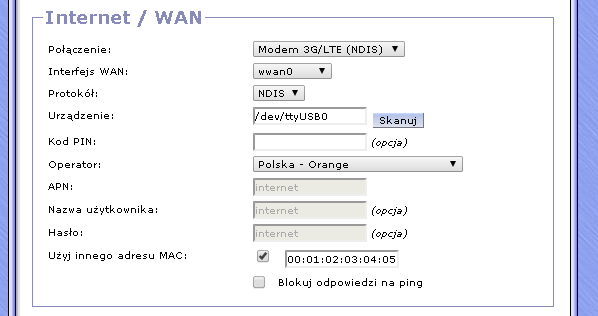
Bo chciałem zrobic exroot przełączyłem modem na stałe ale sypnął interfejs graficzny. Zastanawiam się nad wymianą routera. Tam może dam pendrive ewentualnie i będę miał exroot.
Czy Tp Link WD3600 zmieści w sobie gnokii po instalacji Gargoyle ?
WinSCP
Stworzyłem .gnokiirc i wygląda on tak :
[global]
model = AT
port = /dev/ttyUSB1
connection = serial
No tak wykonałem 2 konfigi prosto w WinSCP ale jak mu teraz mam podać ręcznie ?
gnokii --config /root/.gnokiirc --identify coś takiego ?
A jeśli zrobiłem mu ręcznie konfigi i nie widzi, to chyba muszę mu ręcznie podać tak ?
Nic do tego jak wpisuję gnokii --identify mam Couldn't read /root/.gnokiirc config file. I od tego nie działa ?
Czyli skąd ten błąd ? Usnąć gnokii i instalować jeszcze raz ?
Wszystko działa prawie, po za tym, że plik .gnokiirc jest w folderze root. ale go nie wykrywa wpisywałem jawnie ale też bez skutku.
No i działa. Dziękuję 
Wpisuję w putty opkg install libusb i
login as: root
root@192.168.1.1's password:
BusyBox v1.19.4 (2014-09-27 09:44:51 CEST) built-in shell (ash)
Enter 'help' for a list of built-in commands.
_____ _
| __ \ | |
| | \/ __ _ _ __ __ _ ___ _ _| | ___
| | __ / _` | '__/ _` |/ _ \| | | | |/ _ \
| |_\ \ (_| | | | (_| | (_) | |_| | | __/
\____/\__,_|_| \__, |\___/ \__, |_|\___|
__/ | __/ |
|___/ |___/
----------------------------------------------------------------
| |
| Gargoyle PL 1.6.2.2 (b70bfc1) |
| OpenWrt Attitude Adjustment 12.09.1 (r42647) |
| Build time: 2014-09-27 09:44 CEST |
| |
| Cezary Jackiewicz (obsy), http://eko.one.pl |
| |
----------------------------------------------------------------
| Machine: TP-Link TL-MR3420 v2 |
| Uptime: 0d, 18:12:33 |
| Load: 0.14 0.07 0.05 |
| Flash: total: 320KB, free: 68KB, used: 79% |
| Memory: total: 28.5MB, free: 13.9MB, used: 51% |
| WAN: 5.174.103.168, proto: 3g |
| LAN: 192.168.1.1 |
o | WLAN: mode: ap, ssid: Gargoyle, channel: 11, conn: 1 |
----------------------------------------------------------------
root@Gargoyle:~# opkg update
Downloading package list for attitude_adjustment source...
Package list for attitude_adjustment downloaded successfully.
Downloading package list for eko1 source...
Package list for eko1 downloaded successfully.
Downloading package list for gargoylepl_packages source...
Package list for gargoylepl_packages downloaded successfully.
root@Gargoyle:~# opkg install libusb
WARNING: Package libusb is already installed, ignoring
Use --force-reinstall to force reinstallation
No packages to install.
root@Gargoyle:~#
No i wpisuję
login as: root
root@192.168.1.1's password:
BusyBox v1.19.4 (2014-09-27 09:44:51 CEST) built-in shell (ash)
Enter 'help' for a list of built-in commands.
_____ _
| __ \ | |
| | \/ __ _ _ __ __ _ ___ _ _| | ___
| | __ / _` | '__/ _` |/ _ \| | | | |/ _ \
| |_\ \ (_| | | | (_| | (_) | |_| | | __/
\____/\__,_|_| \__, |\___/ \__, |_|\___|
__/ | __/ |
|___/ |___/
----------------------------------------------------------------
| |
| Gargoyle PL 1.6.2.2 (b70bfc1) |
| OpenWrt Attitude Adjustment 12.09.1 (r42647) |
| Build time: 2014-09-27 09:44 CEST |
| |
| Cezary Jackiewicz (obsy), http://eko.one.pl |
| |
----------------------------------------------------------------
| Machine: TP-Link TL-MR3420 v2 |
| Uptime: 0d, 18:06:45 |
| Load: 0.01 0.04 0.05 |
| Flash: total: 320KB, free: 76KB, used: 76% |
| Memory: total: 28.5MB, free: 14.5MB, used: 49% |
| WAN: 5.174.103.168, proto: 3g |
| LAN: 192.168.1.1 |
| WLAN: mode: ap, ssid: Gargoyle, channel: 11, conn: 1 |
----------------------------------------------------------------
root@Gargoyle:~# echo "U" | gnokii --sendsms 2580 -C 0
gnokii: can't load library 'libusb-0.1.so.4'
root@Gargoyle:~# gnokii: can't load library 'libusb-0.1.so.4'
> echo "U" | gnokii --sendsms 2580 -C 0
>
SMS jest ale nadal nie oczytuje, brak mi głowy na dzis do tego.
A router teraz krzyczy, że jednak jest zainstalowane. Nie wiem czy bawić się w exroot ale chyba będzie trzeba.
Źle zrobiłem zapchałem flash ale wyczyściłem i teraz mam takie coś :
login as: root
root@192.168.1.1's password:
BusyBox v1.19.4 (2014-09-27 09:44:51 CEST) built-in shell (ash)
Enter 'help' for a list of built-in commands.
_____ _
| __ \ | |
| | \/ __ _ _ __ __ _ ___ _ _| | ___
| | __ / _` | '__/ _` |/ _ \| | | | |/ _ \
| |_\ \ (_| | | | (_| | (_) | |_| | | __/
\____/\__,_|_| \__, |\___/ \__, |_|\___|
__/ | __/ |
|___/ |___/
----------------------------------------------------------------
| |
| Gargoyle PL 1.6.2.2 (b70bfc1) |
| OpenWrt Attitude Adjustment 12.09.1 (r42647) |
| Build time: 2014-09-27 09:44 CEST |
| |
| Cezary Jackiewicz (obsy), http://eko.one.pl |
| |
----------------------------------------------------------------
| Machine: TP-Link TL-MR3420 v2 |
| Uptime: 0d, 00:04:20 |
| Load: 0.33 0.24 0.11 |
| Flash: total: 320KB, free: 72KB, used: 78% |
| Memory: total: 28.5MB, free: 15.0MB, used: 47% |
| WAN: 37.7.106.188, proto: 3g |
| LAN: 192.168.1.1 |
| WLAN: mode: ap, ssid: Gargoyle, channel: 11, conn: 1 |
----------------------------------------------------------------
root@Gargoyle:~# gnokii
gnokii: can't load library 'libusb-0.1.so.4'
root@Gargoyle:~# ln -s /tmp/usr/lib/libgnokii.so.3 /usr/lib/libgnokii.so.3
ln: /usr/lib/libgnokii.so.3: File exists
root@Gargoyle:~# ln -s /tmp/usr/lib/libgnokii* /usr/lib/
ln: /usr/lib/libgnokii.so: File exists
ln: /usr/lib/libgnokii.so.3: File exists
ln: /usr/lib/libgnokii.so.3.5.0: File exists
root@Gargoyle:~# gnokii
gnokii: can't load library 'libusb-0.1.so.4'
root@Gargoyle:~# gnokii -- identify
gnokii: can't load library 'libusb-0.1.so.4'
root@Gargoyle:~# gnokii: can't load library 'libusb-0.1.so.4'
>
Po zresetowaniu znikł mi SMS w panelu routera, to jest potrzebne jak chce przez stronę odczytywać sms tak ? Tu gdzie 3ginfo ?
W jakim formacie mam zapisać sms.sh ?
Spróbowałem jeszcze raz. Teraz jest tak
login as: root
root@192.168.1.1's password:
BusyBox v1.19.4 (2014-09-27 09:44:51 CEST) built-in shell (ash)
Enter 'help' for a list of built-in commands.
_____ _
| __ \ | |
| | \/ __ _ _ __ __ _ ___ _ _| | ___
| | __ / _` | '__/ _` |/ _ \| | | | |/ _ \
| |_\ \ (_| | | | (_| | (_) | |_| | | __/
\____/\__,_|_| \__, |\___/ \__, |_|\___|
__/ | __/ |
|___/ |___/
----------------------------------------------------------------
| |
| Gargoyle PL 1.6.2.2 (b70bfc1) |
| OpenWrt Attitude Adjustment 12.09.1 (r42647) |
| Build time: 2014-09-27 09:44 CEST |
| |
| Cezary Jackiewicz (obsy), http://eko.one.pl |
| |
----------------------------------------------------------------
| Machine: TP-Link TL-MR3420 v2 |
| Uptime: 0d, 00:02:03 |
| Load: 0.28 0.15 0.06 |
| Flash: total: 320KB, free: 72KB, used: 78% |
| Memory: total: 28.5MB, free: 15.0MB, used: 47% |
| WAN: 46.215.118.18, proto: 3g |
| LAN: 192.168.1.1 |
| WLAN: mode: ap, ssid: Gargoyle, channel: 11, conn: 1 |
----------------------------------------------------------------
root@Gargoyle:~# opkg update
Downloading package list for attitude_adjustment source...
Package list for attitude_adjustment downloaded successfully.
Downloading package list for eko1 source...
Package list for eko1 downloaded successfully.
Downloading package list for gargoylepl_packages source...
Package list for gargoylepl_packages downloaded successfully.
root@Gargoyle:~# opkg -nodeps install-plugin-smsbox
gpkg: opkg/ipkg compatible package manager
written by Eric Bishop
usage: gpkg sub-command [options] [package argument(s)]
where sub-command is one of:
Package Manipulation:
update Update list of available packages
upgrade [pkgs] Upgrade packages
install [pkgs] Install package(s)
remove [pkgs] Remove package(s)
Informational Commands
list [pkgs|regexp] List available packages
list-installed [pkgs|regexp] List installed packages
info [pkgs|regexp] Display info for packages
dest-info Display info about package destinations
Options:
--regex,r Package argument is a regular expression
Only accepted for list/info commands
--conf,-f [conf_file] Use <conf_file> as opkg/gpkg configuration file
--dest,-d [dest_name] Use <dest_name> as the the root directory for
package installation, removal, upgrading
<dest_name> should be a defined dest name from
the configuration file,
--link-dest,-l [dest_name] After installation, symlink files to a
differentdestination specified by <dest_name>
--only-dest,-n [dest_name] Only display packages installed in <dest_name>
--tmp-dir,-t [dir_path] Specify path of tmp-dir
--output-format,-o [format] Specify output format of list/info commands
can be 'human-readable', 'json' or 'js'
Default is 'human-readable'
--package-variables,-v [vars] Comma seperated list of package variables
to print when info command is called
Force Options:
--force-depends,-p Install/remove despite failed dependencies
--force-maintainer,-m Overwrite preexisting config files
--force-reinstall,-e Reinstall package(s)
--force-overwrite,-w Overwrite files from other package(s)
--autoremove,-a Remove packages that were installed
automatically to satisfy dependencies
--autoremove-same-dest,-s Remove packages that were installed
automatically to satisfy dependencies
only if they were installed to same
destination as package being removed
root@Gargoyle:~# opkg install -d ram gnokii
Preparing to install the following packages, which will require 230657 bytes:
libusb, gnokii
Preparing to install package libusb...
Downloading...
Downloaded libusb successfully.
Installing libusb...
Successfully installed libusb.
Preparing to install package gnokii...
Downloading...
Downloaded gnokii successfully.
Installing gnokii...
Successfully installed gnokii.
Installation of packages successful.
root@Gargoyle:~# n -s /tmp/usr/lib/libgnokii.so.3 /usr/lib/libgnokii.so.3
-ash: n: not found
root@Gargoyle:~# ln -s /tmp/usr/lib/libgnokii* /usr/lib/
root@Gargoyle:~# ln -s /tmp/usr/lib/libgnokii* /usr/lib/
ln: /usr/lib/libgnokii.so: File exists
ln: /usr/lib/libgnokii.so.3: File exists
ln: /usr/lib/libgnokii.so.3.5.0: File exists
root@Gargoyle:~#
Co dalej ? W dodatkach pojawiło się SMS Support for Gargoyle (PL). to zainstalowac ?
Mam wrzucone tu /etc/gnokiirc.
[global]
model = AT
port = /dev/ttyUSB0
connection = serial
W menu routera mam funkcję sms. Skrypt tez wrzuciłem do odbioru przez www.
Wrzuciłem sysupgrade i o dziwo wszystko wróciło. Zainstalowalem gnokii ale nie czyta sms.
Czemu jak chcę zrobić opkg update mam:
login as: root
root@192.168.1.1's password:
BusyBox v1.19.4 (2014-09-27 09:44:51 CEST) built-in shell (ash)
Enter 'help' for a list of built-in commands.
_____ _
| __ \ | |
| | \/ __ _ _ __ __ _ ___ _ _| | ___
| | __ / _` | '__/ _` |/ _ \| | | | |/ _ \
| |_\ \ (_| | | | (_| | (_) | |_| | | __/
\____/\__,_|_| \__, |\___/ \__, |_|\___|
__/ | __/ |
|___/ |___/
----------------------------------------------------------------
| |
| Gargoyle PL 1.6.2.2 (b70bfc1) |
| OpenWrt Attitude Adjustment 12.09.1 (r42647) |
| Build time: 2014-09-27 09:44 CEST |
| |
| Cezary Jackiewicz (obsy), http://eko.one.pl |
| |
----------------------------------------------------------------
| Machine: TP-Link TL-MR3420 v2 |
| Uptime: 0d, 00:04:54 |
| Load: 0.11 0.18 0.10 |
| Flash: total: 320KB, free: 44KB, used: 86% |
| Memory: total: 28.5MB, free: 15.9MB, used: 44% |
| WAN: 31.2.112.86, proto: 3g |
| LAN: 192.168.1.1 |
| WLAN: mode: ap, ssid: Gargoyle, channel: 11, conn: 1 |
----------------------------------------------------------------
root@Gargoyle:~# opkg update
-ash: opkg: not found
root@Gargoyle:~#
root@Gargoyle:~#
Tak, dobra mam. Jednak było czyste.
Strony Poprzednia 1 2 3 4 Następna
eko.one.pl → Posty przez dexter
Forum oparte o PunBB, wspierane przez Informer Technologies, Inc